
Shure BETA98H/C
Shure BETA 98H/C Miniature Instrument Microphone User Manual
Model: BETA98H/C | Brand: Shure
Product Overview
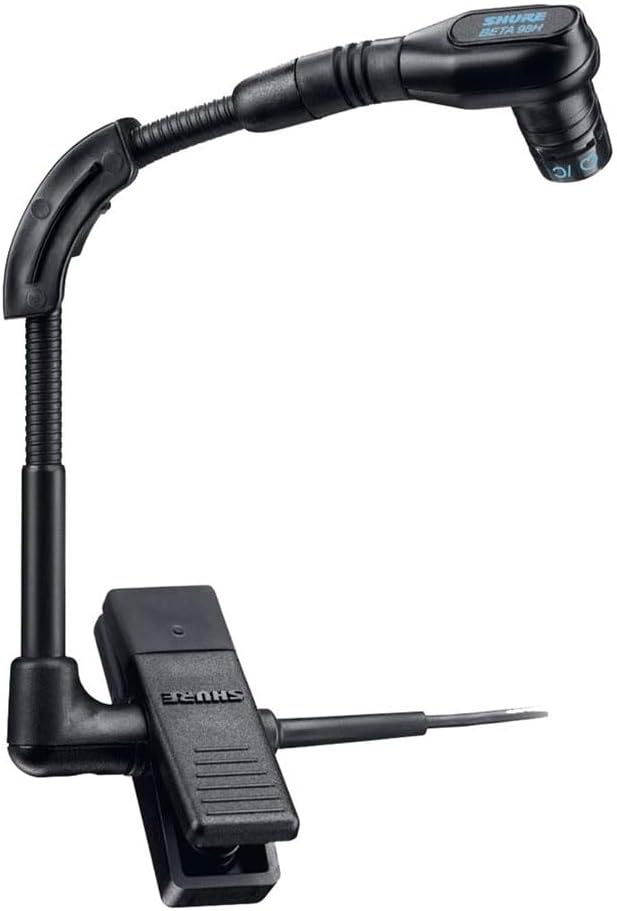
The Shure BETA 98H/C is a premium cardioid condenser instrument microphone designed for precise sound capture of wind instruments and percussion. It features preamplifier circuitry for improved linearity across the full frequency range and a tailored response for natural sound reproduction. Its compact design and integrated clip-on gooseneck allow for versatile and secure placement.
Key Features:
- Transformerless preamplifier circuitry for improved linearity across the full frequency range.
- Cardioid pickup pattern provides high gain-before-feedback and excellent rejection of unwanted noise.
- High maximum sound pressure level (SPL) enables handling of extreme demands from brass, woodwind, and percussion instruments.
- Includes a 3-meter (10 ft.) high-flex cable with attached preamplifier (XLR connection).
- Tailored frequency response for open, natural sound reproduction.
- Compact, lightweight construction provides a low degree of visibility.
- Gooseneck, ratcheting swivel joint, and gooseneck angle brace allow for optimum placement and fixed positioning.
- Legendary Shure ruggedness and reliability.
What's in the Box
- Shure BETA 98H/C Microphone
- Carrying Bag
- Windscreen
- In-Line Preamplifier
- 3m high-flex cable (XLR connection)
Setup Guide
The Shure BETA 98H/C microphone requires phantom power to operate. Ensure your mixer or audio interface provides 48V phantom power via the XLR input.
- Connect the Microphone: Attach the microphone's XLR connector to a compatible mixer or audio interface input.
- Apply Phantom Power: Activate the 48V phantom power on your mixer or audio interface for the connected channel.
- Secure Placement: Use the integrated clip-on gooseneck to securely attach the microphone to the bell of a wind instrument or the rim of a percussion instrument.
- Adjust Position: Utilize the flexible gooseneck and ratcheting swivel joint to precisely position the microphone for optimal sound capture. The gooseneck angle brace helps maintain placement during active performances.
Operating Instructions and Placement
Microphone technique is largely a matter of personal taste, and there is no single "correct" microphone position. The following are common applications and placement techniques for the BETA 98H/C:
Saxophone Placement:
Clamp the microphone onto the bell of the saxophone, positioning it a few inches from and facing into the bell. This setup produces a bright tonal balance while minimizing feedback and leakage.
Soprano Saxophone Placement:
Clamp the microphone onto the bell and adjust the gooseneck so the microphone faces the keys of the instrument, a few inches from the lower keys, for a warm and full tonal balance. For a brighter tone, adjust the gooseneck to face into the bell, a few inches away.
Trombone Placement:
Clamp the microphone onto the bell of the trombone and adjust the gooseneck to face directly into the bell, a few inches away. This provides a bright tonal balance with maximum isolation.
Trumpet Placement:
Similar to trombone, clamp onto the bell and position the microphone directly into the bell, a few inches away, for bright tone and maximum isolation.
Drum Placement:
Clamp the microphone onto the drum rim and adjust the gooseneck so the microphone aims a few inches above the drum head and an inch from the rim. This provides a full tonal balance.
Maintenance
- Cleaning: Use a soft, dry cloth to clean the microphone body. For the grille, a soft brush can be used to remove dust. Avoid using harsh chemicals or abrasive cleaners.
- Storage: When not in use, store the microphone in its carrying bag to protect it from dust, moisture, and physical damage.
- Cable Care: Avoid sharp bends or kinks in the microphone cable. Coil the cable loosely when storing to prevent internal wire damage.
Troubleshooting
- No Sound:
- Ensure phantom power (48V) is enabled on your mixer or audio interface.
- Check all cable connections for secure fit.
- Test with a different XLR cable to rule out cable failure.
- Verify the input gain on your mixer/interface is set appropriately.
- Low Volume/Weak Signal:
- Confirm phantom power is active.
- Adjust microphone placement closer to the sound source.
- Increase input gain on your mixer/interface, being careful to avoid clipping.
- Feedback:
- Reposition the microphone to reduce proximity to loudspeakers.
- Utilize the cardioid polar pattern by aiming the microphone away from monitors.
- Reduce gain on the mixer/interface.
- Distorted Sound:
- Reduce the input gain on your mixer/interface. The microphone has a high SPL, but the input stage might be overloading.
- Ensure the microphone is not too close to an extremely loud sound source.
Specifications
| Feature | Detail |
|---|---|
| Type | Condenser (electret bias) |
| Polar Pattern | Unidirectional (cardioid) |
| Frequency Response | 20 to 20,000 Hz |
| Output Impedance | 1200 ohms |
| Output Level (0 dB = 1 volt per Pascal) | Open Circuit Voltage: -56.5 dB (1.5 mV) |
| Output Clipping Level (at 1kHz, THD <1%) | -9 dBV (0.35 V) |
| Maximum SPL | 143.5 dB |
| Dynamic Range | 112.5 dB |
| Signal-to-noise Ratio | 63 dB at 94 dB SPL (IEC 651) |
| Polarity | Positive pressure on microphone diaphragm produces positive voltage on pins 3 and 4 with respect to pin 1 (ground). |
| Weight | 2.3 ounces (65 grams) |
| Dimensions (L x W x H) | 10.1 x 5 x 3.4 inches |
| Power Source | Phantom Power (48V required) |
| Material | Brass |
| Color | Black |
Product Media


Warranty and Support
For detailed warranty information, please refer to the official warranty document:
For technical support, product inquiries, or service, please visit the official Shure website or contact their customer support:
Please note that product specifications and warranty terms may be subject to change. Always refer to the latest documentation provided by the manufacturer.
Related documentsBETA98H/C


Ask a question about this manual
Ask about setup, troubleshooting, compatibility, parts, safety, or missing instructions. Manuals+ will review the question and use this page’s manual context to help answer it.