
1. Introduction
The Bose TA-55 is a dedicated TV amplifier designed to enhance the audio quality of your television. It offers a simple and compact solution for users who desire improved sound without the complexity of a full home theater system. Its design prioritizes ease of use and placement, making it suitable for any TV environment.
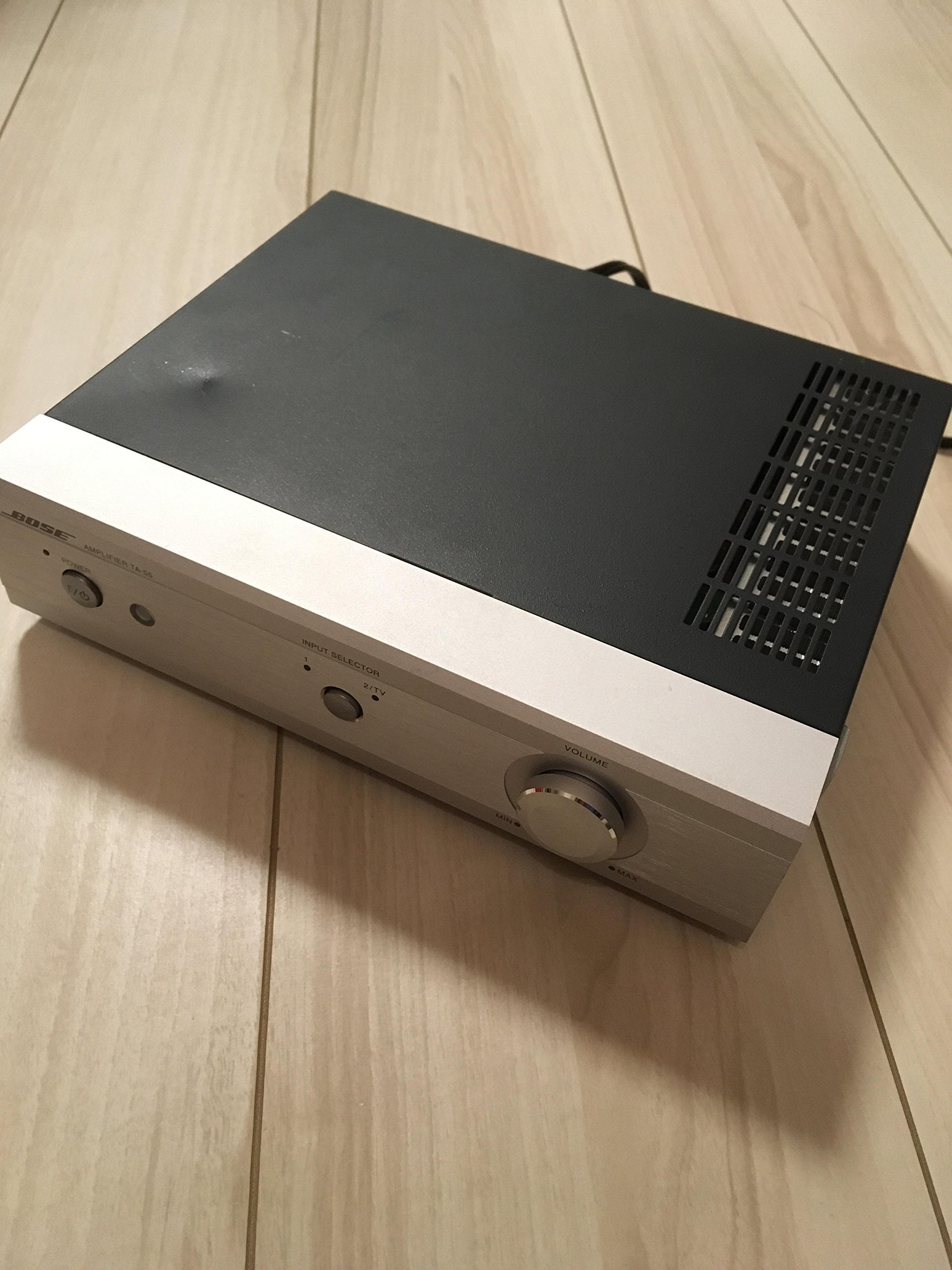
Image 1: Front view of the Bose TA-55 TV Amplifier. This image shows the compact and sleek design of the amplifier, with its silver finish and clearly labeled controls.
2. Setup
The TA-55 amplifier is engineered for straightforward setup and operation. It features a minimalist design, omitting numerous input/output terminals and complex settings found in traditional hi-fi amplifiers. This ensures a quick and hassle-free installation process.
2.1 Connecting to Your TV
- Identify the audio output ports on your television. The TA-55 supports two input systems.
- Connect an audio cable from your TV's audio output to one of the input ports on the TA-55. Input 2 supports both low-level and high-level signals, allowing connection even to TVs without dedicated line outputs, provided they have external speaker output terminals.
- Connect your speakers to the amplifier's output terminals.
- Plug the amplifier into a power outlet.
2.2 Speaker Equalizer Settings
The TA-55 includes a built-in equalizer optimized for Bose's small speaker lineup, such as the 33WER and 101MM series. To maximize your speaker's performance:
- Locate the switch on the back of the amplifier.
- For 33WER and 101 series speakers, set the switch to the "1XX/33WER" position.
- For larger speakers like the 55WER, switch to the "OTHERS" position.
3. Operating Instructions
The TA-55 is designed for intuitive operation, featuring essential controls for an enhanced listening experience.
3.1 Front Panel Controls

Image 2: Close-up of the Bose TA-55 front panel, showing the Power button, Input Selector, and Volume knob.
- Power Button: Press to turn the amplifier ON or OFF. An indicator light will show the power status.
- Input Selector: Use this button to switch between Input 1 and Input 2 (TV). An LED indicator will show the currently selected input.

Image 3: Detailed view of the Input Selector button and its corresponding LED indicators for Input 1 and Input 2/TV.
- Volume Knob: Adjusts the overall sound level. This is a motorized volume control, allowing for precise manual adjustments and remote control operation. The position of the knob provides a visual indication of the current volume level.
3.2 Remote Control Operation
The compact card-sized dedicated remote control allows for convenient operation of the TA-55. It also supports basic functions for most TV manufacturers, including:
- Power ON/OFF for the connected TV.
- Channel switching for the connected TV.
- Volume adjustment for the TA-55.
- Input selection for the TA-55.
4. Features
- Compact Design: Measuring 236mm (width) x 204mm (depth) x 62mm (height), the TA-55 is designed to fit easily into any TV setup without occupying much space.
- Motorized Volume Control: Allows for precise volume adjustments both manually and via the remote control, with visual feedback on the volume level.
- Dedicated Equalizer: Optimizes sound performance for Bose small speakers (e.g., 33WER, 101MM) and offers a general setting for other speaker types.
- Energy-Saving Design: Despite a rated output of 27W + 27W, the standby power consumption is less than 1W, contributing to energy efficiency.
- Universal TV Remote Functionality: The included remote control can perform basic operations for most TV brands, simplifying your entertainment setup.
5. Maintenance
To ensure the longevity and optimal performance of your Bose TA-55 TV Amplifier, follow these simple maintenance guidelines:
- Cleaning: Use a soft, dry cloth to clean the exterior of the amplifier. Avoid using liquid cleaners, aerosols, or solvents, as they may damage the finish or internal components.
- Ventilation: Ensure that the ventilation openings on the amplifier are not blocked. Proper airflow is crucial to prevent overheating.
- Placement: Place the amplifier on a stable, flat surface away from direct sunlight, heat sources, and excessive moisture.
- Power Cord: Regularly inspect the power cord for any signs of damage. If damaged, discontinue use and contact customer support for replacement.
6. Troubleshooting
If you encounter any issues with your Bose TA-55 TV Amplifier, please refer to the following troubleshooting steps:
- No Sound:
- Check if the amplifier is powered on and the indicator light is illuminated.
- Ensure all audio cables are securely connected between the TV and the amplifier, and between the amplifier and speakers.
- Verify that the correct input source is selected on the amplifier.
- Adjust the volume on both the amplifier and your television.
- Distorted Sound:
- Reduce the volume level on both the amplifier and the TV.
- Check speaker connections for proper polarity (+ to + and - to -).
- Ensure the speaker equalizer switch on the back is set appropriately for your speakers.
- Remote Control Not Working:
- Replace the batteries in the remote control.
- Ensure there are no obstructions between the remote control and the amplifier's sensor.
- Point the remote directly at the amplifier.
If the problem persists after trying these steps, please contact Bose customer support.
7. Specifications
| Feature | Specification |
|---|---|
| Brand Name | BOSE |
| Model Number | TA-55 |
| Product Weight | 600 grams |
| Rated Output | 27W + 27W |
| Standby Power Consumption | Less than 1W |
| Dimensions (W x D x H) | 236mm x 204mm x 62mm |
| Input Systems | 2 (Input 2 supports low-level and high-level) |
| Output Systems | 1 |
8. Warranty and Support
For warranty information and customer support, please refer to the documentation included with your purchase or visit the official Bose website. Keep your proof of purchase for any warranty claims.
Bose Customer Support: For technical assistance, troubleshooting, or service inquiries, please contact Bose customer support through their official channels. Contact details can typically be found on the Bose website or in your product's packaging.


