1. Introduction
This manual provides essential instructions for the safe and effective use of your VANGUARD VT-548B Heavy Duty Video Tripod. Please read this manual thoroughly before operating the product to ensure proper setup, operation, and maintenance. Retain this manual for future reference.
2. Safety Instructions
- Always ensure the tripod legs are fully extended and locked before mounting any equipment.
- Do not exceed the maximum load capacity of the tripod. Refer to the specifications section for details.
- Avoid placing the tripod on unstable or uneven surfaces. The self-leveling feet are designed to assist with stability but cannot compensate for extreme angles.
- Keep hands and fingers clear of moving parts, especially when extending or collapsing the legs and adjusting the pan head.
- Do not leave the tripod unattended with heavy equipment mounted, especially in windy conditions.
- Clean the tripod with a soft, dry cloth. Avoid using harsh chemicals or abrasive materials.
3. Package Contents
Verify that all items are present in the package:
- VANGUARD VT-548B Heavy Duty Video Tripod
- 2-way pan head with bubble level
- Safety quick shoe
- Tripod bag
4. Product Overview
The VANGUARD VT-548B is a heavy-duty video tripod designed for stable camera support. It features 27mm legs with self-leveling feet for adaptability on various terrains, and a 2-way pan head with a bubble level for precise adjustments.
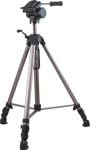
An image showing the VANGUARD VT-548B Heavy Duty Video Tripod fully extended, featuring its three legs, central column, and two-way pan head with a handle. The self-leveling feet are visible at the base of each leg.
5. Setup Instructions
- Unfold the Tripod: Gently release the leg locks and extend the tripod legs to your desired height. Ensure each leg section is securely locked into place.
- Adjust Leg Angle: Position the legs to achieve maximum stability. The self-leveling feet will adapt to minor surface irregularities.
- Level the Head: Use the integrated bubble level on the 2-way pan head to ensure the tripod head is perfectly level. Adjust leg lengths as needed.
- Attach Quick Shoe: If not already attached, secure the quick shoe plate to the bottom of your camera or video equipment. Ensure it is tightened firmly.
- Mount Equipment: Slide the quick shoe with your equipment into the pan head receiver until it clicks securely into place. Verify that the safety lock is engaged.
6. Operating Instructions
- Pan and Tilt Adjustments: Loosen the pan and tilt locking knobs on the 2-way pan head to adjust the camera's horizontal (pan) and vertical (tilt) angles. Tighten the knobs once the desired position is achieved.
- Center Column Adjustment: For additional height, unlock the center column lock and raise or lower the center column. Securely tighten the lock after adjustment.
- Removing Equipment: To remove your camera, disengage the safety lock on the quick shoe receiver and then press the quick release lever to slide out the quick shoe with your equipment.
7. Maintenance
- Cleaning: Wipe down the tripod with a soft, damp cloth after each use, especially if used in dusty or sandy environments. Ensure all parts are dry before storage.
- Lubrication: Periodically check leg locks and moving parts for smooth operation. Do not over-lubricate; a small amount of silicone-based lubricant can be applied if necessary to leg mechanisms.
- Storage: Store the tripod in its included bag in a cool, dry place, away from direct sunlight and extreme temperatures.
8. Troubleshooting
- Tripod is unstable: Ensure all leg locks are fully engaged. Verify the quick shoe is securely mounted. Check the ground surface for extreme unevenness.
- Pan/Tilt movement is stiff: Loosen the pan and tilt locking knobs. Clean any debris from the head mechanism.
- Legs not extending/retracting smoothly: Clean leg sections to remove dirt or sand. Apply a small amount of silicone lubricant if needed.
9. Specifications
| Feature | Detail |
|---|---|
| Model Name | VT-548B |
| Maximum Height | 70 inches |
| Minimum Height | 30.25 inches |
| Folded Length | 30.25 inches |
| Item Weight | 6.5 pounds (approx.) |
| Leg Diameter | 1.06 inches (27mm) |
| Tripod Head Type | 2-way Pan Head |
| Special Feature | Self-Leveling Feet, Bubble Level |
| Material | Alloy Steel |
| Compatible Devices | Camera |
10. Warranty and Support
For warranty information and customer support, please refer to the documentation provided with your purchase or visit the official VANGUARD website. Keep your proof of purchase for any warranty claims.


