
1. Introduction
This manual provides detailed instructions for the safe and efficient operation of your KODAK Carousel 4600 Projector. Designed for projecting 2x2-inch slides, this projector offers clear, bright images and reliable performance. Please read this manual thoroughly before using the projector to ensure proper setup and function.
Key features include:
- Accepts 80- or 140-slide trays.
- Safety thermal fuses for overheating protection.
- Slide prewarmer to prevent "popping."
- Automatic dark screen shutter when no slide is projected.
- Remote control for forward and reverse slide scanning.
- Rear leveling foot for projection angle adjustment up to 16 degrees.
- Autofocus operation.
- 3-position lamp switch (off, fan, and lamp).
- Improved corner-to-corner illumination.
2. Safety Information
Observe the following safety precautions to prevent injury or damage to the projector:
- Electrical Safety: Always connect the projector to a grounded electrical outlet. Do not operate with a damaged power cord.
- Heat: The projector lamp generates significant heat. Ensure adequate ventilation and do not block air vents. Allow the projector to cool down before handling the lamp or storing the unit.
- Lamp Handling: Projector lamps can be hot and fragile. Refer to the maintenance section for safe lamp replacement procedures.
- Placement: Place the projector on a stable, level surface. Avoid placing it near water or in excessively humid environments.
- Children: Keep the projector out of reach of children.
3. Product Overview
Familiarize yourself with the components and controls of your KODAK Carousel 4600 Projector.
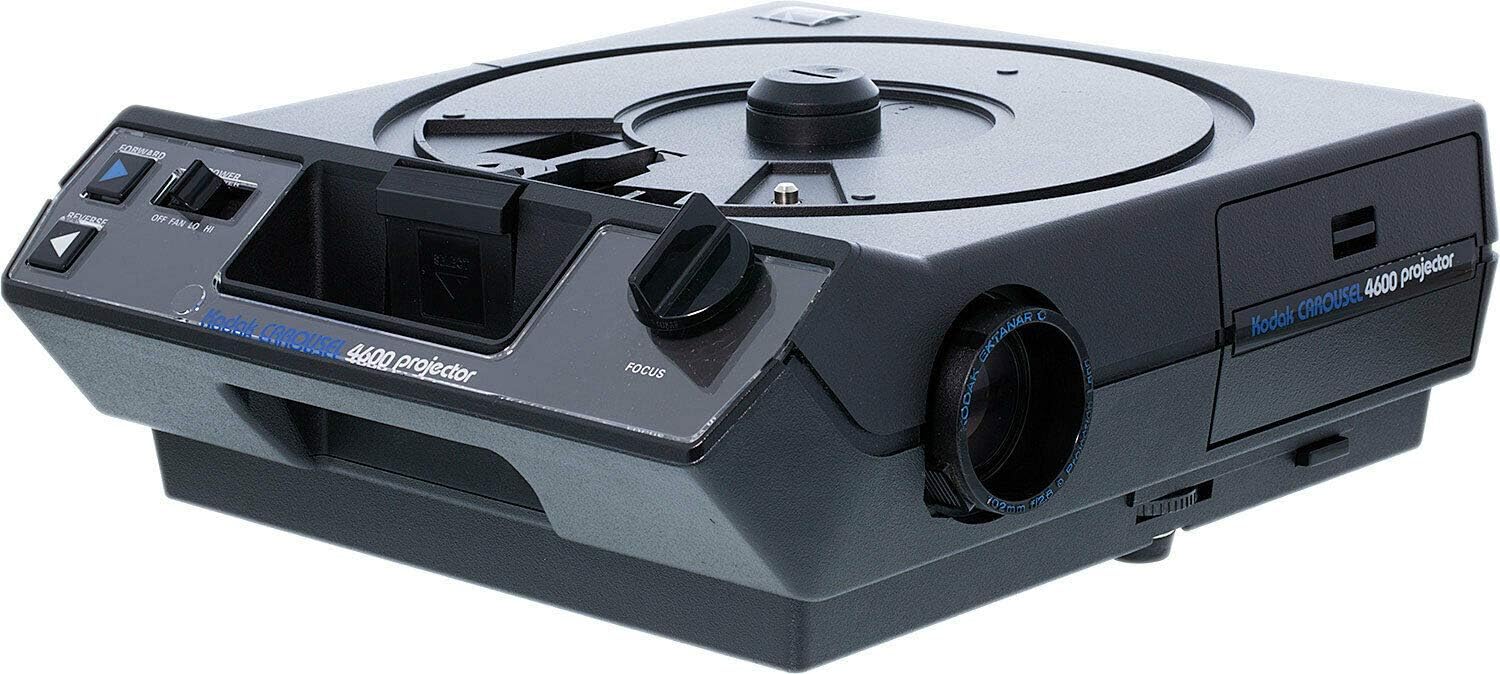
Figure 1: KODAK Carousel 4600 Projector. Visible components include the slide tray area, focus knob, forward/reverse slide advance buttons, and the power/fan switch.
Controls and Indicators:
- Slide Tray Area: Top circular area where the slide carousel is placed.
- Focus Knob: Located on the front-right side, used to adjust the image sharpness.
- Forward Button: Advances the slide carousel to the next slide.
- Reverse Button: Moves the slide carousel to the previous slide.
- Power/Fan Switch: A 3-position switch (OFF, FAN, LO, HI) controlling power and fan speed.
- Projection Lens: Front-mounted lens assembly (lens not included with projector, must be purchased separately).
- Rear Leveling Foot: Adjustable foot at the rear for tilting the projector.
4. Setup
4.1 Unpacking and Placement
- Carefully remove the projector from its packaging.
- Place the projector on a stable, flat surface at the desired projection distance from your screen.
- Ensure there is adequate space around the projector for ventilation.
4.2 Installing the Projection Lens
The KODAK Carousel 4600 Projector requires a separate projection lens (not included). To install:
- Align the lens with the lens opening on the front of the projector.
- Gently push and twist the lens into place until it is securely seated.
4.3 Loading Slides
The projector uses KODAK Carousel slide trays (80- or 140-slide capacity).
- Ensure the projector is turned OFF.
- Place a loaded slide carousel tray onto the circular platform on top of the projector, aligning the key on the tray with the slot on the platform.
- Gently press down until the tray is seated correctly.
4.4 Power Connection
Connect the power cord to the projector's power inlet and then to a standard electrical outlet.
5. Operating Instructions
5.1 Powering On and Lamp Operation
Use the 3-position lamp switch:
- OFF: Turns the projector off.
- FAN: Activates the cooling fan without turning on the lamp. Useful for cooling down after use.
- LO: Turns on the lamp at a lower brightness setting, suitable for smaller screens or extended lamp life.
- HI: Turns on the lamp at full brightness, ideal for larger screens or brighter environments.
Move the switch to the desired setting (LO or HI) to begin projection.
5.2 Adjusting Focus
Once a slide is projected, use the Focus Knob on the front of the projector to achieve a sharp image. The projector also features autofocus for automatic sharpness adjustment.
5.3 Advancing Slides
You can advance or reverse slides using the buttons on the projector or the remote control:
- Press the FORWARD button to move to the next slide.
- Press the REVERSE button to return to the previous slide.
5.4 Adjusting Projection Angle
To adjust the vertical angle of the projected image, locate the Rear Leveling Foot underneath the projector. Rotate or extend this foot to tilt the projector up to 16 degrees.
5.5 Dark Screen Shutter
The projector is equipped with a dark screen shutter latch that automatically masks the light when no slide is being projected, preventing a blank white screen.
6. Maintenance
6.1 Cleaning
- Exterior: Wipe the exterior surfaces with a soft, dry cloth. Do not use abrasive cleaners or solvents.
- Lens: Use a lens cleaning brush or a soft, lint-free cloth specifically designed for optical lenses. Avoid touching the lens surface with your fingers.
- Air Vents: Periodically check and clean the air vents to ensure proper airflow and prevent overheating. Use a soft brush or compressed air.
6.2 Lamp Replacement
When the projection lamp burns out or significantly dims, it needs to be replaced. Always ensure the projector is unplugged and has cooled down completely before attempting lamp replacement.
- Unplug the projector from the power outlet.
- Allow at least 30 minutes for the lamp to cool.
- Refer to the specific instructions for accessing the lamp compartment (typically located at the bottom or side of the projector).
- Carefully remove the old lamp and insert a new, compatible KODAK projector lamp.
- Secure the lamp compartment cover.
7. Troubleshooting
| Problem | Possible Cause | Solution |
|---|---|---|
| No image projected. | Projector not powered on; lamp burned out; power cord disconnected. | Check power switch position (LO/HI); replace lamp if necessary; ensure power cord is securely connected. |
| Dim or uneven image. | Lamp nearing end of life; dirty lens; incorrect lamp switch setting. | Replace lamp; clean lens; set lamp switch to HI. |
| Image out of focus. | Focus knob not adjusted; autofocus malfunction. | Adjust the Focus Knob; ensure no obstructions for autofocus sensor. |
| Slides not advancing. | Slide jam; carousel not seated correctly; advance mechanism issue. | Check for jammed slides and carefully remove; reseat carousel tray; ensure no foreign objects obstruct the mechanism. |
| Projector overheating. | Blocked air vents; prolonged use in high ambient temperature. | Clean air vents; ensure adequate ventilation; allow projector to cool down. |
8. Specifications
- Brand: KODAK
- Model Number: 4600
- Product Dimensions: 12 x 10 x 6 inches
- Item Weight: 14.97 pounds
- Recommended Use: To project 35mm slides
- Special Feature: Portable
- Connectivity Technology: HDMI (Note: This specification is typically for digital projectors and may be an error for this vintage slide projector. Please refer to the physical product for actual connectivity.)
- Display Resolution: 1920 x 1080 (Note: This specification is typically for digital projectors and may be an error for this vintage slide projector, which projects physical slides. Please refer to the physical product for accurate information.)
9. Warranty and Support
The KODAK Carousel 4600 Projector comes with a full one-year warranty from the date of purchase. This warranty covers manufacturing defects and ensures reliable operation under normal use.
For warranty claims, technical assistance, or further support, please refer to the contact information provided with your purchase documentation or visit the official KODAK support website.


