
Introduction
The Zircon 64003 Leak Alert Electronic Water Detector is designed to provide an audible alarm upon contact with water, helping to prevent potential water damage in various areas of your home or property. This device operates automatically and requires no wiring, offering a simple solution for early leak detection.
Key features include:
- Loud 85 dB alarm sounds with direct water contact.
- Floats and continues to signal for up to 72 hours.
- Fully automatic operation; no wiring required.
- Low battery indicator for optimal safety and performance.
Setup
Battery Installation
The Zircon 64003 Leak Alert requires one 9V alkaline battery for operation. To install the battery:
- Locate the battery compartment on the back of the device.
- Open the battery compartment cover.
- Insert a fresh 9V alkaline battery, ensuring correct polarity.
- Close the battery compartment cover securely.
The device features a low battery indicator to alert you when the battery needs replacement. It is recommended to replace the battery annually for optimal performance.
Placement
Place the Leak Alert detector in any area where water leaks or flooding may occur. The device should be placed directly on the floor or surface where water would first accumulate. Common placement areas include:
- Near water heaters
- Under sinks
- Near dishwashers and refrigerators
- In basements
- Near sump pumps
- Under fish tanks
- Near plumbing and toilets
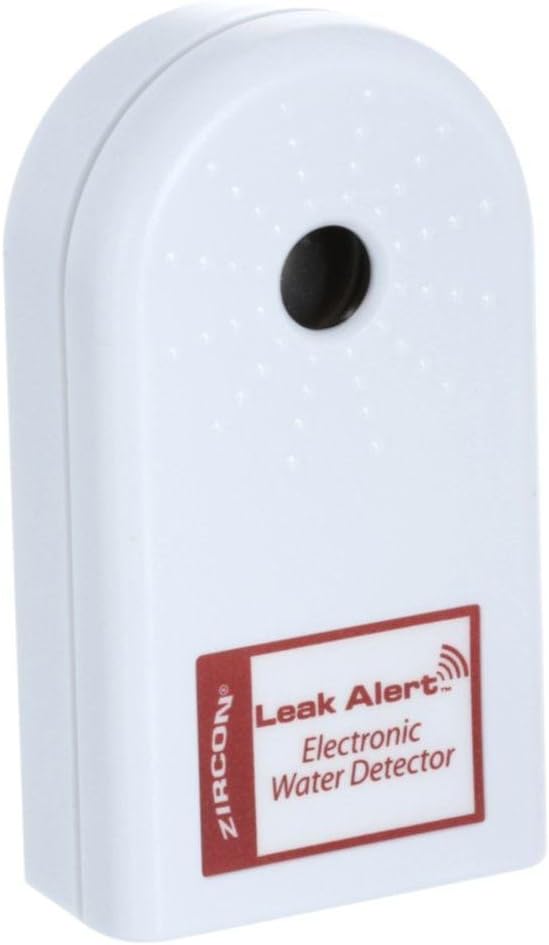
Image: Zircon 64003 Leak Alert Electronic Water Detector. This image shows the front view of the white, rectangular device with the 'Leak Alert Electronic Water Detector' label.

Image: Example placements of the Leak Alert detector. This image illustrates the detector placed near a water heater, under a sink, and next to a sump pump, demonstrating strategic locations for leak detection.
Operating Instructions
The Zircon 64003 Leak Alert operates automatically once the battery is installed and the device is placed in the desired location. No further setup or activation is required.
Alarm Activation
When the two metal contacts on the bottom of the device come into contact with water, the alarm will sound. The alarm is a loud 85 dB signal, designed to be heard from a distance.
Alarm Duration
The device is designed to float in water and will continue to sound the alarm for up to 72 hours, or until the water source is removed and the contacts are dried.
Responding to an Alarm
If the alarm sounds:
- Locate the source of the water leak or flood.
- Remove the Leak Alert detector from the water.
- Dry the metal contacts on the bottom of the device thoroughly with a cloth. The alarm will cease once the contacts are completely dry.
- Address the water leak or flood situation promptly.
Maintenance
Battery Replacement
Replace the 9V alkaline battery annually, or immediately when the low battery indicator activates. Refer to the "Battery Installation" section for instructions.
Testing the Device
It is recommended to test the Leak Alert periodically to ensure proper function. To test:
- Place the device on a flat, non-conductive surface.
- Apply a small amount of water (e.g., a few drops) to the metal contacts on the bottom of the device.
- The alarm should sound immediately.
- Remove the water and dry the contacts completely to stop the alarm.
Cleaning
Keep the metal contacts on the bottom of the device clean and free from debris. Use a soft, dry cloth to wipe them if necessary. Do not use abrasive cleaners or immerse the entire device in water.
Troubleshooting
- Alarm not sounding when wet:
Check if the 9V battery is correctly installed and not depleted. Replace the battery if necessary. Ensure the metal contacts on the bottom of the device are clean and making proper contact with the water. - False alarms:
Ensure the device is placed on a dry, non-conductive surface. If placed on a metal drip pan, use a piece of electrical tape or a non-conductive mat underneath the detector to prevent the metal pan from completing the circuit. Ensure the contacts are completely dry after handling or cleaning. - Low battery indicator:
The device will emit a periodic chirp or visual signal (if applicable) to indicate a low battery. Replace the 9V battery immediately.
Specifications
| Brand | Zircon |
| Model | 64003 |
| Power Source | Battery Powered |
| Battery Type | 1 x 9V Alkaline (not included) |
| Audible Noise | 85 Decibels |
| Product Dimensions (L x W x H) | 11.13" x 4" x 1.5" |
| Sensor Technology | Contact Sensor |
| Mounting Type | Tabletop Mount |

Image: Dimensions of the Zircon 64003 Leak Alert. This image displays the length (11.13 inches), width (4 inches), and height (1.5 inches) of the device.
Warranty
Zircon Corporation warrants this product to be free from defects in materials and workmanship for one year from the date of purchase. For warranty service or claims, please retain your proof of purchase and contact Zircon customer support.
Support
For further assistance, technical support, or inquiries regarding your Zircon 64003 Leak Alert Electronic Water Detector, please refer to the official Zircon website or contact their customer service department. Contact information can typically be found on the product packaging or the manufacturer's official website.


