
1. Langkungview
The Philips TAZ2200 is a versatile portable sound machine designed for enjoying various audio formats. It features a top-loading CD player, a front-loading cassette player, FM radio, Bluetooth 6.0 connectivity, USB playback, and a 3.5mm audio input. Equipped with dynamic bass boost and 6W stereo speakers, it delivers rich sound. The unit can be powered by AC mains or batteries and includes a carrying handle for portability.
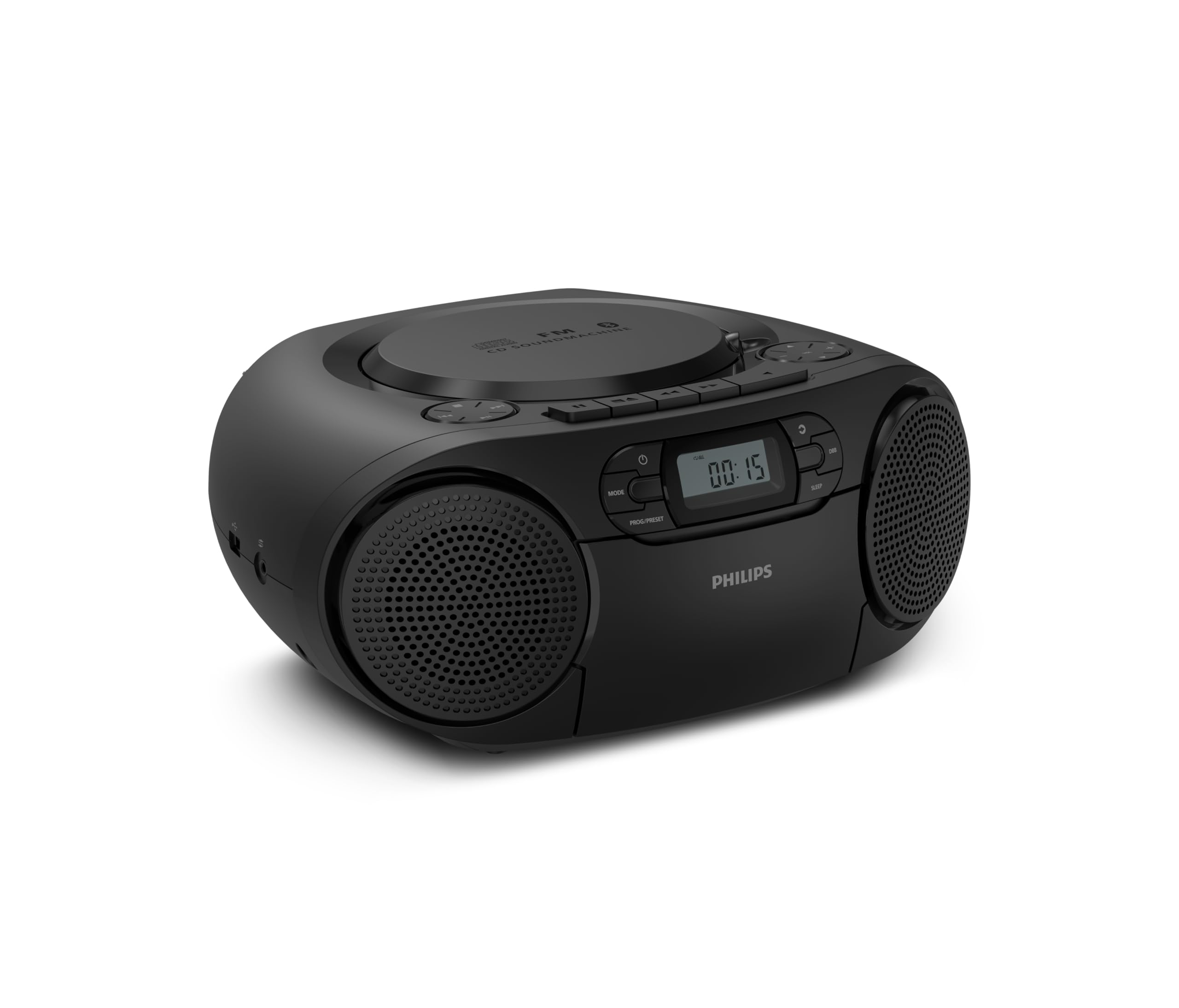
Hareupeun view of the Philips TAZ2200 CD Soundmachine, showing the main display and control buttons.
2. Émbaran Kasalametan
Please read these safety instructions carefully before using your device and keep them for future reference. Incorrect use may result in hazards.
- Sumber Daya: Anggo ngan ukur adaptor daya atanapi batré anu ditangtukeun. Pastikeun voltasetage cocog sareng sarat unit.
- Cai sareng Uap: Ulah ngalaan unit ka hujan, Uap, dripping, atawa splashing. Ulah nempatkeun objék ngeusi cairan, kayaning vases, dina unit.
- Ventilasi: Ensure adequate ventilation. Do not block any ventilation openings. Maintain a minimum distance around the unit for sufficient ventilation.
- Panas: Ulah nempatkeun unit deukeut sumber panas kayaning radiators, registers panas, kompor, atawa alat sejenna (kaasup ampLiifiers) anu ngahasilkeun panas.
- Batré: Follow correct polarity when inserting batteries. Do not mix old and new batteries, or different types of batteries. Remove batteries if the unit is not used for a long period.
- beberesih: Cabut colokan unit tina stop kontak sateuacan beberesih. Paké lawon lemes, garing. Ulah make cleaners cair atawa cleaners aerosol.
- Palayanan: Entong nyobian ngalayanan produk ieu nyalira. Rujuk sadayana ngalayanan ka tanaga jasa anu mumpuni.
3. Naon dina Box
Saatos ngabongkar bungkusan, mangga pastikeun sadaya barang anu didaptarkeun di handap ieu aya:
- Philips TAZ2200 CD Soundmachine
- Kabel kakuatan
- Pituduh ngamimitian gancang
- Buku jaminan
- Lambaran kaamanan
4. Kontrol jeung sambungan
Kadali Panel hareup
The front panel features the main display, power button, mode selection, program/preset buttons, and dynamic bass boost (DBB) control. Playback controls for CD and USB are also located here.

Detil hareup view showing the display, power, mode, program/preset, and DBB buttons.
Side and Rear Connections
The side of the unit provides a USB port for digital audio playback and a 3.5mm audio input jack for connecting external devices.

Samping view illustrating the USB port and Audio Input jack.
The top of the unit houses the CD compartment and additional playback controls, while the rear features the AC power input and the FM antenna.

Puncak view showing the CD compartment and associated controls.

Tukangeun view displaying the AC power input and the telescopic FM antenna.
5. Setélan
5.1 suplai kakuatan
Daya AC
- Pastikeun unit dipareuman.
- Connect the supplied power cable to the AC IN socket on the rear of the sound machine.
- Plug the other end of the power cable into a wall power outlet.
Daya Batré
For portable use, the unit can operate on 6 x C-type batteries (not included).
- Buka tutup kompartemen batréna anu aya di handapeun unit.
- Insert 6 C-type batteries, ensuring correct polarity (+/-) as indicated inside the compartment.
- Tutup panutup kompartemen batré aman.
5.2 Adjustment anteneu
For optimal FM radio reception, fully extend the telescopic antenna located at the rear of the unit. Adjust its position and angle to achieve the clearest signal.
6. Parentah Operasi
6.1 Operasi Umum
- Hurungkeun/Pareuman: Pencét éta POWER tombol pikeun ngahurungkeun atawa mareuman unit.
- Kontrol volume: Ngagunakeun éta VOL+ or VOL- tombol pikeun ngaluyukeun tingkat polumeu.
- Peningkatan Bass Dinamis (DBB): Pencét éta DBB button to activate or deactivate the dynamic bass boost feature for enhanced bass sound.
- Pilihan Mode: Pencét éta MODÉ button repeatedly to switch between CD, Cassette, FM Radio, Bluetooth, USB, and Audio Input modes.
6.2 Playback CD
- Open the CD compartment cover on top of the unit.
- Place a CD (CD, CD-R, or CD-RW) with the label side facing up onto the spindle.
- Tutup panutup kompartemen CD.
- Pencét éta MODÉ tombol pikeun milih modeu CD.
- Pencét éta MUTER / Reureuh tombol pikeun ngamimitian playback.
- Ngagunakeun éta LEWAT kancing (|< or >> |) pikeun ngalangkungan lagu.
- Pencét jeung tahan |< or >> | to search within a track.
- Pencét éta EUREUN tombol pikeun ngeureunkeun playback.
6.3 Playback kaset
- Open the cassette compartment door on the front of the unit.
- Selapkeun pita kasét kalayan ujung kabuka nyanghareup ka luhur.
- Tutup panto kompartemen kasét.
- Pencét éta MODÉ tombol pikeun milih modeu Kaset.
- Pencét éta ulin tombol pikeun ngamimitian playback.
- Ngagunakeun éta MAJU CEPAT or NGUNDUH BALIK buttons to quickly advance or rewind the tape.
- Pencét éta EUREUN tombol pikeun ngeureunkeun playback.
6.4 Radio FM
- Pencét éta MODÉ tombol pikeun milih modeu Radio FM.
- Scan Otomatis: Pencét jeung tahan tombol PROG / PRESET tombol pikeun otomatis nyeken jeung nyimpen stasiun FM sadia.
- Tuning Manual: Pencét éta TUNING kancing (|< or >> |) to manually tune to a desired frequency.
- Nyimpen prasetél: After tuning to a station, press PROG / PRESET once, then use |< or >> | pikeun milih nomer prasetél, terus pencét PROG / PRESET deui pikeun mastikeun.
- Nginget-nginget Préparasi: Dina modeu FM, pencét PROG / PRESET repeatedly to cycle through saved preset stations.
6.5 Playback Bluetooth
- Pencét éta MODÉ button to select Bluetooth mode. The display will show 'BT' and flash, indicating it's in pairing mode.
- Dina alat nu diaktipkeun Bluetooth Anjeun (smartphone, tablet), aktipkeun Bluetooth jeung neangan alat nu sadia.
- Select "Philips TAZ2200" from the list of devices.
- Once paired, the unit will emit a confirmation sound, and 'BT' will stop flashing.
- Start playing audio on your connected device. The sound will be streamed to the sound machine.
6.6 Playback USB
- Insert a USB flash drive into the USB port on the side of the unit.
- Pencét éta MODÉ tombol pikeun milih modeu USB.
- Unit bakal otomatis ngadeteksi sareng mimiti muterkeun audio anu cocog files (MP3, WAV, WMA).
- Paké kadali playback (MUTER / Reureuh, LEWAT, EUREUN) as you would for CD playback.
6.7 Audio Input (AUX)
- Connect one end of a 3.5mm audio cable (not included) to the AUDIO IN jack on the side of the sound machine.
- Connect the other end of the audio cable to the headphone jack or audio output of your external device (e.g., MP3 player, turntable).
- Pencét éta MODÉ button to select Audio Input mode.
- Start playing audio on your external device. The sound will be played through the sound machine.
7. Pangropéa
- Ngabersihan Unit: Ngusap bagian luar unit kalayan lemes, rada damp lawon. Ulah make cleaners abrasive atawa pangleyur.
- Perawatan CD Player: Keep the CD compartment clean. If the lens is dirty, use a specialized CD lens cleaner. Avoid touching the lens.
- Perawatan Pamuter Kaset: Periodically clean the tape heads and pinch rollers with a cotton swab lightly dampDipasang dengan isopropil alkohol.
- Ngagantian batré: If using batteries, replace all 6 C-type batteries when the unit's performance diminishes or if the unit will not be used for an extended period.
- Panyimpenan: Upami teu dianggo, simpen alat ieu di tempat anu bersih sareng garing, jauh tina sinar panonpoé langsung sareng suhu anu ekstrim.
8. Cara ngungkulan
If you encounter any issues with your Philips TAZ2200, please refer to the table below for common problems and solutions.
| Masalah | Mungkin Cukang lantaranana | Solusi |
|---|---|---|
| Taya kakuatan | kabel kakuatan teu disambungkeun; Batré béak atanapi teu leres diselapkeun. | Pariksa sambungan daya AC; Ganti batré atanapi pastikeun polaritasna leres. |
| Taya sora | Volume teuing leutik; Modeu anu dipilih salah; Headphone nyambung. | Increase volume; Select the correct source mode (CD, FM, BT, etc.); Disconnect headphones. |
| CD teu diputer | CD inserted incorrectly; CD is dirty or scratched; CD format not supported. | Insert CD with label side up; Clean or replace CD; Ensure CD is CD-R/RW compatible. |
| Kaset teu diputer | Cassette inserted incorrectly; Tape is damaged. | Insert cassette correctly; Try a different cassette. |
| Panarimaan FM Goréng | Antenna henteu dipanjangkeun atanapi diposisikan leres; Sinyal lemah. | Pinuh manjangkeun tur saluyukeun anteneu telescopic; Coba pindahkeun unit ka lokasi anu béda. |
| Bluetooth teu nyambung | Unit not in pairing mode; Bluetooth device too far; Device already paired with another unit. | Ensure unit is in Bluetooth mode and flashing; Move device closer; Disconnect from other devices. |
| Masalah playback USB | Drive USB teu dipasang kalawan bener; Teu cocog file formatna; drive USB ruksak. | Pasang deui USB drive; Pastikeun files are MP3, WAV, or WMA; Try a different USB drive. |
9. Spésifikasi
| Fitur | Spésifikasi |
|---|---|
| merek | PHILIPS |
| Nomer modél | TAZ2200/10 |
| Téhnologi konektipitas | Bluetooth 6.0, USB, Audio Input (3.5mm) |
| Tipe Speaker | Stereo (2 speakers) |
| Daya Kaluaran | 6 Watt (maks) |
| Média anu Dirojong | CD, CD-R, CD-RW, Cassette, USB (MP3, WAV, WMA) |
| Radio Tuner | Digital FM with 20 presets |
| Sumber Daya | AC (wired), 6 x C-type batteries (not included) |
| Ukuran (L x W x H) | 24.5 x 28.5 x 12.5 cm |
| Beurat | 1.35 kg |
| Warna | pérak |
10. Garansi jeung Rojongan
10.1 Garansi Produk
This Philips TAZ2200 CD Soundmachine comes with a garansi 2 taun ti tanggal beuli. Punten tahan bukti pameseran anjeun pikeun klaim garansi. Garansi nyertakeun cacad manufaktur sareng gangguan dina kaayaan pamakean normal.
10.2 Rojongan Palanggan
For technical assistance, troubleshooting beyond this manual, or warranty service, please refer to the contact information provided in the warranty booklet included with your product. You can also visit the official Philips support website for your region for further assistance and FAQs.


