
1. Bubuka
Hatur nuhun pikeun meuliasing the Audizio Laredo Bluetooth Turntable. This manual provides essential information for the safe and correct operation of your device. Please read it thoroughly before use and keep it for future reference.
Fitur konci:
- Integrated HiFi speakers with 160W total power output.
- Bidirectional Bluetooth for wireless audio streaming (in and out).
- High-quality Audio Technica cartridge for precise playback.
- Supports 7, 10, and 12-inch vinyl records at 33 and 45 RPM.
- Adjustable counterweight on the aluminum tonearm.
- RCA Line Out for external amplifier / speaker.
- AUX Input for connecting external audio sources.
- Elegant bamboo finish.
Naon anu aya dina Kotak:
- Audizio Laredo Turntable Unit
- Instruksi Manual
- Adaptor kakuatan
- 45 RPM Adapter for singles
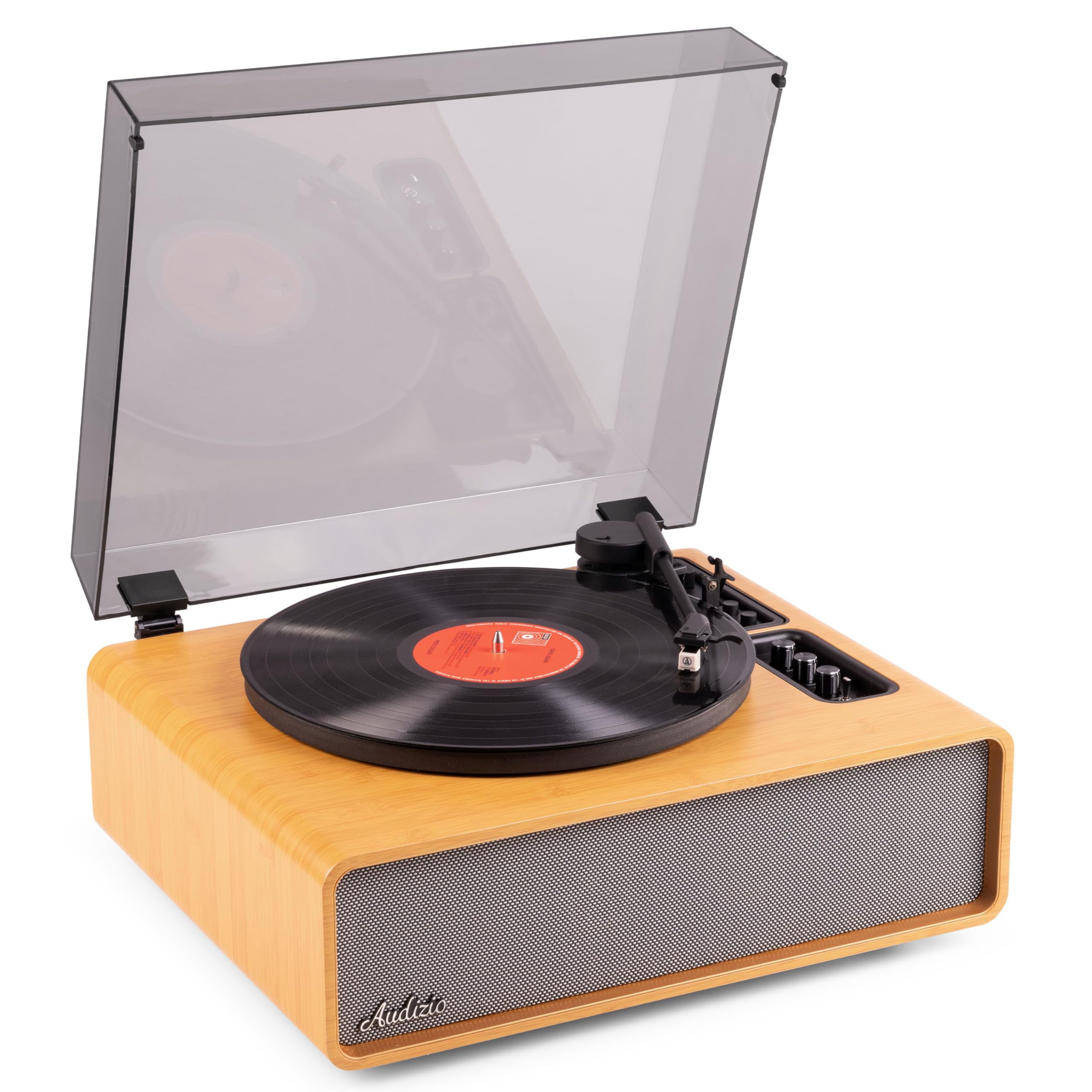
Figure 1.1: Audizio Laredo Turntable, overall view.
2. Parentah Kasalametan
Please read and follow these safety instructions carefully to prevent damage to the unit and ensure your safety.
- Ulah ngalaan unit ka hujan atawa Uap pikeun nyegah seuneu atawa shock listrik.
- Ulah muka casing. Henteu aya bagian anu tiasa dilayanan ku pangguna di jero. Rujuk sadayana jasa ka tanaga anu mumpuni.
- Place the unit on a stable, level surface to prevent it from falling.
- Jauhkeun unit ieu tina sinar panonpoé langsung, sumber panas, sareng lebu anu kaleuleuwihi.
- Pastikeun ventilasi anu leres di sabudeureun unit. Ulah meungpeuk bukaan ventilasi.
- Ngan ukur nganggo adaptor kakuatan anu disayogikeun.
- Cabut colokan unit nalika badai kilat atanapi nalika henteu dianggo kanggo waktos anu lami.
3. Produk Langkungview
Familiarize yourself with the components and controls of your Audizio Laredo turntable.
Komponén utama:
- Piring: Ngarojong rékaman vinil.
- Tonearm: Nyepeng cartridge sareng stylus.
- Cartridge & Stylus: Reads the grooves of the record. (Audio Technica ATN-3600)
- Panutup lebu: Ngajaga platter sareng tonearm tina lebu.
- Speaker terpadu: Pikeun muterkeun audio sacara langsung.
- Panél kontrol: For power, volume, tone, and mode selection.
- Sambungan tukang: RCA Line Out, AUX In, Power Input.

Gambar 3.1: Top view of the turntable with key components visible.

Figure 3.2: Control Panel for volume, bass, and treble adjustments.

Figure 3.3: Audio Technica ATN-3600 Cartridge and Stylus.

Figure 3.4: Tonearm base with speed and auto-stop controls.

Figure 3.5: Rear connection panel.
4. Setélan
4.1 Ngabongkar bungkusan
- Kaluarkeun turntable tina bungkusna kalayan ati-ati.
- Remove all protective materials, including the stylus guard.
- Simpen bungkusna kanggo transportasi atanapi panyimpenan engké.
4.2 Nempatkeun
- Place the turntable on a stable, level surface to prevent vibrations and ensure proper playback.
- Avoid placing the unit near strong magnetic fields, heat sources, or areas with high humidity.
4.3 Pamasangan Panutup Kekebul
- Align the hinges of the dust cover with the slots on the back of the turntable.
- Gently push down until the cover is securely in place.
- The dust cover can be removed for playback if desired.

Figure 4.1: Turntable with dust cover.
4.4 Sambungan Daya
- Connect the power adapter to the DC IN port on the rear of the turntable.
- Plug the adapter into a suitable wall outlet (220V).
4.5 Tonearm jeung Cartridge Setup
- The Audio Technica cartridge is pre-installed.
- The tonearm features an adjustable counterweight. Refer to the detailed instructions in the included manual for precise counterweight adjustment to optimize tracking force.
5. Parentah Operasi
5.1 Maén Rékor
- Place a vinyl record on the platter. If playing a 7-inch single, use the included 45 RPM adapter.
- Select the appropriate speed (33 or 45 RPM) using the speed selector switch near the tonearm base.
- Gently angkat tonearm ngagunakeun uas cueing.
- Posisikeun tonearm di luhur trek rekaman anu dipikahoyong.
- Turunkeun tonearm lalaunan nganggo tuas isyarat. Stylus bakal némpél kana rékaman, sareng puteran bakal dimimitian.
- Di ahir rékaman, fungsi eureun otomatis bakal otomatis ngeureunkeun rotasi platter. Angkat tonearm teras balikkeun deui kana posisina.

Figure 5.1: Playing a vinyl record.
5.2 Bluetooth Operation (Bidirectional)
The Laredo turntable supports both Bluetooth input (receiving audio from a device) and Bluetooth output (sending audio to a Bluetooth speaker/headphones).
Bluetooth Input (BT IN):
- Press the MODE/POWER button to select Bluetooth mode. The LED indicator will flash.
- On your smartphone or tablet, enable Bluetooth and search for 'Audizio Laredo'.
- Select the turntable to pair. Once connected, the LED will glow solid.
- You can now stream audio from your device to the turntable's integrated speakers.
Bluetooth Output (BT OUT):
- Pastikeun headphone Bluetooth anjeun atanapi spiker aya dina mode papasangan.
- Set the BT OUT switch (located near the tonearm base) to 'ON'.
- The turntable will automatically search for and connect to the nearest Bluetooth audio device.
- Once connected, the audio from your vinyl record will be transmitted to your Bluetooth device.

Figure 5.2: Bidirectional Bluetooth functionality.
5.3 Input AUX
- Connect an external audio device (e.g., MP3 player, CD player) to the AUX IN port on the rear of the turntable using a 3.5mm audio cable.
- Press the MODE/POWER button to select AUX mode.
- Audio from the external device will play through the turntable's speakers.
5.4 RCA Line Out
- To connect the turntable to an external amplifier or powered speakers, use an RCA cable (not included) to connect the LINE OUT ports on the rear of the turntable to the corresponding input on your audio system.
- Ensure the 'Speaker ON/OFF' switch on the rear is set to 'OFF' if you only want sound from external speakers.
5.5 Volume jeung Tone Control
- Use the VOLUME knob on the control panel to adjust the overall playback volume.
- Adjust the BASS and TREBLE knobs to fine-tune the audio output to your preference.
6. Pangropéa
6.1 Ngabersihan Unit
- Ngusap panutup lebu sareng kabinét ku kaén anu garing sareng lemes.
- Ulah make cleaners abrasive, lilin, atawa pangleyur.
- Pikeun piring, make rada damp lawon sarta garing tuntas.
6.2 Perawatan sareng Panggantian Stylus
- Stylus mangrupikeun komponén anu hipu. Nanganan kalayan ati-ati.
- Clean the stylus regularly using a soft brush designed for stylus cleaning, brushing from back to front.
- A stylus typically lasts for approximately 300-500 hours of playback. If you notice a decrease in sound quality or increased skipping, it may be time to replace the stylus.
- Replacement styli (e.g., Audio Technica ATN-3600L or compatible) can be purchased from authorized dealers. Refer to the detailed instructions provided with the replacement stylus for installation.
7. Cara ngungkulan
Upami anjeun ngalaman masalah sareng turntable anjeun, mangga tingali tabel di handap ieu sateuacan ngahubungi dukungan.
| Masalah | Mungkin Cukang lantaranana | Solusi |
|---|---|---|
| Taya kakuatan | Power adapter not connected; Power outlet not working. | Pastikeun adaptor daya disambungkeun pageuh kana unit sareng stop kontak anu tiasa dianggo. |
| Teu aya sora ti panyatur | Volume too low; Speaker ON/OFF switch is OFF; Incorrect mode selected. | Increase volume; Set 'Speaker ON/OFF' switch to ON; Select correct input mode (Phono, BT IN, AUX). |
| Ngaliwatan rékaman | Record is dirty or damaged; Stylus is worn or dirty; Turntable not level; Tracking force incorrect. | Clean record; Clean or replace stylus; Place turntable on a level surface; Adjust tonearm counterweight. |
| Masalah papasangan Bluetooth | Alat jauh teuing; Turntable teu dina mode papasangan; gangguan. | Ensure devices are within range; Re-enter pairing mode; Turn off other Bluetooth devices. |
| Distorsi sora | Volume too high; Stylus worn; Record damaged. | Reduce volume; Replace stylus; Try a different record. |
8. Spésifikasi
Technical specifications for the Audizio Laredo Turntable.
| Fitur | Spésifikasi |
|---|---|
| Ngaran modél | Laredo (101.537) |
| Ukuran (L x W x H) | 43.2 x 43.2 x 21 cm (17 x 17 x 8.3 inci) |
| Beurat produk | 7.65 kg (16.86 lbs) |
| Bahan | Wood (Bamboo finish) |
| Laju Rotasi | 33 RPM, 45 RPM |
| Cartridge Tipe | Audio Technica (ATN-3600) |
| Tipe Motor | Sabuk Girang |
| Format Sinyal | Analog |
| Speaker Integrasi | Yes, 160W total output |
| Vérsi Bluetooth | 5.4 (Bidirectional) |
| Konektipitas | Bluetooth (In/Out), RCA Line Out, AUX In |
| Sumber Daya | Kabel Listrik |
| Voltage | 220 volt |
| Alat nu cocog | Speakers, Headphones, Smartphone, Tablet |
9. Garansi jeung Rojongan
9.1 Émbaran jaminan
This Audizio Laredo Turntable comes with a garansi 2 taun from the date of purchase. This warranty covers manufacturing defects and faults under normal use. It does not cover damage caused by misuse, accidents, unauthorized modifications, or normal wear and tear (e.g., stylus wear).
Punten tahan bukti pameseran anjeun pikeun klaim garansi.
9.2 Rojongan Palanggan
If you have any questions, require technical assistance, or need to make a warranty claim, please contact your retailer or visit the official Audizio websitus pikeun sumber rojongan tur inpo kontak.
Official Audizio Websitus: www.audizio.com