
Produk Leuwihview
The LongPlus 1080P Solar Hummingbird Feeder with Camera provides an interactive way to observe hummingbirds. It features a 2K camera for capturing video and images, AI-powered species identification, and a solar panel for continuous power. The feeder is designed with features to deter ants and bees, ensuring a clean feeding environment for hummingbirds.

Gambar: Leuwihview of the LongPlus Smart Hummingbird Feeder highlighting its features like AI recognition, battery power, real-time notifications, easy cleaning, BPA-free material, and ant/bee proof design.
Fitur konci:
- 2K Smart Camera: Captures high-definition video and images, sends real-time notifications via the VicoHome app, and automatically records visits.
- Ant Moat & Bee-Proof Design: Integrated features to protect nectar from pests.
- Bird-Safe Construction: Made from BPA-free plastic with a transparent reservoir for easy nectar level monitoring.
- Gampang pikeun ngabersihan: Detachable camera design and dual-open nectar tank for simplified maintenance. Includes cleaning brush.
- Advanced AI Identification: Identifies up to 95% of hummingbird species through the VicoHome app.
- Solar Powered: Equipped with a solar panel for continuous power, reducing the need for frequent recharging.
Parentah Setup
- Ngabongkar komponén: Carefully remove all items from the packaging. Verify that all parts are present: feeder body, camera module, solar panel, hanging hook, cleaning brush, and ant moat.
- Ngecas kaméra: Before initial use, fully charge the camera module. The camera features a slide-in/out design for easy removal. Connect the camera to a power source using the provided cable. For continuous power, connect the solar panel to the camera and position it in direct sunlight.

Image: The camera module detached from the feeder, connected to a power source for charging. This illustrates the ease of charging the camera separately.
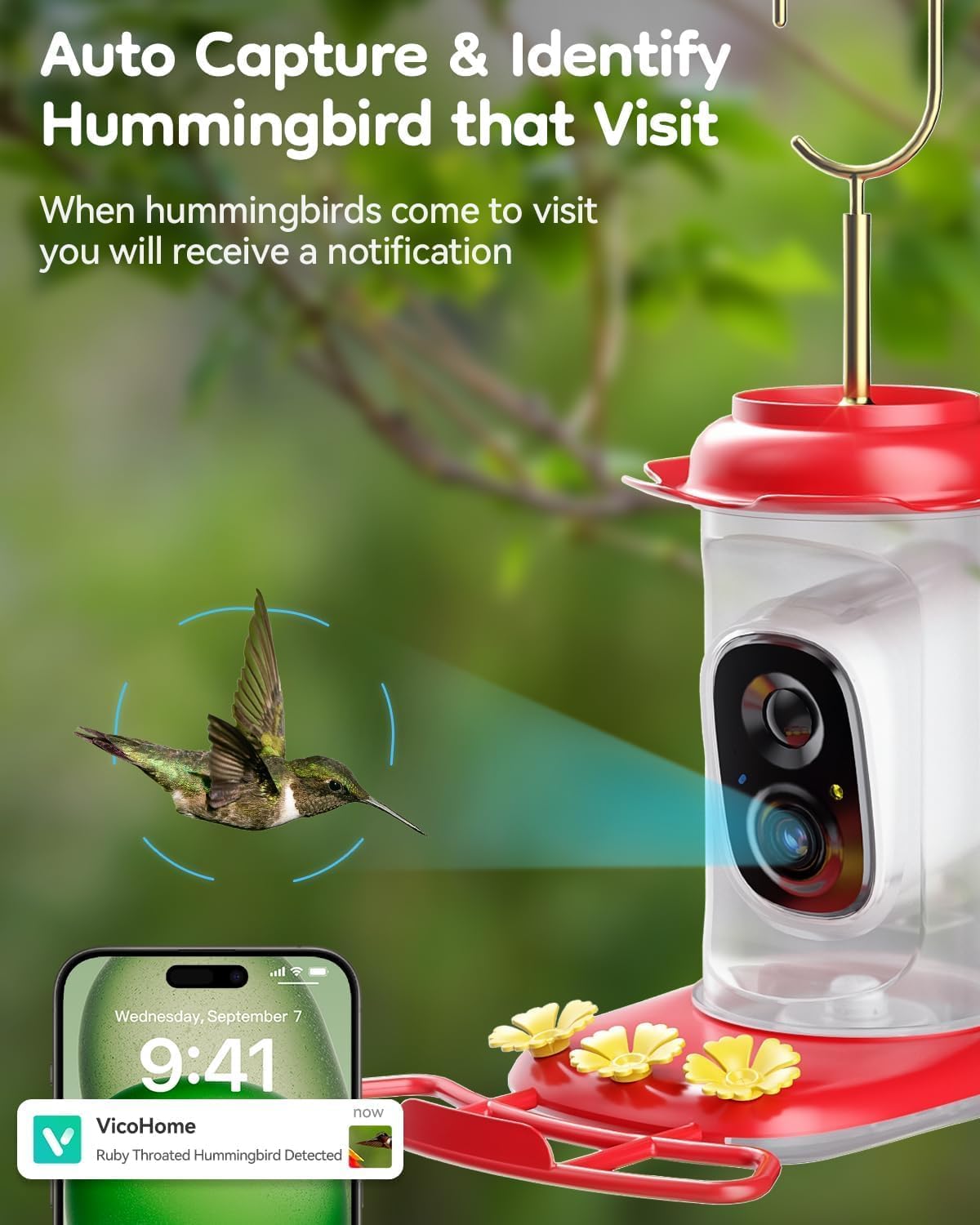
Image: The hummingbird feeder with the solar panel connected, illustrating how the solar panel provides continuous power.
- Install VicoHome App: Download and install the VicoHome app on your smartphone from your device's app store. Follow the in-app instructions to create an account and add your new LongPlus hummingbird feeder camera.
- Prepare Nectar: Prepare hummingbird nectar (typically 1 part sugar to 4 parts water, boiled and cooled). Do not use honey or artificial sweeteners.
- Fill the Feeder: Open the nectar tank and carefully pour the prepared nectar into the transparent reservoir. Ensure the sealing gaskets are properly seated to prevent leaks.
- Assemble Ant Moat: Fill the built-in ant moat with water or any liquid to deter ants from reaching the nectar.
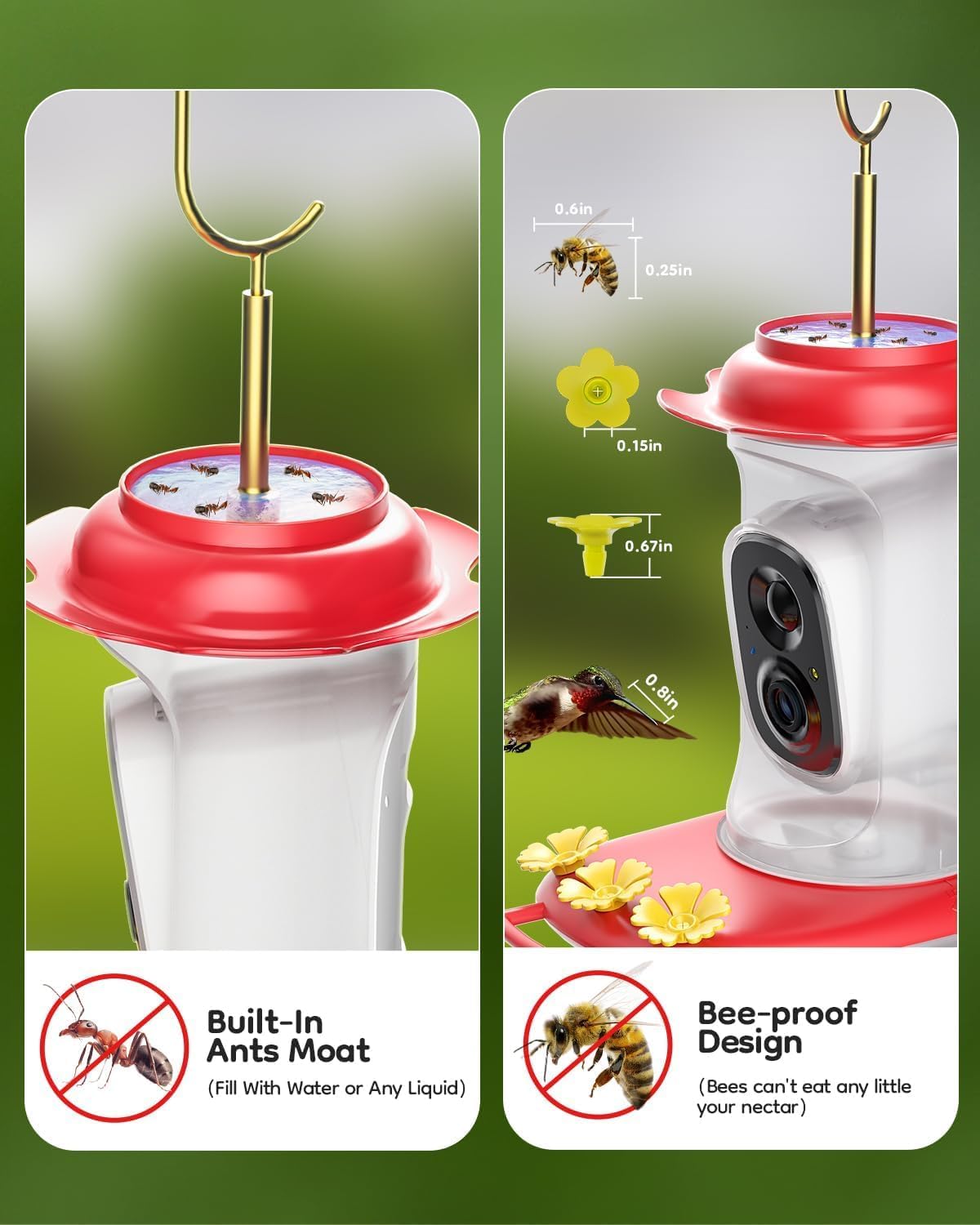
Image: Close-up of the feeder showing the built-in ant moat filled with water and the bee-proof feeding ports, designed to protect the nectar from pests.
- Hang the Feeder: Use the provided hanging hook to suspend the feeder in a suitable location. Choose a spot that is visible from your desired viewing area, protected from strong winds, and ideally in partial shade to prevent nectar spoilage, while ensuring the solar panel receives adequate sunlight.

Image: The LongPlus hummingbird feeder hanging from a tree branch, demonstrating a typical installation setup.
Parentah Operasi
- Pangimeutan Real-Time: Open the VicoHome app to view live 2K video from your feeder camera.
- Narima Tanda: The camera will send instant notifications to your phone when hummingbirds visit.

Image: A smartphone screen displaying a VicoHome app notification indicating a "Ruby Throated Hummingbird Detected" at the feeder.
- Rékam otomatis: The camera automatically records hummingbird visits. These recordings are stored in the cloud (up to 3 days free storage, extendable via subscription).
- Idéntifikasi Spésiés AI: Utilize the VicoHome app's AI algorithm to identify hummingbird species captured by the camera. Detailed species information is available within the app.

Image: A hummingbird feeding at the feeder, with an overlay indicating AI recognition and identification as a "Ruby Throated Hummingbird".
- Share Moments: The app allows you to easily share captured videos and images with family and friends.
Pangropéa
Regular cleaning and refilling are essential for the health of visiting hummingbirds and the longevity of your feeder.
- Nectar Replacement: Replace nectar every 2-3 days, or more frequently in hot weather, to prevent spoilage and mold growth.
- Feeder Cleaning:
- Detach the camera module from the feeder body.
- Empty any remaining nectar.
- Disassemble the feeder components (nectar tank, feeding ports, perches).
- Wash all parts thoroughly with warm water and a mild soap. Use the provided cleaning brush to reach small areas and feeding ports. The nectar tank is dishwasher safe for easy maintenance.
- Rinse all components completely to remove any soap residue.
- Allow parts to air dry completely before reassembling and refilling.
Image: A visual guide showing the camera being detached, then charged, and the feeder being cleaned with a brush, emphasizing the easy-to-clean design.
- Ant Moat Maintenance: Regularly check and refill the ant moat with fresh water to maintain its effectiveness.
Pamérésan masalah
- Nectar Leaking:
If the feeder leaks, ensure all components, especially the sealing gaskets, are correctly assembled and tightened. Check for any cracks or damage to the feeder body or feeding ports. Ensure the feeder is hanging level.
- Ants or Bees Present:
Verify the ant moat is filled with water. Ensure the bee-proof feeding ports are clean and undamaged. If pests persist, consider relocating the feeder or ensuring there are no other attractants nearby.
- Camera Connectivity Issues:
Ensure the camera is fully charged and within range of your Wi-Fi network. Restart the camera and your Wi-Fi router. Re-pair the camera with the VicoHome app if necessary. Check the app for any firmware updates.
- No Hummingbird Detections:
Ensure the camera's motion detection is enabled in the VicoHome app. Check the camera's field of view to ensure it covers the feeding ports. Verify the feeder is placed in an area where hummingbirds are likely to visit.
- Panel Surya Teu Ngecas:
Ensure the solar panel is positioned in direct sunlight for several hours a day, free from obstructions like leaves or dirt. Check the connection cable between the solar panel and the camera.
spésifikasi
| Fitur | Rincian |
|---|---|
| merek | LongPlus |
| Nomer modél | LPN08-S-NEW |
| Spésiés sasaran | Kolibri |
| Dianjurkeun Paké | Nectar Feeding |
| Bahan | Plastik bébas BPA |
| Fitur husus | Bee Proof, Built-In Ant Moat, Easy to Clean, 2K Camera, AI Species Identification, Solar Powered |
| Tipe Pamasangan | Gunung Gantung |
| Sumber Daya | Solar Powered (with 5200mAh Battery) |
| Smart Home kasaluyuan | Smart Home Compatible (via VicoHome app) |
| Ukuran barang (L x W x H) | 7.9 "L x 4" W x 4" H |
| Item Beurat | 1.24 kg |
| Komponén Kaasup | Cleaning brush, Hanging hook, Ant Moat |
Garansi sareng Rojongan
LongPlus offers lifetime support for this product. For any questions, technical assistance, or warranty claims, please contact LongPlus customer service through their official website or the VicoHome app.
Please refer to the product packaging or the LongPlus official websitus pikeun inpormasi jaminan anu paling anyar sareng detil kontak.