
1. Bubuka
Thank you for choosing the Audizio Arco Active Tower Speaker. This manual provides essential information for the safe and correct operation of your new audio system. Please read it thoroughly before use and retain it for future reference.
2. Parentah Kasalametan
- Sasayogian tanaga: Pastikeun catu daya voltage matches the requirements specified on the speaker.
- Ventilasi: Ulah meungpeuk sagala bukaan ventilasi. Pasang saluyu sareng parentah produsén.
- Cai sareng Uap: Ulah ngalaan alat ieu ka hujan atawa beueus. Ulah nempatkeun objék dieusian ku cairan, kayaning vases, dina alat.
- Sumber Panas: Entong dipasang di deukeut sumber panas sapertos radiator, register panas, kompor, atanapi aparat sanésna (kalebet ampLiifiers) anu ngahasilkeun panas.
- beberesih: Ngabersihan ngan ku kaén garing.
- Palayanan: Rujuk sadayana ngalayanan ka tanaga jasa anu mumpuni. Pelayanan diperyogikeun nalika aparat parantos rusak sagala cara.
3. Eusi Paket
Bungkus kotakna kalawan ati-ati sareng pastikeun sadaya barang aya sareng dina kaayaan anu saé. Upami aya barang anu leungit atanapi ruksak, langsung hubungi padagang anjeun.
- Audizio Arco Active Speaker
- Front Panel (Speaker Grille)
- Spéker Stand
- Kadali jauh
- Kabel Daya
- Manual Pitunjuk (dokumén ieu)
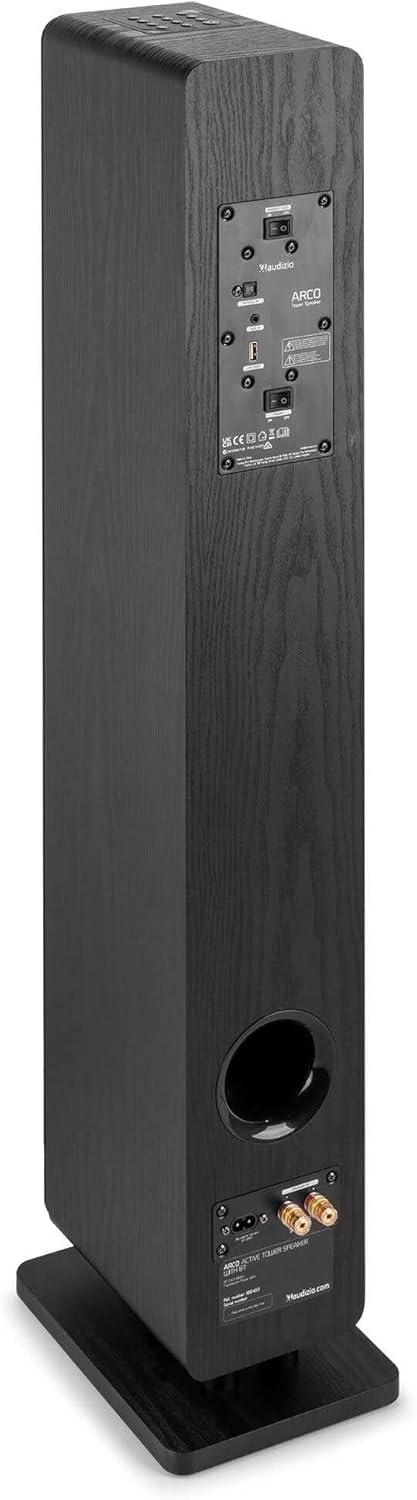
Image: All components included in the Audizio Arco package, including the speaker, remote control, and various connection cables.
4. Produk Langkungview
Hareupeun View (with Grille)

Image: The Audizio Arco speaker from the front, with the black fabric grille covering the drivers. The top panel shows control buttons, and the base features subtle LED lighting.
Hareupeun View (without Grille)

Image: The Audizio Arco speaker with the front grille removed, showcasing the tweeter and three 4-inch woofer/subwoofer drivers. The top panel controls and LED-lit base are also visible.
Tukangeun View (Connections and Controls)

Image: The back panel of the Audizio Arco speaker, featuring the power input, optical input, AUX input, USB port, and speaker output terminals for passive speakers. Control switches are also visible.
Kadali jauh

Gambar: A lengkep view of the Audizio Arco remote control, showing buttons for power, mute, Bluetooth, link (TWS), input selection, playback controls, volume adjustment, and bass/treble settings.
Base LED Lighting

Image: A close-up of the speaker's base, illustrating the integrated ambient LED lighting feature that illuminates the area beneath the speaker.
5. Setélan
5.1 Assembling the Speaker
- Carefully remove the speaker and its stand from the packaging.
- Attach the speaker stand to the base of the speaker using the provided screws. Ensure it is securely fastened.
- If desired, attach the front panel (grille) to the front of the speaker. It is held in place magnetically.
5.2 Sambungan Daya
- Connect the power cable to the AC IN port on the rear of the speaker.
- Colokkeun tungtung kabel daya anu sanésna kana stop kontak témbok anu cocog.
5.3 Panempatan Awal
Place the speaker on a stable, flat surface. For optimal sound, position it in a location where sound can propagate freely without obstruction. Avoid placing it directly against a wall if possible, to allow for better bass response.
6. Parentah Operasi
6.1 Daya Hurung/Pareuman
Pencét éta Kakuatan button on the top panel of the speaker or on the remote control to turn the speaker on or off.
6.2 Pamilihan Input
Pencét éta Input button on the top panel or the remote control to cycle through available input sources: Bluetooth, USB, AUX, Optical.
6.3 Sambungan Bluetooth
- Pilih Bluetooth as the input source. The speaker will enter pairing mode, indicated by a flashing LED.
- Dina alat sélulér anjeun (smartphone, tablet, jsb.), aktipkeun Bluetooth sareng milarian alat anu sayogi.
- Select "Audizio ARCO" from the list of devices.
- Once paired, the LED indicator will stop flashing and remain solid. You can now stream audio from your device.
6.4 Playback USB
- Selapkeun USB flash drive nu ngandung audio files kana USB port di tukang speaker.
- Pilih USB salaku sumber input.
- Speaker bakal otomatis mimiti muterkeun audio files from the USB drive. Use the remote control for playback functions (play/pause, skip track).
6.5 Input AUX
- Sambungkeun alat audio éksternal (contona, pamuter MP3, pamuter CD) ka NGARÉMÉ DI (3.5mm) port on the rear of the speaker using an appropriate audio cable.
- Pilih AUX salaku sumber input.
- Audio from your connected device will now play through the speaker.
6.6 Input optik
- Connect your TV or other audio source with an optical output to the OPTIKAL DI (Toslink) port on the rear of the speaker using an optical cable.
- Pilih Optik salaku sumber input.
- Ensure your TV's audio output settings are configured for PCM stereo output if you experience no sound.
6.7 Leres Wireless Stereo (TWS) papasangan
The Audizio Arco speaker supports TWS functionality, allowing you to pair two Arco speakers wirelessly for a stereo sound experience.
- Ensure both Audizio Arco speakers are powered on and not connected to any Bluetooth device.
- Dina hiji spiker (ieu bakal jadi spiker primér), pencét jeung tahan tombol link button on the remote control or the TWS button on the top panel until you hear a pairing tone.
- The primary speaker will search for the secondary speaker. Once connected, you will hear a confirmation tone, and the LED indicators on both speakers will synchronize.
- Ayeuna, sambungkeun alat Bluetooth anjeun ka spiker utama sapertos anu dijelaskeun dina bagian 6.3. Audio bakal diputer dina stereo ngalangkungan kadua spiker.
6.8 Control Lampu LED
The ambient LED light at the base of the speaker can be controlled via the remote control. Refer to the remote control diagram for the specific button.
6.9 Tone Control (Remote Control)
Ngagunakeun éta BASS+ / BASS- jeung TBL+ / TBL- buttons on the remote control to adjust the bass and treble levels to your preference. The DATAR button resets the tone settings to default.
7. Pangropéa
7.1 beberesih
- Salawasna cabut colokan speaker tina stop kontak sateuacan diberesihan.
- Anggo kaén anu lemes sareng garing pikeun ngusap permukaan luar spéker.
- Do not use liquid cleaners, aerosols, or abrasive chemicals, as these may damage the finish.
- For the speaker grille, use a soft brush or vacuum cleaner with a brush attachment to gently remove dust.
7.2 Panyimpenan
If storing the speaker for an extended period, unplug it from the power source and store it in a cool, dry place, away from direct sunlight and extreme temperatures.
8. Cara ngungkulan
| Masalah | Mungkin Cukang lantaranana | Solusi |
|---|---|---|
| Taya kakuatan | kabel kakuatan teu disambungkeun; Stopkontak teu aktip. | Ensure power cable is securely connected to speaker and outlet. Test outlet with another device. |
| Taya sora | Incorrect input selected; Volume too low; Mute activated; Source device issue. | Select correct input. Increase volume. Deactivate mute. Check audio output of source device. |
| Nyapasangkeun Bluetooth gagal | Speaker not in pairing mode; Device too far; Already paired to another device. | Pastikeun speaker aya dina mode papasangan Bluetooth. Pindahkeun alat ka deukeut. Pegatkeun sambungan ti alat sejen. |
| No sound from Optical input | TV audio output settings incorrect; Optical cable damaged. | Set TV audio output to PCM stereo. Check optical cable for damage and ensure secure connection. |
| Papasangan TWS gagal | Spiker teu dina modeu pasangan TWS; Jauh teuing. | Ensure both speakers are in TWS pairing mode (not connected to Bluetooth). Move speakers closer. |
9. Spésifikasi
| Fitur | Spésifikasi |
|---|---|
| merek | Audizio |
| Ngaran modél | ARCO Active Tower |
| Tipe Speaker | Active Hi-Fi Speaker (Floor-standing) |
| Daya Kaluaran Max | 160 Watt |
| Téhnologi konektipitas | Bluetooth 5.4, Optical (Toslink), USB, AUX (3.5mm) |
| Mode Kaluaran Audio | Stereo |
| Réspon Frékuénsi | 20000 Hz (Wates luhur, has pikeun spiker full-range) |
| Woofer Driver Size | 3 x 4 inci |
| Masukan Voltage | 230 volt |
| Métode kontrol | Kadali Jarak Jauh, Tombol dina alat |
| Fitur husus | Ambient LED light, TWS (True Wireless Stereo) function |
| Diménsi (D x W x H) | 24 cm x 17 cm x 95.5 cm |
| Item Beurat | 9.85 kg |
| Alat nu cocog | Smartphones, Televisions, Tablets |
10. Jaminan & Dukungan
10.1 Émbaran jaminan
Audizio products are manufactured to high quality standards. This product is covered by a manufacturer's warranty, the terms of which may vary by region. Please refer to your purchase documentation or contact your local retailer for specific warranty details.
10.2 Rojongan Palanggan
Should you require technical assistance or have questions regarding your Audizio Arco speaker, please contact your retailer or visit the official Audizio websitus pikeun sumber rojongan tur inpo kontak.