
1. Produk Langkungview
The Edifier W280NB Pro are neckband wireless headphones designed for immersive audio experiences with advanced features. They offer hybrid active noise cancellation, Hi-Res Audio support with LDAC, and a durable, comfortable design suitable for various activities.

Image: Edifier W280NB Pro headphones with key features highlighted.
Fitur konci:
- Deep Hybrid Active Noise Cancellation: Up to -45dB noise reduction with 4 selectable modes (High ANC, Medium ANC, Ambient Aware, Wind Reduction).
- Studio-Quality Hi-Res Audio: 10mm dynamic drivers with titanium-coated composite diaphragms, supporting LDAC codec and Hi-Res Audio Wireless certification (20Hz-40KHz frequency response).
- Long-Lasting Battery & Fast Charging: Up to 23 hours of playback (ANC off), 14 hours (ANC on). 15 minutes of charging provides 5 hours of playtime. Full charge in 1.5 hours.
- Sambungan Bluetooth 5.4 Stabil: Ensures stable transmission, low power consumption, and multipoint connection for seamless device switching.
- All-Day Comfort & Secure Fit: Lightweight, flexible neckband with skin-friendly material and multiple sizes of ear wings for a secure fit. Magnetic earbuds for tangle-free storage.
- Durable & Clear Calls: IP55 dust and water resistance. Built-in AI noise-canceling microphones for clear communication in noisy environments.
2. Setup Guide
2.1 Eusi pakét
Sateuacan dianggo, mangga pastikeun sadaya barang aya dina bungkusan:
- Edifier W280NB Pro Neckband Wireless Headphones
- Kabel Ngecas USB-C
- Multiple sizes of ear tips and ear wings
- Manual pangguna (dokumén ieu)
2.2 Ngecas Headphone
Charge the headphones fully before first use to ensure optimal battery performance.
- Connect the provided USB-C charging cable to the charging port on the neckband.
- Sambungkeun tungtung kabel anu sanés ka adaptor kakuatan USB (teu kalebet) atanapi port USB komputer.
- The indicator light will show charging status (refer to the LED indicator section for details).
- A full charge takes approximately 1.5 hours. A 15-minute quick charge provides approximately 5 hours of playback.

Image: Visual representation of battery life (23 hours ANC off, 14 hours ANC on) and fast charging (15 mins = 5 hours).
2.3 Fitting the Headphones
Proper fit is crucial for comfort, sound quality, and effective noise cancellation.
- Select the ear tips and ear wings that best fit your ears. Experiment with different sizes for the most secure and comfortable seal.
- Pasangkeun pita beuheung di sabudeureun beuheung anjeun.
- Insert the earbuds into your ear canals and adjust the ear wings to sit snugly in your outer ear for stability.

Image: Diagram showing various ear tip and ear wing sizes for a secure and comfortable fit.
2.4 Nyapasangkeun Bluetooth
Pair your Edifier W280NB Pro headphones with your device via Bluetooth.
- Pastikeun headphone dicas sareng dipareuman.
- Press and hold the multi-function button (usually the power button) until the indicator light flashes rapidly (e.g., blue and red alternately), indicating pairing mode.
- Dina alat anjeun (smartphone, tablet, laptop), aktipkeun Bluetooth sareng milarian alat anu sayogi.
- Select "Edifier W280NB Pro" from the list of found devices.
- Sakali nyambung, lampu indikator biasana bakal nembongkeun lampu biru anu ajeg atanapi kedip-kedip lalaunan.
Sambungan Multipoint:
The W280NB Pro supports multipoint connection, allowing you to connect to two Bluetooth devices simultaneously.
- Pasangkeun headphone sareng alat anu munggaran sapertos anu dijelaskeun di luhur.
- Nonaktipkeun Bluetooth dina alat munggaran.
- Pasang deui headphone kana modeu pairing teras pasangkeun sareng alat kadua.
- Re-enable Bluetooth on the first device. The headphones should now be connected to both devices, allowing seamless switching.

Image: Illustration of Bluetooth 5.4 technology for stable transmission and multipoint connection.
3. Parentah Operasi
3.1 Daya Hurung/Pareuman
- Daya Hurung: Press and hold the multi-function button for approximately 3 seconds until the indicator light illuminates.
- Pareum listrik: Press and hold the multi-function button for approximately 5 seconds until the indicator light turns off.
3.2 Kadali Tombol
The Edifier W280NB Pro features intuitive button controls on the neckband for easy management of music, calls, and noise cancellation modes.

Image: Diagram illustrating the functions of each button on the neckband for calls, music playback, and mode switching.
| Aksi | Fungsi |
|---|---|
| Multi-function Button (Power) | Press and hold 3s: Power On Press and hold 5s: Power Off Press and hold (pairing mode): Enter Bluetooth pairing Single press (during call): Answer/End Call Double press (during call): Reject Call |
| Volume Naik (+) | Single press: Increase Volume Press and hold: Next Track |
| Volume Turun (-) | Single press: Decrease Volume Press and hold: Previous Track |
| Puter / Tombol Reureuh | Single press: Play/Pause Music |
| Tombol Mode ANC | Single press: Cycle through ANC modes (High ANC, Medium ANC, Ambient Aware, Wind Reduction, ANC Off) |
3.3 Modeu Pembatalan Noise Aktif (ANC)
The W280NB Pro offers four distinct noise cancellation modes to adapt to your environment.

Image: Visual guide to the four ANC modes and their typical use cases.
- High ANC: Provides maximum noise reduction, ideal for very noisy environments like airplanes or subways.
- Medium ANC: Offers a balanced level of noise cancellation, suitable for offices or cafes.
- Ambient Sadar: Allows you to hear your surroundings while still enjoying your audio, useful for urban environments or when needing to be aware of announcements.
- Ngurangan Angin: Dirancang khusus pikeun ngaminimalkeun sora angin nalika kagiatan di luar ruangan.
3.4 Nelepon jeung Narima Telepon
The headphones feature AI noise-canceling microphones for clear call quality.
- Ngajawab Telepon: Pencét sakali tombol multi-fungsi.
- Tungtung Telepon: Pencét sakali tombol multi-fungsi.
- Nolak Telepon: Pencét dua kali tombol multi-fungsi.

Image: A person using the headphones for a call, highlighting the AI-enhanced clear call feature.
3.5 Edifier Connect App
For advanced settings and customization, download the Edifier Connect app from your device's app store. The app allows you to:
- Ganti ngaran alat Anjeun.
- Personalize ANC levels.
- Fine-tune audio with preset EQs or custom EQs.
- Locate lost headphones.
4. Pangropéa
4.1 beberesih
The W280NB Pro headphones are IP55 rated for dust and water resistance, but proper cleaning helps maintain their condition.
- Wipe the neckband and earbuds with a soft, dry, lint-free cloth.
- For ear tips, gently remove them and clean with a damp lawon jeung sabun hampang lamun perlu. Pastikeun aranjeunna tos rengse garing saméméh reattaching.
- Avoid using harsh chemicals, abrasive materials, or submerging the headphones in water.
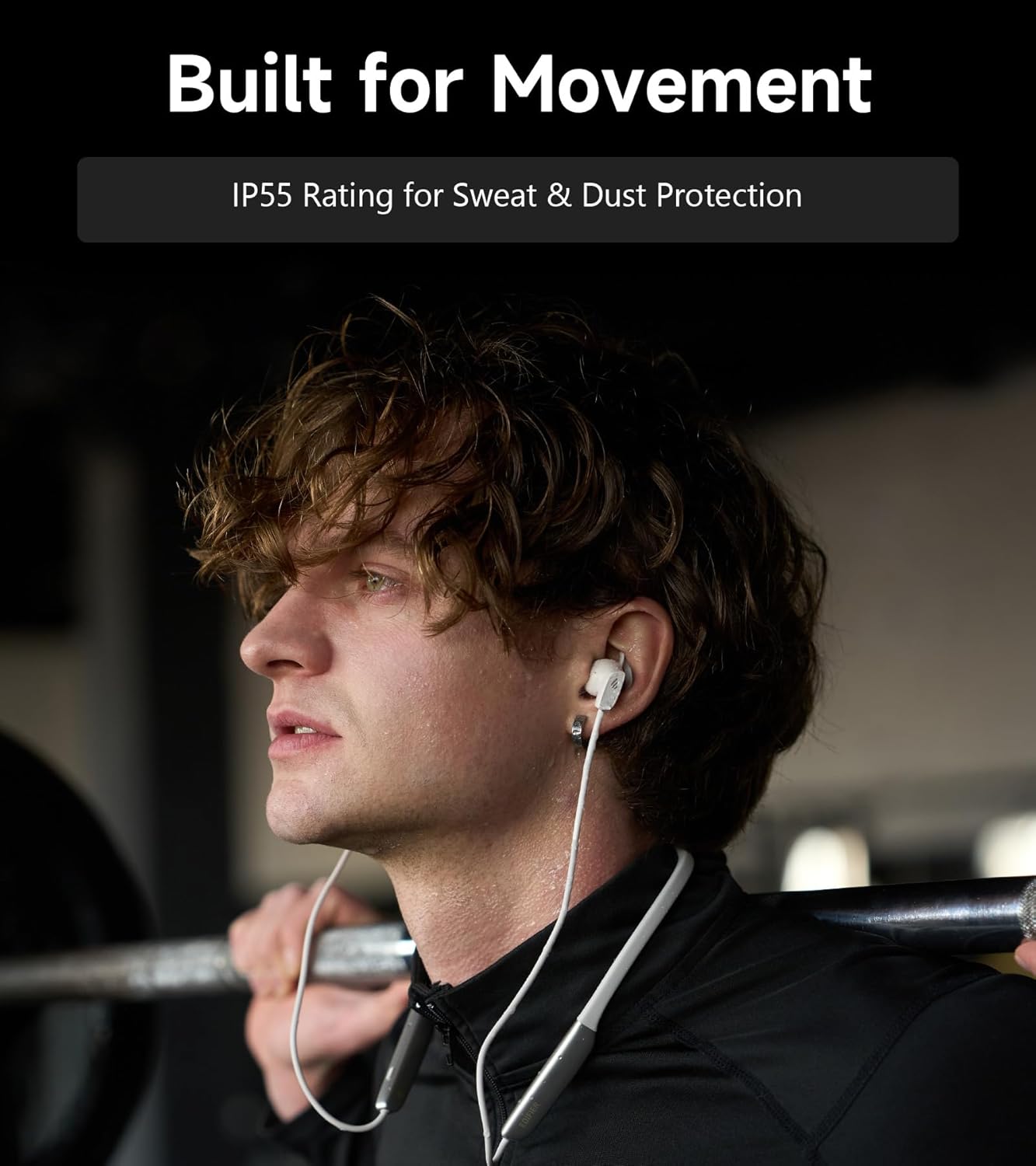
Image: A person wearing the headphones during a workout, illustrating the IP55 sweat and dust protection.
4.2 Panyimpenan
When not in use, store your headphones properly to prevent damage.
- The earbuds are magnetic, allowing them to snap together for tangle-free storage around your neck or in a bag.
- Nyimpen dina tiis, tempat garing jauh ti sinar panonpoé langsung jeung suhu ekstrim.
4.3 Perawatan Batré
- Hindarkeun sering-sering ngeusi batre.
- Cas headphone sacara rutin, sanajan teu dianggo lila, pikeun ngajaga kaséhatan batréna.
5. Cara ngungkulan
If you encounter issues with your Edifier W280NB Pro headphones, refer to the following common problems and solutions.
| Masalah | Mungkin Cukang lantaranana | Solusi |
|---|---|---|
| Headphone teu hurung. | batré lemah. | Ngecas headphone pinuh. |
| Teu tiasa dipasangkeun sareng alat. | Headphone henteu dina mode papasangan. Bluetooth disabled on device. Device too far from headphones. | Ensure headphones are in pairing mode (flashing indicator). Aktipkeun Bluetooth dina alat Anjeun. Pindahkeun alat ka headphone (dina jarak 10 meter). Try resetting the headphones (refer to manual for specific reset procedure if available, or power cycle). |
| Taya sora atawa volume low. | Volume lemah teuing dina headphone atawa alat. Headphones not connected. Kaluaran audio salah dipilih dina alat. | Increase volume on both headphones and device. Pastikeun headphone parantos dipasangkeun sareng disambungkeun kalayan leres. Check your device's audio settings to ensure output is set to Edifier W280NB Pro. |
| Kualitas sora henteu saé. | Sambungan Bluetooth goréng. Improper ear tip fit. Kualitas sumber audio. | Pindah ngadeukeutan ka alat nu disambungkeun. Ensure ear tips provide a secure seal. Coba sumber audio béda atawa file. |
| Aktif Noise Cancellation teu epektip. | Improper ear tip fit. Incorrect ANC mode selected. Extreme noise conditions. | Ensure ear tips provide a secure seal. Cycle through ANC modes to select the most appropriate one. ANC works best for low-frequency, constant noise. |
| Mikropon teu jalan nalika nelepon. | Headphones not selected as input device. Mikropon dipareuman dina alat. | Check your device's call settings to ensure Edifier W280NB Pro is selected for microphone input. Pastikeun mikropon teu dipareuman dina alat Anjeun. |
6. Spésifikasi
Detailed technical specifications for the Edifier W280NB Pro Neckband Wireless Headphones.
| Fitur | Rincian |
|---|---|
| merek | Edifier |
| Ngaran modél | W280NB Pro |
| Warna | Hideung |
| Panempatan Ceuli | Dina Ceuli |
| Faktor Bentuk | Neckband |
| Impedansi | 24 ohm |
| Kontrol bising | Pembatalan Noise aktip |
| Rentang Frékuénsi | 20Hz-40KHz |
| Tipe Supir Audio | Dynamic Driver (10mm with Titanium-Coated Diaphragm) |
| Téhnologi konektipitas | Nirkabel (Bluetooth) |
| Vérsi Bluetooth | 5.4 |
| Rentang Bluetooth | 10 Méter (33 suku) |
| Battery Average Life (Playback) | 23 Jam (ANC pareum), 14 Jam (ANC hurung) |
| Waktu Ngeusi batre | 1.5 Jam |
| Tingkat Résistansi Cai | IP55 (Dust & Waterproof) |
| Alat nu cocog | Smartphone, Tablet, Laptop, Spiker Pinter |
| Bahan | Silicone (Enclosure) |
| UPC | 628430220005 |
7. Émbaran jaminan
The Edifier W280NB Pro Neckband Wireless Headphones come with a 1 Taun Produsén Garansi.
This warranty covers defects in materials and workmanship under normal use. It does not cover damage caused by misuse, accidents, unauthorized modifications, or normal wear and tear. Please retain your proof of purchase for warranty claims.
8. Rojongan Palanggan
For further assistance, technical support, or warranty inquiries, please contact Edifier customer service.
- Websitus: Nganjang ka Edifier resmi websitus pikeun FAQs, sumberdaya rojongan, sarta informasi kontak.
- Email/Telepon: Refer to the Edifier website or your product packaging for specific contact details in your region.