
Bubuka
This manual provides comprehensive instructions for the LG Gram Book 15U50T laptop. Please read this manual thoroughly before using your device to ensure proper operation and to maximize its lifespan. Keep this manual for future reference.
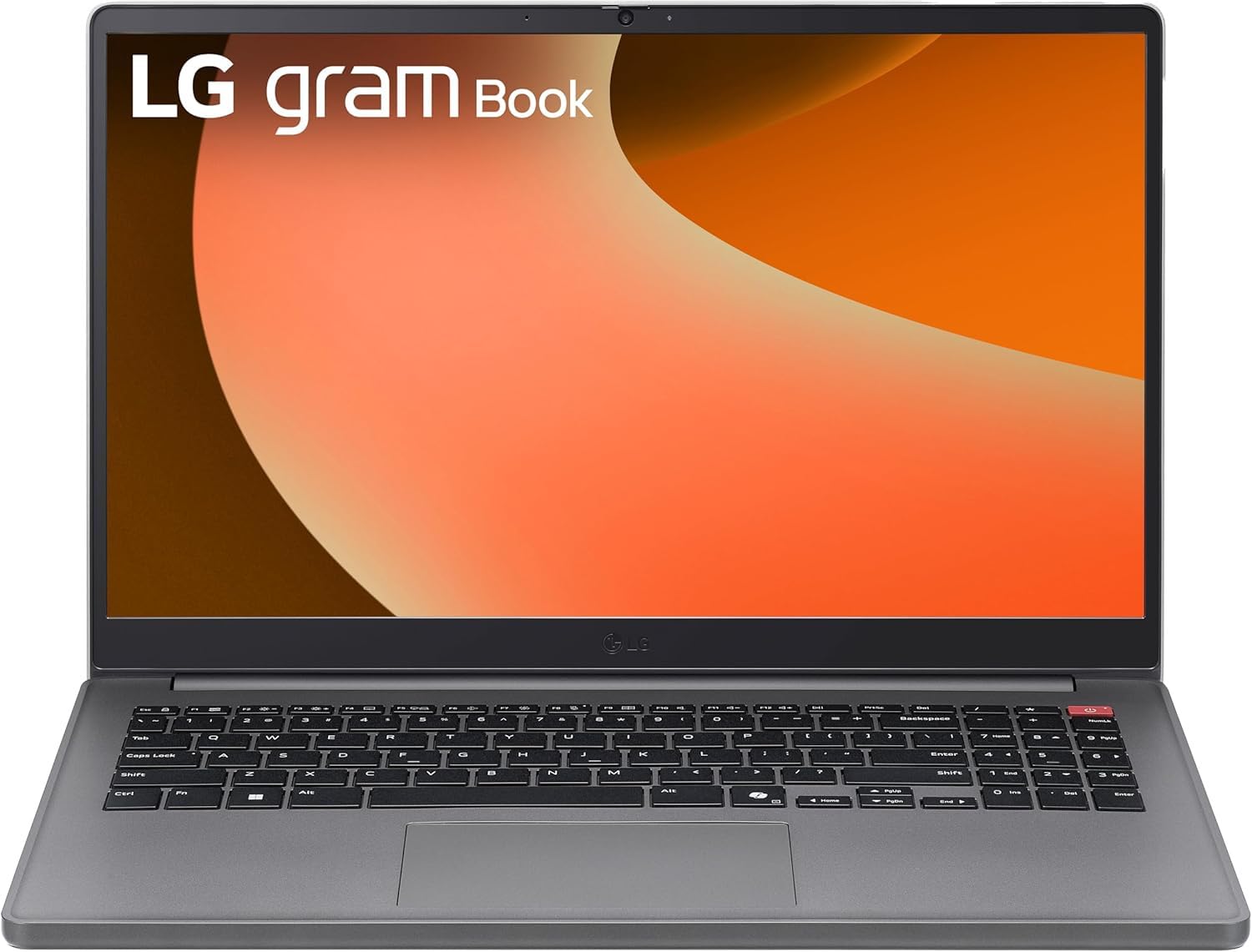
Gambar 1: Hareupeun view of the LG Gram Book 15U50T Laptop.
Disetél
1. Unboxing sareng Inspeksi Awal
Cabut laptop sareng sadaya asesoris sacara saksama tina bungkusan. Pastikeun yén sadaya komponén aya:
- LG Gram Book 15U50T Laptop
- Adaptor AC sareng Kabel Daya
- Dokuméntasi (Panduan Mimitian Gancang, Inpormasi Garansi)
Pariksa laptop pikeun karuksakan fisik. Upami aya karusakan atanapi komponén anu leungit, langsung ngahubungi pangecér anjeun.
2. Nyambungkeun Adaptor Daya
Before initial use, connect the AC adapter to the laptop and a power outlet to fully charge the battery. The charging port is typically located on the side of the laptop.

Figure 2: Port layout of the LG Gram Book 15U50T. This diagram shows the location of the HDMI port (1), USB Type-A ports (2), USB Type-C ports (3), Headphone jack (4), and Kensington lock slot (5).
3. Mimiti Power On jeung Windows Setup
Press the power button, usually located on the top-right of the keyboard, to turn on the laptop. Follow the on-screen instructions to complete the Windows 11 Pro setup process. This includes selecting your region, connecting to a Wi-Fi network, and creating a user account.

angka 3: Tutup-up view of the keyboard, highlighting the power button on the top right.
4. Nyambungkeun périferal
Mangpaatkeun port anu sayogi pikeun nyambungkeun alat éksternal:
- USB 3.2 Gen 2 Type-C (x2): Supports Power Delivery and DisplayPort for external monitors or charging compatible devices.
- USB 3.2 Gen 1 Tipe-A (x1): Pikeun alat USB standar sapertos beurit, kibor, atanapi drive éksternal.
- USB 2.0 Tipe-A (x1): Pikeun alat USB anu langkung lami.
- HDMI 2.0 (x1): Sambungkeun ka tampilan éksternal atanapi proyektor.
- Headphone / Microphone Combo Jack (3.5mm): Pikeun asupan/kaluaran audio.
Ngoperasikeun Laptop Anjeun
1. Keyboard jeung Touchpad
The LG Gram Book 15U50T features a full-size keyboard with a numeric keypad for efficient data entry. The integrated touchpad supports multi-touch gestures for navigation.

Gambar 4: Top-handap view of the full-size keyboard and touchpad.
2. Témbongkeun
The 15.6-inch Full HD (1920 x 1080) IPS Anti-glare display provides clear visuals. Adjust brightness and display settings through Windows settings (Right-click on desktop > Display settings).
3. Konéktipitas Wireless
- Wi-Fi 6 (Intel AX203): Connect to wireless networks for internet access. Manage Wi-Fi connections via the network icon in the Windows taskbar.
- Bluetooth 5.2: Pair with Bluetooth-enabled devices such as headphones, speakers, or mice. Access Bluetooth settings via Windows Settings > Devices > Bluetooth & devices.
4. Kaméra sareng Audio
The laptop includes a 720p HD Camera with a privacy shutter for video calls and conferences. The 3.5mm combo jack supports both headphones and external microphones.
Pangropéa
1. Ngabersihan Laptop
- layar: Anggo kaén anu lemes sareng teu aya serat anu hampang dampDieusian ku cai atanapi pembersih layar. Ulah menyemprot cleaner langsung kana layar.
- Keyboard sareng Chassis: Paké lawon lemes, garing. Pikeun kokotor nekad, a rada damp cloth can be used, ensuring no liquid enters openings. Compressed air can remove dust from between keys.
2. Kaperawatan batré
The 51Wh Lithium-Ion battery provides portable power. To prolong battery life:
- Hindarkeun suhu anu ekstrim.
- Ulah pinuh discharge batré remen.
- Upami nyimpen laptop kanggo waktos anu lami, ngecas batréna dugi ka sakitar 50-60% sateuacan mareumanana.
3. Apdet parangkat lunak
Regularly update your Windows 11 Pro operating system and device drivers to ensure optimal performance and security. Access updates via Windows Settings > Windows Update.
4. Manajemén gudang
The 2TB NVMe M.2 SSD provides fast storage. Periodically clean up unnecessary files and applications to maintain performance. Use Windows Disk Cleanup or Storage Sense features.
Pamérésan masalah
Bagian ieu ngabahas masalah umum anu anjeun tingali.
Taya Daya / Laptop Teu Dihurungkeun
- Pastikeun adaptor AC disambungkeun sacara aman ka laptop sareng stop kontak listrik anu tiasa dianggo.
- Pastikeun stop kontak listrik berpungsi ku cara nyolokkeun alat sejen.
- Upami batréna tos lemes, peryogi sababaraha menit ngecas sateuacan laptop tiasa hurung.
Masalah tampilan
- If the screen is blank, try adjusting the brightness using the function keys (Fn + F2/F3, or similar, refer to keyboard icons).
- If an external monitor is not displaying, ensure the cable is connected correctly and try pressing Windows key + P to cycle through display modes.
Masalah Konéktivitas Wi-Fi atanapi Bluetooth
- Ensure Wi-Fi or Bluetooth is enabled in Windows settings.
- Balikan deui router / modem anjeun pikeun masalah Wi-Fi.
- For Bluetooth, try unpairing and re-pairing the device.
- Update wireless drivers via Device Manager.
Performance Lalaunan
- Tutup aplikasi anu teu perlu jalan di latar tukang.
- Pariksa sareng pasang apdet Windows anu ditangguhkeun.
- Jalankeun beberesih disk pikeun ngosongkeun rohangan panyimpenan.
- Nyeken malware atawa virus.
spésifikasi
| Fitur | Rincian |
|---|---|
| merek | LG |
| Ngaran modél | Gram Book 15U50T |
| Ukuran layar | 15.6 inci |
| Resolusi tampilan | 1920 x 1080 piksel (FHD) |
| Tipe tampilan | IPS Anti-glare LED |
| Prosesor | 13th Generation Intel Core i5-1334U (10-Core) |
| Grafika | Grafik Intel Iris Xe (Terpadu) |
| Mémori RAM | 16GB DDR4 SDRAM 3200 MHz (Up to 64GB Max) |
| Panyimpenan | 2TB NVMe M.2 SSD |
| Sistem operasi | Windows 11 Pro |
| Konéktipitas Wireless | Intel Wi-Fi 6 AX203 (2x2), Bluetooth 5.2 |
| Palabuhan | 2x USB 3.2 Gen 2 Type-C (PD/DP), 1x USB 3.2 Gen 1 Type-A, 1x USB 2.0 Type-A, 1x HDMI 2.0, 1x Headphone/Mic Combo Jack |
| Kaméra | Kaméra HD 720p nganggo Rana Privasi |
| Batré | 51Wh Lithium-Ion (Up to 12 hours battery life) |
| Ukuran (L x W x H) | 14.16" x 9.37" x 0.76" inci |
| Beurat | 3.74 pon |
| Warna | Titan pérak |
Garansi sareng Rojongan
Émbaran jaminan
Your LG Gram Book 15U50T laptop comes with a standard manufacturer's warranty. Please refer to the warranty card included in your product packaging for specific terms, conditions, and duration. Keep your proof of purchase for warranty claims.
Bantosan Téknis
For technical assistance, troubleshooting beyond this manual, or warranty service, please contact LG customer support. You can typically find contact information on the official LG websitus atanapi dina dokuméntasi produk Anjeun.
- Nganjang ka LG resmi websitus pikeun sumber rojongan tur wincik kontak.
- Have your laptop's model number (15U50T) and serial number ready when contacting support.