
1. Bubuka
This manual provides detailed instructions for the ANCEL DS500 Elite Bidirectional Scan Tool and the ANCEL BT310 12V/24V Car Battery Tester. Please read this manual thoroughly before operating the devices to ensure correct usage and optimal performance. Keep this manual for future reference.
2. Produk Langkungview
2.1 ANCEL DS500 Elite Bidirectional Scan Tool
The ANCEL DS500 Elite is an advanced diagnostic scan tool designed for comprehensive vehicle system analysis. It features bidirectional control capabilities, allowing users to send commands to vehicle modules and monitor system responses. This tool supports full-system deep scans and offers over 3,000 active test commands.
- Kontrol dua arah: Perform active tests on various components like fuel pumps, cooling fans, windows, and mirrors.
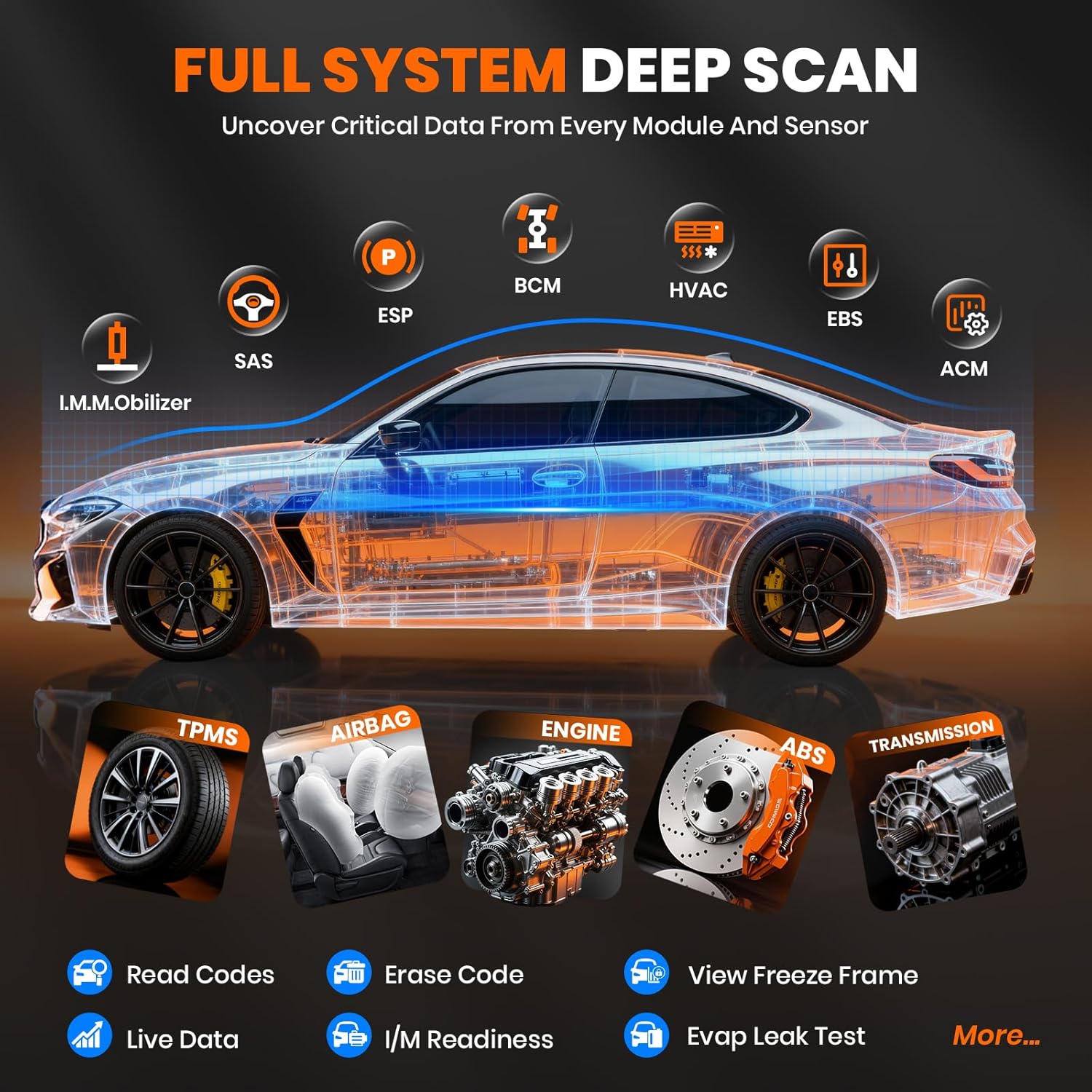
- Full System Deep Scan: Uncover critical data from every module and sensor, including Engine, ABS, Airbag, Transmission, TPMS, SAS, ESP, BCM, HVAC, EBS, and ACM.
- Hot Reset Service: Access over 28 maintenance reset functions for various car brands, including D-P-F Regeneration, AdBlue Reset, Oil Life Reset, EGR Adaptation, IMMO Reset, Gear Learning, Battery Matching, SAS Calibration, A/F Ratio/Fuel Reset, ABS Bleeding, Air Suspension Reset, NOx Sensor Reset, AFS Reset, ETA Reset, Coolant Pump Activation, Brake-pad Reset, Seat Calibration, and Airbag Reset.
- Pembaruan Gratis Saumur hirup: Ensures compatibility with evolving vehicle diagnostic systems without subscription fees.


2.2 ANCEL BT310 12V/24V Car Battery Tester
The ANCEL BT310 is a versatile battery load tester compatible with both 12V and 24V battery systems. It supports various battery types and provides accurate health assessments, cranking tests, and charging tests.
- Kasaluyuan Universal: Supports 12V and 24V Lithium and Lead-Acid batteries, including Flooded, AGM (Spiral & Flat Plate), GEL, and EFB types.
- Multiple Standards: Compatible with major battery standards such as CCA, BCI, CA, MCA, JIS, DIN, IEC, EN, SAE, and GB.
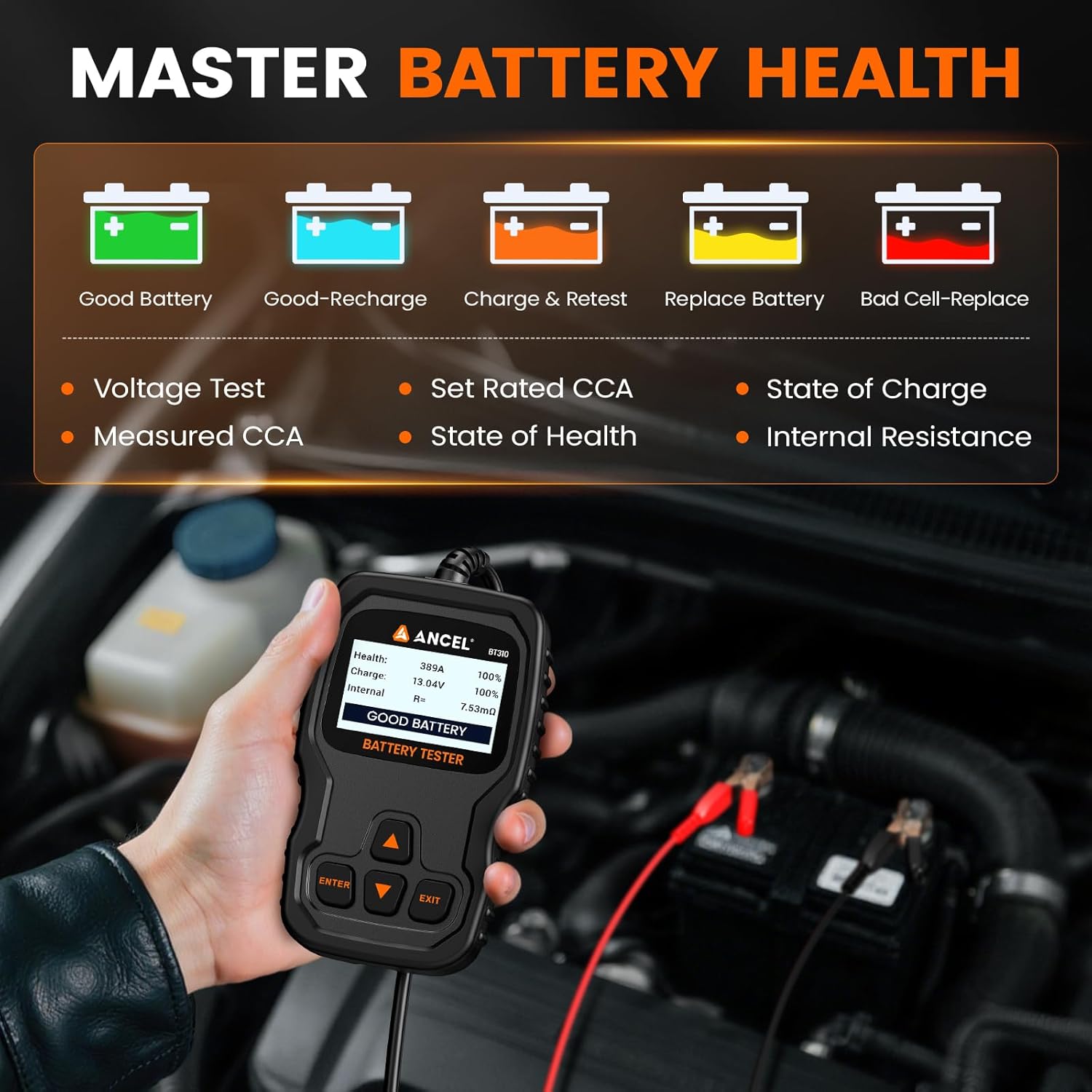
- Key Diagnostics: Measures State of Charge (SOC), State of Health (SOH), Voltage Test, Rated and Measured CCA, and Internal Resistance.
- Hasil tés: Provides clear results: [GOOD BATTERY], [GOOD-RECHARGE], [CHARGE & RETEST], [REPLACE BATTERY], and [BAD CELL-REPLACE].

3. Setélan
3.1 ANCEL DS500 Elite Setup
- Daya Hurung: Connect the DS500 Elite to the vehicle's OBD-II port. The device will power on automatically.
- Konfigurasi awal: Follow the on-screen prompts to select language, time zone, and Wi-Fi connection.
- Apdet parangkat lunak: Ensure the device is connected to Wi-Fi and check for available software updates to maintain optimal performance and vehicle compatibility.
3.2 ANCEL BT310 Setup
- Nyambung ka Batré: Ensure the vehicle engine is off. Connect the red clamp ka positif (+) terminal batré jeung cl hideungamp ka terminal négatip (-).
- Daya Hurung: BT310 bakal otomatis hurung saatos disambungkeun kana batréna.
- Pilih Jenis Batré: Use the navigation buttons to select the correct battery type (e.g., Flooded, AGM, GEL, EFB, Lithium) and standard (e.g., CCA, BCI) as prompted on the screen.

4. Parentah Operasi
4.1 ANCEL DS500 Elite Operation
- Sambungan Kendaraan: Plug the OBD-II cable into the vehicle's diagnostic port, usually located under the dashboard.
- Idéntifikasi Kendaraan: The DS500 Elite will automatically detect the vehicle's VIN or prompt you to manually enter vehicle information (make, model, year).
- Diagnostic Menu: Navigate the main menu to select desired functions:
- Diagnosis: Perform full system scans, read/clear fault codes, view live data streams, and check I/M readiness.
- Tés Aktif: Select specific control modules and components to perform bidirectional tests (e.g., activate ABS pump, cycle cooling fan).
- jasa: Access various reset and maintenance functions (e.g., Oil Reset, EPB Reset, SAS Calibration).
- Pembaruan: Pariksa sareng pasang apdet parangkat lunak.
- Data Réview: After performing tests, review the diagnostic reports, freeze frame data, and live data graphs on the device screen.
4.2 ANCEL BT310 Operation
- Menu utama: Once powered on, the BT310 will display the main menu with options like 'Battery Test', 'Cranking Test', 'Charging Test', and 'Review Data'.
- Tés batré: Select 'Battery Test'. The device will prompt you to enter the battery's rated CCA (Cold Cranking Amps) or other standard values. Follow the on-screen instructions. The test will provide results such as SOC, SOH, Voltage, Measured CCA, and Internal Resistance, along with a clear status (e.g., GOOD BATTERY, REPLACE BATTERY).
- Tes Cranking: Select 'Cranking Test'. The device will instruct you to start the vehicle. It will then measure the cranking voltage sareng waktos, masihan penilaian kinerja sistem starter.
- Tes ngecas: Select 'Charging Test'. The device will instruct you to run the engine at idle and then at a higher RPM (e.g., 2500 RPM). It will measure the alternator's output voltage and ripple, assessing the charging system's efficiency.
- Review Data: Pilih 'Review Data' to view hasil tés anu disimpen sateuacanna.

5. Pangropéa
- beberesih: Use a soft, dry cloth to clean the device screens and bodies. Avoid using abrasive cleaners or solvents.
- Panyimpenan: Store both devices in a dry, cool environment, away from direct sunlight and extreme temperatures.
- Perawatan kabel: Inspect cables regularly for any signs of damage. Do not pull on the cables to disconnect them; always grasp the connector.
- Software Updates (DS500 Elite): Regularly check for and install software updates to ensure the scanner has the latest vehicle data and diagnostic capabilities.
6. Cara ngungkulan
- Alat Teu Dihurungkeun:
- DS500 Elite: Ensure the OBD-II cable is securely connected to the vehicle's diagnostic port. Check the vehicle's battery for sufficient charge.
- BT310: Pastikeun yén clamps are correctly connected to the battery terminals (red to positive, black to negative) and that the battery has sufficient voltage.
- Communication Error (DS500 Elite):
- Pariksa naha konci kontak kendaraan parantos hurung.
- Ensure the OBD-II connector is fully seated.
- Verify that the vehicle supports the OBD-II protocol.
- Try testing on a different compatible vehicle to rule out a vehicle-specific issue.
- Inaccurate Battery Test Results (BT310):
- Pastikeun batréna clamps are clean and have good contact with the battery terminals.
- Verify that the correct battery type and CCA rating were entered into the tester.
- Pastikeun batréna tos dicas pinuh sateuacan diuji pikeun kéngingkeun hasil anu paling akurat.
- Screen Freezes or Device Unresponsive:
- Perform a soft reset by holding the power button (if available) or disconnecting and reconnecting the device.
- If the issue persists, contact ANCEL support.
7. Spésifikasi
7.1 ANCEL DS500 Elite Bidirectional Scan Tool
- Prosesor: 2.0GHz Cortex-A53 Quad-Core
- Sistem operasi: Android 10.0
- Mémori: 2GB RAM, ROM 32GB
- tampilan: 7-inch screen, 1024x600 resolution
- Batré: 3150mAh, 3.8V
- Konektipitas: Wi-Fi for updates and online support
- Fungsi diagnostik: Full system diagnostics, bidirectional control, 28+ reset services.

7.2 ANCEL BT310 12V/24V Car Battery Tester
- Voltage Rentang: 12V jeung 24V
- Rentang CCA: 100-2000 CCA
- Jinis Batré anu Dirojong: Flooded, AGM (Spiral & Flat Plate), GEL, EFB, Lithium.
- Standar Dirojong: CCA, BCI, CA, MCA, JIS, DIN, IEC, EN, SAE, GB.
- Tests Performed: Battery Health (SOC, SOH, Voltage, Internal Resistance, Rated/Measured CCA), Cranking Test, Charging Test.
8. Garansi jeung Rojongan
The ANCEL DS500 Elite comes with lifetime free software updates, ensuring your tool remains compatible with evolving vehicle diagnostic systems without additional subscription fees. For technical assistance or support, you can easily contact the professional engineering team through the online chat window available on the DS500 Elite device. Feedback can also be provided via the feedback section on the device to help improve services.