Bubuka
Thank you for choosing the GOBOULT Partybox X200 Bluetooth Speaker. This powerful portable speaker is designed to deliver high-quality audio with dynamic RGB LED lighting, making it ideal for parties, gatherings, and personal entertainment. This manual will guide you through the setup, operation, and maintenance of your device to ensure optimal performance and longevity.
Eusi pakét
Mangga cék kotak pikeun item di handap ieu:
- GOBOULT Partybox X200 Bluetooth Speaker
- Kabel Daya
- Gancang Mimitian Guide
- Kadali jauh
- Kartu Garansi
Produk Leuwihview
The GOBOULT Partybox X200 features a robust design with dual dynamic drivers for powerful 160W audio output and BoomX bass technology. It includes a professional control panel, multiple input options, and integrated wheels for portability.

Figure 1: GOBOULT Partybox X200 Key Features Overview
Panél kontrol
The top-mounted control panel provides access to all speaker functions. Familiarize yourself with the buttons and knobs for optimal control.
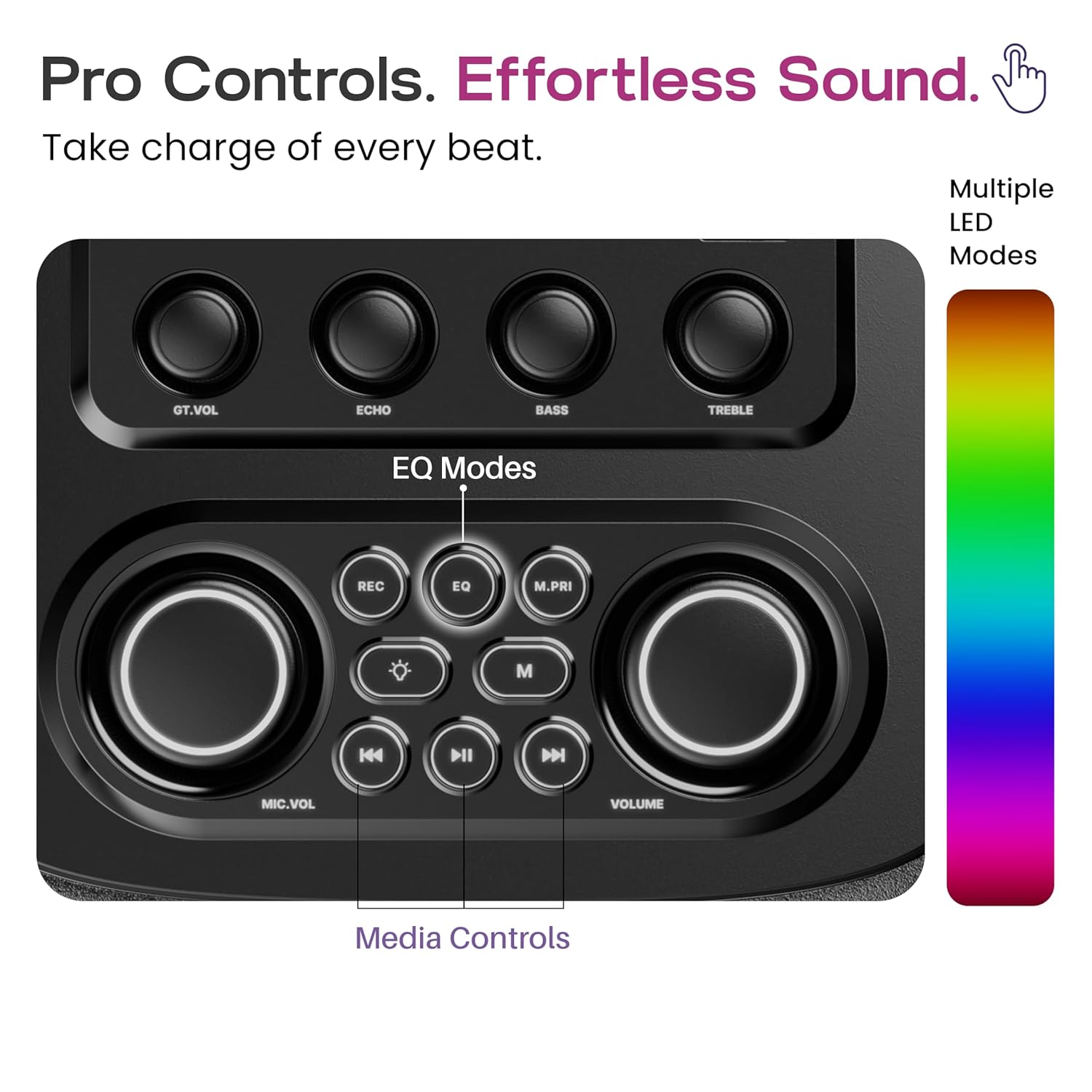
Figure 2: Pro Audio Control Panel Layout
- GT.VOL: Kontrol Volume Gitar
- ECHO: Microphone Echo Effect Control
- BASS: Bass Level adjustment
- TREBLE: Treble Level Adjustment
- REK: Record Function (if supported by connected device)
- EQ: Equalizer Mode Selection (Pop, Rock, Classic, Country, Standard)
- M.PRI: Fungsi Prioritas Mikropon
- MIC.VOL: Kontrol Volume Mikropon
- JILID: Kontrol Jilid Master
- Kadali Media: Play/Pause, Skip Forward/Backward
Disetél
- Ngabongkar bungkusan: Taliti miceun spiker sareng sadaya asesoris tina bungkusan.
- panempatan: Simpen speaker dina permukaan anu rata sareng stabil. Pastikeun ventilasi anu cekap di sakitar unit.
- Ngecas: Before first use, fully charge the speaker using the provided power cable. Connect the power cable to the DC power input port on the speaker and plug it into a standard wall outlet. The charging indicator will show the charging status.
- Daya Hurung: Press and hold the power button on the control panel to turn on the speaker.
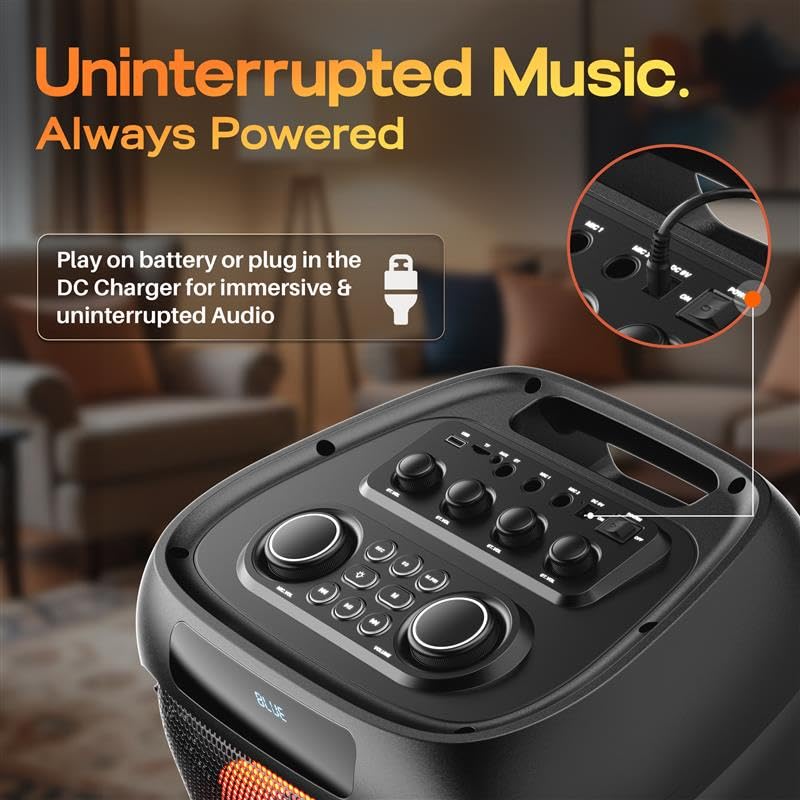
Figure 3: DC Power Input for Charging and Uninterrupted Playback
Parentah Operasi
Papasangan Bluetooth
- Turn on the GOBOULT Partybox X200. It will automatically enter Bluetooth pairing mode, indicated by a flashing LED.
- Dina alat sélulér anjeun (smartphone, tablet, laptop), aktipkeun Bluetooth sareng milarian alat anu sayogi.
- Select "GOBOULT Partybox X200" from the list of devices.
- Once paired, the speaker will emit a confirmation sound, and the LED indicator will stop flashing.
- Anjeun ayeuna bisa muterkeun audio tina alat Anjeun ngaliwatan speaker.
USB / TF Card Playback
- Insert a USB drive or TF (MicroSD) card into the respective port on the control panel.
- Spiker bakal otomatis ngadeteksi alat panyimpen sareng mimiti muterkeun audio files.
- Use the media control buttons (Play/Pause, Skip Forward/Backward) on the control panel or remote to manage playback.
Input AUX
- Sambungkeun hiji tungtung kabel audio 3.5mm (teu kaasup) kana port input AUX dina spiker.
- Sambungkeun tungtung kabel anu sanésna kana colokan kaluaran audio alat éksternal anjeun (contona, pamuter MP3, komputer).
- The speaker will switch to AUX mode. Adjust volume from both the speaker and your connected device.

Figure 4: Multiple Input Modes
Karaoke and Guitar Input
- Connect a microphone to the Mic Input port and/or a guitar to the Guitar Input port.
- Saluyukeun volume mikropon nganggo tombol MIC.VOL knob and guitar volume using the GT.VOL kenop.
- Ngagunakeun éta ECHO kenop pikeun nambahkeun éfék gema kana mikropon.
- Pencét éta M.PRI button to activate Microphone Priority, which lowers music volume when the microphone is in use.

Figure 5: Karaoke and Guitar Ready Inputs
Modeu EQ
The Partybox X200 offers five equalizer modes to optimize sound for different music genres:
- Pop
- Batu
- Klasik
- Nagara
- Standar
Pencét éta EQ button on the control panel or remote to cycle through these modes.

Gambar 6: Pilihan Modeu EQ
Dinamis RGB LED Lampu
The speaker features dynamic RGB LED lights that sync with the music. Use the dedicated light button on the control panel or remote to cycle through different light modes or turn them off.

Figure 7: Dynamic RGB LED Lights in Action
Ngecas sareng Batré
The GOBOULT Partybox X200 is equipped with a 9000 mAh battery for portable use. For extended listening sessions, you can plug the speaker directly into a DC power source. The speaker supports up to 7 hours of direct DC playback.

Figure 8: Battery Life and Direct DC Playback
To charge the speaker, connect the provided power cable to the DC input port and a power outlet. The battery indicator will show the charging status. Ensure the speaker is fully charged before its first portable use to maximize battery life.
Pangropéa
- beberesih: Anggo kaén anu garing sareng lemes pikeun ngabersihan bagian luar spéker. Ulah make cleaners abrasive atawa pangleyur.
- Panyimpenan: Simpen spéker dina tempat anu tiis sareng garing jauh tina sinar panonpoé langsung sareng suhu anu ekstrim.
- Tahan cai: Spiker ieu henteu tahan cai. Ulah kakeunaan cai atanapi kalembaban anu kaleuleuwihi.
- Perawatan batré: For optimal battery health, avoid fully discharging the battery frequently. Charge it regularly, even if not in use for extended periods.
Pamérésan masalah
| Masalah | Mungkin Cukang lantaranana | Solusi |
|---|---|---|
| Taya kakuatan | Batré béak; Kabel listrik teu nyambung kalawan bener. | Cas speaker; Pastikeun kabel daya disambungkeun pageuh. |
| Taya sora | Volume is too low; Incorrect input mode selected; Device not paired (Bluetooth). | Increase volume on speaker and source device; Select correct input mode (Bluetooth, AUX, USB/TF); Re-pair Bluetooth device. |
| Sambungan Bluetooth teu stabil | Device is too far from speaker; Interference from other devices. | Move device closer to speaker (within 10 meters); Avoid obstacles between devices; Turn off other Bluetooth devices. |
| Mikropon/Gitar teu tiasa dianggo | Cable not connected properly; Volume too low. | Ensure cables are fully inserted; Adjust MIC.VOL/GT.VOL knobs. |
spésifikasi
- Ngaran modél: Partybox X200
- Tipe Speaker: Speaker Speaker
- Daya kaluaran: 160 Watt
- Vérsi Bluetooth: 5.3
- Konektipitas: Bluetooth, USB, TF Card, AUX, Guitar Input, Mic Input
- Jenis Supir Audio: Supir dinamis
- Batré: 1 Nonstandard Battery (included), Lithium Ion, 9000 mAh (from description)
- Ukuran produk: 38D x 36W x 84H Sentimeter
- Beurat barang: 9.25 kg
- Métode kontrol: Touch (on panel), Remote
- Fitur husus: Bass Boost, Dynamic RGB LED Light, Portable (with wheels), Karaoke & Guitar Support, 5 EQ Sound Modes
- Komponén Kaasup: Power Cable, Quick Start Guide, Remote, Warranty Card
Émbaran jaminan
The GOBOULT Partybox X200 comes with a 1-taun jaminan produsén from the date of purchase. This warranty covers manufacturing defects and workmanship under normal use. Please retain your purchase receipt for warranty claims. The warranty does not cover damage caused by misuse, accidents, unauthorized modifications, or exposure to water.
For warranty service, please contact GOBOULT customer support with your product details and proof of purchase.
Ngarojong
For further assistance, technical support, or inquiries regarding your GOBOULT Partybox X200, please visit the official GOBOULT website or contact our customer service team. Contact details can typically be found on the warranty card or the GOBOULT brand store page.
Dukungan Online: Visit the GOBOULT Store on Amazon


