1. Bubuka
This manual provides essential information for the installation, operation, and maintenance of your Haozee HZ-WV-02 WiFi Smart Water Valve. This device is designed to monitor water flow, temperature, and pressure, and offers automatic shut-off capabilities to prevent water damage. Please read these instructions carefully before use to ensure proper functionality and safety.
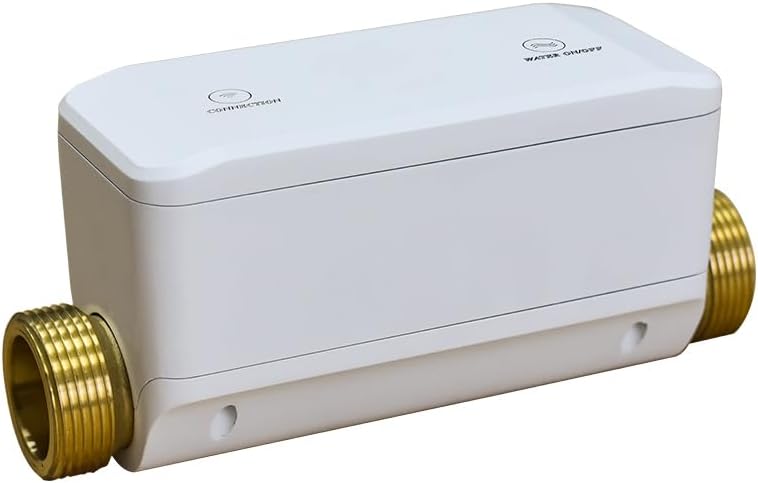
Image 1: Haozee HZ-WV-02 WiFi Smart Water Valve. This image displays the compact, white smart water valve with brass pipe connections on either side, featuring 'CONNECTION' and 'WATER ON/OFF' indicators on its top surface.
2. Fitur Produk
- Konektipitas Wi-Fi: Connects to 2.4 GHz and 5 GHz Wi-Fi networks for remote control via the app without a separate gateway.
- Aplikasi Remote Control: Allows users to open/close the water valve and monitor water flow and consumption in real-time from a mobile device.
- Three-in-One Detection: Utilizes W-type ultrasonic flow measurement technology for precise flow rate detection. Also integrates water temperature and water pressure measurement.
- Méter Cai Pinter: Tracks daily, monthly, and current water usage statistics to promote efficient water consumption.
- One-Click Leak Detection: Integrated water pressure sensor detects minor leaks, burst pipes, or forgotten open taps, with instant app notifications.
- Automated Scenes: Compatible with Tuya WiFi water leak detectors (sold separately) to create automated scenes, such as automatic valve closure upon leak detection.
3. Eusi Paket
Pastikeun yén sadaya item aya dina bungkusan:
- Haozee WiFi Smart Water Valve (Model: HZ-WV-02)
- EU Adapter (Power Supply)
- DN20 (3/4 inch) Adapters (2 pieces)
- Pita Pipa
- Kabel Daya
- Manual pamaké
- Cincin Silikon Tahan Cai

Image 2: Haozee Smart Water Valve and Included Components. This image displays all components included in the product package, laid out on a light blue background. These include the smart water valve, power adapter, power cable, DN20 (3/4 inch) adapters, plumbing tape, silicone waterproof rings, and the user manual.
4. Setélan
4.1 Instalasi fisik
Professional installation is recommended for plumbing work. Ensure the main water supply is turned off before beginning installation.
- Identify the appropriate location for the valve on your DN20 (3/4 inch) water pipe.
- Turn off the main water supply to your property.
- Cut the pipe at the chosen location and install the Haozee Smart Water Valve, ensuring the flow direction arrow on the valve matches your water flow.
- Use the provided DN20 (3/4 inch) adapters and plumbing tape to ensure a watertight seal.
- Connect the power cable to the valve and plug the EU adapter into a power outlet.
- Slowly turn the main water supply back on and check for any leaks.

Image 3: Power Supply Connection for Haozee Smart Water Valve. This image illustrates the smart water valve connected to a copper water pipe, with its 5V-2A AC/DC power adapter plugged into a wall outlet, highlighting the power supply setup.
4.2 Ngundeur Aplikasi sareng Ngajodokeun Alat
The Haozee Smart Water Valve operates with the Tuya Smart Life app.
- Download the "Smart Life" app from your mobile device's app store (iOS or Android).
- Ngadaptar atanapi log in kana akun Smart Life anjeun.
- Ensure your mobile device is connected to a 2.4GHz or 5GHz Wi-Fi network. The valve supports dual-band networks.
- Buka aplikasina, ketok ikon "+" pikeun nambahkeun alat.
- Select the appropriate device type (e.g., "Valve Controller" or search for "Water Valve").
- On the valve, press and hold the "CONNECTION" button until the indicator light starts blinking, indicating pairing mode.
- Turutan pitunjuk dina layar dina aplikasi pikeun ngarengsekeun prosés papasangan.

Image 4: Haozee Smart Water Valve Supporting 2.4G & 5G Network Connection. This image shows the smart water valve with visual representations of 2.4G and 5G Wi-Fi signals, indicating its compatibility with dual-band networks, alongside a smartphone displaying the Smart Life app interface for device connection.
Video 1: Product Usage Video. This video demonstrates the process of adding the Haozee Smart Water Valve to the Smart Life app via Wi-Fi mode, showing how to put the device into pairing state and confirm connection. It also illustrates the one-key on/off control of the water valve through the app and the water leakage self-inspection feature. Finally, it shows how to link the valve with a Wi-Fi water sensor and siren to create smart scenes for automatic shut-off and alarm activation upon leak detection.
5. Parentah Operasi
5.1 Jauh Control via App
Once connected, you can control and monitor your water valve from anywhere using the Smart Life app:
- Kontrol Hurung/Pareuman: Tap the "WATER ON/OFF" icon in the app to remotely open or close the water valve.
- Pangimeutan sacara real-time: The app displays current water temperature, pressure, and flow rate.
- Konsumsi cai: View daily, monthly, and total water usage statistics.

Image 5: APP Remote Control for Haozee Smart Water Valve. This image shows the smart water valve on a wooden table next to a smartphone displaying the Smart Life app interface, which allows for one-key on/off control of the water valve and real-time monitoring of water parameters.
5.2 Water Leakage Detection and Automatic Shut-Off
The valve continuously monitors for anomalies:
- Deteksi bocor: The integrated pressure sensor can detect even small leaks or burst pipes.
- Panggeuing: Upon detection of a leak, the app will send an immediate notification to your smartphone.
- Automated Shut-off: If configured with a compatible water leak detector (e.g., Tuya WiFi water leak detector), the valve can automatically shut off the water supply to prevent further damage.

Image 6: Haozee Smart Water Valve Leak Detection Feature. This image is split into two scenes: one showing a running faucet in a sink, and the other depicting a burst water pipe with a smartphone displaying a water leakage alert in the Smart Life app, illustrating the valve's ability to detect and notify users of water leaks.
5.3 Hubungan Pamandangan Pinter
Enhieve your smart home by creating custom scenes:
- Use the Smart Life app to set up automation rules. For example, if a water leak sensor detects water, the valve can automatically close, and a smart siren can activate.
- Explore various scenarios for integration with other smart home devices.

Image 7: Haozee Smart Water Valve Automated Scene Integration. This image shows the smart water valve alongside various household settings (bathroom, kitchen, basement, ceiling) where water sensors are placed, demonstrating how the valve can automatically shut off water based on automation scenes linked with these sensors to prevent water damage.
6. Pangropéa
To ensure optimal performance and longevity of your Haozee Smart Water Valve:
- Inspeksi rutin: Periodically check the valve and pipe connections for any signs of leaks or corrosion.
- Apdet parangkat lunak: Keep the Smart Life app updated to the latest version to benefit from new features and security enhancements.
- Sasayogian tanaga: Pastikeun adaptor kakuatan disambungkeun aman tur catu daya stabil.
- beberesih: Gently wipe the exterior of the valve with a soft, dry cloth. Do not use abrasive cleaners or solvents.
7. Cara ngungkulan
- Q: The valve is not connecting to Wi-Fi.
- A: Ensure your Wi-Fi network is 2.4GHz or 5GHz. Check that the valve is within range of your router. Try resetting the valve by pressing and holding the "CONNECTION" button until the indicator light blinks, then re-attempt pairing through the Smart Life app.
- Q: Water flow or pressure readings seem inaccurate.
- A: Verify that the valve is installed correctly with the flow direction arrow aligned with your water pipe's flow. Ensure there are no obstructions in the pipe or valve. If issues persist, contact customer support.
- Q: The automatic shut-off feature is not working.
- A: Confirm that the valve is properly paired with the Smart Life app and that any linked water leak detectors are functioning correctly. Check the automation scenes configured in the app to ensure they are set up to trigger the valve shut-off upon leak detection.
- Q: No notifications are received for leaks.
- A: Check your smartphone's notification settings for the Smart Life app to ensure they are enabled. Verify that the valve is connected to Wi-Fi and has an active internet connection.
8. Spésifikasi
| Fitur | Spésifikasi |
|---|---|
| merek | Haozee |
| Nomer modél | HZ-WV-02 |
| Item Beurat | 4.41 pon |
| Dimensi produk | 4.33 x 3.15 x 7.86 inci |
| Kasaluyuan Pipa | DN20 (3/4 inci) |
| Sumber Daya | Corded Electric (5V-2A AC/DC Adapter) |
| Rojongan Wi-Fi | 2.4GHz & 5GHz |
| UPC | 640712054078 |
9. Garansi jeung Rojongan
For warranty information, technical support, or service inquiries, please contact Haozee customer service directly. Refer to the contact details provided with your product packaging or visit the official Haozee websitus.


