1. Bubuka
The Amazfit Active Max Smart Watch is designed to assist with fitness tracking, health monitoring, and smart notifications. This manual provides essential information for setting up, operating, and maintaining your device.
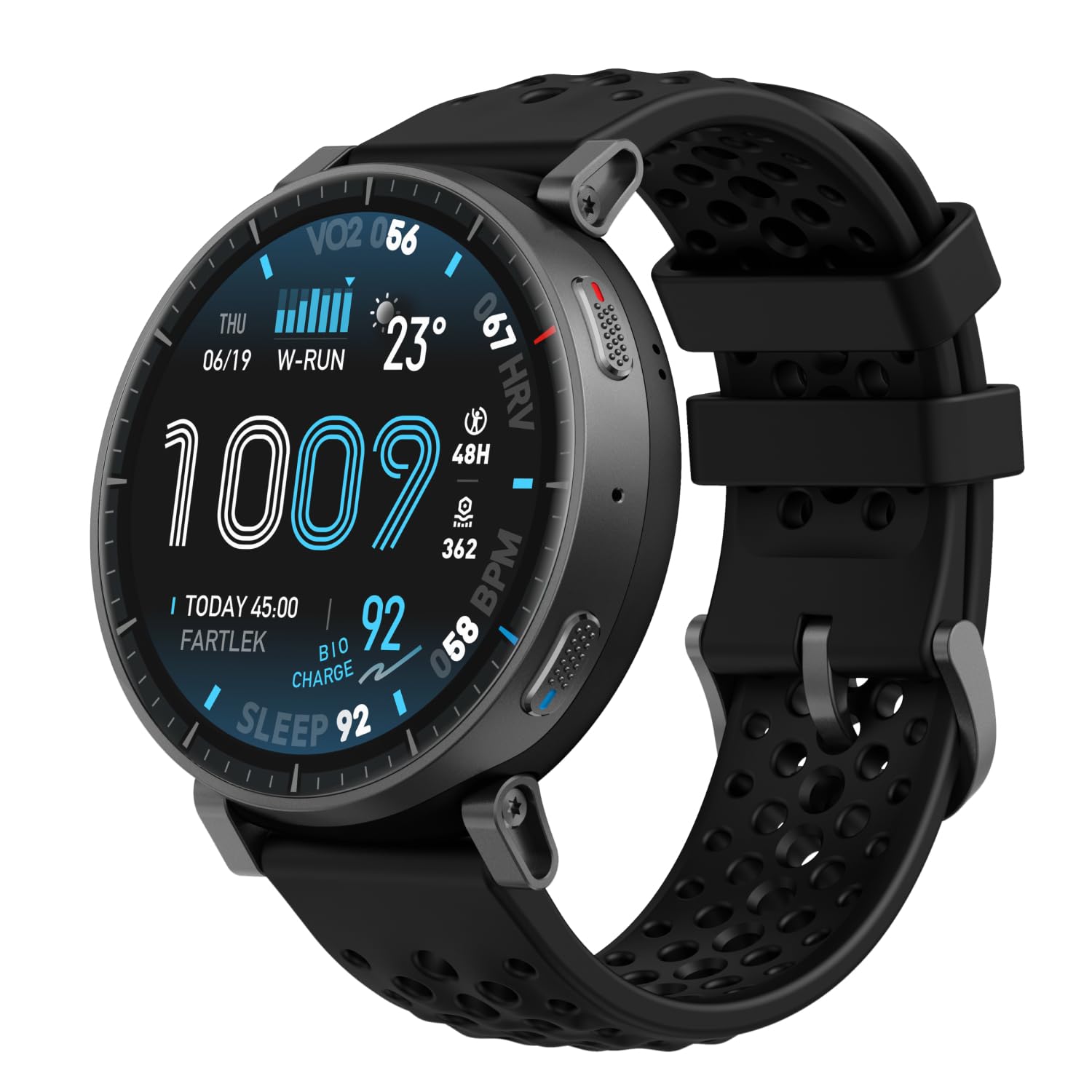
Image: Amazfit Active Max Smart Watch with its vibrant AMOLED display showing various data points.
2. Setup Guide
2.1 Naon dina Box
- Amazfit Active Max Smart Watch
- Dasar Pangecas Magnét (kabel USB Tipe-C teu kaasup)
- Manual pamaké
2.2 Ngecas Alat
Before first use, fully charge your Amazfit Active Max. Connect the magnetic charging base to a USB power source (e.g., a computer USB port or a USB wall adapter). Place the watch onto the charging base, ensuring the magnetic pins align correctly. The watch display will indicate charging status.

Image: The Amazfit Active Max Smart Watch connected to its magnetic charging base, indicating a full charge.
2.3 Masangkeun sareng Smartphone Anjeun
- Unduh Aplikasi Zepp ti toko aplikasi smartphone anjeun (sadia pikeun Android sareng iPhone).
- Buka Aplikasi Zepp sareng jieun akun atanapi log in.
- Follow the on-screen instructions in the app to pair your Amazfit Active Max. This typically involves scanning a QR code displayed on the watch or selecting the device from a list.
- Pastikeun Bluetooth diaktipkeun dina smartphone Anjeun salami prosés papasangan.

Image: A smartphone screen showing the Zepp App interface, which is used to manage the Amazfit Active Max.
3. Ngoperasikeun Watch
3.1 Pintonan sareng Napigasi
The Amazfit Active Max features a 1.5-inch ultra-bright AMOLED display with up to 3,000 nits peak brightness for clear visibility in various lighting conditions. Navigate the watch interface using touch gestures (swipe, tap) and the physical buttons on the side.

Gambar: A lengkep view of the Amazfit Active Max's vivid AMOLED display, showcasing various health and activity metrics.
3.2 Ngaropea Watch Faces
You can change the watch face directly on the device or through the Zepp App. The app offers a wider selection of watch faces, including free and paid options, to personalize your watch's appearance.
4. Kaséhatan jeung Kabugaran Tracking
4.1 Modeu Latihan sareng GPS
The watch supports over 170 workout modes. It features built-in GPS with five satellite systems for accurate outdoor activity tracking. You can download terrain and ski maps directly to the watch for offline navigation, eliminating the need for a phone signal.

Image: A person engaged in outdoor running, demonstrating the watch's use during physical activity and highlighting its workout modes.
4.2 Pangimeutan Kaséhatan
The Amazfit Active Max provides 24/7 monitoring of key health metrics:
- Laju Jantung: Ngalacak denyut jantung anu terus-terusan.
- Oksigén getih (SpO2): On-demand and continuous blood oxygen level measurement.
- Nyukcruk saré: Monitor saré stages, duration, and quality.
- Tingkat Stress: Tracks stress and provides breathing exercises.
- BioCharge Energy Monitoring: Assesses your body's recovery and energy levels based on activity and stress.

Image: A person running while wearing the Amazfit Active Max, with the watch display showing a real-time heart rate graph.
4.3 Zepp Coach and Training Plans
Utilize Zepp Coach for personalized AI-driven workout plans that adapt to your performance and recovery. Choose from various training programs, including specific running plans for 3K, 5K, 10K, half, and full marathons.

Image: An individual running, symbolizing the use of Zepp Coach for guided training and performance improvement.
4.4 Onboard Storage for Music and Maps
The watch includes 4GB of onboard storage, allowing you to store music and downloaded maps directly on the device. This enables phone-free workouts with music playback and offline navigation.

Image: A person using the Amazfit Active Max to view maps and listen to music via connected earbuds, highlighting the onboard storage feature.
5. Fitur pinter
5.1 Bluetooth Calls and Message Replies
When connected to your smartphone, the Amazfit Active Max allows you to take Bluetooth calls directly from your wrist. For Android users, Zepp Flow enables hands-free message replies using a QWERTY keyboard or speech-to-text.

Image: The Amazfit Active Max displaying a message notification and options for replying, demonstrating its communication features.
5.2 Bluetooth Peripheral Connectivity
The watch can connect to various Bluetooth peripherals, including heart rate belts, cadence meters, power meters, and speedometers, to enhance your workout data collection.

Image: An individual cycling indoors, with the Amazfit Active Max on their wrist, illustrating its capability to connect with external Bluetooth sensors.
6. Pangropéa
6.1 Tahan cai
The Amazfit Active Max is 5 ATM water-resistant, meaning it can withstand pressures equivalent to a depth of 50 meters. It is suitable for swimming and showering but not for high-speed water sports or diving.
6.2 Beberesih sareng Perawatan
- Rutin ngabersihkeun arloji sareng tali kalayan lemes, damp lawon.
- Hindarkeun ngagunakeun bahan kimia anu kasar atanapi bahan abrasive.
- Pastikeun yén kontak ngecas dina tonggong arloji beresih sareng garing sateuacan dicas.
6.3 Kahirupan batré
The watch offers extended battery life:
- Pamakéan Biasa: Nepi ka 25 dinten
- Pamakéan beurat: Nepi ka 13 dinten
- Continuous GPS Usage: Nepi ka 64 jam
Umur batré anu saleresna tiasa bénten-bénten dumasar kana pola panggunaan sareng setélan.
7. Cara ngungkulan
7.1 Isu umum jeung Solusi
- Lalajo teu hurung: Pastikeun arloji dicas pinuh.
- Teu tiasa dipasangkeun sareng telepon: Check if Bluetooth is enabled on your phone and the watch is in pairing mode. Restart both devices and try again.
- Data teu akurat: Ensure the watch is worn snugly on your wrist. For GPS, ensure a clear view ti langit.
- Bewara teu muncul: Check notification settings in the Zepp App and your phone's system settings.
Kanggo bantosan salajengna, tingali bagian pitulung Aplikasi Zepp atanapi hubungi dukungan palanggan Amazfit.
8. Spésifikasi
| Fitur | Rincian |
|---|---|
| Nomer modél | A2557 |
| tampilan | 1.5" AMOLED |
| Panyimpenan | 4GB |
| Tahan cai | 5 ATM |
| Kahirupan Batré (Typical) | Nepi ka 25 dinten |
| GPS | 5 Satellite Systems |
| Item Beurat | 1.97 ons |
| Produsén | Amazfit |
9. Garansi jeung Rojongan
Kanggo inpormasi garansi sareng dukungan palanggan, mangga tingal Amazfit resmi website or contact your local Amazfit service center. Keep your purchase receipt for warranty claims.