Bubuka
This manual provides detailed instructions for the use and maintenance of your GOBOULT Raven True Wireless Stereo (TWS) Earbuds. Please read this manual thoroughly before using the product to ensure proper operation and to maximize your listening experience.

Gambar: Leuwihview of GOBOULT Raven TWS Earbuds showcasing main features like 70 hours playtime, app support, dual device pairing, 10mm drivers, quad mic environmental noise cancellation, and available color options.
Naon dina Box
Your GOBOULT Raven TWS Earbuds package includes the following items:
- GOBOULT Raven TWS Earbuds (Left and Right)
- Ngecas Case
- Kabel Ngecas USB
- Sababaraha Ukuran Eartip
- Manual pangguna (dokumén ieu)
- Kartu Garansi
Produk Leuwihview
The GOBOULT Raven TWS Earbuds are designed for comfort and high-quality audio. Familiarize yourself with the components:
- Earbuds: Left (L) and Right (R) earbuds with touch control areas and microphones.
- Kasus ngecas: Stores and charges the earbuds. Features a USB Type-C charging port.
- Indikator LED: On both earbuds and the charging case, indicating battery status, charging, and pairing mode.
- Mikropon: Quad microphones for Environmental Noise Cancellation (ENC) during calls.

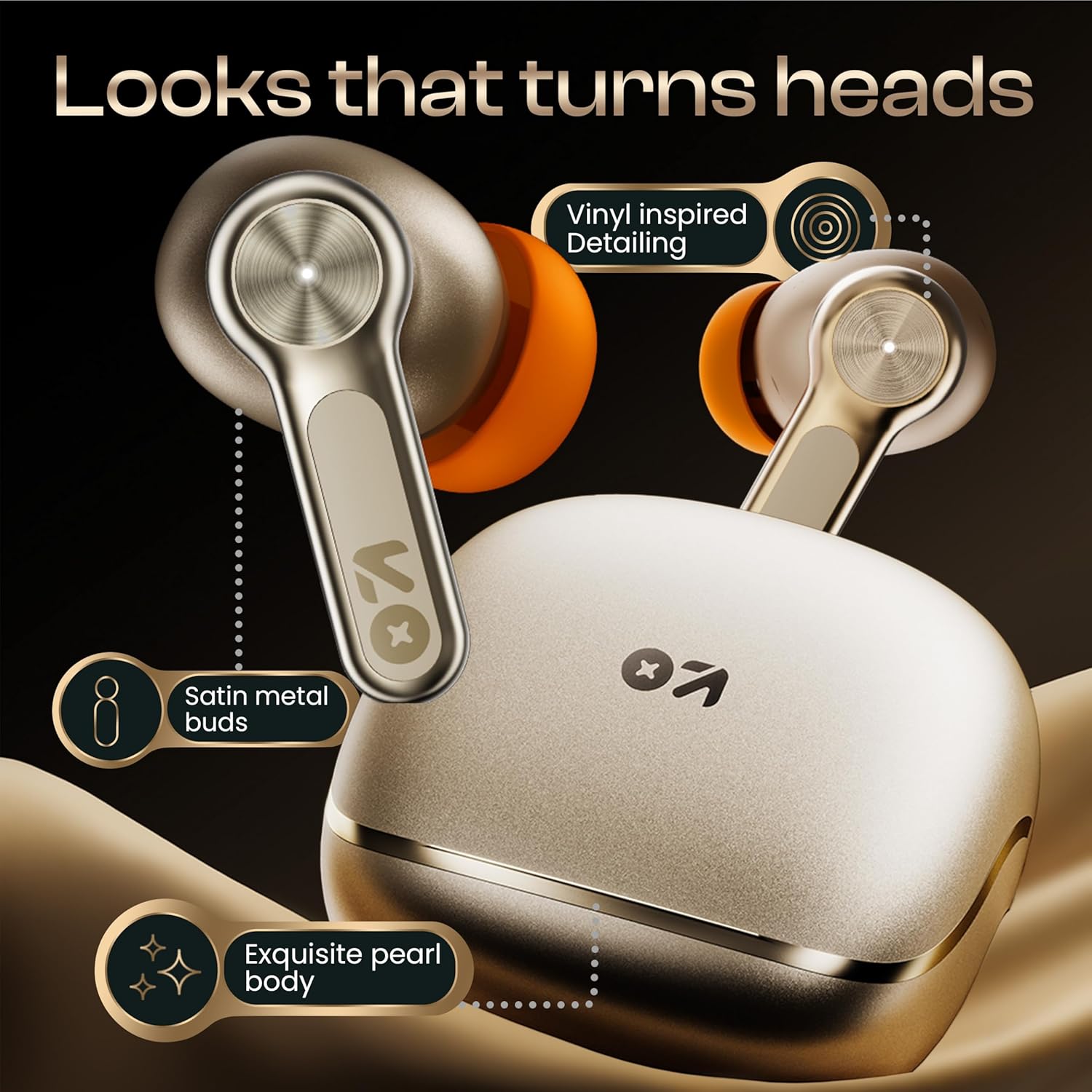
Gambar: Detil view of the GOBOULT Raven earbuds and their charging case, showcasing the satin metal finish and exquisite pearl body design.
Disetél
1. Ngecas Awal
Saméméh dipaké munggaran, eusian pinuh ku earbuds jeung wadah ngecas.
- Tempatkeun duanana earbuds kana kotak ngeusian.
- Sambungkeun kabel ngecas USB Type-C ka port ngecas dina casing sareng ka sumber listrik.
- Indikator LED dina wadahna bakal némbongkeun status ngecas. Sakali dicas pinuh, indikator bakal robah atanapi pareum.
A 10-minute charge provides approximately 120 minutes of playtime.

Image: The GOBOULT Raven earbuds being charged in their case, highlighting the impressive 70-hour total battery life and the quick charge capability (10 mins charge for 120 mins playtime).
2. Nyapasangkeun sareng Alat
The earbuds use Bluetooth 5.4 for stable and quick connections.
- Open the charging case. The earbuds will automatically enter pairing mode (LED indicators will flash).
- Dina alat anjeun (smartphone, tablet, laptop), aktipkeun Bluetooth.
- Milarian pikeun "GOBOULT Raven" in the list of available Bluetooth devices and select it to connect.
- Saatos disambungkeun, indikator LED dina earbud bakal eureun kedip-kedip.
The earbuds feature Blink&Pair™ technology for instant pairing after the initial setup.

Image: The GOBOULT Raven earbuds and case, emphasizing the upgraded Bluetooth v5.4 for instant pairing and reliable connection, along with support for SBC and AAC audio codecs.
3. GOBOULT App Installation
For enhanced customization and control, download the GOBOULT App from your device's app store.
- Milarian pikeun "GOBOULT" in the App Store (iOS) or Google Play Store (Android).
- Install the app and follow the on-screen instructions to connect your Raven earbuds.
- The app allows you to customize sound profiles (EQ modes), control features, and manage touch controls.

Image: A smartphone screen displaying the GOBOULT Amp APP, illustrating features like equalizer customization, custom touch controls, gaming mode activation, and widget support for a personalized audio experience.
Parentah Operasi
Toél Kontrol
The GOBOULT Raven earbuds feature intuitive touch controls on each earbud. The specific functions can often be customized via the GOBOULT App.
| Aksi | Fungsi |
|---|---|
| Ketok Tunggal (L/R) | Puter / Reureuh Musik, Jawab / Tungtung Telepon |
| Ketok dua kali (L) | Lagu saméméhna |
| Ketok dua kali (R) | Lagu salajengna |
| Ketuk Tilu (L/R) | Aktipkeun Asisten Sora |
| Pencét Panjang (K/K) | Reject Call, Toggle Gaming Mode (customizable) |
Note: These are typical touch control functions. Refer to the GOBOULT App for exact and customizable controls.
Gambar: A lengkep view of the GOBOULT Raven earbud's touch-sensitive surface, indicating areas for music playback control and call management.
Pamasangan Alat Ganda
The earbuds can connect to two devices simultaneously, allowing seamless switching between them.
- Pair the earbuds with your first device (e.g., smartphone) as described in the "Pairing with a Device" section.
- Disconnect Bluetooth on the first device or put the earbuds back in the case and close it, then open it again to re-enter pairing mode.
- Pair the earbuds with your second device (e.g., laptop).
- Reconnect the earbuds to the first device via its Bluetooth settings. The earbuds should now be connected to both.
Audio bakal otomatis pindah ka alat anu muterkeun eusi atanapi nampi telepon.

Image: The GOBOULT Raven earbuds and their case positioned between a smartphone and a laptop, demonstrating the dual device pairing feature for seamless switching between audio sources.
Gaming Mode (Ultra-Low Latency)
Activate Gaming Mode for a 50ms ultra-low latency experience, ideal for gaming and video playback.
- Gaming Mode can typically be activated via a specific touch control gesture (refer to your GOBOULT App settings or the table above).
- You can also enable/disable Gaming Mode through the GOBOULT App.

Image: The GOBOULT Raven earbuds and their charging case next to a gaming controller, emphasizing the Combat™ Gaming Mode with 50ms ultra-low latency for an optimized gaming experience.
Asisten sora
Access your device's voice assistant (Google Assistant, Siri) directly from the earbuds.
- Perform the designated touch control gesture (e.g., triple tap) to activate the voice assistant.
- Speak your command after the prompt.

Image: A composite image illustrating the Smart AI Voice Assistance feature, showing integration with "Ok Google" and "Hey Siri", alongside the IPX5 water-resistant rating of the earbuds.
Pangropéa
beberesih
- Rutin ngabersihkeun earbuds sareng wadah ngecas ku lawon anu lemes, garing, teu aya lint.
- Cabut ujung ceuli teras bersihan kotoran ceuli atanapi kokotor tina liang ceuli nganggo sikat alit atanapi kapas.
- Pastikeun ngecas kontak dina duanana earbuds jeung wadahna beresih jeung garing.
Tahan cai (IPX5)
The GOBOULT Raven earbuds are IPX5 water-resistant, meaning they can withstand sweat and light rain. They are not designed for submersion in water.
- Do not expose the earbuds to running water or submerge them.
- If they get wet, wipe them dry thoroughly before placing them back in the charging case.
Panyimpenan
Simpen earbuds dina wadah ngecas nalika henteu dianggo pikeun ngajagi sareng tetep dicas.
- Hindarkeun nyimpen dina suhu ekstrim atanapi kalembaban anu luhur.
Pamérésan masalah
| Masalah | Solusi anu mungkin |
|---|---|
| Earbuds teu dipasangkeun |
|
| Ngan hiji earbud jalan |
|
| Kualitas sora goréng |
|
| Masalah ngecas |
|
spésifikasi
| Fitur | Rincian |
|---|---|
| Ngaran modél | Raven (Airbass Earbuds) |
| Konektipitas | Bluetooth v5.4 |
| Range nirkabel | Nepi ka 10 méter |
| Supir Audio | 10mm Supir dinamis |
| Waktu maén | Dugi ka 70 jam (kalayan ngeusi batre) |
| Waktu Ngecas | Kira-kira 20 menit (kanggo ngecas gancang) |
| Latén Audio | 50ms (Gaming Mode) / 45ms (as per spec) |
| Mikropon | Quad Mic sareng Pembatalan Noise Lingkungan (ENC) |
| Tahan cai | IPX5 |
| Métode kontrol | Toél, Sora |
| Fitur husus | Dual Device Pairing, GOBOULT App Support, Smart AI Voice Assistance |
| Réspon Frékuénsi | 20 Hz (wates handap) |
| Sensitipitas | 115 dB |
| Panganteur Hardware | USB Tipe C |
| Dimensi produk | 5 x 4.5 x 5.4 cm |
| Item Beurat | 600 g (package weight) |
Catetan: Spésifikasi tiasa robih tanpa aya bewara sateuacana.
Garansi sareng Rojongan
Émbaran jaminan
Your GOBOULT Raven TWS Earbuds come with a 1-Taun Garansi Produsén from the date of purchase. This warranty covers manufacturing defects and ensures trusted performance and premium build quality.
- Please retain your purchase receipt and the warranty card for warranty claims.
- Garansi ieu henteu ngawengku karusakan anu disababkeun ku salah panggunaan, kacilakaan, modifikasi anu henteu sah, atanapi panggunaan normal.
Rojongan Palanggan
For any queries, technical assistance, or warranty claims, please contact GOBOULT customer support. Refer to the contact information provided on your warranty card or visit the official GOBOULT websitus pikeun detil rojongan.
Pabrikan: GOBOULT, B-67 Wazirpur Industrial Area, New Delhi 110052, India


