1. Bubuka
Thank you for choosing the GOBOULT Z40 V2.0 True Wireless Earbuds. These earbuds are designed to provide a high-quality audio experience with features such as extended playtime, clear call quality, and low-latency gaming. This manual provides instructions for setup, operation, maintenance, and troubleshooting to ensure optimal use of your device.

Image 1.1: GOBOULT Z40 V2.0 True Wireless Earbuds and Charging Case.
2. Produk Langkungview
2.1 Komponén Kaasup
pakét ngawengku item handap:
- GOBOULT Z40 V2.0 Earbuds
- Ngecas Case
- Kabel Ngecas USB
- Eartips (rupa-rupa ukuran)
- Manual pamaké
- Kartu Garansi
2.2 Fitur konci
- Nepi ka 70 jam total playtime
- Quad Mic Environmental Noise Cancellation (ENC) for clear calls
- 13mm Bass Drivers for enhanced audio
- 45ms Low Latency Gaming Mode
- Bluetooth v5.4 for stable connectivity
- IPX5 Tahan Cai
- Smart Touch Controls with Voice Assistant support
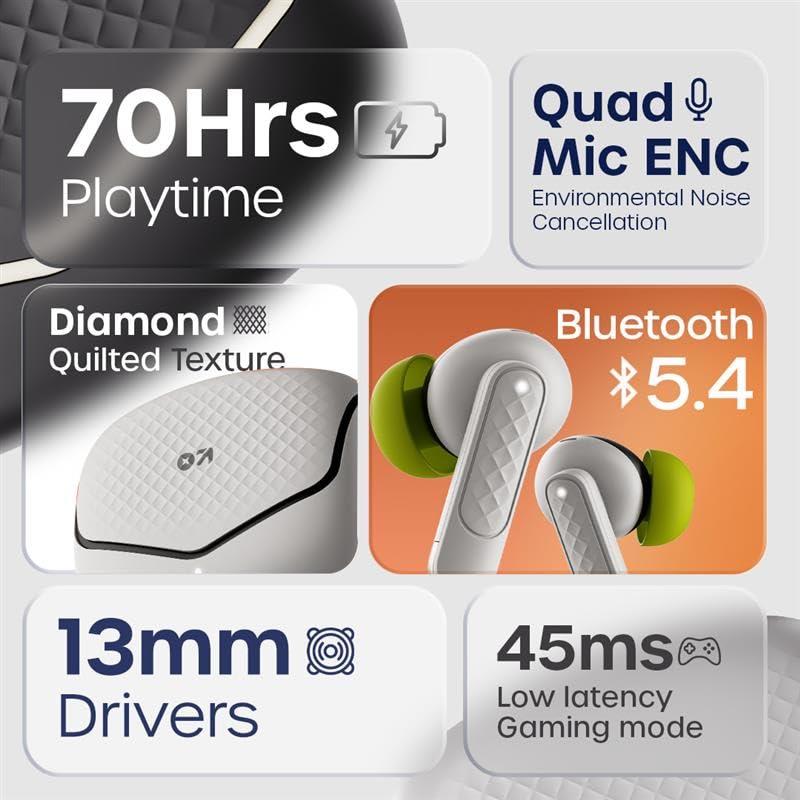
Gambar 2.1: Leuwihview of GOBOULT Z40 V2.0 key features.
3. Parentah Setup
3.1 Ngecas Earbuds sareng Case
Saméméh dipaké munggaran, eusian pinuh ku earbuds jeung wadah ngecas.
- Teundeun earbuds kana wadah ngecas.
- Sambungkeun kabel ngecas USB ka port ngecas dina case jeung ka sumber kakuatan.
- Lampu indikator dina kasus bakal nunjukkeun status ngecas.
- A 10-minute charge provides approximately 120 minutes of playtime. The case offers up to 70 hours of total battery life for the earbuds.

Image 3.1: Charging and battery life details.
3.2 Nyapasangkeun Bluetooth
The GOBOULT Z40 V2.0 earbuds utilize Bluetooth v5.4 for quick and reliable pairing.
- Open the charging case. The earbuds will automatically enter pairing mode (Blink&Pair™ Tech).
- Dina alat anjeun (smartphone, tablet, laptop), aktipkeun Bluetooth.
- Milarian pikeun available Bluetooth devices and select "GOBOULT Z40 V2.0" from the list.
- Sakali disambungkeun, earbuds bakal nunjukkeun pasangan suksés.
- Headphone bakal otomatis nyambung deui ka alat anu terakhir dipasangkeun nalika dicabut tina casingna.

Image 3.2: Bluetooth 5.4 and Blink&Pair™ technology.
4. Parentah Operasi
4.1 Kontrol Toél
The earbuds feature intuitive touch controls for managing various functions:
- Puter / Reureuh: Ketok tunggal dina boh earbud.
- Lagu salajengna: Ketok dua kali dina earbud katuhu.
- Lagu Sateuacanna: Ketok dua kali dina earbud kénca.
- Ngajawab / mungkas Telepon: Ketok tunggal dina boh earbud.
- Nolak Telepon: Pencét jeung tahan boh earbud salila 2 detik.
- Aktipkeun Asisten Sora: Ketok tilu kali dina boh earbud.
- Togél Modeu Kaulinan: Press and hold the right earbud for 2 seconds (specific gesture may vary, refer to quick start guide).

Image 4.1: Hands-free control and voice assistant activation.
4.2 Nelepon jeung Narima Telepon
The Quad Mic ENC system ensures clear voice transmission during calls by reducing environmental noise.
- Pastikeun earbud disambungkeun kana alat anjeun.
- Anggo kontrol toél pikeun ngajawab, mungkas, atanapi nolak telepon.

Image 4.2: Quad Mic ENC for clear calls.
4.3 Modeu kaulinan
Activate Combat™ Gaming Mode for a low-latency audio experience, ideal for gaming and video playback.
- Refer to the touch control section for activating Gaming Mode (typically a press and hold gesture).
- This mode reduces audio latency to 45ms, providing synchronized sound with on-screen action.

Image 4.3: Low Latency Gaming Mode.
5. Pangropéa
5.1 beberesih
Pembersihan rutin ngabantosan ngajaga kinerja sareng umur panjang earbuds anjeun.
- Anggo lawon anu lembut, garing, henteu lint pikeun ngusap earbuds sareng wadah ngecas.
- Gently remove any earwax or debris from the eartips and speaker mesh using a small brush or cotton swab.
- Ulah make bahan abrasive, alkohol, atawa cleaners kimiawi.
5.2 Tahan Cai (IPX5)
The earbuds are rated IPX5 water-resistant, meaning they can withstand sweat and light splashes.
- Ulah beuleum earbuds dina cai.
- Avoid exposing them to heavy rain or strong water jets.
- Pastikeun yén earbuds garing sateuacan nempatkeun deui kana wadah ngecas pikeun nyegah karusakan.
Image 5.1: IPX5 Water Resistance.
6. Cara ngungkulan
If you encounter any issues with your GOBOULT Z40 V2.0 earbuds, please refer to the following common solutions:
- Henteu aya sora: Ensure the earbuds are charged and properly paired with your device. Check the volume level on both the earbuds and your device.
- Masalah pasangan: Pastikeun Bluetooth diaktipkeun dina alat anjeun sareng earbud aya dina modeu papasangan. Cobi pegatkeun pasangan sareng pasangkeun deui earbud.
- Sambungan Intermittent: Pastikeun anjeun aya dina jarak Bluetooth 10 méter. Hindarkeun halangan antara earbud sareng alat anjeun.
- Masalah ngecas: Verify the charging cable is securely connected and the power source is active. Clean the charging contacts on both the earbuds and the case.
- Mikropon Teu Gawé: Ensure the earbuds are properly seated in your ears. Check if any debris is blocking the microphone ports.
If the problem persists, please contact GOBOULT customer support for further assistance.
7. Spésifikasi
Detailed technical specifications for the GOBOULT Z40 V2.0 True Wireless Earbuds:
| Fitur | Spésifikasi |
|---|---|
| Ngaran modél | Z40 V2.0 (Airbass Earbuds) |
| Téhnologi konektipitas | Nirkabel (Bluetooth) |
| Vérsi Bluetooth | 5.4 |
| Rentang Bluetooth | 10 Méter |
| Ukuran Supir Audio | 13 Milimeter |
| Tipe Supir Audio | Supir dinamis |
| Réspon Frékuénsi | 20 Hz |
| Sensitipitas | 115 dB |
| Kahirupan Batré (Earbuds) | Nepi ka 70 Jam (kalayan wadah ngecas) |
| Waktu Ngecas | 10 Minutes for 120 minutes playtime |
| Mikropon | Quad Mic with ENC |
| Latén Audio | 45 Milidetik (Modeu Kaulinan) |
| Tahan cai | IPX5 |
| Tipe Controller | Toél |
| Panganteur Hardware | USB Tipe C |
| Panempatan Ceuli | Dina Ceuli |
| Dimensi produk | 5.8 x 4 x 4.9 cm |
| Item Beurat | 600 g (beurat total bungkus) |

Image 7.1: 13mm Bass Drivers for enhanced audio.
8. Garansi jeung Rojongan
8.1 Garansi Produsén
The GOBOULT Z40 V2.0 True Wireless Earbuds come with a 1-year manufacturer’s warranty. This warranty covers manufacturing defects and ensures product quality and durability.
8.2 Rojongan Palanggan
For any product-related queries, technical assistance, or warranty claims, please contact GOBOULT customer support. Refer to the warranty card included in your package for contact details or visit the official GOBOULT websitus.


