1. Produk Langkungview
The BN-LINK WiFi Smart Plug (Model CP-J31WT) allows you to control your home appliances remotely, set schedules, and use voice commands for a smarter, more convenient lifestyle. This compact plug is designed for ease of use and integrates seamlessly with popular smart home platforms.

Image: BN-LINK WiFi Smart Plug overview with icons for WiFi, timer, app control, voice control, remote operation, and group control.
Fitur konci:
- Kadali jauh: Turn appliances ON/OFF from anywhere using your smartphone.
- Kontrol sora: Cocog sareng Alexa sareng Google Home pikeun operasi handsfree.
- Fungsi Timer: Schedule appliances to turn ON/OFF automatically, saving energy and preventing overcharging.
- Desain kompak: Small size ensures it doesn't block adjacent outlets.
- Fitur kaamanan: Equipped with high-temperature flame-retardant material, overload protection, electric shock prevention, and anti-tracking design.

Image: Diagram highlighting the smart plug's features: LED indicator, ON/OFF button, WiFi connection, timer function, remote operation, and voice control.
2. Émbaran Kasalametan
Mangga baca sareng ngartos sadaya parentah kaamanan sateuacan nganggo produk ieu. Gagalna nuturkeun parentah ieu bisa ngakibatkeun shock listrik, seuneu, atawa tatu serius.
- Ulah ngabongkar atawa ngaropéa alat.
- Ulah dianggo dina lingkungan baseuh atanapi caket cai.
- Pastikeun colokan diselapkeun pinuh kana stop kontak.
- Ulah ngaleuwihan rating beban maksimum 15A / 1500W.
- Jauhkeun tina jangkauan barudak.
- Unplug the device from the outlet before cleaning.
- Produk ieu dirancang pikeun pamakéan jero rohangan wungkul.
Fitur Kaamanan Diwangun-di:
- High-Temperature Flame-Retardant Material: Reduces fire risk.
- Perlindungan Overload: Otomatis motong kakuatan pikeun nyegah karuksakan tina arus kaleuleuwihan.
- Electric Shock Prevention Design: Enhanced safety against accidental contact.
- Anti-Tracking Design: Prevents dust accumulation and potential short circuits.
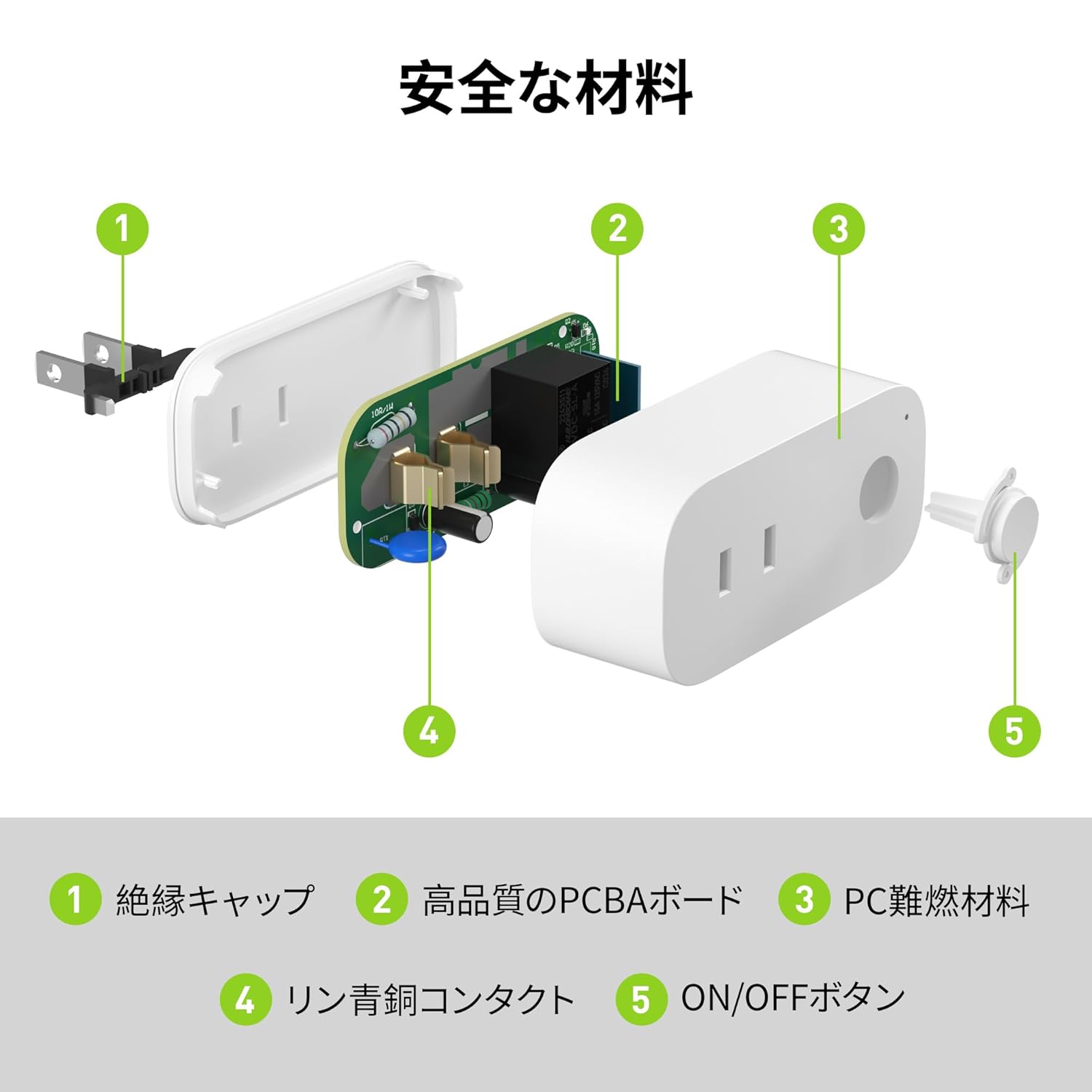
Image: Internal components of the smart plug, highlighting safety features such as the insulation cap, high-quality PCBA board, PC flame-retardant material, phosphor bronze contacts, and the ON/OFF button.
3. Parentah Setup
3.1. Setup Awal
- Unpack the BN-LINK Smart Plug from its packaging.
- Plug the smart plug into a standard wall outlet.
- Observe the indicator light on the plug. It should start blinking. If it does not blink, press and hold the ON/OFF button for approximately 5 seconds until it starts blinking rapidly.
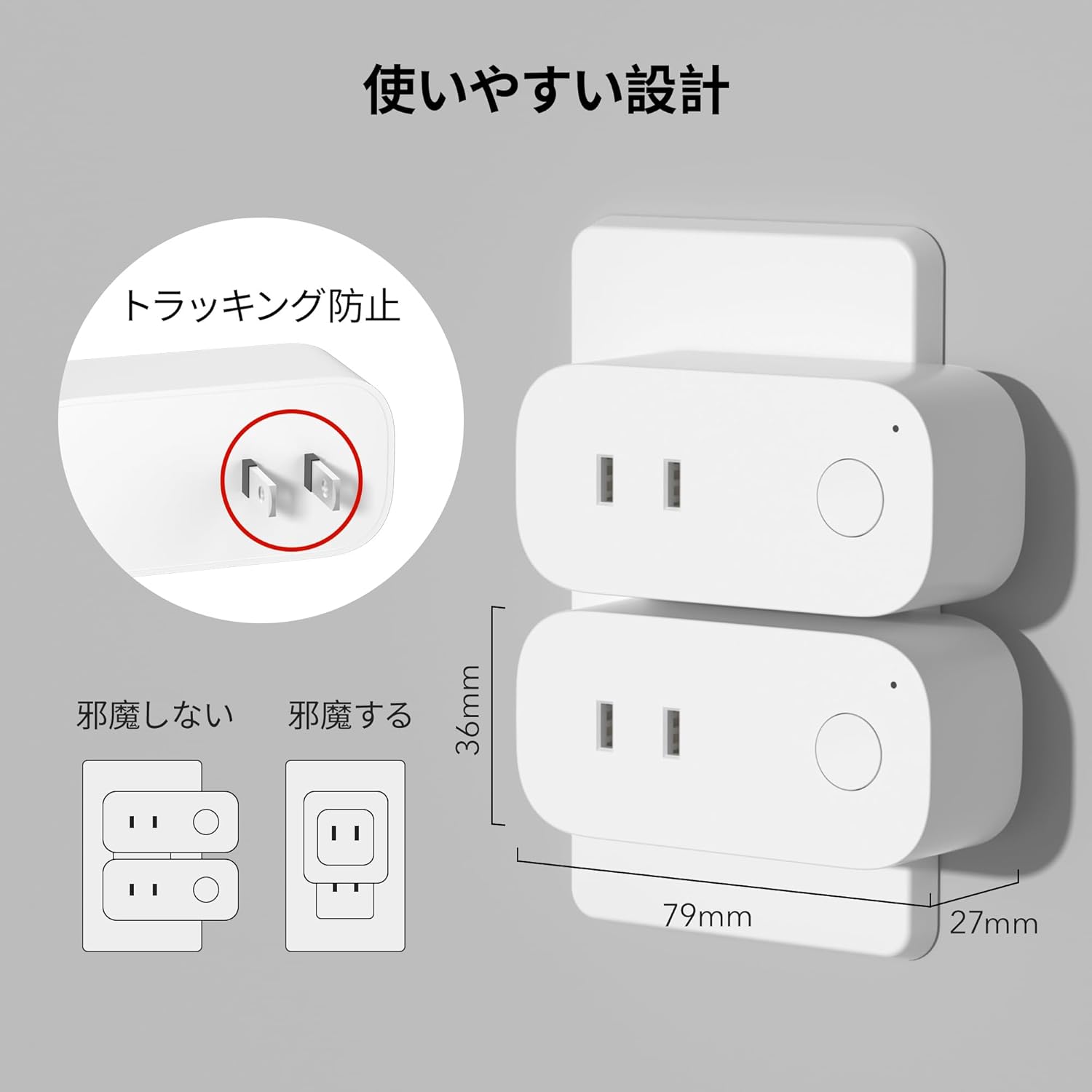
Image: The compact design of the smart plug, illustrating how it fits into an outlet without obstructing the adjacent one. Dimensions are also shown.
3.2. Pamasangan Aplikasi sareng Sambungan Wi-Fi
To utilize all smart features, you need to install the BN-LINK app and connect the plug to your 2.4GHz Wi-Fi network. This device only supports 2.4GHz Wi-Fi.
- Download the "BN-LINK" app from your smartphone's app store (Google Play Store for Android or Apple App Store for iOS).
- Buka aplikasi sareng jieun akun atanapi log in upami anjeun parantos gaduh.
- Ketok ikon "+" atawa "Tambahkeun Alat" pikeun ngamimitian prosés papasangan.
- Pilih "Smart Plug" tina daptar alat.
- Follow the on-screen instructions to connect the smart plug to your 2.4GHz Wi-Fi network. Ensure your phone is also connected to the 2.4GHz network during setup.
- Once connected, you can rename your smart plug for easy identification (e.g., "Living Room Lamp," "Coffee Maker").
Video: This video demonstrates the process of connecting the smart plug to the BN-LINK app and your Wi-Fi network, including resetting the device and confirming indicator light status.
Video: This video provides a step-by-step guide on setting up the ePlugBT and connecting it to Wi-Fi, which is similar to the BN-LINK Smart Plug setup process.
4. Parentah Operasi
4.1. Jauh Control via App
Once connected to Wi-Fi, you can control your appliances from anywhere with an internet connection.
- Open the BN-LINK app.
- Tap on the device name you wish to control.
- Use the ON/OFF toggle button within the app to switch your appliance on or off.

Image: Remote operation of the smart plug via the BN-LINK app on a smartphone. The image shows the app's ON/OFF control for a device connected to the smart plug, with a WiFi router in the background.

Image: A user controlling a smart plug remotely with their smartphone in a modern kitchen environment.
4.2. Kontrol sora
Integrate your smart plug with Amazon Alexa or Google Home for convenient voice commands.
- Ensure your smart plug is successfully connected to the BN-LINK app and your Wi-Fi network.
- Buka aplikasi Alexa atanapi Google Home.
- Follow the app's instructions to add a new device or skill, searching for "BN-LINK" or "Smart Plug."
- Sakali dihubungkeun, anjeun tiasa nganggo paréntah sora sapertos:
- "Alexa, hurungkeun [ngaran alat]."
- "Hé Google, pareuman [ngaran alat]."

Image: A user in a living room controlling a lamp connected to a smart plug using voice commands with an Alexa device. The image also indicates Google Home compatibility.

Image: A smart plug connected to an outlet, being controlled by a Google Home device. A person is shown in bed, illustrating hands-free operation.
4.3. Timer Function and Scheduling
Set custom schedules to automate your appliances and manage energy consumption.
- In the BN-LINK app, select your smart plug.
- Navigate to the "Timer" or "Schedule" section.
- Set specific ON/OFF times for your appliances. You can create daily, weekly, or one-time schedules.
- Use the countdown timer for temporary automation, such as turning off a charger after a set period to prevent overcharging.

Image: The BN-LINK app displaying timer and scheduling features. Examples show a coffee maker turning on at 7:15 AM and a lamp turning off at 10:00 PM, demonstrating automated control.

Image: A smart plug connected to a microwave, with the app interface showing a timer set to turn the device ON at 7:00.
5. Pangropéa
To ensure optimal performance and longevity of your BN-LINK Smart Plug, follow these maintenance guidelines:
- beberesih: Cabut colokan pinter tina stop kontak sateuacan dibersihkeun. Anggo lawon anu garing sareng lemes pikeun ngusap permukaanana. Entong nganggo pembersih cair atanapi semprotan.
- Panyimpenan: If not in use for an extended period, unplug the device and store it in a cool, dry place away from direct sunlight and moisture.
- Pamariksaan: Periodically check the plug and outlet for any signs of damage, wear, or overheating. If any issues are found, discontinue use and contact customer support.
6. Cara ngungkulan
If you encounter issues with your BN-LINK Smart Plug, refer to the following common problems and solutions:
| Masalah | Mungkin Cukang lantaranana | Solusi |
|---|---|---|
| Alat teu bisa nyambung ka Wi-Fi. | Incorrect Wi-Fi password, 5GHz Wi-Fi network, weak signal, or device not in pairing mode. |
|
| Kadali jauh teu jalan. | No internet connection on phone or smart plug, or app issue. |
|
| Kontrol sora teu ngaréspon. | Incorrect device name, smart assistant not linked, or internet connection issue. |
|
| Plug is unresponsive. | Kakuatan anjeuntage, device malfunction, or firmware issue. |
|
7. Spésifikasi
| Fitur | Rincian |
|---|---|
| merek | BN-LINK |
| Nomer modél | CP-J31WT |
| Item Beurat | 70 g |
| Ukuran Paket | 8.2 x 4.7 x 4.3 cm |
| Ukuran | 1 pakét |
| Pindah Tipe | 1-jalan |
| Komponén Kaasup | Smart Plug body, Instruction Manual |
| Batteries Used | No |
| Modeu Operasi | HIRUP |
| Peunteun ayeuna | 15 Amps |
| Operasi Voltage | 100 volt |
| Tipe Panyambung | Plug-in |
| Bahan | palastik |
| Jinis Sirkuit | 1-jalan |
8. Garansi jeung Rojongan
BN-LINK products are designed for quality and reliability. For warranty information and customer support, please refer to the contact details provided in the product packaging or visit the official BN-LINK websitus.
Kanggo bantosan langkung lanjut, anjeun ogé tiasa ngahubungi penjual langsung ngalangkungan platform Amazon.
Sumberdaya Online:
- Official BN-LINK Websitus: www.bn-link.com (Punten dicatet: Ieu mangrupikeun pananda tempat URL, replace with actual if available)
- Kaca Produk Amazon: Amazon.co.jp Product Page


