
Bubuka
This manual provides detailed instructions for the proper use and maintenance of your Monster N-Lite 217 Wireless Earbuds. Please read this manual thoroughly before using the product to ensure optimal performance and longevity.
Naon dina Box
- Monster N-Lite 217 In-Ear Headphones
- Kasus Ngecas Nirkabel
- Manual pamaké
- Multiple sizes of soft silicone ear tips (typically S, M, L)
- Kabel Ngecas USB-C (teu didaptarkeun sacara éksplisit tapi standar)
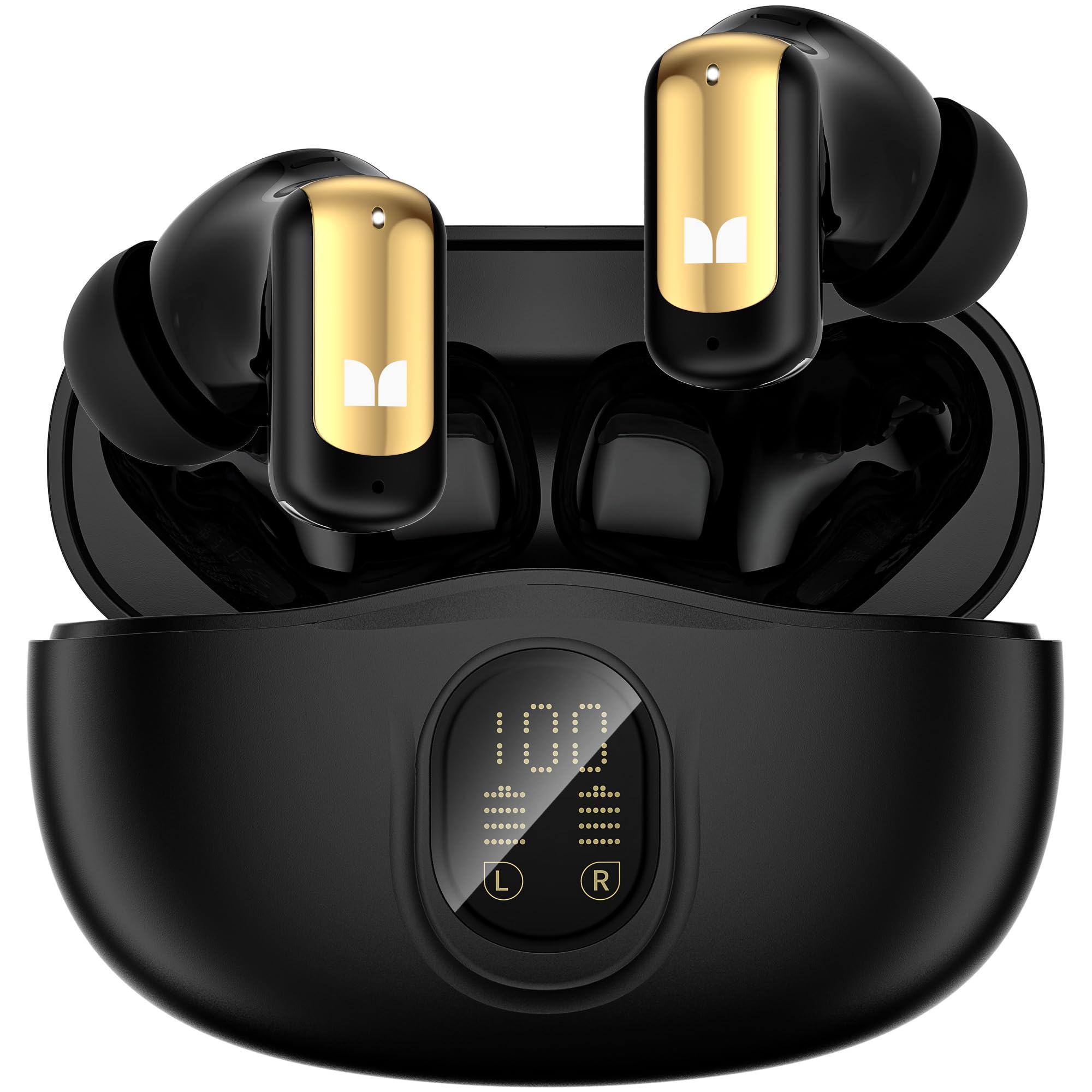
Image: Contents of the Monster N-Lite 217 package, including earbuds, charging case, and accessories.
Produk Leuwihview
The Monster N-Lite 217 Wireless Earbuds are designed for immersive audio and clear communication. They feature 13mm dynamic drivers for powerful sound and a built-in smart noise-reducing microphone for calls.
Komponen Earbud

Gambar: Ngabeledug view of an earbud, highlighting the 13mm dynamic driver for sound production.
Each earbud is equipped with a touch-sensitive surface for control and an ergonomic design for a comfortable fit.
Ngecas Case
The compact charging case not only protects your earbuds but also provides additional battery life. It features an LED display to indicate the remaining power.

Image: The charging case with earbuds, displaying battery levels on its LED screen.
Disetél
1. Ngecas Earbuds jeung Case
Saméméh dipaké munggaran, eusian pinuh ku earbuds jeung wadah ngecas.
- Teundeun earbuds kana wadah ngecas. Pastikeun aranjeunna leres seated.
- Sambungkeun wadah ngecas ka sumber daya nganggo kabel USB-C.
- The LED indicator on the case will show charging status. A full charge for the case and earbuds typically takes approximately 0.5 hours.
- Once fully charged, the LED display will indicate 100% or a steady light, depending on the model's specific indicator.
A fully charged case provides up to 32 hours of total playtime with the earbuds, while the earbuds themselves offer 8 hours on a single charge.
2. Nyapasangkeun sareng Alat Bluetooth
The earbuds are designed for easy pairing with Bluetooth-enabled devices.
- Buka wadah ngecas. Earbuds bakal otomatis asup kana mode papasangan.
- Dina alat anjeun (smartphone, tablet, laptop), buka setélan Bluetooth teras pastikeun Bluetooth diaktipkeun.
- Milarian pikeun available devices. Select "Monster N-Lite 217" from the list.
- Once connected, your device will confirm the pairing. The earbuds are now ready for use.
- Pikeun kagunaan anu salajengna, earbuds bakal otomatis nyambung ka alat anu dipasangkeun terakhir nalika dikaluarkeun tina wadahna.

Image: A user demonstrating the easy pairing process with a smartphone.
The earbuds utilize Bluetooth 6.0 for stable connectivity up to 12 meters.
Parentah Operasi
1. Ngagem Earbuds
For optimal sound quality and comfort, choose the silicone ear tips that best fit your ears. Gently insert each earbud into your ear canal and twist slightly to secure them in place.

Image: A person wearing the N-Lite 217 earbud, illustrating its ergonomic design for comfort.
2. Toél Kontrol
The Monster N-Lite 217 earbuds feature intuitive touch controls on each earbud. Specific functions may vary slightly depending on your device and application.
| Aksi | Fungsi |
|---|---|
| Ketok Sakali (Earbud Kénca/Katuhu) | Puter / Reureuh Musik, Jawab / Tungtung Telepon |
| Ketok dua kali (Earbud Katuhu) | Lagu salajengna |
| Ketok dua kali (Earbud Kénca) | Lagu saméméhna |
| Ketok Tilu Kali (Earbud Kénca/Katuhu) | Aktipkeun Asisten Sora |
| Pencét Lila (Earbud Kénca/Katuhu) | Nolak Telepon |
| Pencét Panjang (Earbud Katuhu) | Volume Up |
| Pencét Panjang (Earbud kénca) | Volume Turun |

Image: A user interacting with the touch-sensitive surface of an earbud to control functions.
3. Nyieun jeung Nampa Telepon
The earbuds feature a built-in smart noise-reducing microphone for clear calls.
- Ngajawab Telepon: Ketok tunggal boh earbud.
- Tungtung Telepon: Ketok tunggal boh earbud.
- Nolak Telepon: Pencét lila salah sahiji earbud.

Image: An earbud illustration demonstrating the noise reduction technology for clear call quality.
4. Maénkeun Musik
Enjoy immersive sound with powerful bass from the 13mm dynamic drivers.
- Puter / Reureuh: Ketok tunggal boh earbud.
- Lagu salajengna: Ketok dua kali earbud katuhu.
- Lagu Sateuacanna: Ketok dua kali earbud kénca.
- Volume Up: Pencét lila earbud katuhu.
- Volume Turun: Pencét lila earbud kénca.
Pangropéa
beberesih
- Rutin ngabersihkeun earbuds sareng wadah ngecas ku lawon anu lemes, garing, teu aya lint.
- Ulah make cleaners abrasive, alkohol, atawa pangleyur kimiawi.
- Cabut kotoran ceuli atawa kokotor tina tungtung ceuli jeung jaring spiker sacara lalaunan maké sikat leutik nu lemes atawa kapas.
Panyimpenan
- Lamun teu dipake, sok nyimpen earbuds dina wadah ngecas maranéhanana pikeun ngajaga eta jeung tetep dicas.
- Simpen produk di tempat anu tiis sareng garing, jauh tina suhu anu ekstrim sareng sinar panonpoé langsung.
Tahan cai
The Monster N-Lite 217 earbuds are IPX5 waterproof, meaning they are resistant to sweat and light splashes. They are not designed for submersion in water. Ensure the earbuds are dry before placing them back in the charging case to prevent damage.

Image: A user wearing the earbuds during a light rain, demonstrating their IPX5 water resistance.
Pamérésan masalah
If you encounter any issues with your Monster N-Lite 217 Wireless Earbuds, please refer to the following common solutions:
| Masalah | Solusi anu mungkin |
|---|---|
| Earbuds henteu dipasangkeun sareng alat. |
|
| Taya sora tina earbuds. |
|
| Earbuds teu ngecas. |
|
| Kualitas panggero goréng. |
|
spésifikasi
| Fitur | Rincian |
|---|---|
| Ngaran modél | Monster N-Lite 217 Wireless Earbuds |
| Téhnologi konektipitas | Bluetooth, Nirkabel |
| Vérsi Bluetooth | 6.0 |
| Rentang Bluetooth | 12 méter |
| Ukuran Supir Audio | 13 milimeter |
| Tipe Supir Audio | Supir dinamis |
| Kahirupan Batré (Earbuds) | 8 Jam (sakali muatan) |
| Total Playtime (kalawan Case) | 32 Jam |
| Waktu Ngecas | 0.5 Jam |
| Tingkat Résistansi Cai | IPX5 (Tahan cai) |
| Tipe Kontrol | Toél Control |
| Mikropon | Built-in Smart Noise-Reducing Mic |
| Fitur Control Noise | Noise Reduction for Calls |
| Item Beurat | 0.04 Kilogram (kira-kira 1.41 ons) |
| Bahan | Plastik, Silikon |
| Alat nu cocog | All Bluetooth enabled devices, Cellphones, Laptops, Portable Media Player, Tablets |
Garansi sareng Rojongan
Kanggo inpormasi garansi sareng dukungan palanggan, mangga tingali dokuméntasi anu kalebet dina produk anjeun atanapi kunjungi situs resmi Monster. websitus. Simpen bukti pameseran anjeun pikeun klaim garansi.
Pabrikan: Raksasa
model: N-Lite 217
Kanggo bantosan langkung lanjut, mangga ngahubungi layanan palanggan Monster ngalangkungan saluran resmi na.