1. Produk Langkungview
The LIGE Smart Watch EF24-A is a versatile and durable smartwatch designed for active lifestyles. It features a 1.7-inch HD display, long-lasting 1000mAh battery, Bluetooth calling, comprehensive health tracking, and over 100 sports modes. This manual provides essential information for setting up, operating, and maintaining your device.
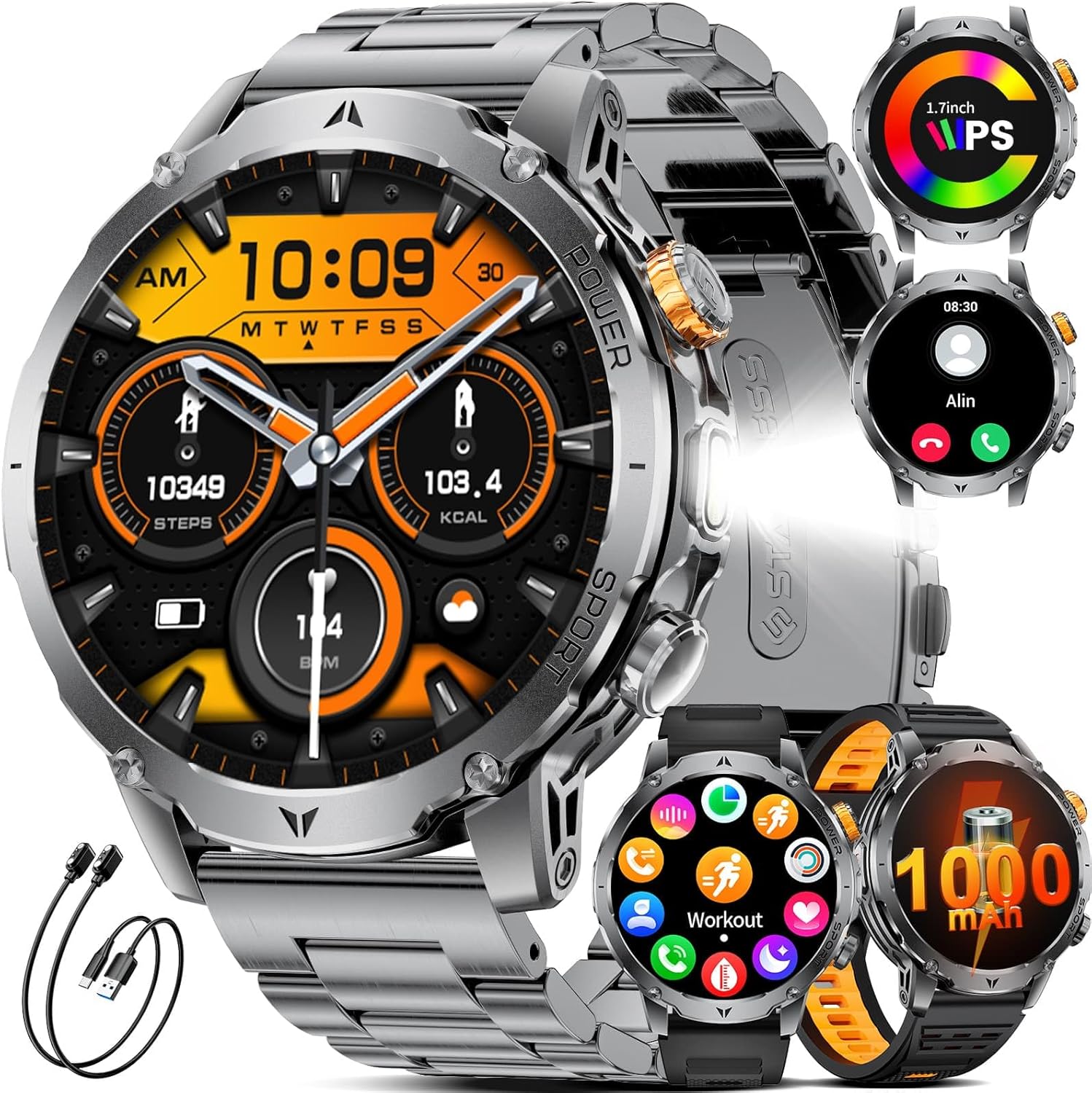
Figure 1: LIGE Smart Watch EF24-A. This image displays the smartwatch with a metal strap, showcasing its round face and robust design.
2. Naon dina Box
Upon opening your LIGE Smart Watch EF24-A package, you should find the following items:
- Jam Tangan Pinter (1 unit)
- Tali Jam (3 unit: 1 baja tahan karat, 2 silikon)
- Charging Cables (2 units: USB and Type-C magnetic charging cables)
- Manual pamaké (1 unit)

Figure 2: Package contents including the smartwatch, three watch bands, and two charging cables.
3. Setup Guide
3.1 Ngecas Smart Watch
Before initial use, fully charge your smartwatch. The device comes with two magnetic charging cables (USB and Type-C) for convenience.
- Connect one of the magnetic charging cables to a compatible USB or Type-C power adapter (not included) or a computer's USB port.
- Align the magnetic end of the cable with the charging contacts on the back of the smartwatch. The watch will snap into place and display a charging indicator.
- Allow approximately 2 hours for a full charge. A full charge provides up to 15 days of typical daily use and over 60 days of standby time.

Figure 3: The smartwatch being charged using both USB and Type-C magnetic cables, highlighting the 1000mAh battery capacity.
3.2 Pamasangan Aplikasi sareng Pamasangan Alat
To unlock the full potential of your smartwatch, download and install the companion app on your smartphone.
- Scan the QR code in the manual or on the watch packaging, or search for the designated app (e.g., 'FitCloudPro' as commonly used by LIGE) in your smartphone's app store (compatible with iOS 8.0+ and Android 4.4+).
- Pasang sareng buka aplikasina. Turutan pitunjuk dina layar pikeun ngadamel akun atanapi lebet.
- Aktipkeun Bluetooth dina smartphone Anjeun.
- In the app, navigate to the device pairing section and search for your smartwatch (e.g., 'EF24-A').
- Pilih alat anjeun tina daptar pikeun ngamimitian masangkeun. Konfirmasi pamundut masangkeun dina telepon anjeun sareng jam tangan pinter.
3.3 Pamasangan tali
The LIGE Smart Watch EF24-A comes with three interchangeable straps: a stainless steel band and two silicone straps. To change a strap:
- Locate the quick-release pins on the back of the watch straps.
- Slide the pin inwards to detach the current strap from the watch body.
- Align the new strap with the watch lugs and slide the pin inwards. Release the pin once the strap is in place to secure it. Gently pull on the strap to ensure it is firmly attached.
4. Parentah Operasi
4.1 Napigasi Dasar
Smartwatch ieu ngagaduhan layar rampa lengkep sareng tombol fisik pikeun navigasi:
- Gesek ka luhur/handap: Gulung ka ménu sareng béwara.
- Gesek Kénca/Katuhu: Aksés fungsi atanapi widget gancang.
- Ketok: Pilih hiji item atawa mastikeun hiji aksi.
- Pencét Tombol Samping: The watch typically has a power/home button and a customizable function button. Refer to the watch settings for specific button assignments.

Figure 4: Various menu interfaces and navigation options on the smartwatch display.
4.2 Telepon Bluetooth sareng Bewara
With its advanced dual-core chip and BLE 5.3 support, the smartwatch offers stable Bluetooth calling and real-time notifications.
- Nelepon/Narima Telepon: Once paired, you can answer or make calls directly from your watch using the built-in speaker and microphone.
- Bewara Pesen: Receive real-time alerts from social apps (e.g., Facebook, Twitter, WhatsApp) and other smartphone notifications directly on your wrist. Ensure notification permissions are enabled in the companion app.

Figure 5: The smartwatch displaying incoming calls and various app notifications.
4.3 Beungeut Lalajo
Personalisasikeun jam tangan pinter anjeun ku rupa-rupa pilihan tampilan jam.
- The watch comes with 7 built-in faces.
- The companion app offers over 400 additional UI designs. You can also upload a photo to create a unique personal background.
- To change watch faces, long-press the home screen or select from the watch face settings in the app.

Figure 6: A selection of customizable watch faces available for the smartwatch, including options for DIY backgrounds.
4.4 Fungsi senter
The smartwatch includes a powerful LED flashlight for various situations.
- Access the flashlight function from the watch's menu.
- It offers different modes, including constant light, warning mode, and SOS mode.

Figure 7: The smartwatch's powerful LED flashlight being used in various outdoor and emergency scenarios.
4.5 Fitur séjén
The LIGE Smart Watch EF24-A offers a range of practical features:
- Asisten Sora AI: Interaksi sareng jam tangan anjeun nganggo paréntah sora.
- Kontrol Musik: Kontrol playback musik dina smartphone anjeun langsung tina jam tangan.
- Kaméra jauh: Anggo jam tangan anjeun salaku jepret jauh pikeun kaméra telepon anjeun.
- Témbongkeun Cuaca: Kéngingkeun apdet cuaca sacara real-time.
- Jam alarem: Setel alarm langsung dina jam tangan anjeun.
- Timer: Mangpaatkeun fungsi timer anu tos aya.
- Panggihan Telepon: Milarian telepon sélulér anjeun anu disapasangkeun ku cara ngirining.
- Panginget Sedentary: Kéngingkeun béwara pikeun mindahkeun saatos sababaraha waktos teu aktip.
- Panginget cai: Receive reminders to drink water throughout the day.

Figure 8: A collage showing the smartwatch's music control, weather display, alarm clock, camera control, find phone, sedentary reminder, and water reminder features.
5. Nyukcruk Kaséhatan
The LIGE Smart Watch EF24-A is equipped with sensors to monitor various health metrics. Note: Measurements are for reference only and are not medical data.
5.1 Pangimeutan Denyut Jantung
The watch tracks your heart rate 24 hours a day. All data can be synced to the app to record physical changes.
- Ka view your current heart rate, navigate to the heart rate section on your watch.
- The app provides detailed historical data and analysis.

Figure 9: The smartwatch displaying real-time heart rate and blood oxygen levels, with a user actively monitoring their health.
5.2 Oksigén getih (SpO2) pangimeutan
Monitor your blood oxygen levels directly from your wrist.
- Access the blood oxygen feature on your watch to take a measurement.
- Ensure the watch is snug on your wrist for accurate readings.
5.3 Pemantauan Kualitas Sare
The smartwatch automatically tracks your sleep patterns, providing insights into awake, light, and deep sleep stages.
- Anggo jam tangan nalika bade bobo kanggo ngalacak bobo otomatis.
- View detailed sleep analysis in the companion app to understand your sleep quality.

Figure 10: The smartwatch displaying sleep quality data, including total sleep duration and different sleep stages, with a person sleeping in the background.
5.4 Pressure Detection and Breathing Training
The watch can help you stay on top of stress levels and guide you through breathing exercises.
- Access the pressure detection feature to monitor your stress.
- Use the breathing training function to relax and recover.

Figure 11: The smartwatch displaying pressure detection data, with a graph showing stress levels over time, and a user engaged in focused work.
6. Olahraga Mode
The LIGE Smart Watch EF24-A offers over 100 sports modes to track your physical activities. It monitors key metrics such as steps taken, distance covered, calories expended, and exercise duration.
- To start a workout, navigate to the 'Workout' or 'Sports' section on your watch.
- Select your desired activity (e.g., walking, running, cycling, tennis, mountaineering, basketball, badminton, rope skipping).
- The watch will begin tracking your activity. End the workout when finished to save the data.
- Review ringkesan latihan anu lengkep dina aplikasi pendamping.

Figure 12: The smartwatch displaying various sports modes and tracking metrics like steps, distance, and calories, with images of people engaged in different sports activities.
7. Pangropéa
7.1 Daya Tahan sareng Tahan Cai
The LIGE Smart Watch EF24-A is built with military-grade protection standards, offering exceptional resistance to scratches, impacts, and harsh environmental conditions. It is IP68 waterproof, protecting it from splashes, rain, and sweat, and suitable for swimming (without hot water or steam).
- Ulah ngalaan arloji ka cai panas, uap, atawa jet cai tekanan luhur.
- Ulah ngajalankeun tombol arloji di jero cai.
- Saatos kakeunaan cai, usap jam tangan dugi ka garing nganggo lawon lemes.

Figure 13: The smartwatch highlighting its water-resistant, cold-resistant, shock-resistant, and dust-resistant properties.
7.2 Beberesih sareng Perawatan
- Regularly clean the watch body and straps with a soft, damp lawon.
- Ulah make bahan kimia kasar atawa bahan abrasive, sabab ieu bisa ngaruksak finish.
- Pastikeun kontak ngecas beresih jeung garing saméméh ngecas pikeun nyegah korosi.
8. Cara ngungkulan
If you encounter issues with your LIGE Smart Watch EF24-A, try the following troubleshooting steps:
8.1 Masalah konektipitas
- Pastikeun Bluetooth diaktipkeun dina smartphone anjeun sareng arlojina aya dina jangkauan.
- Balikan deui smartphone anjeun sareng jam tangan pinter.
- Unpair and re-pair the device through the companion app.
- Pariksa naha aplikasi pendamping jalan di latar tukang sareng gaduh idin anu diperyogikeun.
8.2 Masalah Umur Batré
- Ensure the watch is fully charged using the provided magnetic cables.
- Reduce screen brightness and turn off unnecessary features (e.g., continuous heart rate monitoring, always-on display) to conserve battery.
- Check for app updates, as software optimizations can improve battery performance.
8.3 Layar Teu Ngaréspon
- Coba hurungkeun deui jam tangan ku mencét terus tombol daya.
- Pastikeun layar beresih jeung garing.
- If the issue persists, perform a factory reset (note: this will erase all data on the watch).
9. Spésifikasi
| Fitur | Spésifikasi |
|---|---|
| Nomer modél | EF24-A |
| Ukuran tampilan | 1.7 inci |
| Resolusi tampilan | 360*360 piksel |
| Kapasitas batré | 1000 mAh Litium Polimér |
| Typical Use Battery Life | Nepi ka 15 dinten |
| Waktu sayaga | Above 60 days |
| Waktu Ngecas | Kira-kira. 2 jam |
| Konektipitas | Bluetooth 5.3 |
| Sistem operasi | Android (4.4 and above), iOS (8.0 and above) |
| Tahan cai | IP68 |
| Dimensi produk | 5.91 x 2.76 x 0.79 inci |
| Item Beurat | 8.8 ons (0.25 Kilogram) |

Figure 14: Visual comparison of the 1.7-inch display size of the LIGE Smart Watch EF24-A against other smartwatches.
10. Garansi jeung Rojongan
10.1 Émbaran jaminan
LIGE stands behind the quality of its products. The LIGE Smart Watch EF24-A comes with a Garansi produk 24 bulan tanpa rasa hariwang. This warranty includes services such as replacement, return, or accessory replacement.
10.2 Rojongan Palanggan
If you have any questions or concerns about your smartwatch, please do not hesitate to contact our customer support team. Our team is always ready to provide you with the support you need.
- Refer to the contact information provided in your product packaging or on the official LIGE websitus pikeun saluran rojongan.
- Please have your model number (EF24-A) and purchase details ready when contacting support.
11. Video produk
11.1 Military Smart Watch for Men EF24 Overview
Video 1: video ieu nyadiakeun leuwih komprehensifview of the LIGE Smart Watch EF24, showcasing its design, various watch faces, flashlight function, and charging capabilities. It also highlights health monitoring features like heart rate and blood pressure, along with music control and weather updates.
11.2 Smart Watch for Men EF24 Features and Durability
Video 2: This video demonstrates the durability of the LIGE Smart Watch EF24, showing its resistance to impact and water. It also illustrates key functionalities such as charging, various sports modes, health tracking (heart rate, blood oxygen, pressure), call handling, notifications, and the flashlight feature.


