
TECKNET TK-HS023
TECKNET TK-HS023 V5.4 Bluetooth Trucker Headset
Manual pamaké
1. Bubuka
This manual provides detailed instructions for the proper use, setup, and maintenance of your TECKNET TK-HS023 V5.4 Bluetooth Trucker Headset. Please read this manual thoroughly before using the product to ensure optimal performance and longevity.
Eusi pakét
- TECKNET TK-HS023 Bluetooth Headsét
- Kabel Ngecas USB
- Manual pamaké
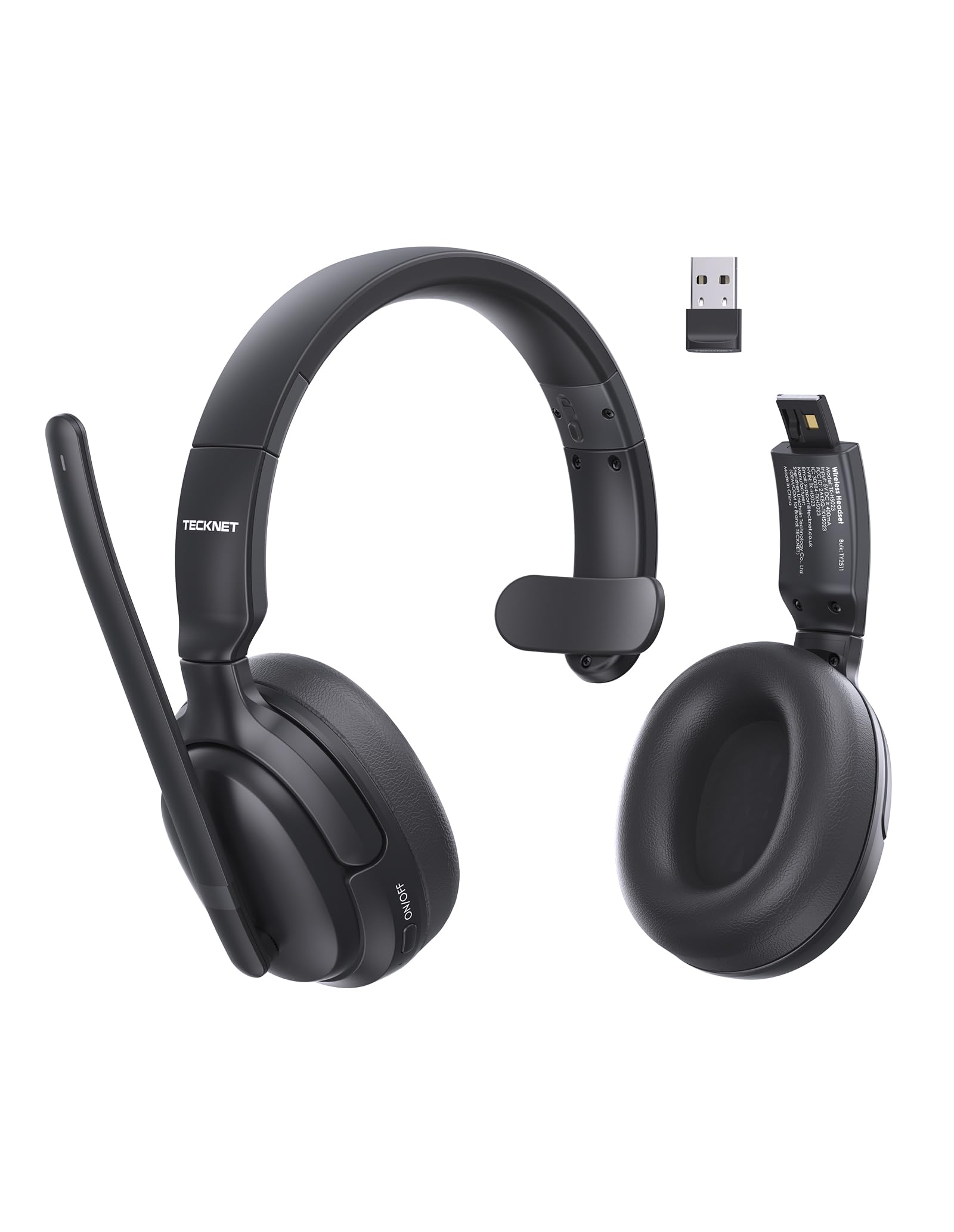
Image 1.1: TECKNET TK-HS023 Bluetooth Trucker Headset. This image displays the headset with its adjustable headband and microphone boom.
2. Fitur Produk
- Mikropon Pangurang Sora AI: Designed to filter out background noise, ensuring clear voice transmission in noisy environments.
- Single-Ear Design: Allows users to remain aware of their surroundings while using the headset.
- Dual-Device Seamless Connectivity: Connects to two Bluetooth devices simultaneously, enabling easy switching between calls and audio.
- Batré Awét: Nyayogikeun waktos panggunaan anu langkung lami dina sakali ngecas.
- Stable Bluetooth V5.4 Connection: Offers reliable wireless connectivity with a range of up to 15 meters.
- Easy Call & Audio Controls: Intuitive buttons for managing calls, adjusting volume, and controlling media playback.
- Headband adjustable: Mastikeun pas anu nyaman pikeun rupa-rupa ukuran sirah.
3. Setélan
3.1 Ngecas Headsét
Before initial use, fully charge the headset. A full charge takes approximately 2 hours and provides up to 65 hours of battery life.
- Sambungkeun tungtung leutik kabel ngecas USB kana port ngecas dina headset.
- Connect the large end of the USB charging cable to a USB power source (e.g., computer USB port, wall adapter).
- The LED indicator on the headset will show the charging status. It typically turns red during charging and blue or off when fully charged.
3.2 Nyapasangkeun Bluetooth
To connect your headset to a device via Bluetooth:
- Pastikeun headset tos dicas pinuh.
- Power on the headset by pressing and holding the Multi-Function Button (MFB) until the LED indicator flashes blue and red alternately, indicating pairing mode.
- Dina alat anjeun (smartphone, tablet, laptop), aktipkeun Bluetooth sareng milarian alat anu sayogi.
- Select "TECKNET TK-HS023" from the list of found devices.
- Once connected, the LED indicator on the headset will flash blue slowly or turn solid blue.
Konéktivitas Alat Ganda: After pairing with the first device, disable Bluetooth on the first device, then put the headset back into pairing mode to connect to a second device. Once the second device is paired, re-enable Bluetooth on the first device. The headset should automatically connect to both devices, allowing seamless switching.
4. Parentah Operasi
4.1 Kontrol Headsét
- Tombol Multi-Fungsi (MFB): Power on/off, Play/Pause, Answer/End Call, Reject Call, Redial.
- Volume Naik (+): Ningkatkeun volume, lagu salajengna (pencét panjang).
- Volume Turun (-): Turunkeun polumeu, Lagu saméméhna (pencét panjang).
- Tombol Bisu: Mute/unmute microphone during a call.
4.2 Manajemén Telepon
- Ngajawab Telepon: Pencét MFB sakali.
- Tungtung Telepon: Pencét MFB sakali nalika nelepon.
- Nolak Telepon: Pencét jeung tahan MFB salila 2 detik.
- Telepon deui Nomer Panungtungan: Pencét dua kali MFB nalika teu keur nelepon.
- Mikropon bisu: Press the Mute button during a call. Press again to unmute.
4.3 Playback audio
- Puter / Reureuh: Pencét MFB sakali.
- Lagu salajengna: Pencét lila tombol Volume Naék (+).
- Lagu Sateuacanna: Pencét lila tombol Volume Turun (-).
4.4 Mikropon Pangurang Sora AI
The integrated AI Noise Cancelling Microphone actively reduces ambient noise, such as engine sounds or office chatter, to ensure your voice is transmitted clearly to the other party during calls. Position the microphone boom approximately 1-2 inches from your mouth for best performance.
5. Pangropéa
5.1 beberesih
- Lap headset ku kaén nu lemes, garing, atawa rada garingamp lawon.
- Ulah make bahan kimia kasar, pangleyur beberesih, atawa detergents kuat.
- Ulah meunang Uap kana sagala bukaan.
5.2 Panyimpenan
- Simpen headset dina tempat anu tiis sareng garing jauh tina suhu anu ekstrim.
- Hindarkeun paparan anu berkepanjangan kana sinar panonpoé langsung atanapi kalembaban.
6. Cara ngungkulan
Isu umum jeung Solusi
- Headset teu hurung: Pastikeun headset tos dicas pinuh.
- Teu tiasa dipasangkeun sareng alat:
- Pastikeun headset aya dina modeu pairing (LED kedip-kedip biru sareng beureum).
- Pastikeun Bluetooth diaktipkeun dina alat Anjeun.
- Pindahkeun headset ngadeukeutan ka alat Anjeun.
- Balikan deui headset sareng alat anjeun.
- Taya sora atawa kualitas audio goréng:
- Pariksa tingkat polumeu boh dina headset sareng alat Anjeun nu disambungkeun.
- Ensure the headset is within the 15-meter Bluetooth range.
- Disconnect and reconnect the headset to your device.
- Pariksa gangguan tina alat nirkabel séjén.
- Mikropon teu jalan:
- Pastikeun mikropon teu dijempékeun.
- Pariksa setelan mikropon dina alat nu disambungkeun.
7. Spésifikasi
| Fitur | Spésifikasi |
|---|---|
| merek | TAKEUN |
| Ngaran modél | TK-HS023 |
| Téhnologi konektipitas | Nirkabel (Bluetooth V5.4) |
| Rentang Bluetooth | Nepi ka 15 méter |
| Panempatan Ceuli | Over Ear (Single-ear design) |
| Mikropon | AI Noise Canceling |
| Waktu Ngeusi batre | Kurang leuwih 2 Jam |
| Batré Rata Kahirupan | Nepi ka 65 Jam |
| Alat nu cocog | Telepon sélulér, Desktop, Laptop, Tablet |
| Fitur tambahan | Adjustable Headband, Volume Control, Dual-Device Connectivity |
| Warna | Hideung |
8. Garansi jeung Rojongan
8.1 Émbaran jaminan
The TECKNET TK-HS023 Bluetooth Trucker Headset comes with a garansi 3 taun ti tanggal pameseran. Garansi ieu ngawengku cacad manufaktur sareng mastikeun produk bébas tina cacad dina bahan sareng padamelan dina panggunaan normal.
The warranty does not cover damage caused by misuse, accident, unauthorized modification, or external causes such as drops or liquid damage.
8.2 Rojongan Palanggan
For technical support, warranty claims, or any questions regarding your TECKNET TK-HS023 headset, please refer to the contact information provided on the TECKNET official website or your purchase documentation. Please have your model number (TK-HS023) and proof of purchase ready when contacting support.
Ask a question about this manual
Ask about setup, troubleshooting, compatibility, parts, safety, or missing instructions. Manuals+ will review the question and use this page’s manual context to help answer it.