1. Produk Langkungview
The Silonn Nugget Ice Maker is a countertop appliance designed to produce soft, chewable nugget ice. It features smart app and voice control, a detachable large water tank, quiet operation, and a self-cleaning function. This machine is ideal for home, kitchen, and party use, providing up to 40 lbs of ice per day.
Fitur konci
- Aplikasi Pinter & Kontrol Sora: Control ice making with the intuitive LED display, your voice, or remotely via the SmartBQ App.
- Detachable Large Water Tank: A 3L removable water tank allows for easy filling and cleaning, producing ice for up to 7.5 hours on a single fill.
- Tenang sareng Efisien: Produces nugget ice in just 8 minutes, with a daily output of approximately 40 lbs, operating quietly at 40-50 dB.
- Soft, Chewable Ice: Enjoy the satisfying crunch of nugget ice, perfect for cooling drinks and enhancing flavors.
- Status Updates and Self-Cleaning: Clear ring indicators show water levels and ice basket status. Features a self-cleaning function for hassle-free maintenance.

Figure 1: Silonn Nugget Ice Maker with key dimensions and ice production details.
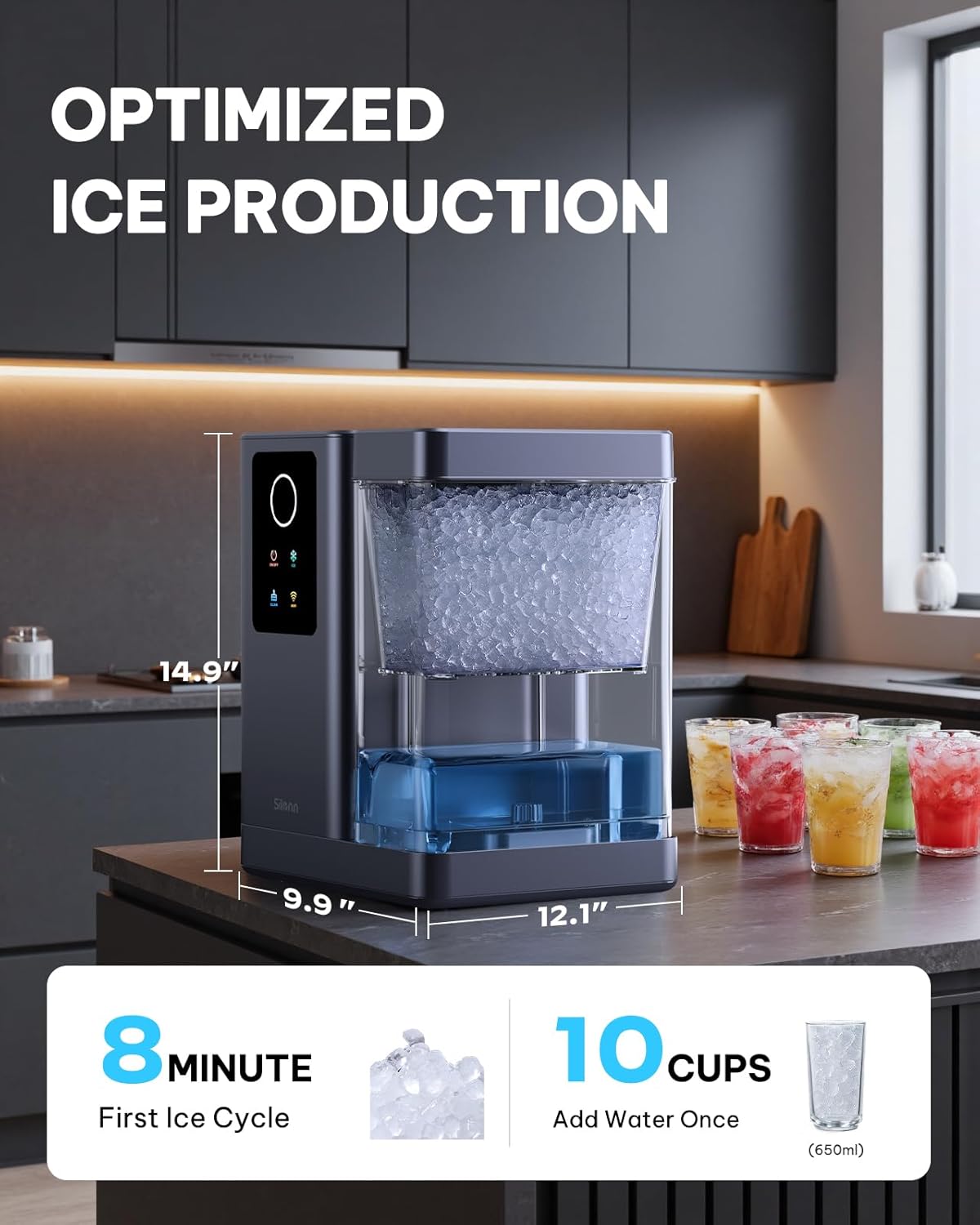
Figure 2: The soft, chewable nugget ice produced by the machine.
2. Parentah Kasalametan
Please read and understand all safety instructions before operating your Silonn Nugget Ice Maker to prevent injury or damage.
- Always place the ice maker on a stable, level surface to ensure proper operation and prevent tipping.
- Entong neuleumkeun alat, kabel listrik, atanapi nyolok kana cai atanapi cairan sanésna.
- Keep the ice maker out of reach of children and pets. Adult supervision is required when the appliance is in use.
- Unplug the ice maker from the power outlet before cleaning, performing maintenance, or when not in use for extended periods.
- Anggo ngan ukur cai anu tiasa diinum (cai anu tiasa diinum) dina tangki cai.
- Entong ngajalankeun alat nganggo kabel atanapi colokan anu ruksak, atanapi upami alatna teu tiasa dianggo atanapi parantos ruksak dina cara naon waé.
- Ensure adequate ventilation around the ice maker. Do not block any ventilation openings.
3. Eusi Paket
Upon opening your Silonn Nugget Ice Maker package, please verify that all the following items are included:
- Silonn Nugget Ice Maker unit
- És Scoop
- És Karanjang
- Manual pangguna (dokumén ieu)
4. Setélan
Unboxing
Carefully remove the ice maker from its packaging. Ensure all protective foam inserts, plastic bags, and adhesive tapes are removed from the unit and its components.
Ngabersihan Awal
Before the first use, it is crucial to clean the internal components. Remove the water tank and ice basket, wash them with mild soap and water, and rinse thoroughly. It is also recommended to run a self-cleaning cycle with clean water before making ice for consumption.
Video 1: Demonstrates the initial setup and cleaning process of the Silonn Nugget Ice Maker.
panempatan
Place the ice maker on a flat, stable, and heat-resistant surface. Ensure there is at least 5 inches of space around the unit for proper ventilation. Avoid placing it near direct sunlight, heat sources, or in areas with extreme temperatures.
5. Parentah Operasi
Ngeusian Tangki Cai
- Lift the lid of the ice maker.
- Leupaskeun karanjang és.
- Carefully lift out the transparent water tank.
- Fill the water tank with potable water up to the 'MAX' fill line indicated on the tank.
- Pasang deui tangki cai kana tempatna, pastikeun tangki cai parantos dipasang kalayan leres.
- Lebetkeun deui karanjang és sareng tutup tutupna.

Figure 3: Detachable water tank being filled with water.
Ngadamel És
- Ensure the water tank is filled and the unit is plugged into a grounded power outlet.
- Press the 'ON/OFF' button on the LED display to power on the machine.
- Press the 'ICE' button (snowflake icon) to start the ice-making cycle. The indicator light will illuminate.
- The first batch of nugget ice will be ready in approximately 8 minutes. Subsequent batches will be produced continuously.
- The machine will automatically stop making ice when the ice basket is full or when the water level is low.

Figure 4: Intuitive LED color display for easy control.
Aplikasi Pinter & Kontrol Sora
Your Silonn Nugget Ice Maker can be controlled via the SmartBQ App and voice commands through compatible smart home devices.
- Download the SmartBQ App from your device's app store.
- Turutan parentah dina aplikasi pikeun nyambungkeun mesin és anjeun ka jaringan Wi-Fi bumi anjeun.
- Once connected, you can use the app to start/stop ice production, set schedules, and receive notifications (e.g., ice basket full, low water).
- For voice control, link the SmartBQ App with your Google Home or Alexa device. Use commands like "Hey Google, make ice" or "Alexa, turn on the ice maker."

Figure 5: Voice-activated control for convenient operation.

Figure 6: SmartBQ App interface for remote control and scheduling.
Video 2: Official Silonn video demonstrating the app and voice control features of the ice maker.
6. Pangropéa
Fungsi timer beberesih
The self-cleaning function helps maintain the hygiene of your ice maker. It is recommended to run this cycle regularly, especially if you notice any changes in ice quality or taste.
- Pastikeun tank cai dieusian ku cai bersih.
- Press the 'CLEAN' button (bucket icon) on the LED display.
- The machine will run a cleaning cycle, circulating water through its internal system.
- Once the cycle is complete, drain the water from the unit as described in the 'Drainage' section.

Figure 7: Visual representation of the powerful self-cleaning mode.
Water Tank and Ice Basket Cleaning
For thorough cleaning, manually wash the detachable water tank and ice basket. Use a soft cloth or sponge with mild dish soap and warm water. Rinse all components thoroughly to remove any soap residue before reassembling.
Drainase
To drain water from the unit, locate the drainage plug at the bottom of the machine. Place a container under the plug, then remove it to allow water to flow out. Reinsert the plug firmly once all water has drained.
7. Cara ngungkulan
If you encounter any issues with your Silonn Nugget Ice Maker, please refer to the following common troubleshooting steps:
Taya Produksi És
- Pariksa tingkat cai: Ensure the water tank is filled above the minimum level.
- Sasayogian tanaga: Verify the unit is properly plugged in and powered on.
- Karanjang És: Check if the ice basket is full. The machine will pause production if the basket is full.
- Halangan: Inspect the ice-making mechanism for any blockages.
Ice Basket Full Indicator On, But Basket Not Full
- Halangan Sénsor: Ensure the ice level sensor is clean and free from ice buildup or other obstructions.
Masalah Sambungan Wi-Fi
- Pariksa jaringan: Confirm your Wi-Fi network is active and the ice maker is within range.
- Papasangan Aplikasi: Follow the detailed pairing instructions within the SmartBQ App.
- Setélan Router: Ensure your router settings allow new device connections.
If these steps do not resolve the issue, please contact Silonn customer support for further assistance.
8. Spésifikasi
| Fitur | Spésifikasi |
|---|---|
| merek | Silonn |
| Ngaran modél | SLIM41T-US |
| Dimensi produk | 12.1 "D x 10" W x 15" H |
| Kapasitas Produksi És | 40 lbs/24 jam |
| Kapasitas Tangki Cai | 3 liter |
| First Ice Cycle Time | Kira-kira. 8 menit |
| Tingkat Noise | 40-50 dB |
| Voltage | 120 volt |
| Refrigerant | R600a |
| Bahan | Acrylonitrile Butadiena Styrene |
| Smart Home kasaluyuan | Smart Home Compatible (App & Voice Control) |
| Item Beurat | 23.2 pon |
9. Garansi jeung Rojongan
Silonn provides a limited warranty for its products. For specific warranty terms, conditions, and duration, please refer to the warranty card included in your original product packaging or visit the official Silonn website. To make a warranty claim or for technical support, please have your purchase receipt and product model number (SLIM41T-US) ready when contacting customer service.
For the most up-to-date support information and contact details, please visit the Silonn official websitus atanapi tingal inpormasi kontak anu disayogikeun dina dokuméntasi produk anjeun.


