1. Bubuka
Thank you for choosing the VEVOR 4000W Pure Sine Wave Power Inverter. This device converts 12V DC power from your battery into 120V AC household power, enabling you to operate various electronic devices and appliances. Designed for reliability and efficiency, it is ideal for RVs, trucks, outdoor activities, and mobile offices. Please read this manual thoroughly before use to ensure safe and optimal performance.
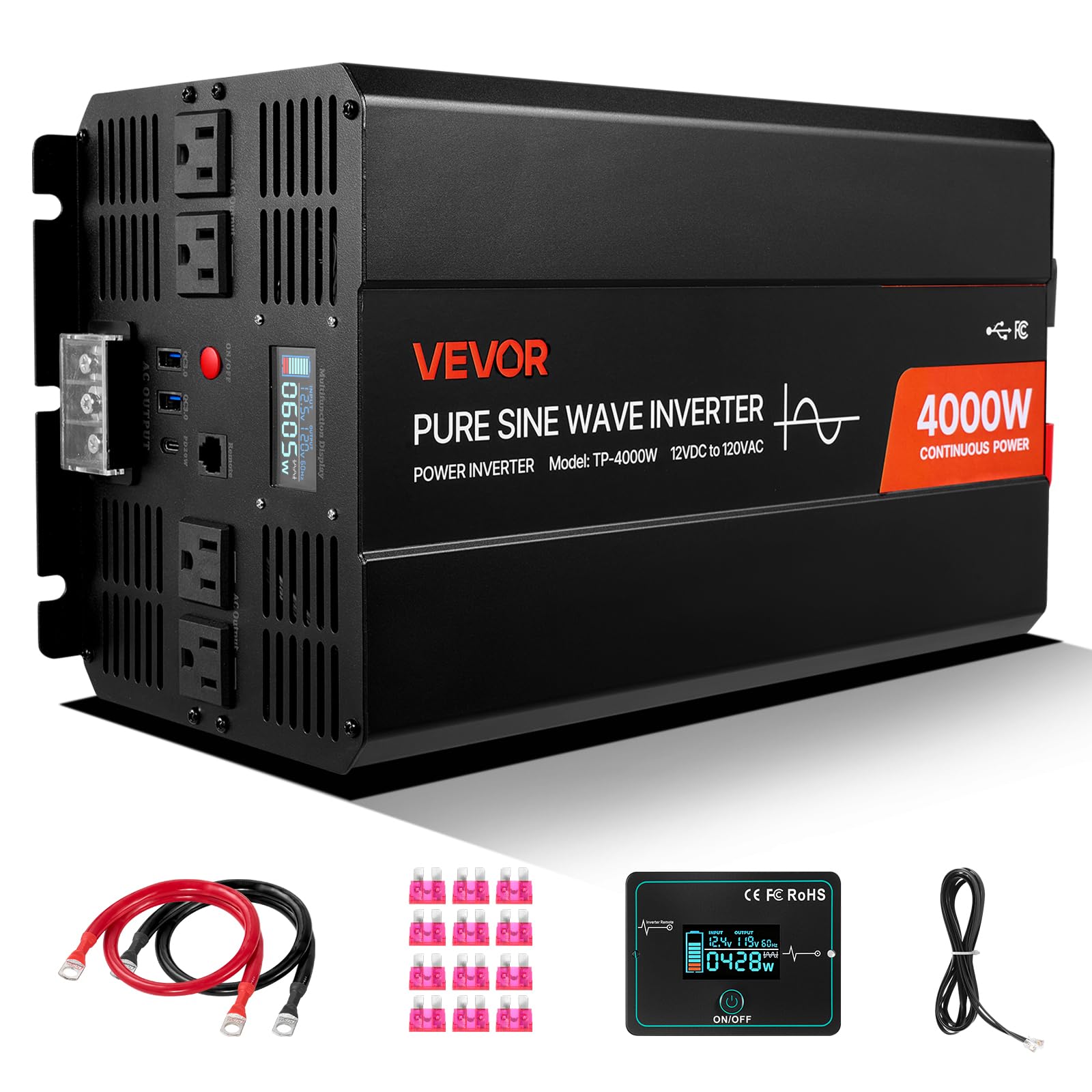
Figure 1: VEVOR 4000W Pure Sine Wave Power Inverter. This image shows the overall design of the inverter, highlighting its compact form factor and robust construction.
2. Émbaran Kasalametan
PERHATOSAN: Gagal nuturkeun parentah kaamanan ieu bisa ngakibatkeun tatu serius atawa karuksakan harta.
- Luhur Voltage: The inverter produces 120V AC, which can be lethal. Treat all connections with extreme caution.
- Ventilasi anu leres: Ensure the inverter is installed in a well-ventilated area. Do not block ventilation openings.
- Hindarkeun Uap: Do not expose the inverter to rain, water, or excessive humidity.
- Bahan anu gampang kaduruk: Do not operate the inverter near flammable liquids, gases, or other combustible materials.
- Kasalametan batré: Connect the inverter only to 12V DC batteries. Ensure correct polarity (+ to + and - to -). Battery acid is corrosive; wear protective gear.
- Grounding: The inverter must be properly grounded.
- Barudak: Tetep inverter kaluar jangkauan sahiji barudak.
- Personil anu mumpuni: Pamasangan sareng ngalayanan kedah dilakukeun ku tanaga anu mumpuni.
3. Fitur Produk
The VEVOR 4000W Pure Sine Wave Power Inverter is equipped with advanced features for reliable power conversion:
- Seven Output Ports: Includes 2 USB ports, 4 AC outlets, and 1 Type-C port for versatile device charging and power.
- Kaluaran Gelombang Sinus Murni: Provides clean and stable power, suitable for all electronics, including sensitive devices and high-power appliances like refrigerators and air conditioners.
- Flexible Remote Control: A 9.8 ft (3 m) cable remote allows convenient operation from a distance.
- Sababaraha panyalindungan: Features over-voltage, handapeun-voltage, overload, over-temperature, short circuit, and reverse polarity protection for enhanced safety.
- Layar LCD: Real-time display of power usage, input voltage, output power, and error codes for easy monitoring.
- Kipas Pendingin Calakan: Automatically activates above 113°F (45°C) to maintain optimal operating temperature and extend inverter life.
- Kompatibilitas Batré anu Lega: Compatible with GEL, SLA, LI, FLD, AGM, CLA, and USER battery types.

Figure 2: VEVOR 4000W Power Inverter with multiple output ports (2x USB, 4x AC, 1x Type-C) and compatible battery types (GEL, SLA, LI, FLD, AGM, CLA, USER). This image illustrates the various connectivity options and battery types supported by the inverter.

Figure 3: Diagram illustrating the difference between Pure Sine Wave and Modified Sine Wave output, highlighting the VEVOR inverter's pure sine wave for sensitive electronics. This graphic explains why pure sine wave is superior for powering a wide range of devices.

Gambar 4: Kelamples of devices compatible with the VEVOR 4000W Power Inverter, including phones, laptops, air conditioners, and coffee makers, with their typical wattage. This image demonstrates the wide range of applications for the inverter.
4. Parentah Setup
4.1 Ngabongkar sareng Inspeksi
- Carefully remove the inverter and all accessories from the packaging.
- Pariksa unit pikeun tanda-tanda karusakan salami transit. Lamun ruksak, ulah beroperasi sarta ngahubungan rojongan customer.
- Ensure all listed accessories are present: user manual, fuses, battery cables, and remote control.
4.2 Pemasangan sareng Ventilasi
- Pasang inverter di tempat anu garing, tiis, sareng gaduh ventilasi anu saé.
- Hindarkeun sinar panonpoé langsung, sumber panas, sareng kalembaban.
- Ensure there is at least 6 inches (15 cm) of clear space around all sides of the inverter for proper airflow.
- Do not mount the inverter in the same compartment as batteries, as batteries can emit explosive gases.
4.3 Sambungan Batré
IMPORTANT: Always connect the inverter to a 12V DC battery system. Ensure the battery is fully charged or has sufficient capacity for your intended load.
- Turn off the inverter and ensure no loads are connected.
- Nyambungkeun beureum kabel batré ka positip (+) terminal inverter teras ka positip (+) terminal batré 12V.
- Nyambungkeun hideung kabel batré ka négatip (-) terminal inverter teras ka négatip (-) terminal batré 12V.
- Ensure all connections are tight and secure to prevent loose connections, which can cause overheating.
- Connect the inverter's grounding terminal to a proper earth ground (e.g., vehicle chassis or ground rod).
4.4 Sambungan Kadali Jarak Jauh
Plug the remote control cable into the designated remote port on the inverter. The remote allows you to power the inverter on/off from a convenient location.
5. Parentah Operasi
5.1 Powering on / Pareum
- After connecting the battery, press and hold the power button on the inverter or the remote control for a few seconds until the LCD display illuminates.
- To turn off, press and hold the power button again until the display turns off.
5.2 Ngagunakeun Ports Kaluaran
- Outlet AC: Plug your 120V AC appliances into the standard AC outlets. Ensure the total wattage of connected devices does not exceed the inverter's continuous power rating (4000W).
- Port USB: Connect your USB-powered devices for charging. The inverter provides fast charging capabilities (e.g., 20W).
- Tipe-C Port: Connect your Type-C compatible devices for fast charging (e.g., 18W).

Figure 5: Illustration of the fast-charging capabilities of the USB (20W) and Type-C (18W) ports on the VEVOR 4000W Power Inverter, showing charging times for an iPhone. This image highlights the efficiency of the charging ports.
5.3 Pintonan LCD
Layar LCD nyayogikeun inpormasi sacara real-time ngeunaan operasi inverter:
- Masukan Voltage: Shows the current DC voltage ti batré Anjeun.
- Daya kaluaran: Displays the current AC power being drawn by connected devices.
- Kode Kasalahan: In case of a fault, the display will show an error code to help with troubleshooting. Refer to the troubleshooting section for details.
6. Pangropéa
6.1 beberesih
- Regularly clean the exterior of the inverter with a dry, soft cloth.
- Ensure ventilation openings are free from dust and debris to maintain proper airflow. Do not use liquids or abrasive cleaners.
6.2 Pamariksaan Konéksi
- Periodically check all battery and output connections to ensure they are tight and secure. Loose connections can cause voltage turun sareng panas teuing.
- Inspect battery cables for any signs of wear or damage. Replace if necessary.
6.3 Sistim cooling

Figure 6: Image demonstrating the intelligent cooling fan system of the VEVOR 4000W Power Inverter, which activates automatically when the internal temperature exceeds 113°F (45°C). This graphic illustrates the fan's operational thresholds.
The inverter features an intelligent cooling fan that activates automatically. Ensure the fan is not obstructed and operates freely when the inverter is under load or reaches a certain temperature.
7. Cara ngungkulan
This section provides solutions to common issues you might encounter with your VEVOR 4000W Power Inverter.
| Masalah | Mungkin Cukang lantaranana | Solusi |
|---|---|---|
| Inverter teu hurung. | Sambungan batréna leupas, voltase batréna lemahtage, sekering beak. | Check battery cable connections. Ensure battery voltage is above 11V. Check and replace internal fuses if necessary (consult a professional). |
| Henteu aya kaluaran AC. | Overload, over-temperature, low battery voltage, alat anu rusak. | Reduce connected load. Allow inverter to cool down. Recharge battery. Test appliance with another power source. |
| Overload alarm/shutdown. | Connected load exceeds inverter's capacity. | Disconnect some appliances to reduce the total load. Restart the inverter. |
| Over-temperature alarm/shutdown. | Poor ventilation, high ambient temperature, excessive load. | Ensure proper ventilation around the inverter. Reduce load. Allow inverter to cool down. |
| batré low voltage alarm/shutdown. | Batré discharged. | Recharge the battery. Disconnect non-essential loads. |
8. Spésifikasi
| Fitur | Spésifikasi |
|---|---|
| Ngaran modél | Pure Sine Wave Inverter 4000W (TP-4000W) |
| Dipasang Output Kakuatan | 4000W |
| Daya Puncak | 8000W (for a short duration) |
| Masukan Voltage | 12V DC |
| Kaluaran Voltage / Frékuénsi | 120V AC, 60Hz |
| Bentuk gelombang kaluaran | Galura murni |
| Jumlah Outlet AC | 4 |
| palabuhan USB | 2 (20W each) |
| Tipe-C Port | 1 (18W) |
| Bahan Utama | Aluminium Alloy |
| Ukuran produk (L x W x H) | 15.35 in x 6.50 in x 8.07 in (390 mm x 165 mm x 205 mm) |
| Beurat bersih | 15.65 lbs (7.1 kg) |
| Dianjurkeun Mangpaat | Camping, Car, Home, Office, Recreational Vehicle |
| Kaasup Asesoris | User Manual, 12x Fuses, 2x 60 cm Battery Cables, 1x Remote Control, 1x 3 m Remote Cable |

Figure 7: Detailed dimensions of the VEVOR 4000W Power Inverter (15.35in x 6.50in x 8.07in) and a list of included accessories: user manual, fuses, battery cables, and remote control. This image provides a visual reference for the inverter's size and package contents.
9. Garansi jeung Rojongan
produk VEVOR dirancang pikeun durability jeung kinerja. Kanggo inpormasi garansi, dukungan téknis, atanapi patarosan jasa, mangga tingal kartu garansi anu kalebet dina produk anjeun atanapi kunjungan ka VEVOR resmi. website. Please have your model number (TP-4000W) and purchase date available when contacting support.