1. Émbaran Kasalametan penting
Read all instructions before using the appliance. This manual contains important safety messages. Always follow basic safety precautions to reduce the risk of fire, electric shock, or injury to persons when using your refrigerator.
- Ulah nyimpen bahan ngabeledug sapertos kaléng aerosol kalayan propelan anu gampang kaduruk dina alat ieu.
- Entong nganggo alat-alat listrik di jero kompartemen panyimpen dahareun alat éta, kecuali aranjeunna tina jinis anu disarankeun ku produsén.
- Tetep bukaan ventilasi, dina kandang alat atawa dina struktur diwangun-di, jelas tina halangan.
- Ulah ngaruksak sirkuit refrigerant.
- Alat ieu henteu dimaksudkeun pikeun dianggo ku jalma (kalebet murangkalih) anu ngirangan kamampuan fisik, indrawi atanapi mental, atanapi kirang pangalaman sareng pangaweruh, kecuali aranjeunna dipasihan pangawasan atanapi petunjuk ngeunaan panggunaan alat ku jalma anu tanggung jawab kana kasalametanana.
- Barudak kedah diawaskeun pikeun mastikeun yén aranjeunna henteu maén sareng alatna.
2. Produk Langkungview
The LG LT19HBHSIN is a 506-liter top freezer refrigerator designed for efficient food preservation. It features a Smart Inverter Compressor for energy efficiency and durability, LINEARCooling technology to minimize temperature fluctuations, and Hygiene FRESH for internal air purification. The refrigerator also includes ThinQ technology for smart control via Wi-Fi.
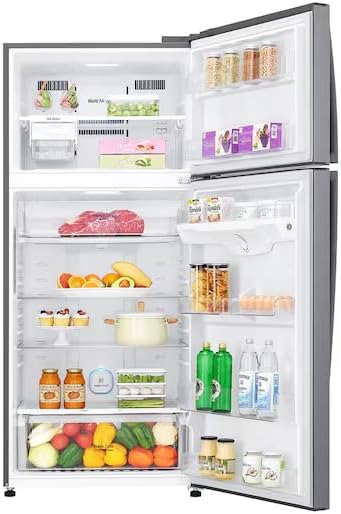
Image: The LG LT19HBHSIN refrigerator with both freezer and fresh food compartments open, displaying various food items stored on shelves and in drawers.
3. Setup jeung Instalasi
3.1 Ngabongkar bungkusan
Carefully remove all packaging materials, including tape and temporary labels. Clean the interior of the refrigerator with a soft cloth and warm water before use.
3.2 Sarat Lokasi
- Teundeun kulkas dina teguh, lanté datar.
- Ensure adequate ventilation. Maintain at least 5 cm (2 inches) clearance from the back and sides of the refrigerator to allow for proper air circulation.
- Hindarkeun sinar panonpoé langsung atanapi sumber panas.
3.3 Sambungan Daya
Connect the power cord to a dedicated grounded outlet. Do not use extension cords or multi-outlet adapters. Allow the refrigerator to stand for at least 2-3 hours before plugging it in to allow refrigerants to settle.
3.4 Mimiti Power-On
After plugging in, the refrigerator will begin cooling. It may take several hours for the appliance to reach its optimal operating temperature. Avoid placing food inside until the temperature stabilizes.

Image: The fresh food compartment of the LG LT19HBHSIN refrigerator, showing the arrangement of empty shelves and the Fresh Zone drawer.
4. Parentah Operasi
4.1 Kontrol Suhu
The refrigerator features electronic temperature controls, typically located inside the fresh food compartment or on the freezer door. Adjust the temperature settings according to your needs. The LINEARCooling system helps maintain consistent temperatures, minimizing fluctuations.
4.2 Hygiene FRESH Operation
The Hygiene FRESH system purifies the internal air using a 5-step filtering process to reduce odors and bacteria. This system operates automatically. Ensure the air filter is clean for optimal performance.
4.3 ThinQ (Wi-Fi Control)
To use the smart features, download the LG ThinQ app on your smartphone. Follow the in-app instructions to connect your refrigerator to your home Wi-Fi network. This allows for remote monitoring and control of certain functions.
4.4 Rekomendasi Panyimpenan Kadaharan
- Kompartemen dahareun seger: Store fruits, vegetables, dairy products, and cooked foods. Utilize the Fresh Zone drawer for optimal preservation of specific items.
- Kompartemen freezer: Nyimpen pangan beku. Pastikeun bungkusan disegel pikeun nyegah freezer kaduruk.
- Avoid overcrowding shelves to allow for proper air circulation.

Image: A user adjusting the humidity control on the Fresh Zone drawer, which contains various fruits and vegetables.
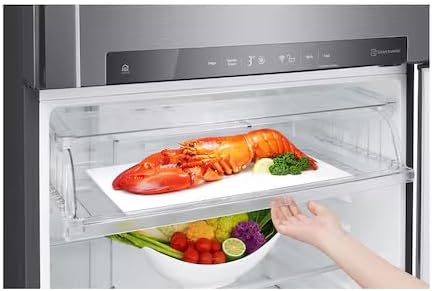
Image: The Fresh Zone drawer with a lobster on a tray, demonstrating its capacity for larger items, with vegetables stored in the compartment below.
5. Pangropéa jeung beberesih
5.1 Ngabersihan Interior
Unplug the refrigerator before cleaning. Use a mild detergent and warm water to clean the interior surfaces, shelves, and drawers. Rinse thoroughly and dry with a soft cloth. Do not use abrasive cleaners or harsh chemicals.
5.2 Ngabersihan Exterior
Ngusap permukaan luar kalayan lemes, damp cloth. For stainless steel finishes, use a specialized stainless steel cleaner. Clean door gaskets regularly to ensure a tight seal.
5.3 Defrosting
This refrigerator features a Frost-Free defrost system, eliminating the need for manual defrosting. If ice buildup occurs, check door seals for proper closure.
5.4 Hygiene FRESH Filter Maintenance
The Hygiene FRESH filter should be cleaned or replaced periodically as indicated by the appliance or the ThinQ app. Refer to the specific instructions for filter removal and maintenance.
6. Cara ngungkulan
Sateuacan ngahubungan jasa, ulangview masalah umum sareng solusi ieu:
| Masalah | Mungkin Cukang lantaranana | Solusi |
|---|---|---|
| Kulkas teu cooling | Kabel listrik dicabut; suhu disetel teuing luhur; panto ditinggalkeun muka. | Check power connection; adjust temperature setting; ensure door is closed properly. |
| Sora anu teu biasa | Refrigerator not level; items rattling inside; normal operating sounds. | Level the appliance; rearrange items; some sounds (e.g., refrigerant flow) are normal. |
| Cai dina lantai | pipah solokan clogged; panto teu sealing leres. | Clear drain tube (refer to service manual); check door gasket for damage or obstruction. |
| Bau di jero kulkas | Food items not covered; Hygiene FRESH filter needs cleaning/replacement. | Cover all food items; clean or replace Hygiene FRESH filter. |
If the problem persists after attempting these solutions, contact LG customer service.
7. Spésifikasi
Detailed technical specifications for the LG LT19HBHSIN refrigerator:
| Fitur | Spésifikasi |
|---|---|
| Ngaran Brand | LG |
| Émbaran modél | LT19HBHSIN |
| Kapasitas | 506 liter |
| Tipe Pamasangan | Jalanan |
| Faktor Bentuk | Top Freezer |
| Fitur husus | AI Smart, Smart Inverter Compressor, LINEARCooling, Hygiene FRESH, ThinQ |
| Warna | Platinum |
| Sistem Defrost | Ibun-Free |
| Engsel Panto | Leres |
| Tipe Bahan Panto | PET |
| Jumlah Panto | 1 |
| Batré Diperlukeun? | No |
| Tanggal Sadia munggaran | 28 Séptémber 2025 |
8. Garansi jeung Rojongan
Your LG refrigerator is covered by a limited warranty. Please refer to the warranty card included with your product for specific terms and conditions, including coverage duration and limitations. For technical assistance, spare parts, or to schedule a service appointment, please contact LG customer support.
You can find contact information for LG customer support on the official LG website or in your product documentation. When contacting support, please have your model number (LT19HBHSIN) and serial number ready.
For additional resources and FAQs, visit the official LG support page: LG Global Support