
1. Langkungview
The Xiaomi Redmi Note 15 Pro 5G is a high-performance smartphone designed for robust daily use. It features a massive 6580 mAh battery, IP66/IP68 dust and water resistance, a 200 MP camera, and a 6.83-inch 1.5K AMOLED display. This manual provides essential information for setting up, operating, and maintaining your device.

Gambar: sababaraha views of the Xiaomi Redmi Note 15 Pro 5G smartphone, showcasing desain na jeung modul kaméra.
2. Naon dina Box
Upon unboxing your Xiaomi Redmi Note 15 Pro 5G, you should find the following items:
- Xiaomi Redmi Catetan 15 Pro 5G Smartphone
- USB Cable (USB Type-C)
- Alat Ejection SIM
- Kasus pelindung
- Holding Ring (Keyring)
Note: A power adapter is not included with this device.
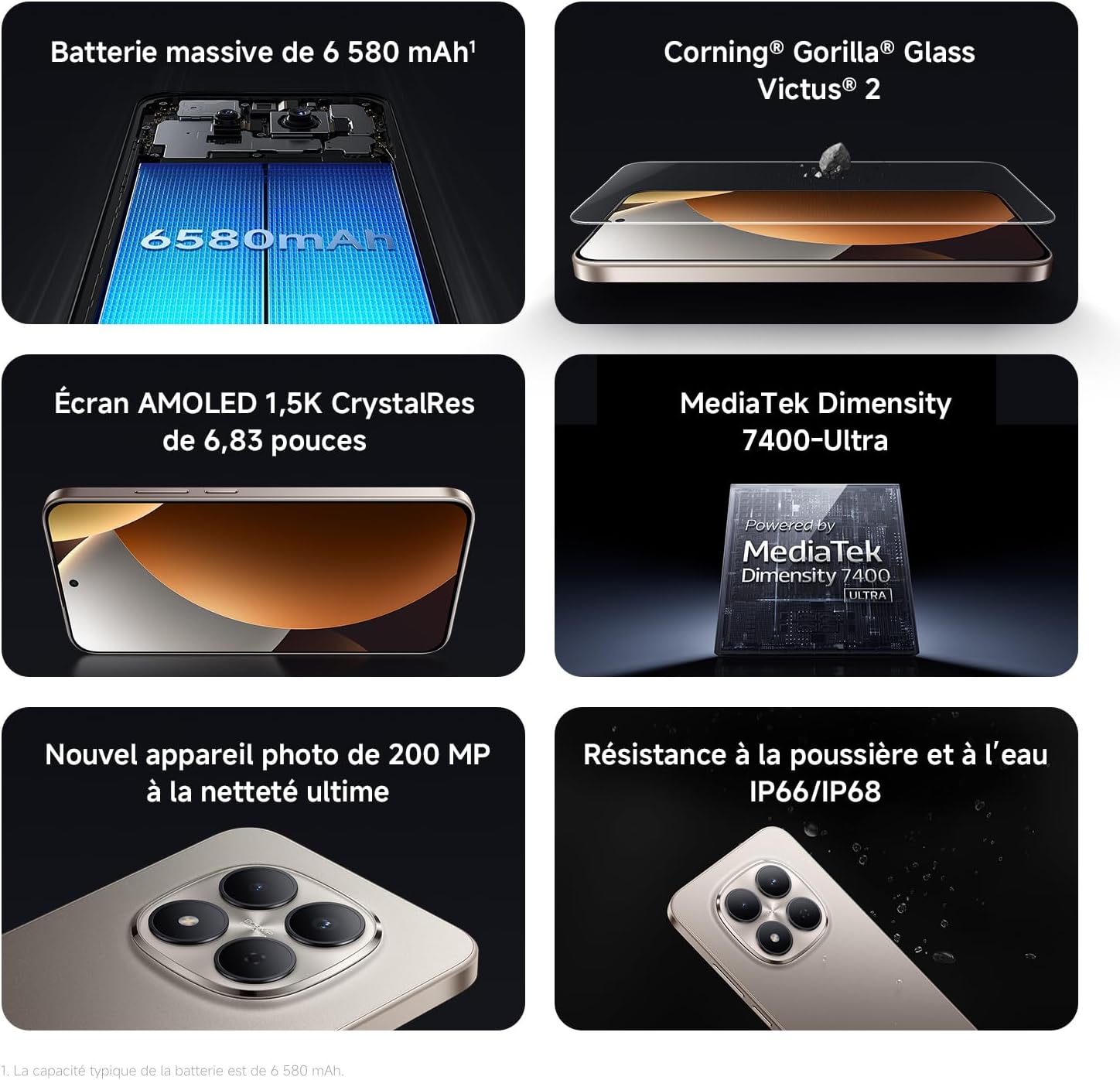
Image: Contents of the Xiaomi Redmi Note 15 Pro 5G box, showing the smartphone, USB-C cable, SIM ejection tool, protective case, and holding ring.
3. Fitur konci
- Massive 6580 mAh Battery with 45W Turbo Charging: Equipped with an ultra-large silicon-carbon battery for extended usage while maintaining a slim and light design. Supports 45W turbo charging and up to 22.5W reverse charging.
- IP66 / IP68 Dust and Water Resistance: The device has successfully passed 2-meter water resistance tests for 24 hours. It is designed to withstand daily splashes, accidental immersion, or drops in water without affecting performance.
- New 200 MP Ultra-Clear Camera System: Features a 4th generation 200 MP main sensor combined with a large 1/1.4-inch sensor, offering unprecedented image detail.
- Immersive 6.83-inch 1.5K Eye-Care AMOLED Display: Utilizes flagship-level luminous materials for reduced power consumption and a peak brightness of 3200 nits, ensuring clear visibility even in bright sunlight.
- Asisten AI: Intelligent optimization with a single gesture, enhancing imaging capabilities and creative efficiency.
- Corning Gorilla Glass Victus 2: Reinforced front glass for enhanced shock and scratch resistance, ensuring long-term durability.
- MediaTek Dimensity 7400-Ultra Processor: Built on a 4nm TSMC process with an octa-core architecture up to 2.6 GHz, providing powerful multitasking, smooth gaming, and stable performance.
- Xiaomi HyperOS 2: Offers a faster, smarter, and smoother user experience with 6 years of security updates.

Image: Diagram illustrating the 6580 mAh battery capacity of the Redmi Note 15 Pro 5G.

Image: The Redmi Note 15 Pro 5G with water droplets, demonstrating its IP66/IP68 dust and water resistance.

Gambar: Deukeut view of the 200 MP camera module on the Redmi Note 15 Pro 5G.

Image: The 6.83-inch 1.5K AMOLED display of the Redmi Note 15 Pro 5G with its specifications.

Image: Before and after images demonstrating AI photo optimization on the Redmi Note 15 Pro 5G.

Image: Illustration of Corning Gorilla Glass Victus 2 durability on the Redmi Note 15 Pro 5G.

Image: Technical image showing RAM chips, indicating up to 24GB RAM with memory extension on the Redmi Note 15 Pro 5G.

Image: Screenshot of the Xiaomi HyperOS 2 interface on the Redmi Note 15 Pro 5G.
4. Setélan
4.1. Nyelapkeun Kartu SIM
- Tangtukeun lokasi baki kartu SIM di sisi alat Anjeun.
- Selapkeun alat ejection SIM kana liang leutik gigireun baki jeung pencét pageuh nepi ka baki pops kaluar.
- Place your Nano-SIM card(s) into the tray with the gold contacts facing down. Ensure they are correctly aligned.
- Carefully push the SIM card tray back into the device until it clicks into place.
4.2. Daya Awal Hurung sareng Setup
- Pencét terus tahan tombol Daya (biasana di sisi katuhu) dugi ka logo Xiaomi némbongan.
- Turutan parentah dina-layar pikeun milih basa, wewengkon, jeung nyambung ka jaringan Wi-Fi.
- Asup sareng akun Google Anjeun atawa jieun nu anyar pikeun ngakses ladenan Google jeung Play Store.
- Set up your screen lock (PIN, pattern, password, fingerprint, or face unlock) for security.
- Review sareng satuju kana syarat sareng katangtuan pikeun ngalengkepan prosés setelan.
5. Parentah Operasi
5.1. Napigasi Dasar
- Layar Utama: Gesek ka kenca atawa ka katuhu pikeun napigasi antara layar utama.
- Laci Aplikasi: Gesek ka luhur ti bagean handap layar pikeun ngakses sadaya aplikasi anu dipasang.
- Bewara & Setélan Gancang: Gesek ka handap ti luhur layar pikeun view bewara sareng toggle aksés setélan gancang.
- Aplikasi panganyarna: Swipe up from the bottom and hold, or tap the square navigation button (if enabled) to see recently used applications.
5.2. Pamakéan kaméra
The 200 MP camera system offers various modes for capturing photos and videos.
- Buka aplikasi Kamera tina layar utama anjeun atanapi laci aplikasi.
- Swipe left or right on the screen to switch between modes like Photo, Video, Portrait, Pro, and more.
- Ketok tombol jepret pikeun nyandak poto atanapi tombol rekam pikeun ngamimitian/ngeureunkeun ngarékam pidéo.
- Use the zoom options (e.g., 0.6x, 1x, 2x) or pinch to zoom for different perspectives.
- Access settings (gear icon) for advanced options like resolution, aspect ratio, and AI enhancements.

Image: A hand holding the Redmi Note 15 Pro 5G, displaying the camera interface with various modes and controls.
5.3. Setélan tampilan
Sesuaikeun tampilan anjeun pikeun optimal viewkanyamanan sarta kanyamanan.
- Pindah ka Setelan > Tampilan.
- Adjust brightness, enable Adaptive brightness, or activate Reading mode for eye comfort.
- Change the Refresh rate (up to 120Hz) for smoother scrolling and animations.
- Select Color scheme and adjust color temperature to your preference.
5.4. Manajemén batré
Optimize your battery life and utilize charging features.
- Aksés Setélan> Batré ka view usage statistics and enable Battery Saver modes.
- Use the provided USB Type-C cable with a compatible 45W charger for turbo charging.
- To use reverse charging, connect a compatible device to your smartphone via a USB-C to USB-C cable.
6. Integrasi Média
6.1. Produk Langkungview Video
Pidéo: Anu ngajual nyayogikeun langkung tiview of the Redmi Note 15 Pro, showcasing its design, interface, and camera features. This video highlights the device's smooth operation and aesthetic appeal.
7. Pangropéa
7.1. Ngabersihan Alat Anjeun
- Anggo lawon anu lemes sareng henteu buluan pikeun ngabersihkeun layar sareng awak telepon anjeun.
- Hindarkeun ngagunakeun bahan kimia anu kasar atanapi bahan abrasive.
- For speaker and port cleaning, the device features a function to expel water and dust. Access this feature through the settings or a dedicated app.

Image: Screenshot of the Redmi Note 15 Pro 5G showing a speaker cleaning function on the screen, which uses high-frequency vibration to expel residual water and dust.
7.2. Apdet parangkat lunak
Rutin pariksa sareng pasang apdet parangkat lunak pikeun mastikeun kinerja optimal, kaamanan, sareng aksés ka fitur anyar.
- Pindah ka Setelan > Ngeunaan telepon > Vérsi MIUI (atanapi versi HyperOS) pikeun mariksa apdet.
8. Cara ngungkulan
8.1. Alat Teu Ngabales
- Pencét jeung tahan tombol Daya salila kira 10-15 detik pikeun maksa balikan deui.
- If the issue persists, ensure the device is charged. Connect it to a charger and wait a few minutes before attempting to power it on again.
8.2. Masalah Konektipitas Jaringan
- Toggle Airplane mode on and off from Quick Settings.
- Balikan deui alat anjeun.
- Pariksa naha kartu SIM anjeun leres diselapkeun.
- Pindah ka Setelan > Kartu SIM & jaringan seluler to ensure your mobile data is enabled and the correct network type is selected.
8.3. Aplikasi nabrak atanapi katirisan
- Hapus cache sareng data aplikasi anu bermasalah (Setélan > Aplikasi > Atur aplikasi > [Ngaran Aplikasi] > Hapus data).
- Uninstall sareng pasang deui aplikasi.
- Pastikeun parangkat lunak alat anjeun parantos diropéa.
8.4. Reset pabrik
If you encounter persistent issues, a factory reset may be necessary. Awas: Ieu bakal mupus sadaya data dina alat Anjeun. Nyadangkeun data penting sateuacan neraskeun.
- Pindah ka Setelan > Ngeunaan telepon > Reset pabrik.
- Turutan parentah dina-layar pikeun mastikeun reset.
9. Spésifikasi
| Fitur | Rincian |
|---|---|
| merek | XIAOMI |
| Ngaran modél | Redmi Catetan 15 Pro 5G |
| Sistem operasi | Sistem Operasi Hiper |
| Ram | 12 GB |
| Kapasitas Panyimpenan | 512 GB |
| Modél CPU | Mediatek Dimensity 7400 |
| Ukuran layar | 6.83 inci |
| Resolusi tampilan | 1560 x 720 |
| Refresh Laju | 120 Hz |
| Tipe tampilan | AMOLED |
| Pamawa nirkabel | Henteu dikonci |
| Warna | Hideung |
| Slot Kartu SIM | Dual SIM |
| Panganteur Input | USB Tipe C |
| Tingkat Résistansi Cai | Waterproof (IP66/IP68) |
| Resolusi kaméra hareup | 20 MP |
| Résolusi kaméra pungkur | 200 megapiksel |
| Kapasitas batré | 6580 mAh |
| Téhnologi sélular | 5G |
| Téhnologi konektipitas | Bluetooth, NFC, USB, Wi-Fi |
| Model Taun | 2026 |

Image: Technical specifications and feature legends for the Redmi Note 15 Pro 5G.
10. Garansi jeung Rojongan
Your Xiaomi Redmi Note 15 Pro 5G comes with a 2-taun jaminan produsén urang. Garansi ieu nyertakeun cacad dina bahan sareng pagawean dina panggunaan normal.
For warranty claims, technical support, or service inquiries, please contact Xiaomi customer service or visit the official Xiaomi support websitus. Simpen bukti pameseran anjeun pikeun validasi jaminan.