1. Bubuka
Hatur nuhun pikeun meuliasing the ThermoPro TP210B Wireless Refrigerator/Freezer Thermometer. This device is designed to help you monitor the temperature of your refrigerator and freezer wirelessly, ensuring your food is stored at optimal temperatures. With a strong 500ft/150m wireless range and customizable alarms, you can easily keep track of temperature fluctuations.
2. Eusi Paket
- 1 x Unit panarima
- 1 x Unit pamancar
- 2 x AAA Batteries (for Receiver)
- 1 x USB Charging Cable (for Transmitter)
- 1 x Manual Pamaké
3. Fitur konci
- Jangkauan Wireless diperpanjang: Up to 500ft/150m using advanced RF technology for stable connection.
- Pre-Paired for Immediate Use: No complex setup required; units are pre-paired from the factory.
- Rentang Ukur Lebar: Accurate readings within ±0.9°F across -40°F to 158°F (-40°C to 70°C).
- Smart Temperature Alerts: Customizable high/low temperature limits with audio-visual alarms.
- Easy-to-Read Backlit Display: Shows fridge and freezer readings, Max/Min records, and low-battery status.
- Considerate Power Design: Receiver uses AAA batteries, transmitter features a rechargeable lithium battery.
- Pilihan Penempatan Fleksibel: Receiver has hook, stand, or magnet; transmitter has clip or stand.
4. Setélan
4.1. Receiver Battery Installation
- Buka kompartemen batré dina tonggong unit panarima.
- Selapkeun 2 batré AAA, mastikeun polaritasna bener (+/-).
- Tutup kompartemen batré anu aman.
Note: The receiver requires 2 AAA batteries, which are included in the package.
4.2. Transmitter Charging
- Locate the charging port on the transmitter unit.
- Connect the provided USB charging cable to the transmitter and a standard USB power source (e.g., wall adapter, computer USB port).
- Allow the transmitter to charge fully before first use. The charging indicator will change when fully charged.
Note: The transmitter uses a rechargeable lithium battery designed for low-temperature environments.
4.3. Initial Pairing (Pre-Paired)
The ThermoPro TP210B units are pre-paired at the factory. Simply power on both the receiver and transmitter, and they should automatically connect. If connection issues occur, refer to the Troubleshooting section.
4.4. Panempatan
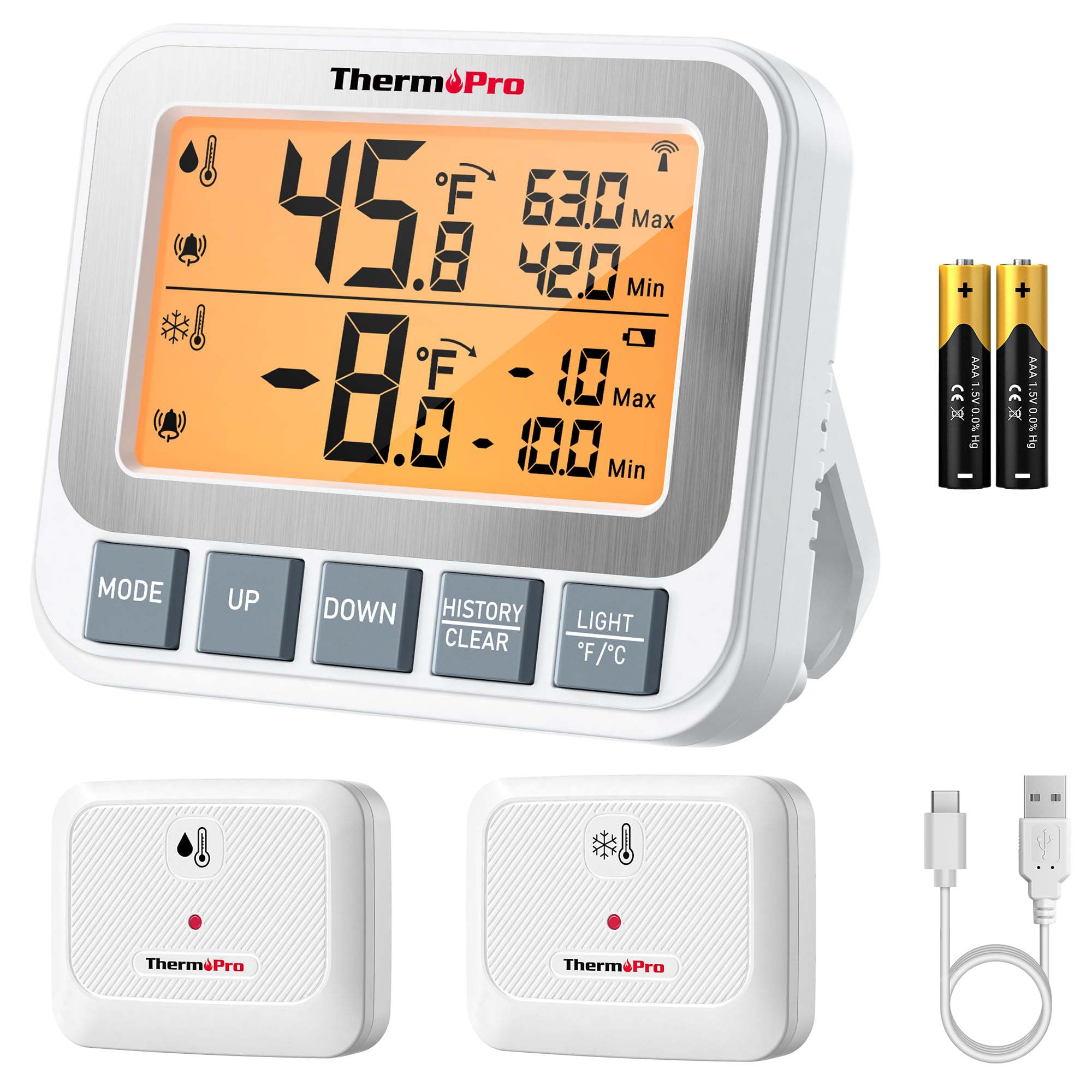
Image: ThermoPro TP210B Receiver and Transmitter. The receiver displays temperatures, while the transmitter sends data from inside the appliance.
Penempatan panarima:
- Use the integrated stand to place it on a countertop.
- Utilize the magnetic back to attach it to a metallic surface.
- Hang it using the hook on the back.
- Place the receiver in a location where you can easily view the display and hear alarms, within the 500ft/150m range of the transmitter.
Panempatan Pemancar:
- Place the transmitter inside your refrigerator or freezer.
- Use the integrated clip to attach it to a shelf or rack.
- Ensure the transmitter is not obstructed by large items that could block the wireless signal.
5. Parentah Operasi
5.1. Daya Hurung / Pareum
- Pencét éta POWER button on both the receiver and transmitter to turn them on or off.
5.2. Maca Suhu
- The receiver's backlit LCD display will show the current temperature from the transmitter.
- The display typically shows both the current temperature and the all-time Max/Min records.
5.3. Nyetel Alarm Suhu
The TP210B allows you to set custom high and low temperature limits for alerts.
- Pencét éta AWAS button on the receiver. The high limit will flash.
- Ngagunakeun éta UP or TURUN buttons to adjust the high temperature limit.
- Pencét AWAS again to confirm the high limit and move to the low limit setting.
- Ngagunakeun éta UP or TURUN buttons to adjust the low temperature limit.
- Pencét AWAS a third time to confirm the low limit and exit alarm setting mode.
When the temperature exceeds the set range, the receiver will emit an audio-visual alarm.
5.4. Max/Min Temperature Records
- The receiver automatically records the maximum and minimum temperatures detected since the last reset.
- Pencét éta MAX/MIN button to cycle through current, maximum, and minimum temperature readings.
- To reset the Max/Min records, press and hold the MAX/MIN tombol pikeun 3 detik bari viewing the Max/Min display.
5.5. Lampu tukang
- The receiver features a bright backlit display for easy reading in low-light conditions.
- The backlight will activate automatically when a button is pressed and will turn off after a short period of inactivity to conserve battery.
6. Pangropéa
6.1. beberesih
- Lap unit-unitna nganggo iklanamp lawon. Ulah beuleum dina cai.
- Ulah make cleaners abrasive atawa pangleyur.
6.2. Battery Replacement (Receiver)
- When the low battery indicator appears on the receiver display, replace the 2 AAA batteries.
- Pastikeun polaritasna leres nalika masang batré anyar.
6.3. Transmitter Charging
- Recharge the transmitter's lithium battery when the low battery indicator appears.
- Paké kabel ngecas USB disadiakeun.
6.4. Panyimpenan
- If storing the device for an extended period, remove the AAA batteries from the receiver.
- Nyimpen dina tempat garing jauh ti suhu ekstrim.
7. Cara ngungkulan
| Masalah | Mungkin Cukang lantaranana | Solusi |
|---|---|---|
| No temperature reading / "--" displayed | Transmitter not powered on, out of range, or low battery. |
|
| Bacaan suhu teu akurat | Sensor obstruction, extreme environmental conditions, or sensor malfunction. |
|
| Alarm teu disada | Alarm limits not set correctly or alarm function disabled. |
|
| Transmitter battery drains quickly | Operating in extremely low temperatures or frequent signal transmission. |
|
8. Spésifikasi
- Rentang Suhu: -40°F nepi ka 158°F (-40°C nepi ka 70°C)
- Akurasi Suhu: ± 0.9 ° F (± 0.5 ° C)
- Jangkauan nirkabel: Up to 500ft (150m) in open air
- Frékuénsi pangiriman: 433 MHz
- Daya panarima: 2 x batré AAA (kaasup)
- Daya pamancar: Rechargeable Lithium battery (included, with USB charging cable)
- tampilan: LCD backlit
- Ukuran (Receiver): Kira-kira 4.33 inci (panjangna)
- Beurat (Item): Kira-kira 11.2 ons
9. Jaminan & Dukungan
ThermoPro provides a warranty for this product against defects in materials and workmanship. For detailed warranty information, product registration, or technical support, please visit the official ThermoPro websitus atanapi ngahubungan layanan palanggan maranéhanana langsung.
Resmi Websitus: www.thermopro.com
Rojongan Palanggan: Refer to the contact information provided on the ThermoPro websitus atanapi bungkusan produk.


