1. Bubuka jeung Leuwihview
The Zoom PodTrak P4next is a portable podcast recorder designed for high-quality audio capture and production. This device offers a comprehensive solution for podcasters, featuring multiple inputs, advanced audio processing, and flexible recording options. Its compact design and battery power capability make it suitable for both studio and on-the-go recording environments.
Fitur konci:
- Kualitas Audio Unggul: 4 XLR inputs with -125 dBu EIN for professional-grade recordings.
- Portability ditingkatkeun: Lightweight (10.58 oz / 300g) and compact (4.95 x 4.72 x 1.57 inches) for mobile use.
- Manjangkeun Umur Batré: Up to 8.5 hours of continuous recording with lithium batteries.
- Daya tahan anu kuat: Sturdy construction for demanding environments.
- Intuitive Ease of Use: Clear 128 x 64 OLED display and user-friendly controls.
- Pangaruh Diwangun-di: AI Noise Reduction, Tone, and Compression.
- Konektipitas serbaguna: Phone input for call-in guests, USB audio interface mode.
- Pad sora: Customizable sound pads for instant playback.
2. Setélan
2.1 Powering Alat
The PodTrak P4next can be powered in multiple ways:
- Batré AA: Insert 2 AA batteries into the battery compartment located on the underside of the device.
- Daya USB-C: Connect a USB-C cable to the DC 5V port on the side of the unit and to a compatible USB power adapter or power bank.

Gambar 2.1: Tukangeun view of the PodTrak P4next, illustrating the battery compartment for 2 AA batteries.

Gambar 2.2: Sisi view of the PodTrak P4next, highlighting the microSD card slot and USB-C power input.
2.2 Nyambungkeun Mikropon
The PodTrak P4next features 4 XLR inputs for connecting microphones. These inputs provide phantom power for condenser microphones.
- Connect your XLR microphones to the corresponding input jacks (1-4) on the top of the device.
- Ensure phantom power is enabled for condenser microphones via the dedicated switches if required.

Gambar 2.3: Hareupeun view of the PodTrak P4next, displaying the four XLR microphone inputs at the top.
2.3 Nyambungkeun headphone
Four independent headphone outputs are available for monitoring.
- Plug your headphones into the 3.5mm jacks (1-4) located on the front edge of the device.
- Each output has an individual volume control knob.

Gambar 2.4: Sisi view of the PodTrak P4next, illustrating the four headphone output jacks and their respective volume controls.
2.4 Nyelapkeun Kartu SD
The PodTrak P4next records directly to an SD card.
- Open the microSD card slot cover on the side of the device.
- Insert a microSD card (up to 1TB supported) until it clicks into place.
Gambar 2.5: Sisi view of the PodTrak P4next, indicating the microSD card slot for recording media.
2.5 Connecting to Phone/Computer
The device supports external connections for various recording scenarios.
- Input Telepon: Use a TRRS cable to connect your smartphone to the dedicated phone input for recording call-in guests.
- Antarmuka Audio USB: Connect the PodTrak P4next to a computer via USB-C to use it as an audio interface for recording directly to your digital audio workstation (DAW).

Figure 2.6: The PodTrak P4next connected to a smartphone, demonstrating its capability to integrate phone calls into your podcast.
3. Operating the PodTrak P4next
3.1 Rekaman Dasar
Pikeun ngamimitian ngarékam:
- Ensure microphones and headphones are connected and powered.
- Adjust the gain knobs for each microphone input to achieve optimal levels, avoiding clipping.
- Pencét beureum RECORD button to start recording. The button will illuminate.
- Pencét éta RECORD tombol deui pikeun ngeureunkeun ngarékam.
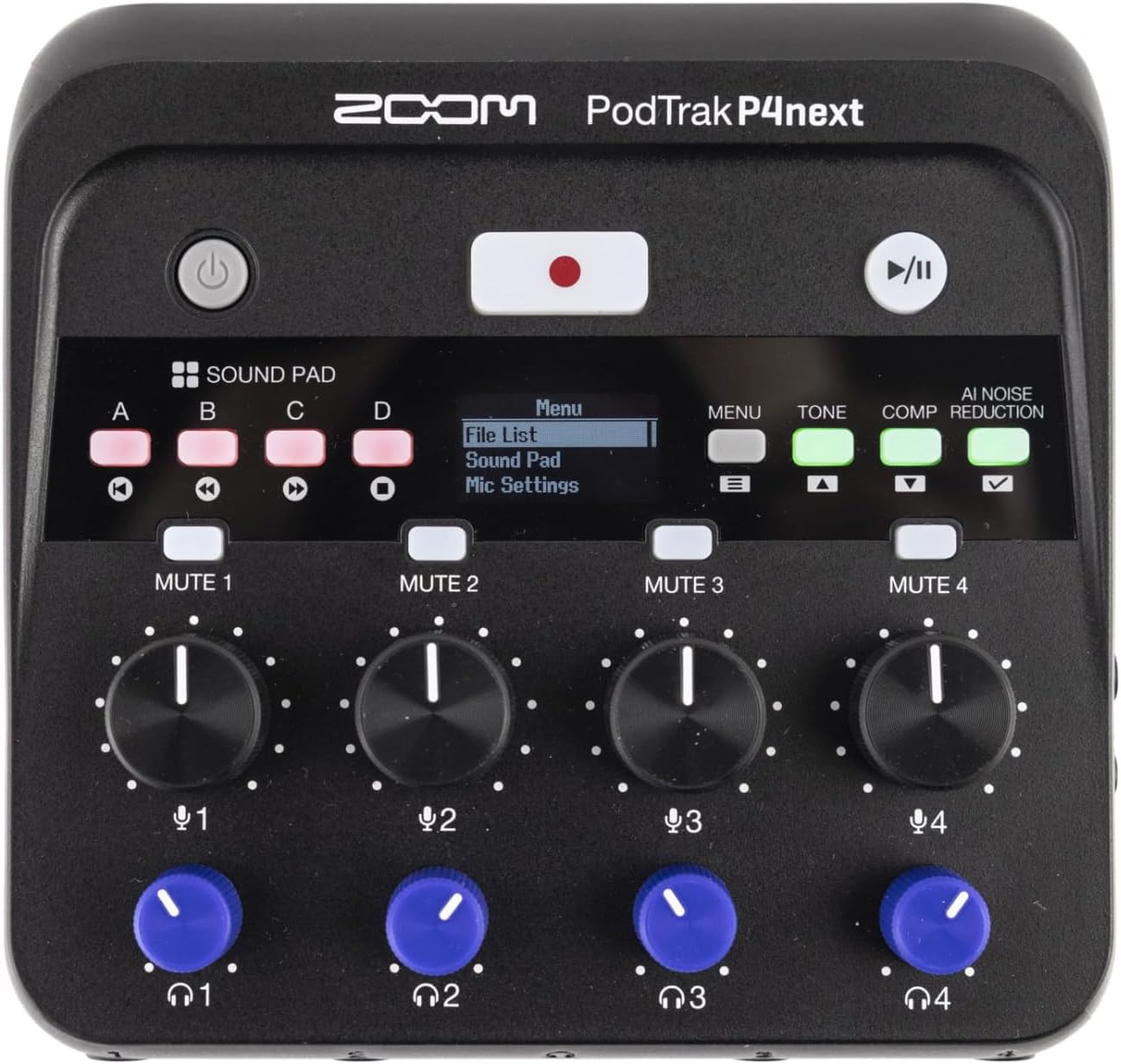
Gambar 3.1: Top-handap view of the PodTrak P4next, highlighting the main controls including the record button and input gain knobs.
3.2 Pad sora
The four sound pads (A, B, C, D) can be used to trigger pre-recorded audio clips or sound effects during your podcast.
- Press a sound pad button (A, B, C, or D) to play the assigned sound.
- Adjust the volume of the sound pads using the dedicated knob.
3.3 Tombol Bisu
Each microphone input has a dedicated mute button (MUTE 1-4) to quickly silence a participant.
- Pencét éta BISA button for the desired channel to mute it. The button will illuminate to indicate it is muted.
- Pencét deui pikeun nganonaktipkeun.
3.4 Audio Effects (AI Noise Reduction, Tone, Comp)
Enhance your audio with built-in effects:
- Pangurangan Noise AI: Activates intelligent noise cancellation to minimize background distractions.
- Nada: Adjusts the tonal characteristics of the audio.
- Comp (Compression): Applies compression to even out audio levels.
- Press the respective buttons (AI NOISE REDUCTION, TONE, COMP) to toggle these effects on or off.

angka 3.2: Tutup-up view of the PodTrak P4next's control panel, highlighting the AI Noise Reduction, Tone, and Compression effect buttons.
3.5 Recording Phone Calls and USB Audio
The PodTrak P4next allows seamless integration of phone calls and USB audio.
- Connect your phone to the dedicated input using a TRRS cable. The device automatically creates a mix-minus feed to prevent echo for the caller.
- When connected as a USB audio interface, audio from your computer can be routed through the P4next and recorded alongside your microphones.
4. Pangropéa
Proper maintenance ensures the longevity and optimal performance of your PodTrak P4next.
- beberesih: Anggo lawon anu lemes sareng garing pikeun ngabersihkeun bagian luar alat. Hindarkeun pembersih atanapi pangleyur anu abrasif.
- Panyimpenan: Store the unit in a cool, dry place away from direct sunlight and extreme temperatures. Remove batteries if storing for extended periods to prevent leakage.
- Pembaruan firmware: Périodik pariksa Zoom resmi websitus pikeun apdet firmware pikeun mastikeun alat anjeun ngagaduhan fitur pangénggalna sareng perbaikan bug.
5. Cara ngungkulan
If you encounter issues with your PodTrak P4next, refer to the following common solutions:
- Henteu aya kakuatan: Ensure batteries are correctly inserted and charged, or that the USB-C power source is functioning.
- Henteu aya Input Audio: Check microphone connections, ensure phantom power is on for condenser mics, and verify gain levels are appropriately set.
- No Headphone Audio: Confirm headphones are plugged in correctly and individual headphone volume knobs are turned up.
- Masalah Rekaman: Check if the SD card is properly inserted and has sufficient free space. Ensure the card is formatted correctly (FAT32).
- Echo on Phone Calls: The P4next features automatic mix-minus. Ensure your phone is connected via a TRRS cable to the dedicated phone input.
6. Spésifikasi
| Fitur | Spésifikasi |
|---|---|
| Item Beurat | 12 ons (340g) |
| Dimensi produk | 4.95 x 4.72 x 1.57 inci (12.57 x 11.99 x 3.99 cm) |
| Nomer Modél Item | P4next/230EU |
| Input Mikropon | 4 x XLR (with -125 dBu EIN) |
| Kaluaran headphone | 4 x 3.5mm stereo mini jack (with individual volume control) |
| Média Rékam | microSD/microSDHC/microSDXC card (up to 1TB) |
| Kahirupan batré | Up to 8.5 hours (with lithium batteries) |
| Audio Interface Mode | Dirojong via USB-C |
7. Video Produk Resmi
Video 7.1: An official introduction to the Zoom PodTrak P4next, showcasing desain na fitur primér.
8. Garansi jeung Rojongan
For warranty information, technical support, and additional resources, please visit the official Zoom websitus atanapi ngahubungan departemén layanan palanggan maranéhna. Simpen bukti pameseran anjeun pikeun klaim garansi.
- Dukungan Online: Visit the Zoom Store on Amazon
- Pendaptaran Produk: Ngadaptar produk Anjeun online pikeun nampa apdet sarta rojongan.


