1. Produk Langkungview
The TECKNET TK-KB041 is a versatile, slim wireless keyboard designed for multi-device compatibility and comfortable typing. It offers both 2.4GHz USB-A and Bluetooth connectivity, allowing seamless switching between up to three devices. Its low-profile scissor-switch keys provide a quiet and fluid typing experience, while the integrated numeric keypad enhances productivity. The keyboard features a rechargeable battery with long standby time and power-saving auto-sleep functionality.

Figure 1: TECKNET TK-KB041 Slim Wireless Keyboard.
2. Naon dina Box
- Wireless Keyboard (Model TK-KB041) x 1
- Kabel Ngecas USB-C x 1
- Buku Panduan x 1
- USB-A Receiver (stored in the keyboard's back slot) x 1
3. Parentah Setup
3.1 Powering On the Keyboard
- Locate the ON/OFF switch on the side of the keyboard.
- Geser saklar ka posisi "ON".

Figure 2: The keyboard's ultra-slim profile, nyorot desain kompak na.
3.2 Connecting via 2.4GHz USB-A Receiver
- Locate the USB-A receiver stored in the magnetic slot on the back of the keyboard.
- Plug the USB-A receiver into an available USB port on your computer or device.
- Kiborna kedahna nyambung sacara otomatis.

Figure 3: Location of the USB-A receiver slot on the back of the keyboard.
3.3 Nyambungkeun via Bluetooth
- Pastikeun keyboard diaktipkeun.
- Pencét jeung tahan tombol Fn konci sareng salah sahiji konci saluran Bluetooth (Fn + 1, Fn + 2, atawa Fn + 3) for 3 seconds. The corresponding Bluetooth indicator light (B1, B2, or B3) on the keyboard will start blinking, indicating it's in pairing mode.
- Dina alat anjeun (komputer, tablet, smartphone), buka setélan Bluetooth.
- Milarian pikeun available devices and select "TK-KB041" (or similar name) from the list.
- Follow any on-screen prompts to complete the pairing process. The indicator light on the keyboard will stop blinking and remain solid for a few seconds, then turn off, indicating a successful connection.
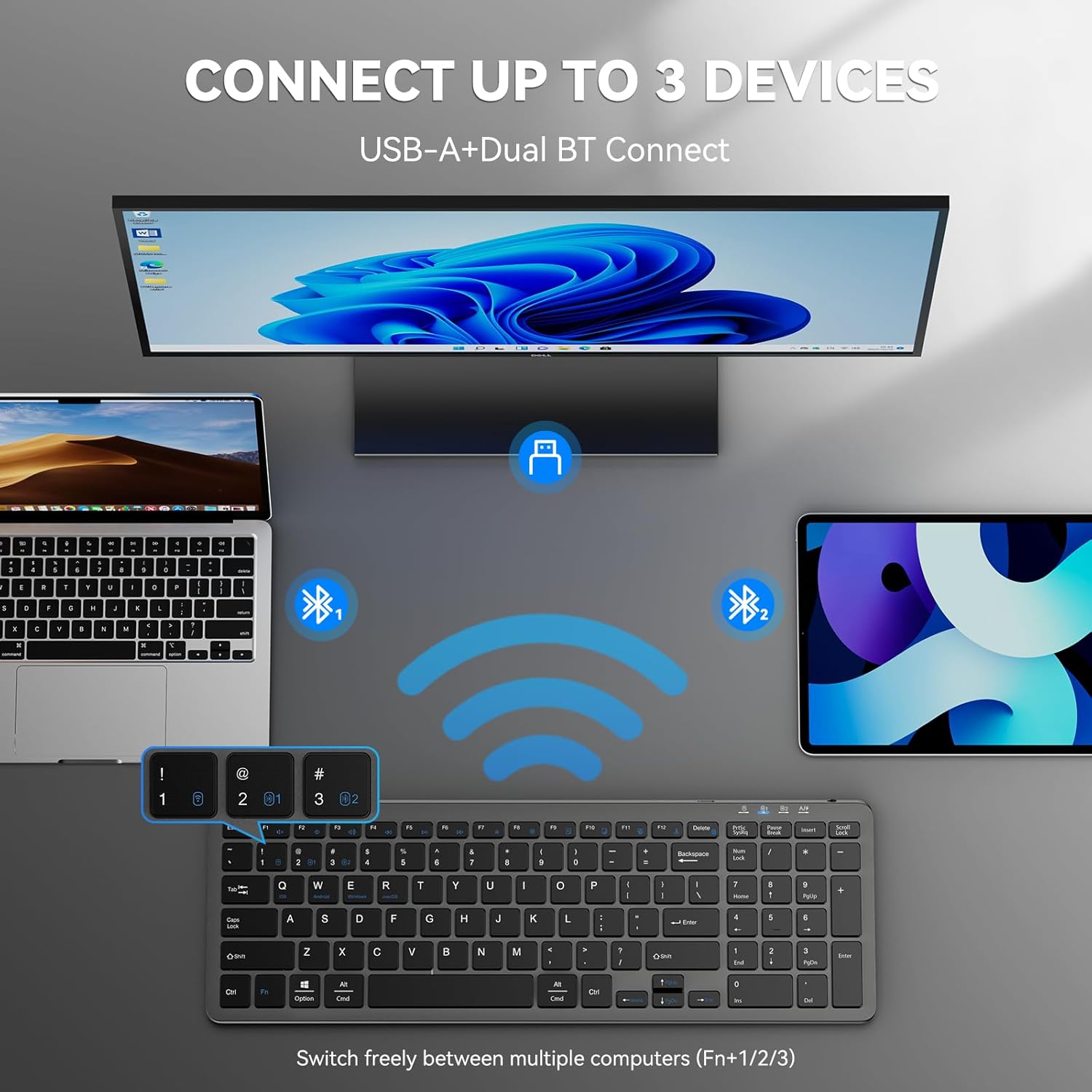
Figure 4: The keyboard connected to multiple devices via Bluetooth and USB-A.
4. Parentah Operasi
4.1 Ngalihkeun Antara Alat nu Nyambung
The keyboard supports connecting to up to three devices via Bluetooth and one via 2.4GHz USB-A. To switch between devices:
- For Bluetooth devices: Press fn+1, fn+2, atawa fn+3 to switch to the corresponding Bluetooth-paired device.
- For 2.4GHz USB-A device: Press fn+4 to switch to the device connected via the USB-A receiver.
4.2 Ngaganti Sistem Operasi
The keyboard is compatible with Windows, macOS, iOS, and Android. To optimize key functions for your operating system:
- For Windows: Press Fn + W
- For macOS: Press Fn + E
- For iOS: Press Fn + Q
- For Android: Press Fn + Urang Sunda

Figure 5: Keyboard layout highlighting function keys and OS switch keys.
4.3 Multimedia Function Keys (F1-F12)
The F1-F12 keys have secondary multimedia functions. To use these functions, press the Fn konci sakaligus jeung F-konci nu dipikahoyong.
- F1: Home
- F2: Pilarian
- F3: Pilih Sadaya
- F4: Salin
- F5: Témpél
- F6: Potong
- F7: Lagu saméméhna
- F8: Play / Reureuh
- F9: Lagu salajengna
- F10: Jempé
- F11: Volume Turun
- F12: Volume Up

Figure 6: Illustration of the multimedia function keys (F1-F12).
4.4 Lampu Indikator
Kibor ieu ngagaduhan sababaraha lampu indikator:
- B1/B2/B3: Bluetooth connection indicators. Blink during pairing, solid when connected, then turn off.
- Konci hurup ageung: Nyaangan nalika Caps Lock aktip.
- Nomer Konci: Illuminates when Num Lock is active.
- Ngecas Nagara: A red light indicates charging. A green light indicates fully charged.
- Batré lemah: The charging state indicator will blink blue when the battery is low, signaling that a recharge is needed.
5. Pangropéa
5.1 Ngecas kibor
The keyboard has a built-in 280mAh rechargeable battery. To charge:
- Connect the provided USB-C charging cable to the USB-C port on the keyboard.
- Sambungkeun tungtung kabel anu sanés ka sumber kakuatan USB (contona, port USB komputer, adaptor témbok USB).
- The charging indicator light will illuminate red during charging and turn green when fully charged.
- A full charge takes approximately 2 hours and provides up to 200 hours of use or 90 days of standby time. The keyboard can be used while charging.

Figure 7: USB-C charging port on the keyboard.
5.2 beberesih
- Pareuman kibor sateuacan beberesih.
- Ngagunakeun lemes, damp cloth to wipe the surface of the keyboard.
- Hindarkeun ngagunakeun bahan kimia anu kasar atanapi bahan abrasive.
- Pikeun ngabersihkeun antara konci, anggo udara anu dikomprés atanapi sikat lemes.
5.3 Modeu Hemat Daya
The keyboard automatically enters sleep mode after 10 minutes of inactivity to conserve power. Press any key to wake it up.
6. Cara ngungkulan
6.1 Kibor Teu Nyambung
- Pastikeun keyboard diaktipkeun.
- Pariksa tingkat batré; ngecas lamun perlu.
- For 2.4GHz connection: Ensure the USB-A receiver is securely plugged into your device. Try a different USB port.
- Pikeun sambungan Bluetooth:
- Pastikeun Bluetooth diaktipkeun dina alat Anjeun.
- Put the keyboard into pairing mode (Fn + 1/2/3 for 3 seconds).
- Remove any previous "TK-KB041" pairings from your device's Bluetooth list and try pairing again.
- Ensure the keyboard is within the 33ft (10m) operating range.
6.2 Kenop Teu Ngabales
- Check the connection (USB-A or Bluetooth) as described above.
- Pastikeun batré kibor tos dicas.
- Pareuman terus hurungkeun deui alat anjeun teras cobian sambungkeun deui.
6.3 Incorrect Key Output
- Ensure the correct operating system mode is selected (Fn + Q/W/E/R).
- Check your device's language and keyboard layout settings.
7. Spésifikasi produk
| Fitur | Rincian |
|---|---|
| Nomer modél | TK-KB041 |
| Téhnologi konektipitas | 2.4GHz USB-A, Bluetooth |
| Alat nu cocog | PC, Laptop, Mac, MacBook, Tablet, Smartphone, iPhone, iPad (Windows, macOS, iOS, Android) |
| Kapasitas batré | 280mAh (bisa dicas deui) |
| Waktu Ngecas | Kira-kira. 2 jam |
| Waktos Operasi | Nepi ka 200 jam |
| Waktu sayaga | Nepi ka 90 dinten |
| Rentang Operasi | Nepi ka 33 suku (10 méter) |
| Tipe kibor | Low-profile Pindah Gunting |
| Dimensi produk | 14.42 x 5 x 0.46 inci (36.63 x 12.7 x 1.17 cm) |
| Item Beurat | 14.1 ons (400 gram) |
| Bahan | palastik |
| Warna | Hideung |
8. Garansi jeung Rojongan
TECKNET provides 36-Month Support for registered products. If you encounter any problems in using the product, please reach out to the TECKNET professional customer service team for assistance.
For further support and warranty registration, please visit the official TECKNET websitus atanapi ngahubungan layanan palanggan maranéhanana langsung.

Figure 8: TECKNET's commitment to technology and customer support.
9. Pituduh Pidéo
Video 1: Official product video demonstrating the features and usage of the Tecknet Slim Rechargeable Bluetooth Wireless Keyboard.