1. Bubuka
The COUGAR CFV235 is an innovative PC case featuring a Central Floating Ventilation (CFV) structure. This design separates the power supply unit compartment from the main chamber, utilizing the space between them as a highly effective ventilation channel to enhance cooling performance. The CFV235 combines a full panoramic view, a compact footprint, and structurally reinforced cooling capabilities to achieve superior airflow beyond traditional case designs.
This manual provides essential information for the proper installation, operation, and maintenance of your COUGAR CFV235 PC case. Please read it thoroughly before beginning assembly.
2. Fitur konci
- Central Floating Ventilation (CFV) Structure: Innovative design for enhanced cooling efficiency.
- Full Panoramic View: Clear tempered glass panels for showcasing komponén internal.
- Desain Aliran Udara Tinggi: Optimized for superior air circulation.
- Kasaluyuan lega: Supports Mini ITX, Micro ATX, ATX, and CEB motherboards.
- AmpPilihan Panyimpenan: Multiple drive bays for 3.5" HDDs and 2.5" SSDs.
- Generous Component Clearance: Accommodates long GPUs, tall CPU coolers, and standard PSUs.
- Konstruksi awét: Built with robust materials for longevity.

Gambar 2.1: Hareup-sisi view of the COUGAR CFV235 PC case, highlighting its panoramic glass panels and illuminated interior.

Figure 2.2: The COUGAR CFV235 PC case showcasing its design in both black and white variants, with internal components and customizable RGB lighting.
3. Setup Guide
3.1 Unpacking the Case
- Kaluarkeun wadah PC tina bungkusna kalayan ati-ati.
- Inspect the case for any signs of damage during transit. Contact your retailer immediately if any damage is found.
- Remove all protective films and internal packaging materials.
3.2 Pamasangan komponén
Before installing components, ensure you have all necessary tools, including a Phillips head screwdriver.
- Pamasangan motherboard:

Figure 3.1: Interior of the CFV235 case, showing pre-installed motherboard standoffs.
- Pasang tameng I/O kana bukaan pungkur wadahna.
- Align your Mini ITX, Micro ATX, ATX, or CEB motherboard with the pre-installed standoffs.
- Secure the motherboard using the provided screws.
- Pamasangan Power Supply Unit (PSU):
- The CFV235 features a dedicated PSU compartment. Install your ATX PSU (up to 200mm length) into this compartment.
- Amankeun PSU nganggo sekrup ti tukangeun casing.
- Pamasangan Drive Panyimpen:

Figure 3.2: Rear interior of the CFV235, illustrating cable management options and locations for 2.5" and 3.5" drive bays.
- Install 3.5" HDDs into the designated drive bays (up to 2 drives).
- Install 2.5" SSDs into the dedicated SSD mounts (up to 4 drives, 2 of which are shared with 3.5" bays).
- Ensure all drives are securely fastened.
- Pamasangan Kartu Grafis (GPU):

Figure 3.3: Diagram indicating the maximum GPU length of 430mm supported by the CFV235 case.
- Casing ieu ngadukung GPU anu panjangna dugi ka 430mm.
- Insert your GPU into the appropriate PCIe slot on the motherboard and secure it with the retention clip and screw.
- Pamasangan CPU Cooler:
- The case supports CPU coolers up to 175mm in height.
- Pasang cooler CPU anjeun nurutkeun parentah produsén na.
- Manajemén Kabel:
- Mangpaatkeun potongan rute kabel sareng titik pangiket di tukangeun baki motherboard pikeun ngatur kabel kalayan rapih.
- Proper cable management improves airflow and aesthetics.
4. Parentah Operasi
4.1 Panel I/O Hareup

Figure 4.1: The front I/O panel of the CFV235, featuring USB ports, audio jacks, and the power button.
Panel I/O hareup nyadiakeun aksés anu merenah kana port sareng kontrol penting:
- Tombol Daya: Pencét pikeun ngahurungkeun/mareuman sistem anjeun.
- Tombol Reset: Pencét pikeun ngamimitian deui sistem anjeun.
- Port USB: Sambungkeun alat USB.
- Jacks audio: Sambungkeun headphone sareng mikropon.
4.2 Aliran Udara jeung Cooling
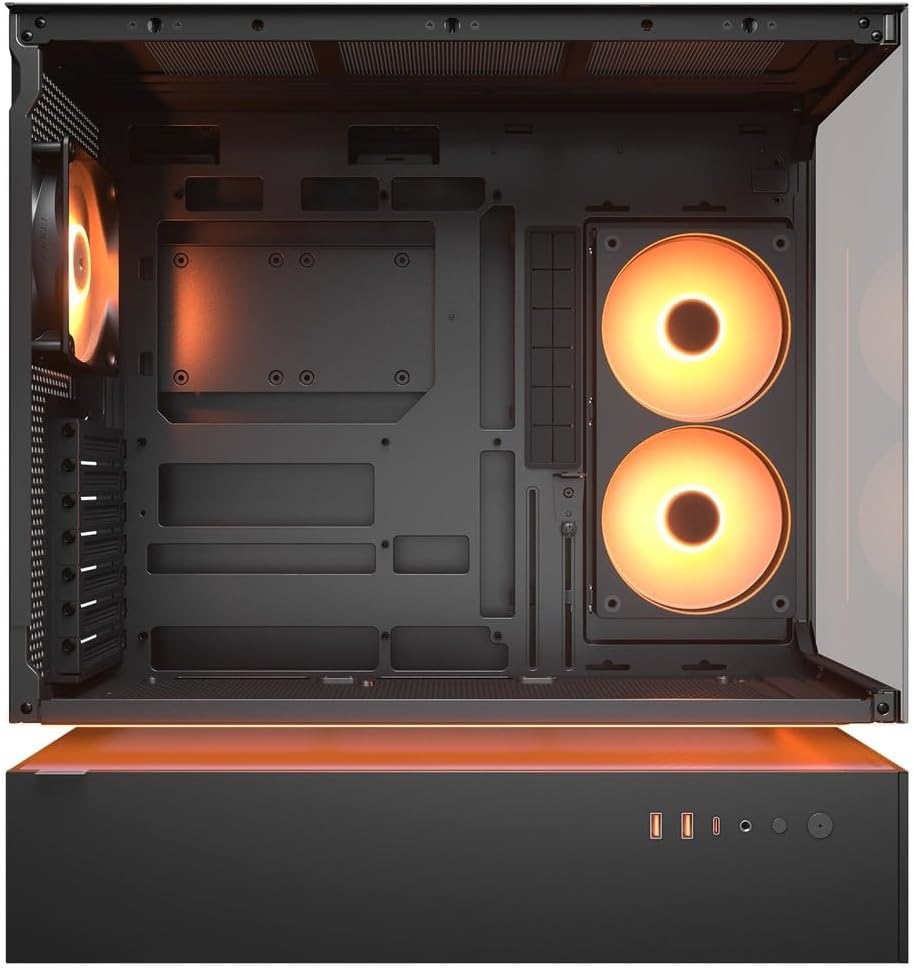
Gambar 4.2: Internal view of the CFV235 with fans installed, demonstrating the potential for high airflow.
The CFV235 is designed for optimal airflow. Ensure all fans are correctly installed and oriented to facilitate efficient cooling. The Central Floating Ventilation structure promotes direct airflow to critical components.
5. Pangropéa
5.1 Lebu Filter beberesih

Figure 5.1: Removable magnetic dust filter for easy cleaning.
Regular cleaning of dust filters is crucial for maintaining optimal airflow and preventing dust buildup inside your PC. The CFV235 features easily removable dust filters:
- Gently remove the magnetic dust filters located on the top and bottom of the case.
- Bersihkeun saringan nganggo hawa anu dikomprés atanapi ku cara dibilas ku cai. Pastikeun saringanna garing pisan sateuacan dipasang deui.
- Reattach the filters to their respective positions.
5.2 beberesih umum
- Ngagunakeun lemes, damp cloth to wipe down the exterior surfaces of the case.
- Avoid using harsh chemicals or abrasive materials that could damage the finish or tempered glass.
- For internal cleaning, use compressed air to remove dust from components and fan blades.
6. Cara ngungkulan
Bagian ieu ngabahas masalah umum anu anjeun tiasa pendak. Pikeun masalah anu langkung rumit, mangga tingali bagian dukungan.
6.1 Sistim Teu Powering On
- Pariksa naha kabel daya parantos nyambung kalayan pageuh kana PSU sareng stop kontak dina témbok.
- Ensure the PSU switch is in the "ON" position.
- Pariksa deui yén kabel tombol daya panel hareup parantos disambungkeun kalayan leres kana motherboard.
- Confirm that all internal power connections (24-pin ATX, CPU, GPU) are firmly seated.
6.2 Isu overheating
- Ensure all case fans and CPU/GPU coolers are functioning correctly.
- Clean any dust buildup from fans and dust filters (refer to Section 5.1).
- Verify that fans are oriented for optimal airflow (intake and exhaust).
- Check for proper cable management to avoid obstructing airflow.
6.3 USB/Audio Ports Not Working
- Ensure the front panel USB and audio cables are correctly connected to the motherboard headers.
- Check your operating system's device manager for any driver issues.
7. Spésifikasi
| Fitur | Spésifikasi |
|---|---|
| merek | Cougar |
| Ngaran modél | CFV235 |
| Diménsi Produk (W x H x D) | 235 x 493 x 460 mm |
| Beurat produk | 9.5 kg |
| Dirojong Motherboards | Mini ITX / mikro ATX / ATX / CEB |
| Drive Bays | 5.25" x0 / 3.5" x2 / 2.5" SSD x2+2 (2 shared with 3.5" bays) |
| Max GPU Panjangna | 430 mm |
| Max CPU Cooler Jangkungna | 175 mm |
| Max Panjang PSU | 200 mm |
| Warna | Hideung |
| Fitur | Central Floating Ventilation, Panoramic Glass, High Airflow, Built-in Fans |
8. Garansi jeung Rojongan
Your COUGAR CFV235 PC case comes with a garansi 1 taun ti tanggal beuli. Garansi ieu nyertakeun cacad manufaktur sareng cacad bahan dina panggunaan normal.
For technical support, warranty claims, or further assistance, please visit the official COUGAR website or contact your local retailer. Please have your product model number (CFV235) and proof of purchase ready when contacting support.
Official COUGAR Websitus: cougargaming.com


