1. Bubuka
This manual provides detailed instructions for the installation, operation, and maintenance of your ASUS ROG Strix X870E-H Gaming WIFI7 Motherboard. Please read this manual thoroughly before attempting any installation or configuration to ensure proper functionality and to prevent damage to the components.
2. Émbaran Kasalametan
- Salawasna pegatkeun kabel daya tina stop kontak témbok sateuacan noel komponén internal naon waé.
- Anggo tali pigeulang anti-statik nalika nanganan komponén motherboard pikeun nyegah karusakan éléktrostatik (ESD).
- Pastikeun ventilasi anu pas dina wadah PC anjeun pikeun nyegah overheating.
- Tetep motherboard jauh ti Uap jeung hawa ekstrim.
- Refer to the CPU and other component manuals for specific installation guidelines.
3. Eusi Paket
Pariksa yén sadaya item anu didaptarkeun di handap aya dina pakét motherboard anjeun:
- ROG STRIX X870E-H GAMING WIFI7 Motherboard
- 2 x kabel SATA 6Gb/s
- Antena ASUS WiFi Q
- Cable ties package
- M.2 Q-Latch package
- PCIe to Front USB Card (supports 2 x USB Type-A 5Gbps and 1 x USB Type-C 10Gbps Ports)
- PHONE STAND HATSUNE MIKU EDITION
- THANK YOU CARD HATSUNE MIKU EDITION
- STICKER HATSUNE MIKU EDITION
- 4 x M.2 rubbers
- Pituduh ngamimitian gancang

Image: Contents of the ASUS ROG Strix X870E-H Gaming WIFI7 Motherboard retail package, including the motherboard, cables, antenna, and documentation.
4. Setup jeung Instalasi
4.1 Tata Letak Motherboard

Gambar: luhur-handap view of the ASUS ROG Strix X870E-H Gaming WIFI7 Motherboard, highlighting key areas and design elements.
4.2 CPU Installation (AMD AM5 Socket)
This motherboard supports AMD Ryzen 9000, 8000 & 7000 series desktop processors. Carefully align your AMD AM5 processor with the socket, ensuring the triangular markers on the CPU and socket match. Gently lower the CPU into the socket without applying force. Secure the retention arm.
4.3 Pamasangan RAM (DDR5)
The motherboard features 4 DIMM slots supporting DDR5 memory up to 256GB. For optimal performance, install memory modules in matched pairs for dual-channel operation. Open the DIMM slot clips, align the memory module notch with the slot key, and press down firmly on both ends until the clips snap into place.
4.4 M.2 Instalasi SSD
The board includes two PCIe 5.0 M.2 slots and two PCIe 4.0 M.2 slots, all equipped with cooling solutions. Utilize the M.2 Q-Release mechanism for tool-less installation. Insert the M.2 SSD into the slot at an angle, then gently push it down and secure it with the Q-Latch.
4.5 Pamasangan Kartu PCIe
Install graphics cards or other expansion cards into the PCIe 5.0 x16 SafeSlots. Ensure the card is properly seated and secured with the PCIe Slot Q-Release mechanism.
4.6 Sambungan kakuatan
Connect the 24-pin ATX power connector and the dual ProCool II 8-pin CPU power connectors from your power supply to the motherboard. Ensure all connections are secure.

Image: Diagram illustrating the motherboard's power stages, DDR5 DIMM slots, M.2 slots, and PCIe expansion slots.
4.7 Pamasangan Sistim cooling
Install your CPU cooler onto the AM5 socket. Connect CPU fan headers and AIO pump headers to the designated points on the motherboard. The board features massive heatsinks with an integrated I/O cover and high-conductivity thermal pads for optimal thermal management. Connect case fans to the four-pin case fan headers.
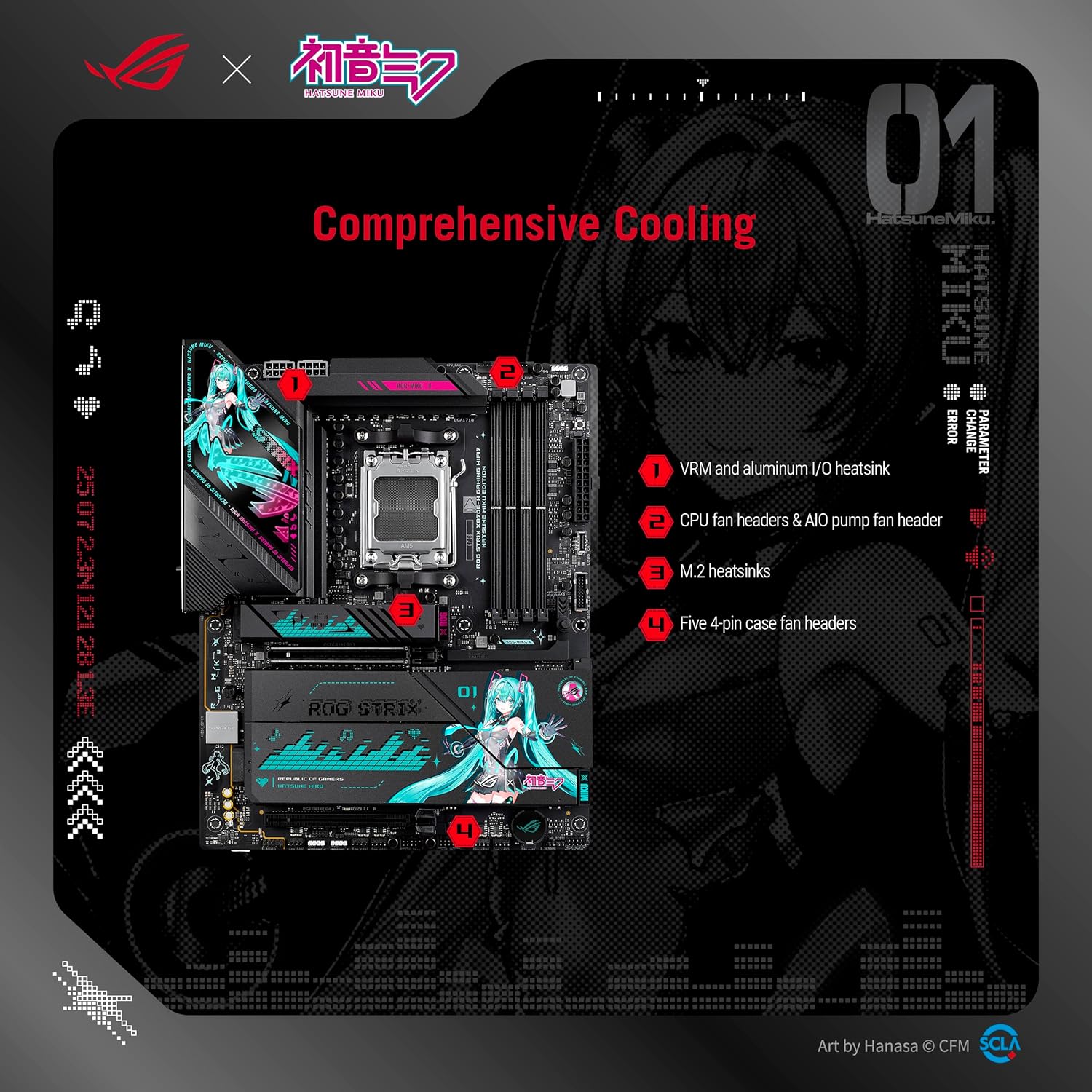
Gambar: Leuwihview of the motherboard's comprehensive cooling solutions, including VRM heatsinks, CPU fan headers, M.2 heatsinks, and case fan headers.
5. Parentah Operasi
5.1 BIOS / Setup UEFI
Aksés UEFI BIOS ku mencét tombol DEL or F2 key during system startup. The intuitive UEFI BIOS dashboard allows for system configuration, monitoring, and updates. Refer to the ASUS support website for detailed BIOS guides.
5.2 Pamasangan parangkat lunak
Utilize ASUS DriverHub for easy driver installation. Additional software like ASUS GlideX, HWiNFO, Norton 360 for Gamers (60-day free trial), and a 60-day AIDA64 Extreme trial subscription are bundled for enhanced functionality and system monitoring.
5.3 Fitur AI
The motherboard integrates several AI-driven features:
- Overclocking AI: Profiles the CPU and cooling to predict optimal configuration.
- Pendinginan AI II: Balances thermals and acoustics with a single click.
- Jaringan AI II: Provides reliable and full-speed WiFi 7 connectivity.
- Panaséhat AI ASUS: Uses AI technology to understand natural-language questions, simplifying the functionality of ASUS motherboards.
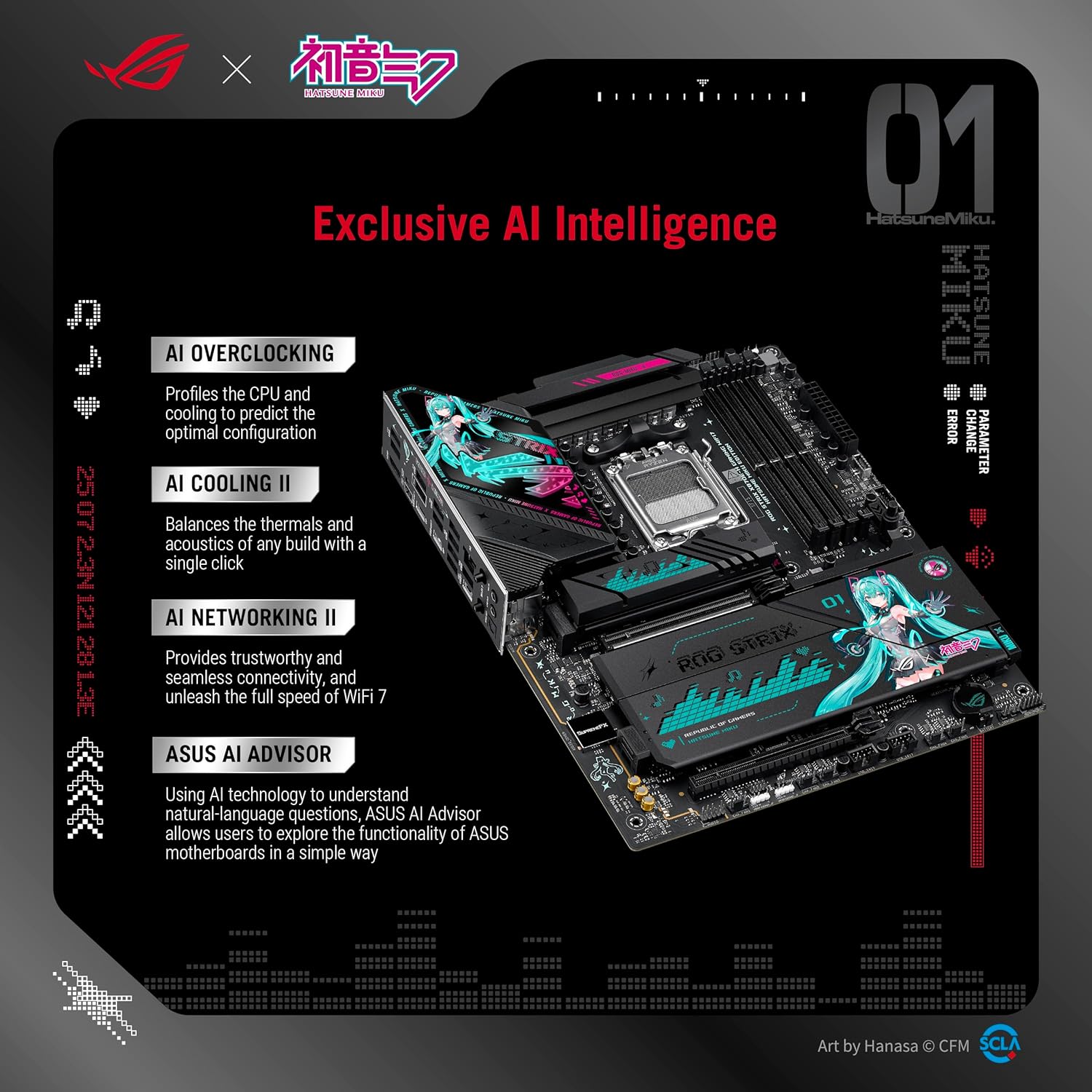
Image: Visual representation of the motherboard's exclusive AI Intelligence features, including AI Overclocking, AI Cooling II, AI Networking II, and ASUS AI Advisor.
5.4 Jaringan
Benefit from high-performance networking with on-board WiFi 7 (802.11be) and Realtek 5Gb Ethernet. Ensure the ASUS WiFi Q-Antenna is properly connected for optimal wireless performance.
5.5 Audio
Experience immersive audio with the Realtek ALC1220P 7.1 Surround Sound High Definition Audio CODEC, featuring a Savitech SV3H712 AMP.
5.6 Lampu RGB Sinkronisasi Aura
Personalize your system with ASUS-exclusive Aura Sync RGB lighting, including three addressable Gen 2 headers for connecting compatible RGB devices.
6. Pangropéa
6.1 beberesih
Regularly clean your PC case and motherboard components to prevent dust buildup, which can lead to overheating. Use compressed air to remove dust from heatsinks, fans, and other components. Ensure the system is powered off and unplugged before cleaning.
6.2 Update mios
Keep your BIOS updated to ensure compatibility with new hardware and to benefit from performance improvements and bug fixes. The BIOS FlashBack button allows for easy BIOS updates without a CPU or RAM installed. Refer to the ASUS support websitus pikeun versi mios panganyarna na prosedur update.
6.3 Pembaruan Pembaruan
Ensure all drivers for your motherboard components (chipset, audio, LAN, WiFi, etc.) are up-to-date. Use ASUS DriverHub or visit the ASUS support websitus pikeun ngaunduh panggerak panganyarna pikeun sistem operasi anjeun.
7. Cara ngungkulan
7.1 Q-LED Indicators
The Q-LED indicators on the motherboard provide visual cues for system status during boot-up. Consult your quick start guide or the ASUS support website for a detailed explanation of Q-LED codes to diagnose boot issues.
7.2 Hapus Tombol CMOS
If you encounter system instability or boot issues after changing BIOS settings, use the Clear CMOS button to reset the BIOS to its default settings. Refer to the motherboard layout for the exact location of this button.
7.3 Connectivity Issues (Bluetooth/WiFi)
For optimal Bluetooth and WiFi functionality, ensure you are running Windows 11, as the wireless card used in this board may have drivers primarily available for this operating system.
7.4 General System Instability
If your system experiences crashes or freezes, check the following:
- Pastikeun sadaya kabel kakuatan disambungkeun aman.
- Verify that RAM modules are properly seated.
- Pariksa suhu CPU sareng GPU pikeun nyingkahan panas teuing.
- Update all system drivers and BIOS to the latest versions.
8. Spésifikasi
| Fitur | Spésifikasi |
|---|---|
| merek | ASUS |
| Ngaran modél | ROG STRIX X870E-H GAMING WIFI7 |
| CPU Socket | Socket AM5 |
| Prosesor cocog | AMD Ryzen™ 9000, 8000 & 7000 Series Desktop Processors |
| Tipe Chipset | AMD X870E |
| Téhnologi Mémori RAM | DDR5 |
| RAM Mémori Ukuran Maximum | 256 GB |
| Solusi kakuatan | 16+2+1 kakuatan stages, 80A per stage, Dual ProCool II connectors |
| M.2 Rojongan | 2x PCIe 5.0 M.2 slots, 2x PCIe 4.0 M.2 slots |
| liang ékspansi PCIe | 1x PCIe 5.0 x16 SafeSlot (CPU), 1x PCIe 4.0 x16 slot (Chipset) |
| Jaringan | On-board WiFi 7 (802.11be), Realtek 5Gb Ethernet |
| Konektipitas USB | Dual USB4 Type-C, USB 20Gbps Type-C front-panel, USB 10Gbps Type-C rear I/O (PD 3.0 up to 30W), 3x additional USB 10Gbps ports |
| Audio | Realtek ALC1220P 7.1 Surround Sound HD Audio CODEC with Savitech SV3H712 AMP |
| Ukuran (L x W x H) | 12 x 9.6 x 1.5 inci |
| Item Beurat | 5.52 pon |
| Platform | Windows 11 |
9. Garansi jeung Rojongan
9.1 Émbaran jaminan
Your ASUS ROG Strix X870E-H Gaming WIFI7 Motherboard is covered by a manufacturer's warranty. Please refer to the warranty card included in your package or visit the official ASUS websitus pikeun istilah jaminan lengkep jeung kaayaan husus pikeun wewengkon Anjeun.
9.2 Rojongan Téknis
Kanggo bantosan téknis, unduhan supir, apdet BIOS, sareng inpormasi produk salajengna, mangga buka dukungan resmi ASUS. websitus:
https://www.asus.com/support/download-center/
You can also contact ASUS customer service for direct support.