
Bubuka
This manual provides essential information for the safe and efficient operation of your AIPER Cordless Robotic Pool Cleaner, Seagull Pro ZT6002. Designed for inground pools up to 1,600 sq.ft, this cleaner features WavePath Navigation, wall-climbing capabilities, and a powerful quad-motor system for thorough cleaning of the pool floor, walls, and waterline. Please read this manual carefully before use and retain it for future reference.

The AIPER Seagull Pro ZT6002 robotic pool cleaner is designed for comprehensive pool maintenance.
Disetél
- Unboxing: Kaluarkeun sadaya komponén tina bungkusna kalayan ati-ati. Pastikeun sadaya bagian aya numutkeun daptar bungkusna.
- Ngecas: Before first use, fully charge the robotic pool cleaner. The built-in 7,800mAh battery offers up to 150 minutes of continuous cleaning and fully recharges in approximately 3-6 hours. Connect the charger to the device and a power outlet. The LED indicator on the control dial will show charging status.

The robotic pool cleaner connected to its charger, indicating the charging process.
- Penempatan awal: Once fully charged, slowly submerge the cleaner into the pool. Ensure it fills with water and sinks to the bottom.
This video demonstrates the AIPER robotic pool cleaner operating in a pool, showcasing kamampuh gerakan sareng beberesihna.
Parentah Operasi
The Seagull Pro ZT6002 features an intuitive control dial for selecting cleaning modes and monitoring battery status.
Modeu Ngabersihan:
Rotate the control dial to select one of the three cleaning modes:
- Modeu otomatis: The cleaner intelligently navigates to clean both the pool floor and walls. When the battery is above 50%, it prioritizes floor cleaning in an 'S' pattern. Below 50% battery, it switches to wall and waterline cleaning in an 'N' pattern.
- Mode Lantai Hungkul: Focuses solely on cleaning the pool floor.
- Modeu Témbok Hungkul: Concentrates on scrubbing the pool walls and waterline.
The intuitive control dial allows selection of cleaning modes and displays battery status with different colors.
WavePath Navigation:
The advanced WavePath navigation system ensures efficient and thorough coverage of your pool. It adapts its cleaning pattern based on battery level to optimize cleaning performance.

WavePath Navigation technology uses different patterns for floor and wall cleaning depending on battery charge.
Indikator batré:
The LED ring around the control dial indicates the battery level:
- héjo: > 90% batré
- Biru: 50-89% batré
- Koneng: 10-49% batré
- Beureum: Batré <9%
Pangropéa
Ngabersihan Keranjang Filter:
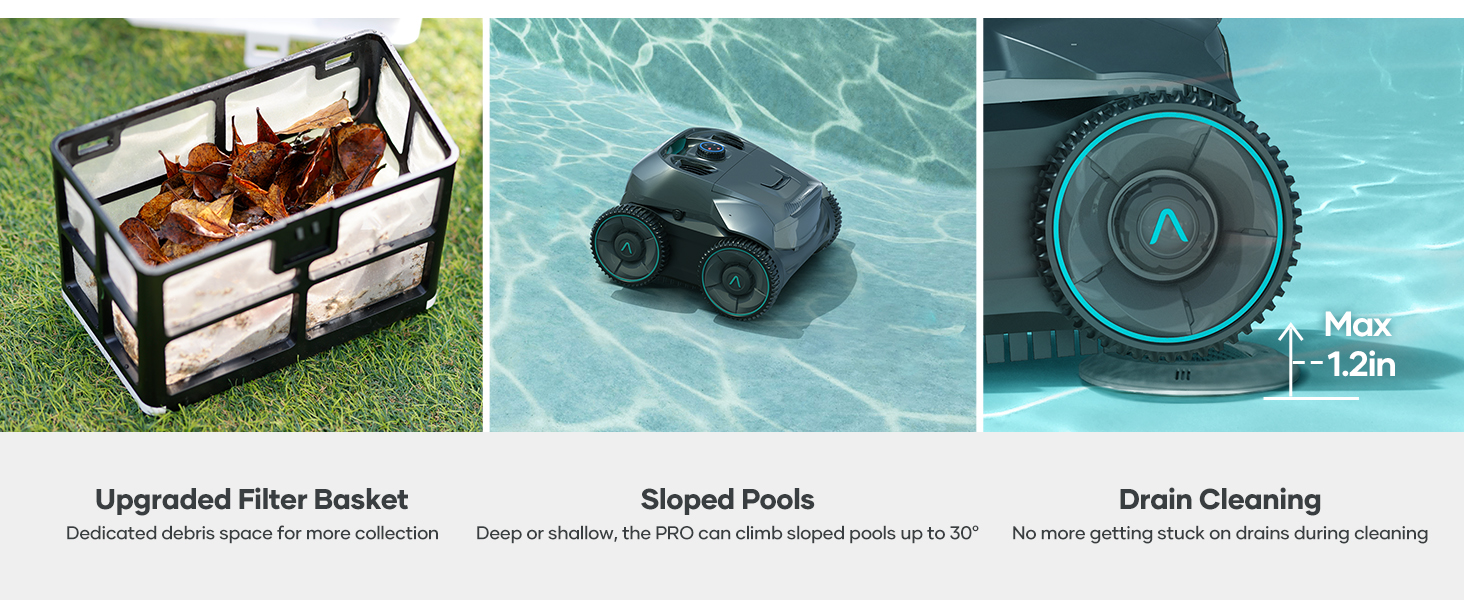
Regularly clean the filter basket to maintain optimal cleaning performance. The Seagull Pro ZT6002 features an easy-access top-load filter basket.
- Buka panutup luhur pembersihna.
- Lift out the filter basket using its handle.
- Kosongkeun runtah anu dikumpulkeun.
- Bilas karanjang saringan sacara saksama nganggo selang dugi ka bersih.
- Pasangkeun deui karanjang saringan anu bersih teras tutup deui panutup luhurna kalayan pageuh.

The easy-access filter basket simplifies debris removal and cleaning.
Ngambil Tukang Bersih:
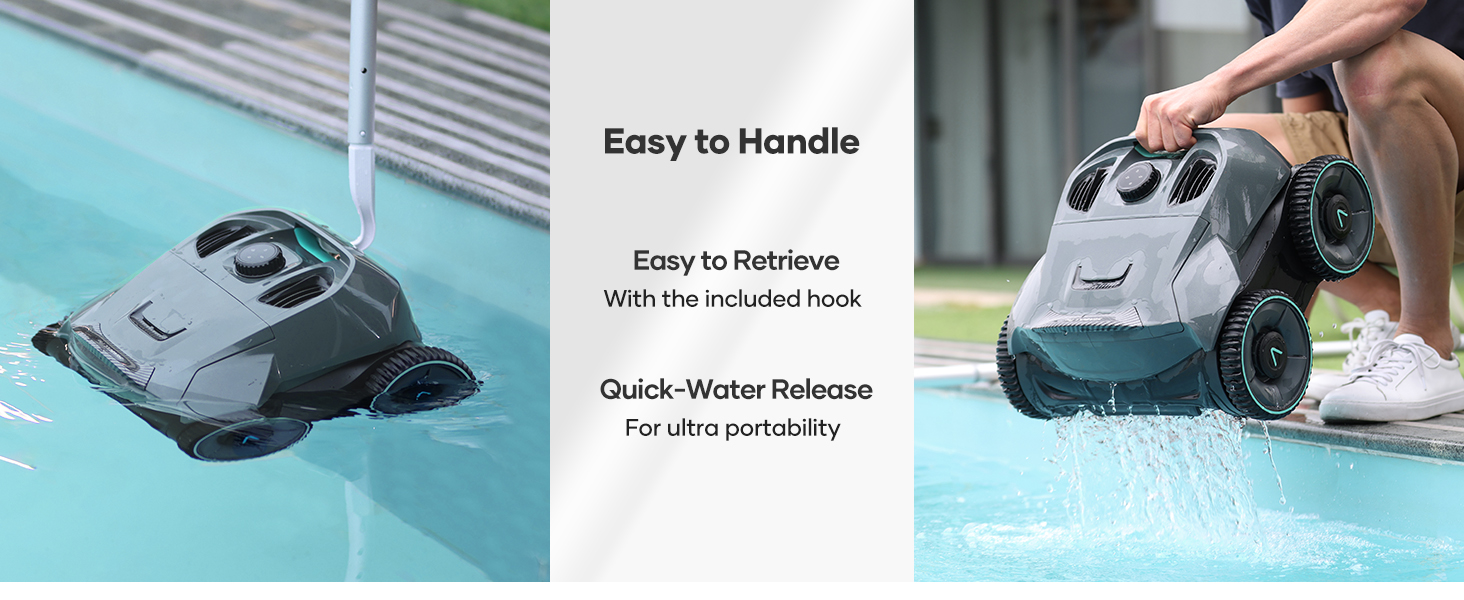
Use the included retrieval hook to safely remove the cleaner from the pool. This allows for quick water release and easy handling.
The cleaner can be easily retrieved from the pool using the provided hook, and its design allows for quick water drainage.
Pamérésan masalah
- Tukang beberesih teu gerak: Ensure the battery is fully charged. Check for any obstructions in the wheels or brushes.
- Kinerja beberesih goréng: Clean the filter basket. Ensure the pool water chemistry is balanced.
- Tukang beberesih teu nanjak témbok: Verify the Wall Only mode is selected or that the battery is below 50% in Automatic mode. Ensure the pool surface is not excessively slippery with algae.
- Device appears wet or repackaged: All AIPER machines undergo 100% water testing and re-sampling inspection before shipping to ensure proper functionality. This may result in the device appearing wet or repackaged, but it is not a used item.
AIPER products are water-tested before shipping, which may result in residual moisture or repackaging.
spésifikasi
| Fitur | Rincian |
|---|---|
| merek | AIPER |
| Ngaran modél | Manuk camar Pro |
| Nomer modél | ZT6002-RV |
| Bahan | palastik |
| Warna | kulawu |
| Sumber Daya | Batré Powered |
| Kapasitas batré | 7,800mAh (196.56 Watt Hours Lithium-Ion) |
| Runtime | Nepi ka 150 menit |
| Waktu Ngecas | 3-6 jam |
| Max Kolam Ukuran | Nepi ka 1,600 sq.ft |
| System Napigasi | WavePath Navigation |
| Sistem Motor | Quad-Motor (up to 196W) |
| Laju filtrasi | Up to 82 gallons per minute |
| Modeu beberesih | Automatic, Floor, Wall |
| Fitur husus | Wall-Climbing, Extended Runtime, Fully Wireless, Powerful Cleaning Suction |
Garansi sareng Rojongan
Inpormasi Garansi:
The AIPER Cordless Robotic Pool Cleaner Seagull Pro ZT6002 comes with a 90 poé jaminan kawates from the manufacturer. Please refer to your product packaging or the official AIPER websitus pikeun istilah jeung kaayaan jaminan pinuh.
Rojongan Palanggan:
For technical assistance, troubleshooting, or warranty claims, please contact AIPER customer support through their official website or the contact information provided in your product documentation. Ensure you have your model number (ZT6002) and proof of purchase available when contacting support.