Bubuka
This manual provides essential information for the setup, operation, and maintenance of your Alesis Nitro Ultimate Electric Drum Set, including the Gibraltar Hi-Hat Stand. The Nitro Ultimate kit is a nine-piece electronic drum set designed to offer an authentic drumming experience with mesh pads and a versatile sound module.
The kit features dual-zone mesh pads, a stand-mounted movable hi-hat, and a drum module with 640 authentic BFD sounds and 52 pre-configured kits. It also includes Bluetooth connectivity and access to educational resources like Drumeo lessons and BFD Player software.

Image: A drummer performing on the Alesis Nitro Ultimate kit, highlighting its authentic feel and sound capabilities.
Produk Leuwihview Video
Video: Langkung lengkepnaview of the Alesis Nitro Ultimate Electric Drum Set, demonstrating its features and components. (Duration: 5:42)
Naon dina Box
Pastikeun sadaya komponén anu didaptarkeun di handap ieu aya dina bungkusan anjeun sateuacan ngamimitian perakitan.
- Alesis Nitro Ultimate Drum Module
- 10-inch Dual-Zone Mesh Snare Pad with metal hoops
- Three (3) 8-inch Dual-Zone Mesh Tom Pads with metal hoops
- 8-inch Mesh Kick Tower Pad
- Nyepak pedal
- Three (3) 10-inch Dual-Zone Cymbal Pads with choke (one ride, two crashes)
- 10-inch Stand-Mounted Movable Hi-Hat Controller
- Gibraltar Medium Weight, Double-Braced Hi-Hat Stand
- 4-Post Adjustable Steel Rack with locking clamps
- Tongkat Drum
- Konci Drum
- Connection Cables (snake cable for pads/cymbals, power supply)

Image: The Alesis Nitro Ultimate kit fully assembled, showing the various components and accessories included.

Image: A detailed diagram of the Alesis Nitro Ultimate kit, labeling each drum and cymbal component.
Parentah Setup
Follow these steps to assemble your Alesis Nitro Ultimate Electric Drum Set.
- Kumpulkeun rak: Unfold the 4-post steel rack and secure all locking clamps. Adjust the height and position of the rack arms to your preference.
- Mount the Pads and Cymbals: Attach the snare, tom pads, and kick tower to the rack using the provided clamps. Mount the cymbal pads (ride, crashes) to their respective arms.
- Install the Hi-Hat Stand: Place the Gibraltar Hi-Hat Stand in the desired position. Mount the 10-inch movable hi-hat controller onto the hi-hat stand.
- Sambungkeun Modul Drum: Securely attach the Alesis Nitro Ultimate Drum Module to the rack.
- Sambungkeun kabel: Use the included snake cable to connect all drum pads and cymbal pads to the corresponding inputs on the drum module. Ensure each connection is firm.
- Sambungan Daya: Connect the power adapter to the drum module's power input and then to a power outlet.
- Kaluaran Audio: For sound, connect headphones to the 1/8-inch stereo headphone output or connect external speakers/amplifier to the 1/4-inch TRS main outputs.

Image: A visual guide to the main components of the Alesis Nitro Ultimate kit, useful for assembly.
Diagram Konéktipitas

Image: The rear panel of the Nitro Ultimate Drum Module, detailing all connection ports for power, USB, triggers, and audio.
Parentah Operasi
This section covers the basic operation of your Alesis Nitro Ultimate Drum Module.
Drum Module Leuwihview
The Nitro Ultimate Drum Module is the central control unit for your drum set. It features a clear display, navigation buttons, and dedicated controls for various functions.
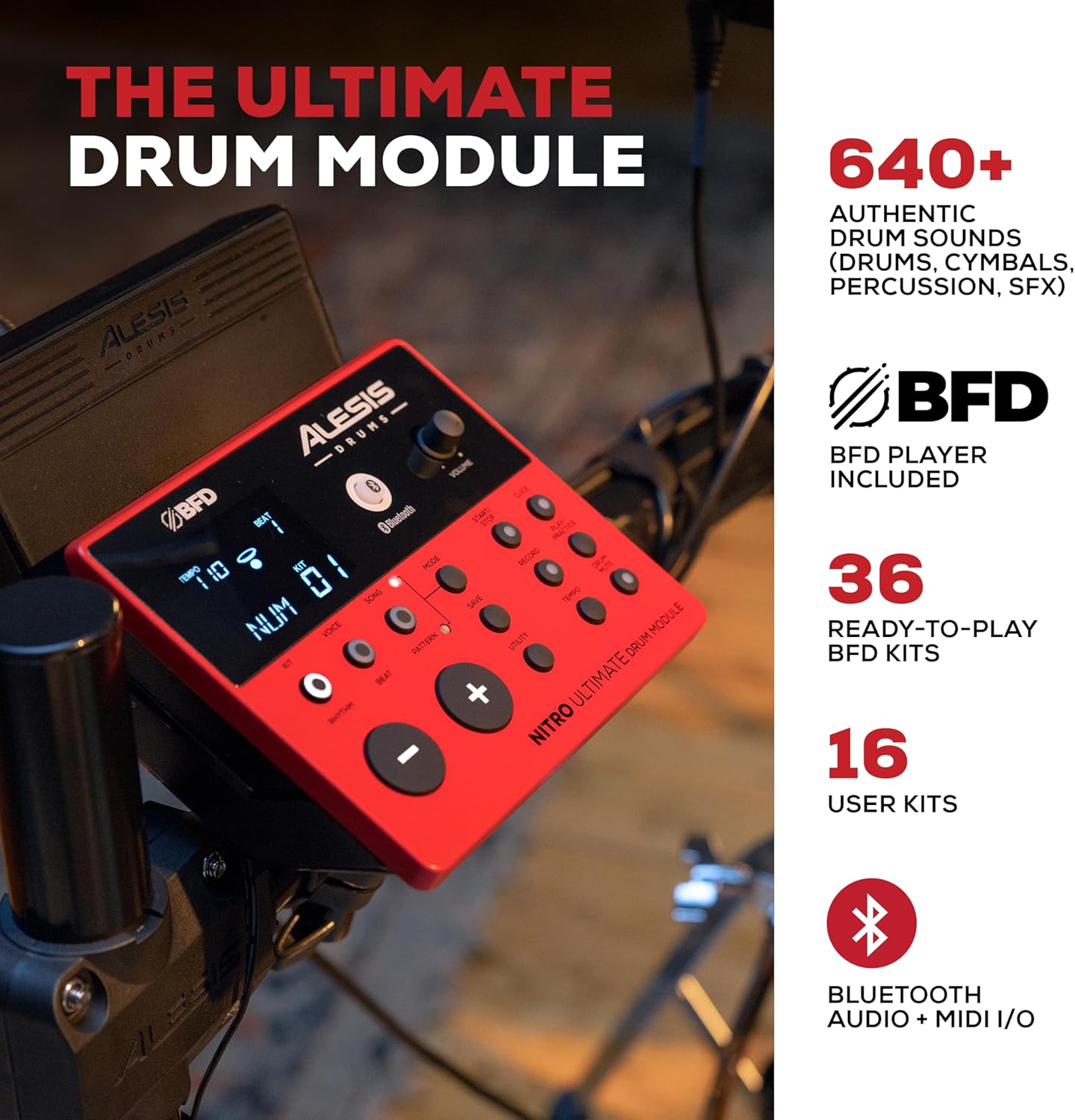
Image: The Alesis Nitro Ultimate Drum Module, showing its interface and controls.
Operasi Dasar
- Hurungkeun/Pareuman: Press the Power button on the module to turn the unit on or off.
- Pilihan Pakakas: Use the 'Kit' buttons to navigate through the 52 pre-set drum kits or your 16 user kits.
- Kontrol volume: Adjust the main volume using the dedicated knob on the module.
- Penyesuaian Tempo: Use the 'Tempo' button and navigation controls to set the desired tempo for practice or songs.
Fitur canggih
- Konektipitas Bluetooth: The module supports Bluetooth audio and MIDI I/O. Pair your device to stream audio or send/receive MIDI data wirelessly.
- USB MIDI: Connect the module to a computer via USB for MIDI recording with virtual instruments or recording software.
- Input bantu: Use the 1/8-inch stereo auxiliary input to connect an external audio device (e.g., smartphone, MP3 player) and play along with your favorite tracks.
- Paranti diwangun: Utilize the integrated sequencer, recorder, and metronome functions for practice and performance.

Image: The Alesis Nitro Ultimate kit in use, illustrating its educational and practice tools.
Integrasi Software
Your Nitro Ultimate kit includes access to Drumeo lessons and BFD Player software.
- Drumeo: Access 90 days of interactive drum lessons from various instructors to enhance your skills.
- BFD Player: This virtual drum instrument includes the BFD Player Core Library and Dark Mahogany expansion pack, offering a wide range of high-quality drum sounds and mixing options for recording and performance.

Image: A tablet showing the Drumeo application, demonstrating the integration of learning tools with the drum kit.

Image: A laptop running BFD Player software, showcasing the high-quality drum kits, grooves, and mixing options available.
Pangropéa
Proper maintenance ensures the longevity and optimal performance of your drum set.
- beberesih: Use a soft, dry cloth to wipe down the drum module, pads, and cymbals. Avoid abrasive cleaners or solvents.
- Mesh Head Tension: The mesh heads are tension-adjustable. Use the included drum key to adjust the tension for your preferred feel. Do not overtighten.
- Manajemén Kabel: Ensure all cables are neatly routed and secured to prevent damage or accidental disconnection.
- Panyimpenan: When not in use for extended periods, store the drum set in a clean, dry environment away from extreme temperatures.

Image: A close-up of an Alesis mesh head, emphasizing its design for quiet and responsive play.
Pamérésan masalah
If you encounter issues with your Alesis Nitro Ultimate Electric Drum Set, refer to the following common problems and solutions.
| Masalah | Mungkin Cukang lantaranana | Solusi |
|---|---|---|
| No sound from headphones/speakers. | Volume too low; incorrect cable connection; module not powered on. | Check module volume, external speaker volume, and headphone connection. Ensure power is on. Verify audio cables are correctly inserted into the module's output. |
| Pads not triggering sounds. | Loose cable connection; incorrect pad sensitivity settings. | Ensure all pad cables are securely connected to the module's trigger inputs. Check the module's sensitivity settings for each pad and adjust if necessary. |
| Bluetooth device not connecting. | Module not in pairing mode; device too far; interference. | Ensure the module's Bluetooth is enabled and in pairing mode. Move the device closer to the module. Try restarting both the module and your Bluetooth device. |
| Inconsistent pad response. | Mesh head tension uneven; worn drum sticks; sensitivity settings. | Adjust mesh head tension evenly using the drum key. Ensure you are using appropriate drum sticks. Review and adjust pad sensitivity and threshold settings in the module. |
spésifikasi
| Fitur | Rincian |
|---|---|
| Ngaran modél | Nitro Ultimate |
| merek | Alesis |
| Set Konfigurasi | 9-piece electronic drum kit |
| Snare Pad | 10-inch Dual-Zone Mesh |
| Tom Pads | Three (3) 8-inch Dual-Zone Mesh |
| Tajongan Pad | 8-inch Mesh Kick Tower with Pedal |
| Pads Cymbal | Three (3) 10-inch Dual-Zone with Choke (1 Ride, 2 Crash) |
| hi-hat | 10-inch Stand-Mounted Movable Controller |
| Stand Hi-Hat | Gibraltar Medium Weight, Double-Braced |
| Modul Drum | Nitro Ultimate Module (640+ sounds, 52 kits, 16 user kits) |
| Konektipitas | Bluetooth Audio + MIDI I/O, USB MIDI, DB25-pin snake cable input, 2x 1/4-inch TRS Main Outs, 1/8-inch TRS Stereo Aux In, 1/8-inch Stereo Headphone Out |
| Rak | 4-Post Adjustable Steel Rack |
| Jenis Bahan | Logam, Silikon |
| Warna | Beureum |
| Beurat | Kira-kira 46.9 lbs (21.27 kg) |
Garansi sareng Rojongan
For detailed warranty information and technical support, please refer to the official Alesis websitus atanapi ngahubungan layanan palanggan maranéhanana langsung. Simpen resi pameseran anjeun salaku bukti pameseran pikeun klaim garansi.
Online resources, including FAQs and additional documentation, may be available on the Alesis support page.


