1. Bubuka
The SUNLU Official Filament Dryer S4 is designed to efficiently dry 3D printer filaments, ensuring optimal printing quality. This device features a large 4-spool capacity, efficient heating up to 70°C, a triple-safe system, intelligent humidity control, and high compatibility with various FDM 3D printers and filament diameters. Proper filament drying is crucial for preventing common printing issues such as stringing, clogging, and poor layer adhesion, leading to smoother and more reliable prints.
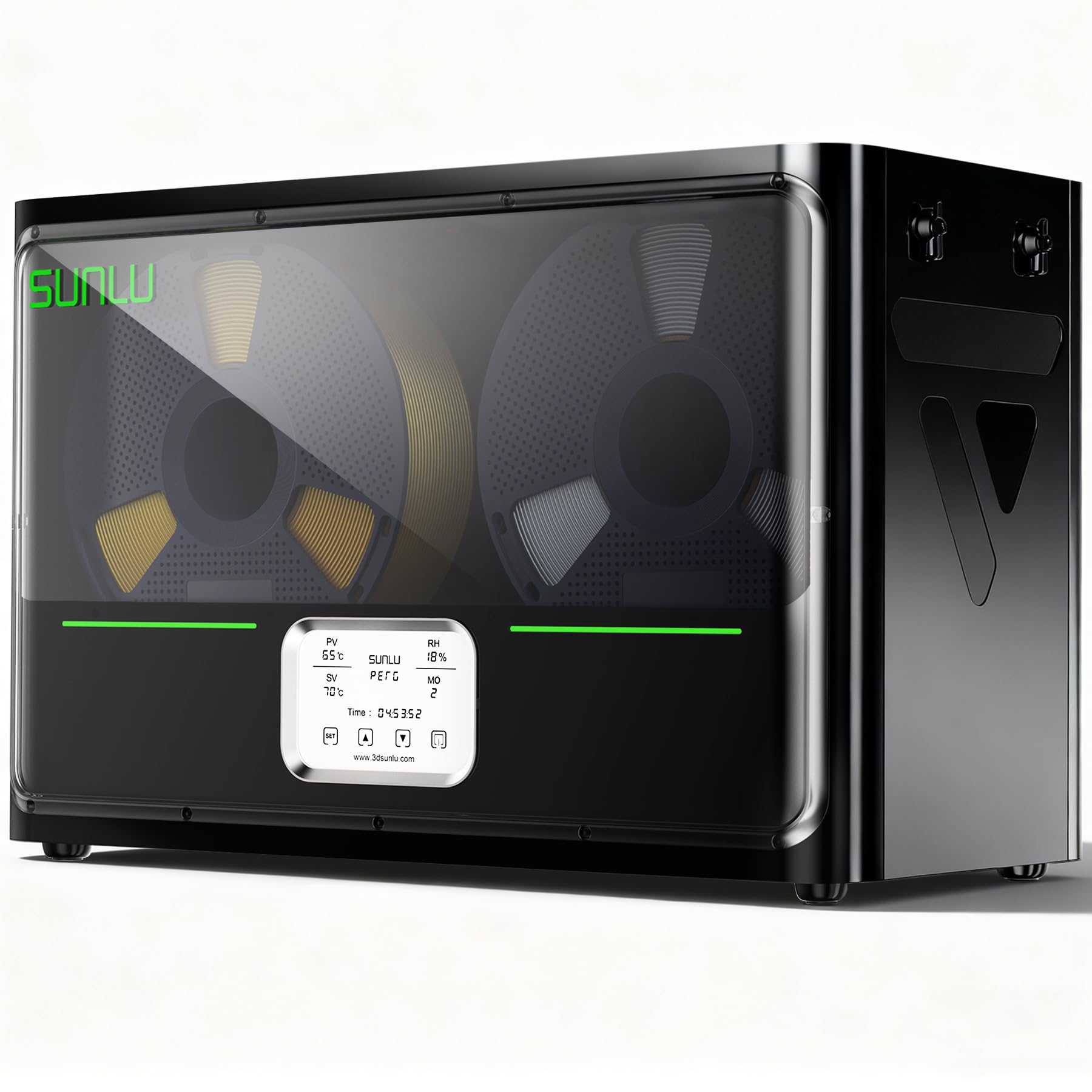
Image 1.1: The SUNLU S4 Filament Dryer, capable of holding four spools simultaneously.
2. Fitur konci
- Large 4 Spool Capacity: The S4 filament dryer (450x210x211mm interior) holds 4 x 1kg filament spools for simultaneous drying. This enables non-stop multi-color projects or feeding multiple 3D printers.
- Efficient Heating to 70℃: The SUNLU S4 3D printer filament dryer provides rapid, uniform heat up to 70°C, effectively drying a wide range of filaments. This ensures optimal filament condition for smoother, more reliable prints.
- Triple-Safe System: Equipped with a 350W PTC heater, backup thermal switch, and software monitoring, the SUNLU filament dryer S4 actively ensures temperature and alerts on anomalies for worry-free drying.
- Kontrol Kalembaban anu Cerdas: Triggered at 30-50% RH and stops under 25% RH, ensuring a consistently dry environment to protect your filament from getting damp deui.
- kasaluyuan luhur: The SUNLU S4 dryer boasts wide compatibility with most FDM 3D printers, which actively dries filament for up to 4 printers concurrently and supports most common diameters (1.75mm, 2.85mm, 3.0mm), making it suitable for multi-printer setups.
- 3 Circulation Fans: The S4 filament dehydrator uses three high-quality fans to circulate air, ensuring a consistent temperature and 360° surround heating for even drying.
3. Eusi Paket
Saatos muka bungkusan, mangga pariksa yén sadaya item di handap ieu kalebet:
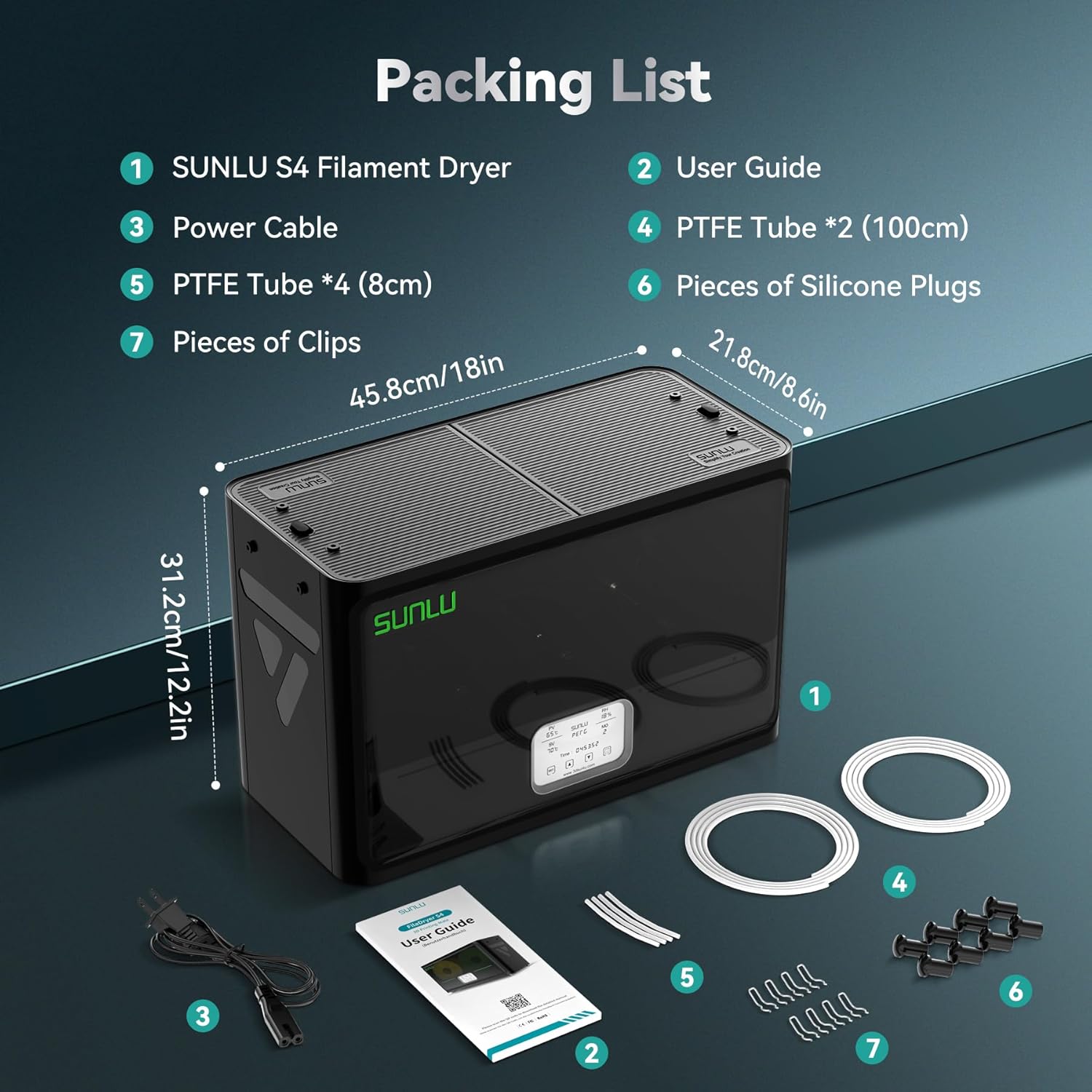
Image 3.1: All items included in the SUNLU S4 Filament Dryer package.
- SUNLU S4 Filament Dryer (1 unit)
- User Guide (1 unit)
- Kabel Listrik (1 unit)
- PTFE Tube (100cm) (2 units)
- PTFE Tube (8cm) (4 units)
- Silicone Plugs (6 pieces)
- Clips (7 pieces)
4. Setélan
4.1 Unboxing sareng Inspeksi Awal
Carefully remove the filament dryer from its packaging. Place the unit on a stable, flat surface. Inspect the dryer for any visible damage that may have occurred during shipping. Refer to the 'Package Contents' section to ensure all accessories are present.
Video 4.1: An unboxing tutorial for the SUNLU S4 Filament Dryer, demonstrating how to safely unpack the unit and its components.
4.2 Installing PTFE Tubes
The PTFE tubes guide the filament from the dryer to your 3D printer. Install the appropriate length of PTFE tube into the designated outlet holes on the dryer, ensuring a secure fit. The shorter 8cm tubes are typically used for direct drive extruders, while the longer 100cm tubes are for Bowden extruders.
4.3 Filamen Muatan
Open the top cover of the dryer. Place your filament spool(s) onto the rollers inside the dryer. Ensure the filament unwinds smoothly. Thread the end of the filament through the installed PTFE tube. If the filament end is bent, cut off the bent portion for a clean feed.
Video 4.2: A tutorial demonstrating the installation of PTFE tubes and loading filament into the SUNLU S4 Filament Dryer.
5. Parentah Operasi
5.1 Powering On and Setting Parameters
Connect the power cable to the dryer and plug it into a power outlet. Press the power button on the front panel to turn on the device. Use the 'SET' key to navigate through the menu options (temperature, time, filament type). Use the up and down arrow keys to adjust the corresponding parameters according to your filament's requirements.
5.2 Filament Drying Guide
Refer to the table below for recommended drying temperatures and times for common filament types. These are general guidelines; optimal settings may vary based on filament brand and environmental humidity.
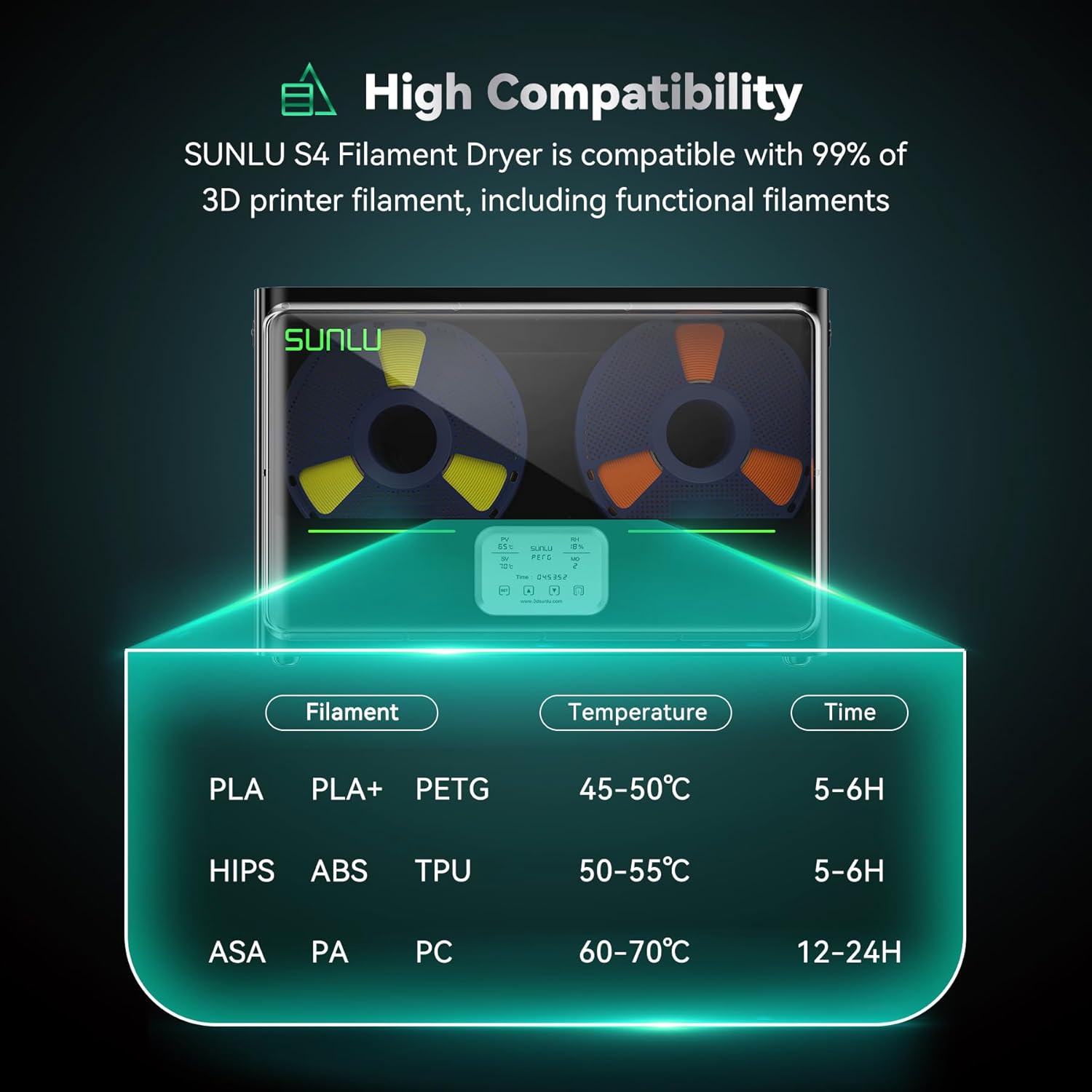
Image 5.1: Recommended temperature and time settings for different filament materials.
| Bahan | Baking Temp (°C) | Waktos (Jam) |
|---|---|---|
| PLA, PLA+, PETG | 45-50 | 5-6 |
| HIPS, ABS, TPU | 50-55 | 5-6 |
| ASA, PA, PC | 60-70 | 12-24 |
5.3 Direct Printing from Dryer
The SUNLU S4 allows you to print directly from the dryer, maintaining optimal filament conditions throughout your print job. Ensure the PTFE tube is securely connected to both the dryer and your 3D printer's extruder. This setup helps prevent re-absorption of moisture during printing, especially for hygroscopic filaments.

Image 5.2: Direct printing setup with the SUNLU S4 Filament Dryer and a 3D printer.
6. Pangropéa
To ensure the longevity and optimal performance of your SUNLU S4 Filament Dryer, regular maintenance is recommended:
- beberesih: Periodically wipe down the interior and exterior of the dryer with a soft, dry cloth. Avoid using abrasive cleaners or solvents.
- Inspeksi Roller: Check the filament rollers for any debris or wear. Ensure they spin freely to prevent filament tangling.
- PTFE Tube Replacement: If the PTFE tubes show signs of wear or damage, replace them to maintain smooth filament feeding.
7. Cara ngungkulan
If you encounter issues with your SUNLU S4 Filament Dryer, consider the following:
- Filament Not Drying Effectively: Ensure the correct temperature and time settings are selected for your filament type. Verify that the dryer lid is properly closed and sealed.
- Tampilan Teu Gawé: Check the power connection and ensure the power switch is in the 'ON' position.
- Filament Snapping/Brittle: This often indicates insufficient drying. Increase the drying time or temperature slightly, within the recommended range for your filament.
8. Spésifikasi
| Fitur | Rincian |
|---|---|
| Produsén | SUNLU |
| Item Beurat | 10.56 pon (4.8 Kilogram) |
| Dimensi produk | 18.03 x 8.58 x 12.28 inci |
| Warna | S4 Filament Dryer Dark Black |
| Jenis Bahan | S4 Filament Dryer Dark Black |
| Jumlah Item | 1 |
| Produsén Bagian Jumlah | DCUS-FD-S4-BK-US |
| Kasaluyuan Filamén | 1.75mm, 2.85mm, 3.0mm |
| Suhu Pemanasan Max | 70°C |
| manaskeun daya | 350W PTC Heater |
9. Garansi jeung Rojongan
The SUNLU S4 Filament Dryer comes with a 1-year warranty under normal operating conditions, as described in this manual. The warranty does not cover damages caused by using power cables of different specifications or incorrect operation as per the instructions in the manual. For technical support or warranty claims, please contact SUNLU customer service through their official website or the contact information provided in the user guide.