Bubuka
This manual provides comprehensive instructions for the safe and efficient operation of your Crosley CR3505A-LN Cruiser Portable CD Player. Please read this manual thoroughly before using the device and retain it for future reference. This portable audio player combines classic design with modern functionality, offering CD playback, Bluetooth connectivity, FM radio, and auxiliary input.
Naon dina Box
Pastikeun yén sadaya barang aya nalika ngabongkar:
- Crosley CR3505A-LN Portable CD Player
- Kabel USB-C
Fitur produk
- Pamuter Musik Portabel: Equipped with a rechargeable lithium battery, providing up to 4 hours of playback at 50% volume after a 3.5-hour charge.
- Versatile Audio Options: Features built-in stereo speakers and a headphone jack. Supports CD playback, Bluetooth streaming to wireless headphones/speakers, and auxiliary input for other devices.
- Retro Style, Modern Function: Blends nostalgic aesthetics with contemporary features, including a tonearm-inspired power switch and a built-in FM radio.
- Designed for Portability: Lightweight construction with a magnetic lid closure for easy transport.
Idéntifikasi komponén
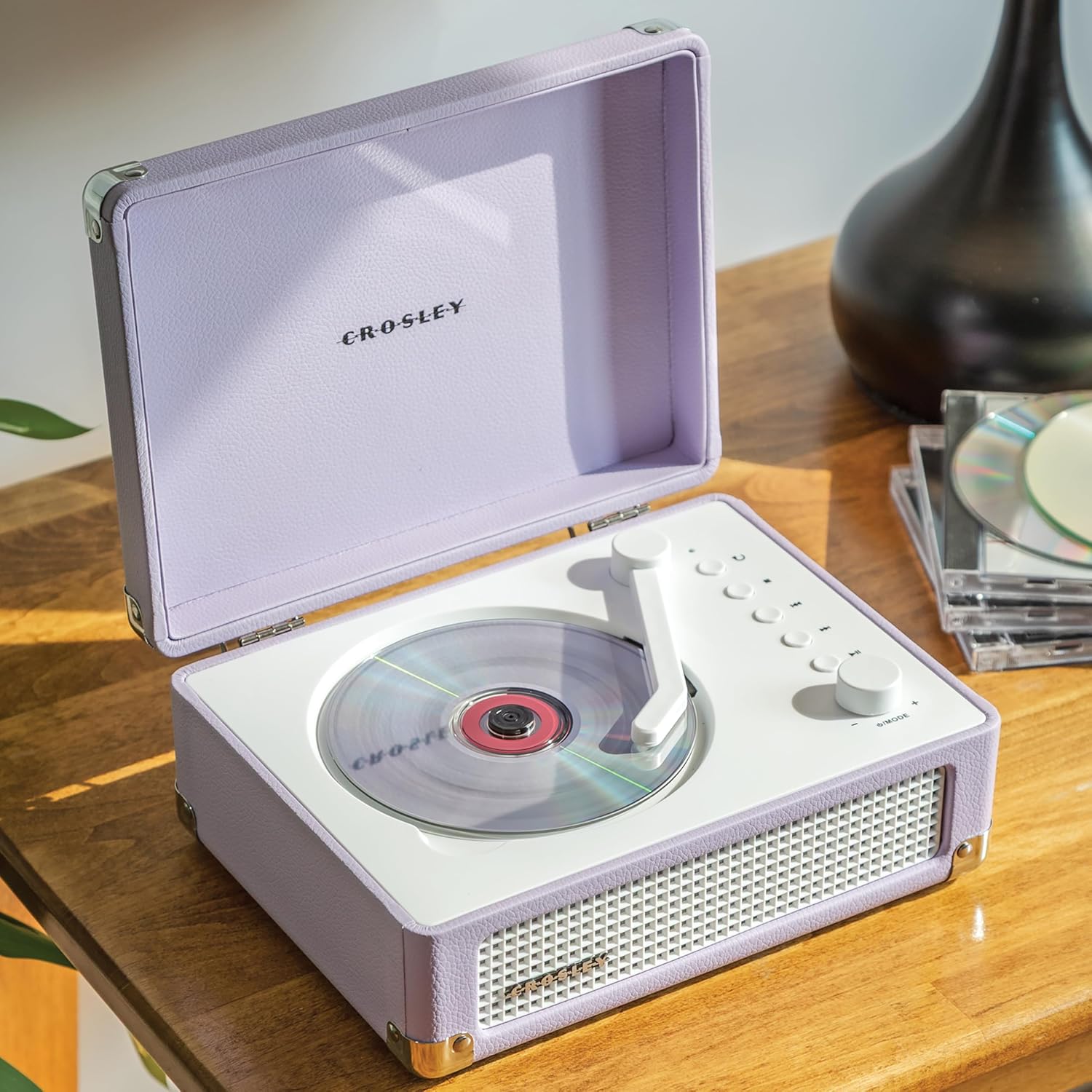
Gambar 1: Top view of the Crosley CR3505A-LN with lid open, highlighting the CD compartment and control panel.

Gambar 2: Tukangeun view of the unit, displaying the headphone jack, AUX In port, and USB-C charging port.
Kontrol Panel Langkungview
- Tonearm-inspired Power Switch: Activates/deactivates the unit and initiates CD playback.
- Mode/Power Dial: Rotates to adjust volume. Press to cycle through modes (CD, Bluetooth, FM, AUX).
- Tombol Ulang: Repeats current track or album.
- Tombol Eureun: Ngeureunkeun playback CD.
- Tombol Lagu/Mundurkeun Saméméhna: Skips to the previous track or rewinds during playback.
- Tombol Lagu Salajengna/Maju Gancang: Skips to the next track or fast forwards during playback.
- Tombol Puter/Reureuh: Controls playback for CD and Bluetooth.
- Bluetooth/FM Indicator Light: Indicates current mode and pairing status.
Disetél
Ngecas Batré
- Connect the supplied USB-C cable to the DC 5V port on the rear of the unit (Figure 2).
- Sambungkeun tungtung kabel USB-C anu sanésna kana adaptor daya USB anu cocog (henteu kalebet).
- Lampu indikator bakal némbongkeun status ngecas. Ngecas pinuh peryogi waktos sakitar 3.5 jam.
Ngahurungkeun/Pareuman
To power on the unit, move the tonearm-inspired switch over the CD spindle. To power off, move the switch back to its resting position.
Parentah Operasi
Puteran CD
- Open the lid of the CD player.
- Carefully place a CD onto the spindle in the CD compartment, label side up.
- Tutup tutupna.
- Move the tonearm-inspired switch over the CD spindle to power on and initiate playback.
- Use the Play/Pause, Stop, Previous Track/Rewind, and Next Track/Fast Forward buttons to control playback.
- Press the Repeat button to cycle through repeat modes (repeat one track, repeat all tracks, random play).
Papasangan Bluetooth
- Kakuatan dina unit.
- Press the Mode/Power dial repeatedly until the Bluetooth indicator light flashes blue, indicating pairing mode.
- On your Bluetooth-enabled device (e.g., smartphone, tablet), search for "Crosley CR3505A-LN" in the Bluetooth settings.
- Select the device to pair. Once connected, the Bluetooth indicator light will turn solid blue.
- You can now stream audio from your device to the CD player.
Radio FM
- Kakuatan dina unit.
- Press the Mode/Power dial repeatedly until the FM indicator light illuminates.
- Use the Previous Track/Rewind and Next Track/Fast Forward buttons to tune to desired FM stations.
Input bantu
- Kakuatan dina unit.
- Press the Mode/Power dial repeatedly until the AUX indicator light illuminates.
- Connect an external audio device (e.g., MP3 player) to the AUX In port on the rear of the unit (Figure 2) using a 3.5mm audio cable (not included).
- Audio from the external device will now play through the CD player's speakers.
Volume Control
Rotate the Mode/Power dial clockwise to increase volume and counter-clockwise to decrease volume.
Pangropéa
beberesih
- Salawasna cabut unit tina sumber kakuatan saméméh beberesih.
- Anggo lawon anu lemes sareng garing pikeun ngusap permukaan luar. Entong nganggo pembersih abrasif, lilin, atanapi pangleyur.
- Pikeun lénsa CD, paké pembersih lénsa CD khusus. Ulah noel lensa langsung.
Perawatan batré
- Pikeun manjangkeun umur batre, ulah miceun batre pinuh.
- If storing the unit for an extended period, charge the battery to approximately 50% every few months.
Pamérésan masalah
| Masalah | Mungkin Cukang lantaranana | Solusi |
|---|---|---|
| Taya kakuatan | Battery is discharged; Unit is not powered on. | Charge the battery using the USB-C cable; Ensure the tonearm-inspired switch is moved to the ON position. |
| CD teu diputer | CD teu dipasang kalawan bener; CD kotor atanapi calar; Unitna teu dina modeu CD. | Reinsert CD label side up; Clean or replace CD; Press Mode/Power dial to select CD mode. |
| Bluetooth teu nyambung | Unit teu dina modeu pasangan; Alat jauh teuing; Alat anu dipasangkeun sateuacanna nyambung. | Press Mode/Power dial until Bluetooth light flashes; Move device closer; Disconnect from other Bluetooth devices. |
| panarimaan radio FM goréng | Sinyal lemah; Gangguan. | Adjust the unit's position; Try tuning to a stronger station. |
| Taya sora | Volume teuing leutik; Modeu anu dipilih salah; Headphone nyambung. | Increase volume; Ensure correct mode (CD, BT, FM, AUX) is selected; Disconnect headphones if using speakers. |
spésifikasi
- Ukuran produk: 6.75 x 8.75 x 3.75 inci
- Beurat barang: 2.54 pon
- Jumlah modél: CR3505A-LN
- merek: Crosley
- warna: Lavender
- Téknologi konektipitas: Bluetooth
- Jumlah Cakram: 1
Émbaran Kasalametan
- Ulah ngalaan unit ka suhu ekstrim, kalembaban, atawa sinar panonpoé langsung.
- Ulah nempatkeun unit caket sumber panas atanapi di tempat anu ventilasina goréng.
- Ulah ngabongkar atanapi nyobian ngalereskeun unit sorangan. Rujuk sadayana jasa ka tanaga anu mumpuni.
- Keep the unit away from water or other liquids.
- Paké ngan kabel ngecas husus.
Garansi sareng Rojongan
Crosley products are designed in the USA and come with USA-based customer support. For warranty information or technical assistance, please refer to the official Crosley websitus atanapi ngahubungan layanan palanggan maranéhanana langsung. Simpen resi pameseran anjeun salaku bukti pameseran pikeun klaim garansi.


