
1. Bubuka
Welcome to the user manual for your MUNBYN Rugged Tablet ILT03. This device is engineered for durability and high performance in challenging environments, featuring Android 14, IP68 water and dust resistance, MIL-STD-810H certification, and robust connectivity options. This manual provides essential information for setting up, operating, maintaining, and troubleshooting your tablet to ensure optimal performance and longevity.
2. Produk Langkungview
The MUNBYN ILT03 is a rugged 8.68-inch tablet designed for demanding use. It combines advanced features with a durable build.
Fitur konci:
- Sistem operasi: Android 14 for broad app compatibility and security.
- Prosesor: Mediatek 8781 CPU for efficient performance.
- Mémori & Panyimpenan: 8GB RAM and 128GB internal storage, expandable up to 512GB via Micro SD card.
- tampilan: 8.68-inch screen with 1340x800 resolution.
- Daya tahan: IP68 waterproof and MIL-STD-810H certified for resistance against water, dust, and drops.
- Batré: 8000mAh battery with 33W fast charging, providing up to 11 hours of usage.
- Kaméra: 32MP front camera and 48MP rear camera for high-resolution photos and videos.
- Konektipitas: 4G LTE, 802.11ac/ax Wi-Fi, Bluetooth, and GPS.
- Audio: Equipped with four speakers for an enhanced audio experience.
komponén tablet:
Familiarize yourself with the physical components of your ILT03 tablet.
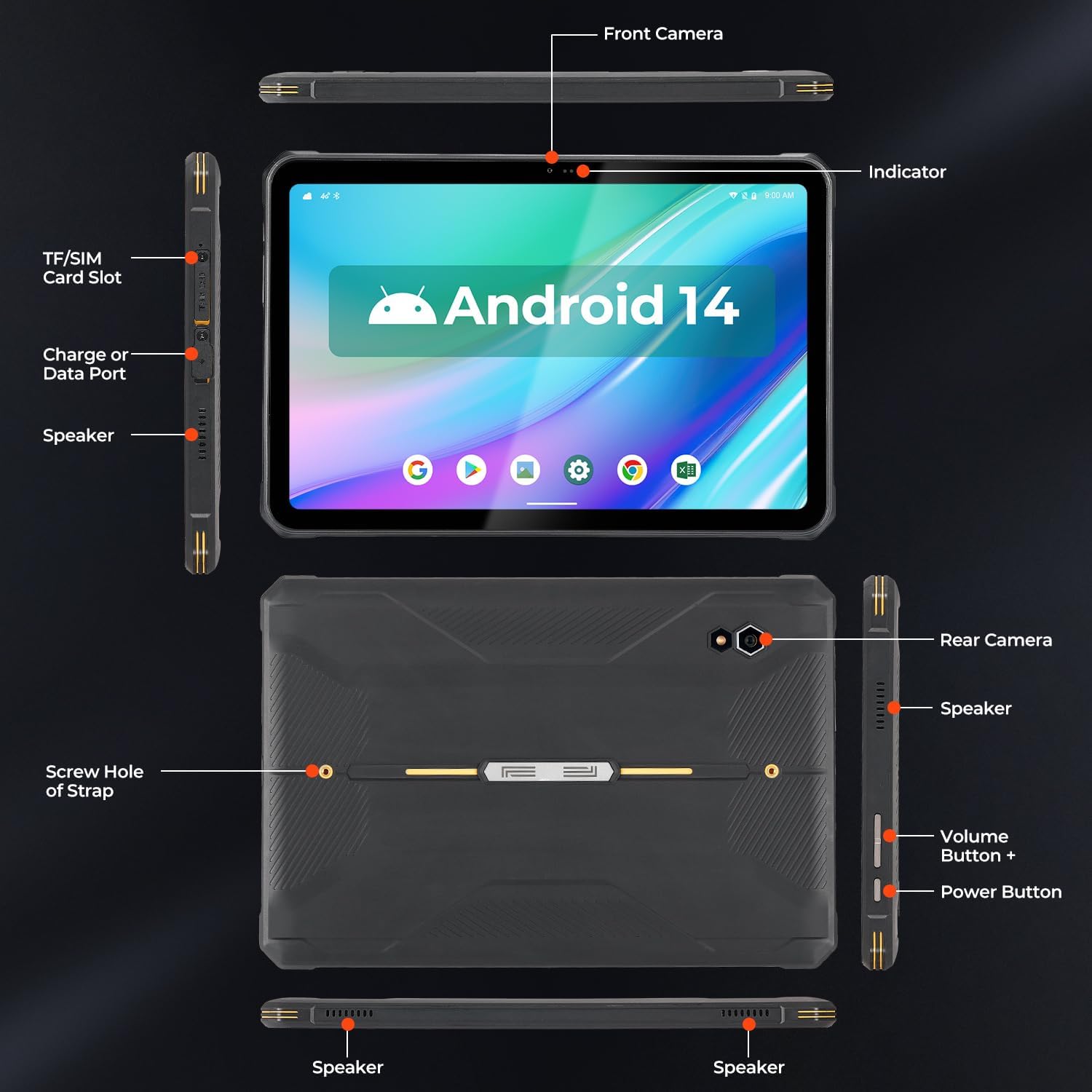
Gambar: Detailed diagram of the MUNBYN ILT03 tablet, indicating the location of the front camera, indicator light, TF/SIM card slot, charge or data port, speakers, rear camera, volume buttons, power button, and screw holes for the hand strap.

Gambar: The MUNBYN ILT03 Rugged Tablet showcasing its Android 14 interface with multiple applications open, demonstrating its capability for diverse tasks.
3. Setélan
3.1 Ngecas Awal
Before first use, fully charge your tablet using the provided 33W fast charger. The 8000mAh battery ensures extended use, and fast charging minimizes downtime.

Gambar: The MUNBYN ILT03 tablet illustrating its 33W fast charging capability and 8000mAh battery, designed for all-day use, even in outdoor settings.
3.2 Kartu SIM sareng Pamasangan Kartu Micro SD
- Locate the TF/SIM card slot on the side of the tablet (refer to the Component Diagram).
- Anggo alat anu disayogikeun pikeun muka baki.
- Insert your 4G LTE SIM card and/or Micro SD card (up to 512GB) into the designated slots.
- Carefully close the tray, ensuring it is flush with the tablet's body to maintain water and dust resistance.
3.3 Powering on / Pareum
- Pikeun Ngahurungkeun: Press and hold the Power Button until the MUNBYN logo appears.
- Pikeun mareuman: Press and hold the Power Button, then select 'Power Off' from the options on the screen.
- Pikeun ngamimitian deui: Pencét terus tahan Tombol Daya, teras pilih 'Restart' tina pilihan anu aya.
3.4 Setelan Android Awal
Follow the on-screen prompts to complete the initial setup of Android 14, including language selection, Wi-Fi connection, Google account login, and security settings.

Gambar: The MUNBYN ILT03 tablet highlighting its Android 14 operating system, 8GB RAM, and 128GB storage, ensuring smooth performance for various applications.
3.5 Attaching the Hand-Strap
The tablet comes with a hand-strap for secure handling. Attach it using the screw holes on the back of the tablet (refer to the Component Diagram) to enhance grip and prevent accidental drops.
4. Parentah Operasi
4.1 Napigasi Dasar
- Layar cabak: Navigate the interface by tapping, swiping, pinching, and zooming.
- Layar Utama: Aksés aplikasi sareng widget anjeun.
- Bewara: Gesek ka handap ti luhur layar pikeun view bewara sareng setelan gancang.
4.2 Pamakéan kaméra
The ILT03 features a 32MP front camera and a 48MP rear camera.
- Buka aplikasi Kamera tina layar utama anjeun atanapi laci aplikasi.
- Ganti antara kaméra hareup sareng tukang upami diperyogikeun.
- Tap the screen to focus and press the shutter button to capture photos or start/stop video recording.

Gambar: The MUNBYN ILT03 tablet highlighting its 32MP front and 48MP rear cameras, capable of capturing clear images in various scenarios.
4.3 Fungsi GPS
The tablet includes GPS hardware for location services. Catetan: The ILT03 does not come with pre-installed GPS navigation software. You will need to download your preferred navigation or mapping applications from the Google Play Store.
4.4 Konéktipitas
- Wifi: Sambungkeun ka jaringan Wi-Fi anu sayogi via Setelan > Jaringan & internét > Wi-Fi.
- 4G LTE: Once a SIM card is installed, mobile data will be available. Manage settings via Settings > Network & internet > Mobile network.
- Bluetooth: Pair with Bluetooth devices (e.g., headphones, external sensors) via Settings > Connected devices > Bluetooth.
5. Pangropéa
5.1 Ngabersihan Tablet Anjeun
Despite its rugged design, regular cleaning helps maintain performance and appearance.
- Anggo lawon anu lemes sareng henteu lint pikeun ngusap layar sareng awak.
- Keur kokotor bandel, rada dampbilas lawon ku cai atawa pembersih anu aman pikeun layar.
- Ensure all port covers are securely closed before cleaning with liquids to maintain IP68 rating.
5.2 Perawatan Batré
Pikeun ngamaksimalkeun umur batré 8000mAh anjeun:
- Hindarkeun suhu anu ekstrim.
- Ulah ngantep batré lengkep solokan remen.
- Use the original 33W fast charger for optimal charging.
5.3 Apdet parangkat lunak
Regularly check for and install system updates to ensure your Android 14 tablet has the latest security patches and performance improvements. Go to Settings > System > System update.
6. Cara ngungkulan
This section addresses common issues you might encounter with your MUNBYN ILT03 tablet.
| Masalah | Solusi |
|---|---|
| Tablet teu hurung. | Ensure the tablet is charged. Connect to the charger and wait a few minutes before attempting to power on again. |
| Aplikasi jalan lalaunan atawa katirisan. | Close unnecessary background apps. Restart the tablet. If the issue persists, consider clearing app caches or performing a factory reset (back up data first). |
| Taya sinyal GPS. | Pastikeun anjeun aya di daérah anu kabuka kalayan jelas view of the sky. Verify that location services are enabled in settings. Remember to download a GPS application as none are pre-installed. |
| Cannot connect to Wi-Fi/4G LTE. | For Wi-Fi, ensure the network is active and you have the correct password. For 4G LTE, check SIM card installation and ensure mobile data is enabled in settings. Contact your service provider if issues persist. |
| Tablet teu keur dicas. | Check the charging cable and adapter for damage. Ensure the charging port is clean and free of debris. Try a different power outlet. |
7. Spésifikasi
Detailed technical specifications for the MUNBYN ILT03 Rugged Tablet.
| Fitur | Spésifikasi |
|---|---|
| Modél | ILT03 |
| Sistem operasi | Android 14 |
| Prosesor | MediaTek 8781 |
| Ram | 8 GB |
| Panyimpenan internal | 128 GB |
| Panyimpenan Expandable | Up to 512 GB Micro SD |
| Ukuran layar | 8.68 inci |
| Resolusi layar | 1340x800 Piksel |
| Kaméra hareup | 32 MP |
| Kaméra tukang | 48 MP |
| Kapasitas batré | 8000 mAh |
| Ngecas | 33W Ngecas Gancang |
| Rata Kahirupan Batré | 11 Jam |
| Peunteun durability | IP68, MIL-STD-810H |
| Tipe Wireless | 802.11ac, 802.11ax (Wi-Fi), Bluetooth, 4G LTE |
| Item Beurat | 2.2 pon |
| Dimensi produk | 12.08 x 2.36 x 6.29 inci |
8. Garansi jeung Rojongan
8.1 Product Protection
The MUNBYN ILT03 tablet is eligible for extended protection plans. A 2-Year Protection Plan is available for purchase, offering additional coverage beyond the standard warranty.
8.2 Rojongan Palanggan
For technical assistance, warranty claims, or further inquiries, please refer to the official MUNBYN website or contact their customer support channels. Keep your purchase receipt and product serial number handy for faster service.