Bubuka
This manual provides comprehensive instructions for the Sena OUTRUSH 2 Modular Smart Motorcycle Helmet. It covers essential information regarding the helmet's features, setup, operation, maintenance, and safety guidelines. The OUTRUSH 2 integrates advanced communication technology with robust helmet design, offering a connected and secure riding experience.

The Sena OUTRUSH 2 helmet is designed for modern motorcyclists, combining safety with integrated communication capabilities.
Fitur produk
The Sena OUTRUSH 2 helmet is equipped with several key features designed to enhance your riding experience:
- Konektipitas Bluetooth: Seamlessly connect your smartphone for navigation, music, and phone calls.
- Mesh Intercom 3.0: Communicate with other riders in your group with enhanced reliability and range.
- WAVE Intercom Compatibility: Connect with various motorcycle headset brands over cellular networks, extending communication range significantly.
- 2nd Generation HD Speakers: Experience clear audio quality for music and communication.
- Manajemén Daya Calakan: Automatic power-off feature conserves battery life when no movement is detected.
- P/J Dual Homologation: Certified for safe use with the chin bar in both open and closed positions.
- DOT and FMVSS 218 Compliance: Meets stringent safety standards for head protection.

This image highlights the core technologies integrated into the OUTRUSH 2, such as advanced intercom systems, high-definition audio, and smart power management.
Disetél
1. Ngecas Helm
Before initial use, fully charge the Sena OUTRUSH 2 helmet. Connect the provided USB-C Charging Cable to the helmet's charging port and a compatible USB power source. The charging indicator will show the charging status.

The helmet features intelligent power management to maximize ride time between charges, automatically powering off when not in use.
2. Powering on / Pareum
To power on the helmet, press and hold the main button until you hear an audible prompt. To power off, repeat the process until the power-off prompt is heard.
3. Bluetooth Pairing with a Smartphone
- With the helmet powered off, press and hold the main button for approximately 10 seconds until the LED flashes red and blue, indicating pairing mode.
- On your smartphone, navigate to the Bluetooth settings and select "Sena OUTRUSH 2" from the list of available devices.
- Once paired, the LED will flash blue, and you will hear a confirmation tone.
4. Apdet firmware
For optimal performance, regularly check for and install firmware updates using the Sena Device Manager software on your computer or the Sena Utility App on your smartphone. This ensures access to the latest features and improvements.
Parentah Operasi
1. Komunikasi Interkom
The OUTRUSH 2 supports both Mesh Intercom 3.0 and WAVE Intercom for rider-to-rider communication.
Interkom bolong 3.0
Mesh Intercom allows for group communication with other Sena Mesh-enabled devices. Refer to the full Sena manual for detailed instructions on creating and joining Mesh groups.
WAVE Intercom
WAVE Intercom enables communication with non-Sena headsets over cellular networks. This feature requires a smartphone connection and an active data plan. Consult the Sena Utility App for setup and usage.

The Sena OUTRUSH 2 helmet allows riders to stay connected through advanced intercom systems, enhancing group rides.
2. Audio Functions
The 2nd Generation HD Speakers provide clear audio for music and calls.
Puterkeun Musik
Once paired with your smartphone, you can control music playback directly from the helmet's controls. Use the buttons to play, pause, skip tracks, and adjust volume.

Enjoy your favorite music on the go with the helmet's integrated high-definition speakers, providing a soundtrack to your journey.
Telepon Telepon
Answer or reject incoming calls using the helmet's controls. The integrated microphone ensures clear voice transmission.

The helmet features discreetly integrated speakers and a microphone for clear audio communication and music listening.
3. Modular Function and Ventilation
The OUTRUSH 2 is a modular helmet, allowing the chin bar to be raised for increased airflow or convenience.
Chin Bar Operation
To raise the chin bar, locate the release mechanism, typically at the front center of the chin bar, and activate it while lifting the chin bar upwards until it locks into place. To lower, press the release and push the chin bar down until it securely latches.
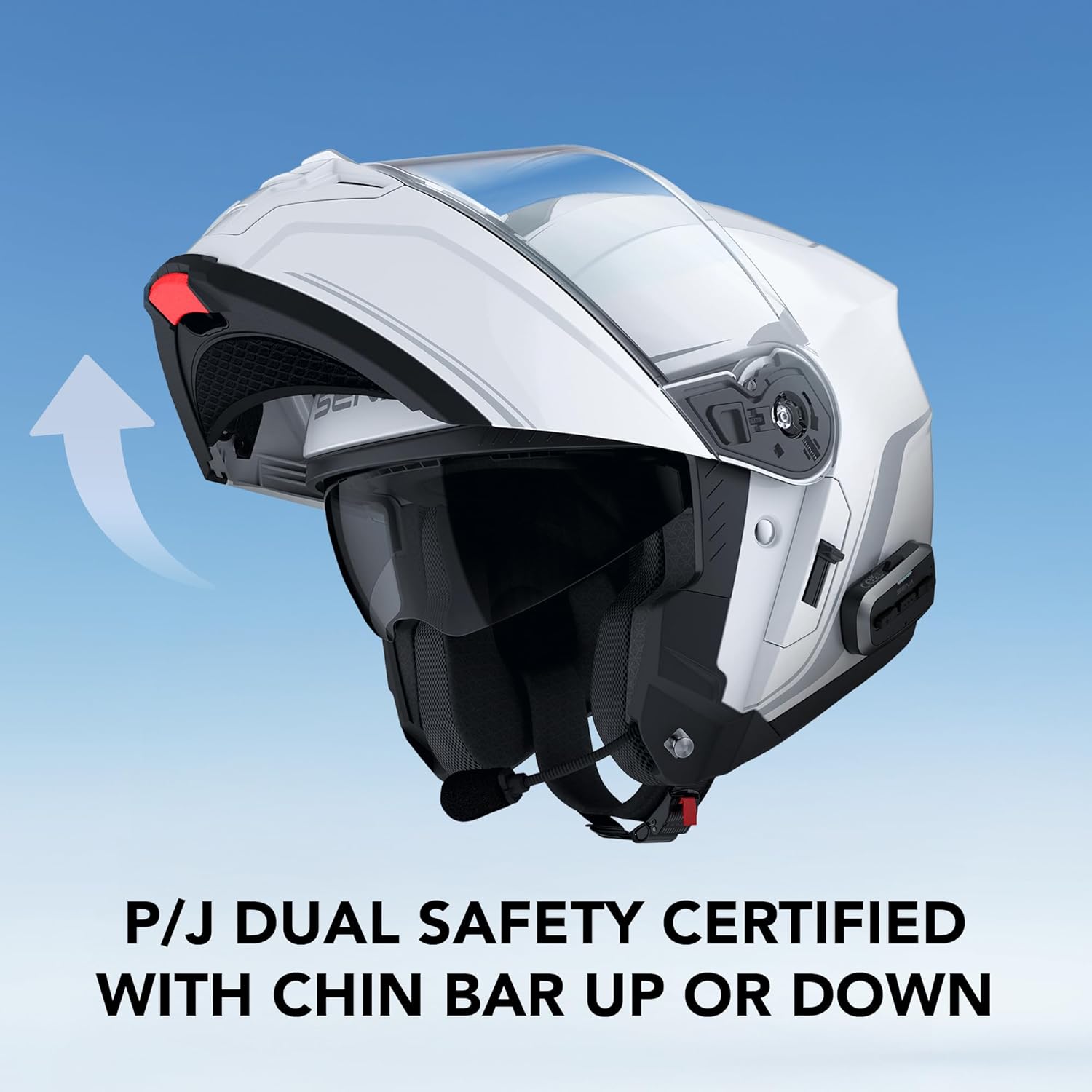
The helmet's modular design allows the chin bar to be securely raised, offering versatility while maintaining safety standards.

Experience the best of both worlds with full-face protection and the option for open-face ventilation by raising the chin bar.
Sistem ventilasi
The helmet features adjustable vents for comfort control. Locate the top and chin vents and adjust them to regulate airflow according to riding conditions.

The helmet's ventilation system is designed to provide optimal airflow, keeping the rider comfortable in various conditions.
Integrated Sun Visor
The helmet includes an integrated drop-down sun visor. Use the slider mechanism on the side of the helmet to deploy or retract the sun visor as needed for varying light conditions.
Pangropéa
1. Ngabersihan Cangkang Helm
Ngagunakeun lemes, damp cloth and mild soap to clean the exterior shell. Avoid abrasive cleaners or solvents that could damage the finish or materials.
2. Visor Care
Clean the clear visor and integrated sun visor with a soft cloth and warm water. For stubborn dirt, use a helmet-specific visor cleaner. Do not use harsh chemicals.
3. Interior Liner Removal and Cleaning
The interior comfort liner is removable for cleaning. Follow the instructions in the full user manual for proper removal and reinstallation. Hand wash with mild soap and air dry completely before reinserting.
4. Electronic Component Care
Keep the electronic components dry. If the helmet gets wet, allow it to air dry thoroughly before use. Do not attempt to disassemble the integrated communication system.
Pamérésan masalah
If you encounter issues with your Sena OUTRUSH 2 helmet, refer to the following common solutions:
- Henteu aya kakuatan: Ensure the helmet is fully charged. Check the charging cable and power source.
- Masalah Nyapasangkeun Bluetooth: Ensure the helmet is in pairing mode. Delete previous pairings on your smartphone and try again. Restart both devices.
- Interkom Teu Nyambung: Verify that all devices are within range and are using compatible intercom modes (Mesh or WAVE). Check for firmware updates.
- Masalah Kualitas Audio: Ensure speakers are correctly positioned over your ears. Adjust volume levels on both the helmet and your connected device.
- Pas Helm: If the helmet feels too tight or loose, consult the size guide or Sena support for advice on proper fit.
For more detailed troubleshooting, visit the official Sena support websitus.
spésifikasi
| Fitur | Rincian |
|---|---|
| Ngaran modél | OUTRUSH 2 |
| merek | Sena |
| Bahan | Polikarbonat (PC) |
| Beurat | Kira-kira 4 Pon (1.81 kg) |
| Konektipitas | Bluetooth, Mesh Intercom 3.0, WAVE Intercom |
| Panyatur | 2nd Generation HD Speakers |
| Standar Kasalametan | DOT, FMVSS 218, P/J Dual Homologation |
| Komponén Kaasup | OUTRUSH 2 Helmet, USB-C Charging Cable |
| UPC | 885465022947 |
| Nomer Bagian | OUTRUSH2-MB00S1 |
Émbaran Kasalametan
The Sena OUTRUSH 2 helmet is designed and manufactured to meet stringent safety standards. It complies with Federal Motor Vehicle Safety Standard 218 (FMVSS 218) and features P/J dual homologation, ensuring protection whether the chin bar is up or down. Always ensure the helmet fits correctly and is securely fastened before riding. Never modify the helmet or its integrated components, as this may compromise its protective capabilities.
Garansi sareng Rojongan
The Sena OUTRUSH 2 helmet comes with a 2-Taun Garansi from the date of purchase. This warranty covers manufacturing defects and ensures the product meets Sena's quality standards.
For warranty claims, technical support, or additional product information, please visit the official Sena websitus atanapi ngahubungan departemén layanan palanggan maranéhna. Simpen bukti pameseran anjeun pikeun validasi jaminan.
Sena Resmi Websitus: www.sena.com


