Bubuka
This manual provides detailed instructions for the setup, operation, and maintenance of your LIGE EF21-B Smart Watch. Please read this manual thoroughly before using the device to ensure proper function and to maximize your user experience. Keep this manual for future reference.
Naon dina Box
Upon opening your LIGE EF21-B Smart Watch package, you should find the following items:
- 1 x LIGE EF21-B Smart Watch
- 1 x Tali Baja Tahan Karat
- 1 x Tali Silikon
- 1 x Kabel Ngecas Magnétik USB
- 1 x Type-C Magnetic Charging Cable
- 1 x Manual Instruksi

Image: The LIGE EF21-B Smart Watch shown with both USB and Type-C magnetic charging cables, highlighting the included accessories.
Disetél
1. Ngecas Smart Watch
Before initial use, fully charge your smart watch. Connect the magnetic charging cable to the charging contacts on the back of the watch and plug the USB or Type-C end into a compatible power source (e.g., computer, wall adapter). The watch display will indicate charging status. A full charge typically takes approximately 3 hours.

Image: The LIGE EF21-B Smart Watch connected to its magnetic charger, displaying a charging animation and indicating its 600mAh battery capacity.
2. Pamasangan Aplikasi
To unlock the full functionality of your LIGE EF21-B Smart Watch, you need to install the companion application, FitCloudPro, dina smartphone Anjeun.
- Scan the QR code provided in the watch's interface or in the included manual to download the FitCloudPro app.
- Alternatively, search for "FitCloudPro" in your smartphone's app store (Google Play Store for Android, Apple App Store for iOS).
- Install the application and grant necessary permissions when prompted.
3. Papasangan Parangkat
After installing the app and fully charging your watch:
- Buka aplikasi FitCloudPro dina smartphone Anjeun.
- Pastikeun Bluetooth diaktipkeun dina smartphone Anjeun.
- Dina aplikasi, buka bagian "Alat" atanapi "Tambahkeun Alat".
- The app will search for available devices. Select "EF21-B" from the list to initiate pairing.
- Follow any on-screen prompts on both your phone and watch to confirm the pairing.
Parentah Operasi
Napigasi Dasar
The LIGE EF21-B Smart Watch features a 1.43-inch AMOLED touchscreen display and a rotary encoder crown for navigation.
- Layar cabak: Swipe left, right, up, or down to navigate through menus and access different features. Tap to select items.
- Rotary Encoder Crown: Rotate the crown to scroll through lists, adjust settings, or zoom in/out on certain interfaces. Press the crown to return to the home screen or confirm selections.
- Kancing samping: The watch includes additional side buttons that can be customized for quick access to specific functions or apps.

Gambar: A close-up view of the LIGE EF21-B Smart Watch's 1.43-inch AMOLED display, showcasing its vibrant colors and sharp resolution.
Telepon Bluetooth sareng Bewara
Once paired with your smartphone, the watch supports Bluetooth calling and message notifications.
- Nelepon/Ngawalon Telepon: You can answer or reject incoming calls directly from your watch. Use the built-in microphone and speaker for hands-free communication.
- Panginget pesen: Receive real-time notifications for calls, SMS, and various social media apps directly on your watch display.

Image: A user interacting with the LIGE EF21-B Smart Watch to answer a Bluetooth call, demonstrating its clear two-way communication capabilities.

Image: The LIGE EF21-B Smart Watch showing incoming notifications from various social media applications, ensuring discreet awareness of important messages.
Pangimeutan Kaséhatan
Arloji nyadiakeun fitur tracking kaséhatan komprehensif:
- Ngawaskeun Laju haté: Terus-terusan monitor denyut jantung anjeun sapopoe. View real-time data and historical trends in the FitCloudPro app.
- Pangimeutan Saré: Automatically records your sleep patterns, including deep sleep, light sleep, and wake times. Provides insights to help improve sleep quality.
- Nyukcruk Oksigén Darah (SpO2): Ukur tingkat oksigén getih anjeun.
- Pangimeutan Tingkat Stress: Tracks daily stress levels to help you manage well-being.
Catetan: Alat ieu sanés alat médis. Data kaséhatan ngan ukur kanggo rujukan sareng henteu kedah dianggo pikeun diagnosis atanapi pangobatan médis.

Image: The LIGE EF21-B Smart Watch displaying continuous heart rate monitoring data, showing BPM and historical trends.

Image: The LIGE EF21-B Smart Watch displaying sleep monitoring data, including total sleep time and sleep stage breakdown over several days.
Modeu Olahraga
Arloji ngadukung langkung ti 200 modeu olahraga pikeun ngalacak kagiatan fisik anjeun sacara akurat.
- Pilih olahraga nu dipikahoyong ti menu nu lalajo urang.
- The watch will record data such as distance, steps, calories burned, and heart rate during your workout.
- Review detailed analysis of your training results in the FitCloudPro app.

Image: The LIGE EF21-B Smart Watch displaying its interface for selecting from over 100 sports modes, with examples of users engaged in golf, climbing, and running.
Fitur séjén
The LIGE EF21-B Smart Watch includes several additional smart features:
- Asisten Sora AI: Interact with your watch using voice commands for various tasks.
- Senter: Utilize the built-in LED flashlight for convenience in low-light conditions.
- Kontrol Musik: Kontrol playback musik dina smartphone anjeun langsung tina jam tangan anjeun.
- Ramalan Cuaca: Kéngingkeun apdet cuaca sacara real-time.
- Jam alarem: Setel alarm sareng panginget.
- Manggihan Telepon abdi: Pilari deui smartphone anjeun anu leungit.
- Jauh Kaméra: Anggo jam tangan anjeun salaku jepret jauh pikeun kaméra telepon anjeun.
- Panginget cai: Receive prompts to drink water throughout the day.
- Kalkulator: Fungsi kalkulator dasar sayogi.

Image: The LIGE EF21-B Smart Watch showcasing its diverse range of smart features, including music control, weather, health monitoring, and a flashlight icon.
Video: Hiji leuwihview of the LIGE EF21-B Smart Watch's key features, including its AMOLED display, rotary crown, health monitoring, sports modes, and charging capabilities.
Pangropéa
beberesih
Pikeun ngajaga penampilan sareng fungsi jam tangan anjeun:
- Ngusap layar arloji jeung awak ku lawon lemes, tanpa serat.
- Keur kokotor bandel, rada dampen lawon jeung cai. Ulah make bahan kimia kasar atawa bahan abrasive.
- Bersihkeun kontak pangisi daya sacara rutin pikeun mastikeun pangisian daya anu efisien.
Tahan cai (IP68)
The LIGE EF21-B Smart Watch is rated IP68, meaning it is resistant to dust and can withstand immersion in water up to 1.5 meters for up to 30 minutes. This makes it suitable for daily use, such as washing hands or light rain exposure. However, it is not recommended for hot showers, saunas, or diving, as steam and high water pressure can compromise the seals.
Perawatan batré
Pikeun manjangkeun umur batre:
- Hindarkeun sering-sering ngeusi batre.
- Simpen arloji dina tempat anu tiis sareng garing upami henteu dianggo kanggo waktos anu lami.
- Use only the provided charging cables.
Pamérésan masalah
If you encounter issues with your LIGE EF21-B Smart Watch, refer to the following common solutions:
| Masalah | Solusi anu mungkin |
|---|---|
| Arloji teu hurung | Pastikeun arloji dicas pinuh. Pencét jeung tahan tombol daya sababaraha detik. |
| Teu tiasa dipasangkeun sareng telepon | Ensure Bluetooth is enabled on your phone and the watch. Restart both devices. Make sure the FitCloudPro app has necessary permissions. |
| Bewara teu katarima | Check app permissions for notifications on your phone. Ensure the watch is connected via Bluetooth. Verify notification settings within the FitCloudPro app. |
| Data kaséhatan teu akurat | Ensure the watch is worn snugly on your wrist. Clean the sensor on the back of the watch. Remember, this is not a medical device. |
| hirup batré pondok | Reduce screen brightness, disable unnecessary features (e.g., always-on display), and limit frequent heart rate monitoring. |
Lamun masalah persists, mangga ngahubungan rojongan customer.
spésifikasi
Key technical specifications for the LIGE EF21-B Smart Watch:
- model: EF21-B
- tampilan: Layar AMOLED 1.43 inci, 466x466 piksel
- Kapasitas batré: 600mAh Litium Polimér
- Kahirupan batré: 10+ days (typical use), 30+ days (standby)
- Waktu Ngecas: Kurang leuwih 3 jam
- Tahan cai: IP68
- Konektipitas: Bluetooth
- Kasaluyuan: Android 8.0+ / iOS 12.0+ (via FitCloudPro App)
- Sénsor: Heart Rate, Blood Oxygen, Pedometer
- Fitur husus: Bluetooth Call, Voice Assistant, 200+ Sports Modes, Flashlight, Music Control, Notifications, Sleep Monitor, Activity Tracker
- ukuran: Watch case approx. 47-48mm diameter, 22mm lug width. Max wrist circumference: 250mm, Min wrist circumference: 150mm.
- beurat: 180 Gram (kira-kira 6.3 ons)
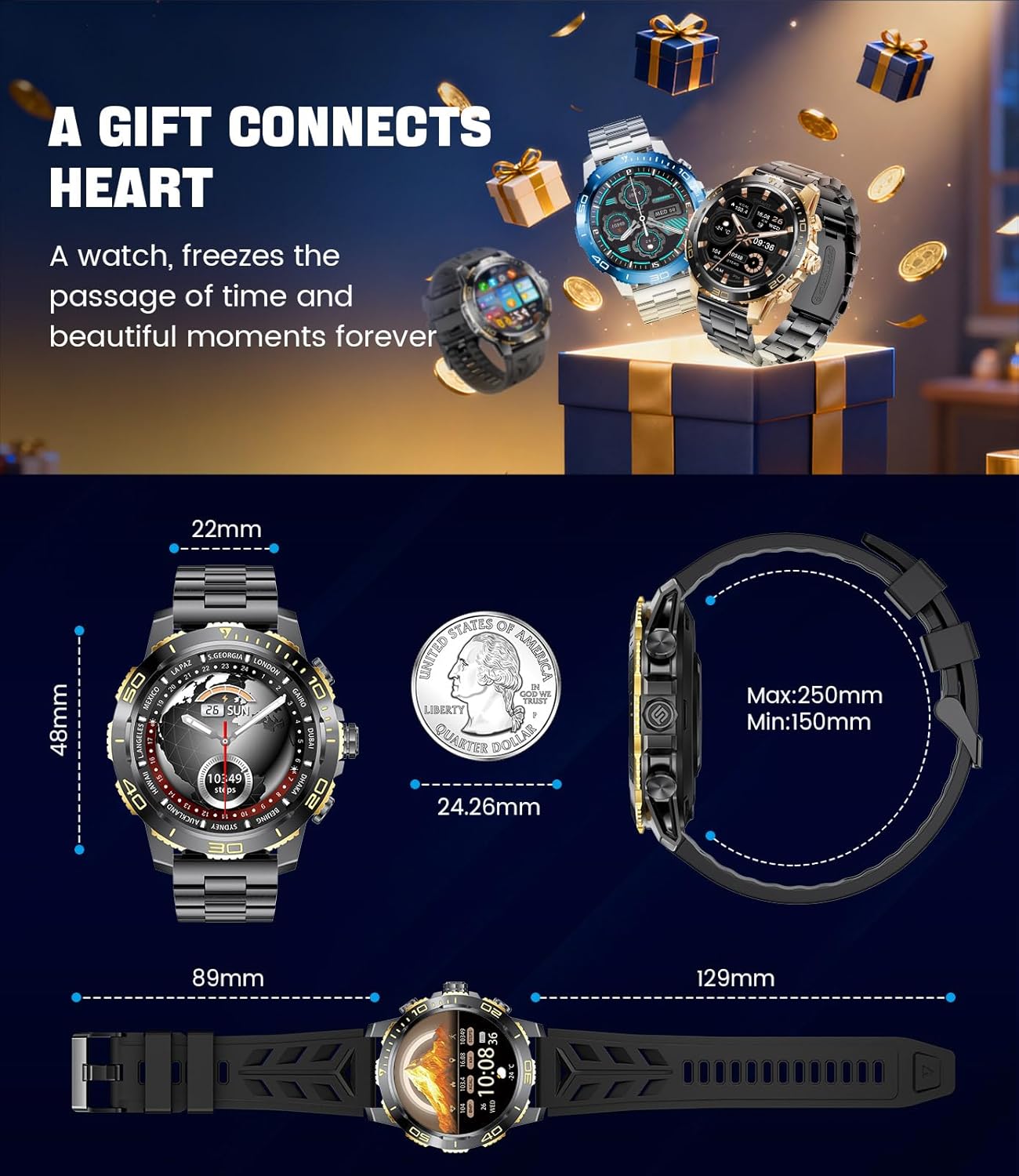
Image: Detailed dimensions of the LIGE EF21-B Smart Watch, including case diameter, strap width, and wrist circumference range.
Garansi sareng Rojongan
Your LIGE EF21-B Smart Watch comes with a manufacturer's warranty. Please refer to the warranty card included in your packaging for specific terms and conditions.
For any questions, technical support, or warranty claims, please contact LIGE customer service through the platform where you purchased the product. Our professional customer service team is available to assist you.


