1. Bubuka
Thank you for choosing the DEVAISE ASJZ031 Electric Standing Desk. This manual provides essential information for the safe assembly, operation, and maintenance of your new desk. Please read these instructions thoroughly before use and retain them for future reference.
This electric standing desk is designed to provide a versatile workspace, allowing seamless transitions between sitting and standing positions to promote better posture and productivity. It features a robust steel frame, a powerful lift system, and a seamless one-piece desktop for enhanced stability.
2. Parentah Kasalametan
- Pastikeun sadaya komponén aya sareng henteu ruksak sateuacan dipasang.
- Jauhkeun barudak sareng piaraan tina méja nalika dianggo pikeun nyegah cilaka.
- Ulah ngabeungbeuratan méja sacara kaleuleuwihi. Kapasitas beurat maksimum nyaéta 176 lbs (80 kg).
- Pastikeun teu aya halangan di luhur atanapi di handap méja nalika nyaluyukeun jangkungna.
- Jaga leungeun sareng ramo tetep bébas tina bagian anu obah nalika nyaluyukeun jangkungna.
- Ngan anggo adaptor daya sareng kabel anu disayogikeun.
- Ulah ngabongkar atanapi ngarobih komponén listrik méja. Hubungi dukungan palanggan pikeun layanan.
- Teundeun meja dina permukaan datar pikeun mastikeun stabilitas.
3. Eusi Paket
Verify that all parts are included in your package. Refer to the diagram below for identification.

Image: All components of the DEVAISE Electric Standing Desk laid out for assembly.
- Desktop (1 piece)
- Suku (2 lembar)
- Suku (2 lembar)
- Crossbar/Motor Assembly
- Panél kontrol
- Adaptor Daya sareng Kabel
- Headphone Hook
- Parabot Perakitan (sekrup, konci Allen)
4. Parentah Majelis
Follow these steps for assembling your DEVAISE Electric Standing Desk. It is recommended to have two people for certain steps.
- Pasangkeun Suku kana Suku: Secure the two feet to the bottom of each leg using the provided screws.
- Install Crossbar/Motor Assembly: Connect the crossbar, which contains the motor, between the two legs. Ensure it is securely fastened.
- Gantelkeun Suku ka Desktop: Carefully place the desktop upside down on a soft, clean surface. Align the assembled leg frame with the pre-drilled holes on the desktop and secure it with the appropriate screws.
- Sambungkeun Panel Kontrol sareng Daya: Mount the control panel to the underside of the desktop in the designated area. Connect all motor and power cables as per the diagram in your included paper manual.
- Pasang Headphone Hook: Attach the headphone hook to the desired side of the desk.
- Manajemén Kabel: Use the included cable ties or clips to organize and secure all cables to prevent tangling and damage.
- Power-Up mimiti: Plug the desk into a power outlet. The control panel should light up.
Pikeun visual leuwihview of the desk's features and operation, please refer to the video below:
Video: Leuwihview of the DEVAISE Adjustable Electric Standing Desk, demonstrating its features and height adjustment.
5. Parentah Operasi
Your DEVAISE Electric Standing Desk is equipped with an intuitive digital control panel for easy height adjustment and memory presets.
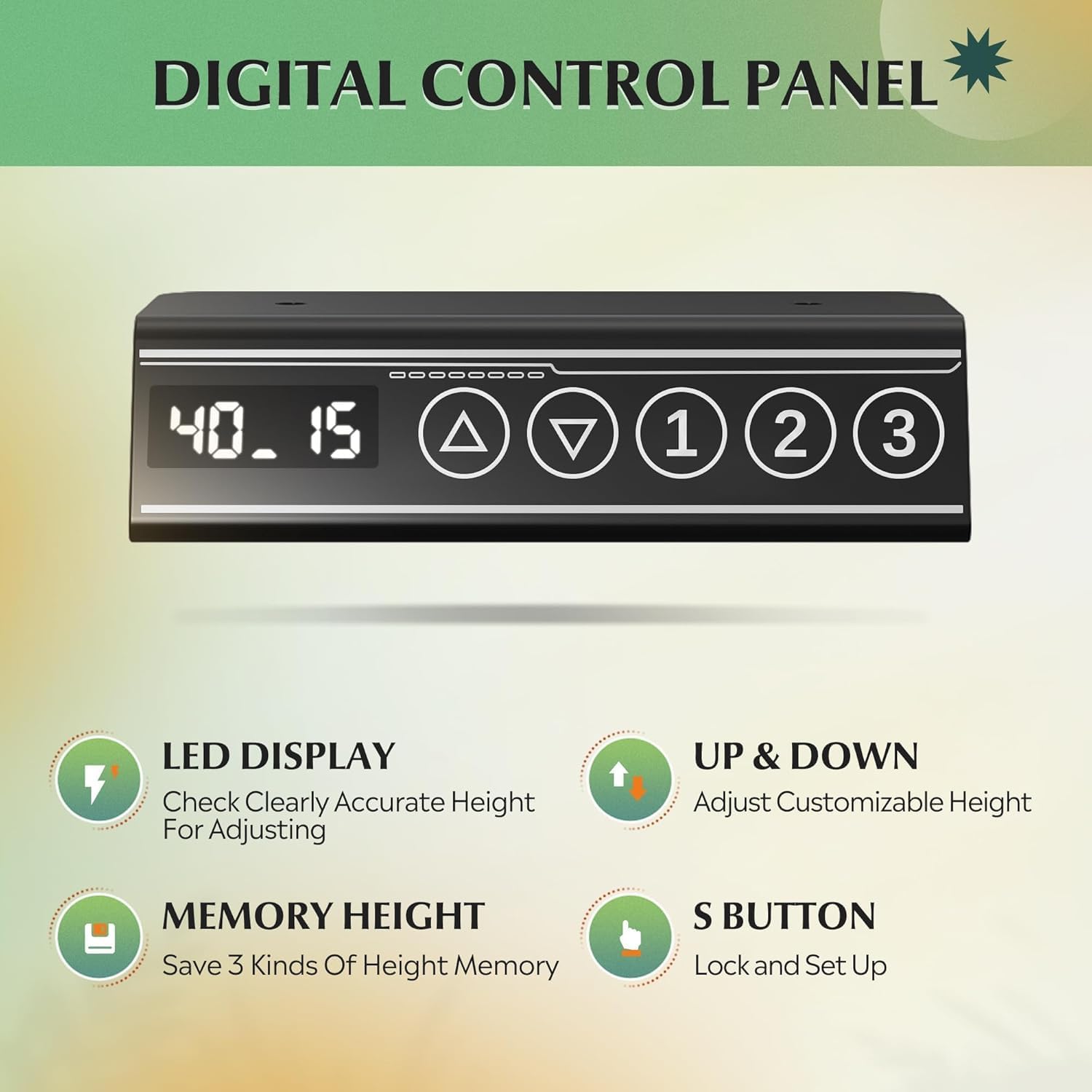
Image: Close-up of the digital control panel with LED display, up/down arrows, and three memory preset buttons.
adjustment jangkungna
- Angkat Meja: Pencét jeung tahan tombol Panah Ka Luhur (▲) tombol pikeun naékkeun méja ka jangkungna nangtung anu dipikahoyong.
- Meja Handap: Pencét jeung tahan tombol Panah Ka Handap (▼) tombol pikeun nurunkeun méja ka jangkungna diuk anu dipikahoyong.
- The LED display will show the current height in inches. The adjustable height range is approximately 28.35 inches to 46.46 inches.

Image: Illustration showing the DEVAISE Standing Desk adjusting from its lowest height (28.35 inches) to its highest height (46.45 inches).
Mémori prasetél
The desk features three programmable memory presets to save your favorite sitting and standing heights.
- Atur méja kana jangkungna anu dipikahoyong nganggo panah ka luhur/ka handap.
- Pencét éta 'S' button (Set button). The display will flash.
- Pencét langsung salah sahiji tombol mémori anu dinomeran (1, 2, atawa 3) pikeun nyimpen jangkungna ayeuna kana prasetél éta.
- Pikeun nginget jangkungna anu disimpen, cukup pencét tombol mémori anu dinomeran (1, 2, atawa 3). Méja bakal otomatis pindah ka posisi anu disimpen.
Sistem Anti-Tabrakan
The desk is equipped with an anti-collision system that automatically stops and slightly reverses movement if it encounters an obstruction during height adjustment. This feature enhances safety and prevents damage to the desk or surrounding objects.
Video: Demonstration of the DEVAISE Electric Standing Desk in various home office settings, highlighting its smooth operation and cable management features.
6. Pangropéa
- beberesih: Lap méja sareng pigura nganggo kaén anu lemes,amp lawon. Hindarkeun bahan kimia anu kasar atanapi pembersih abrasive.
- Manajemén Kabel: Periodically check that all cables are securely fastened and not pinched or tangled.
- Pengikat: Occasionally check and tighten any loose screws to maintain stability.
- Motor: Motorna bébas pangropéa. Ulah nyobian ngalumaskeun atanapi muka wadah motor.
7. Cara ngungkulan
| Masalah | Mungkin Cukang lantaranana | Solusi |
|---|---|---|
| Méja teu obah. | Power cable disconnected; motor cable loose. | Check all power and motor connections. Ensure the desk is plugged into a working outlet. |
| Méja obah teu rata atawa ngaluarkeun sora anu teu biasa. | Uneven load; loose fasteners; obstruction. | Distribute weight evenly. Check and tighten all screws. Ensure no obstructions are interfering with movement. |
| Sistem anti tabrakan sering aktip. | Sensitivity too high; frequent obstructions. | Ensure clear path for desk movement. Refer to the full manual for adjusting anti-collision sensitivity if available. |
| Preset mémori teu tiasa dianggo. | Preset teu disimpen kalawan bener. | Re-program the memory presets following the operating instructions. |
If you encounter issues not listed here or if solutions do not resolve the problem, please contact DEVAISE customer support.
8. Spésifikasi
| merek | DEVAISE |
| Nomer modél | ASJZ031-new |
| Dimensi produk | 27.5 "D x 55" W x 28" H |
| Rentang Jangkungna adjustable | 28.35" nepi ka 46.46" |
| Warna | Hideung |
| Tipe Bahan Top | Kayu direkayasa |
| Bahan Dasar | Beusi |
| Rekomendasi beurat maksimum | 180 Pon (81.6 kg) |
| Item Beurat | 37 Pon (16.8 kg) |
| Fitur husus | 3 Preset Memories, Adjustable Height, Electric, Quiet, Whole Piece Desktop |
9. Garansi jeung Rojongan
The DEVAISE ASJZ031 Electric Standing Desk comes with a 1-taun jaminan pigura. For any questions regarding assembly, product selection, or warranty claims, please contact our U.S.-based product support team. We offer 24/7 customer service to assist you.
For further assistance, please visit the official DEVAISE website or contact the customer service number provided with your purchase documentation.


