1. Produk Langkungview
The AOC Roku TV 50U7045/78G is a 50-inch 4K UHD Smart TV designed to deliver a modern and immersive viewing experience. Featuring a flat, borderless display, this television showcases images in stunning 4K resolution at a 60 Hz refresh rate. It integrates the Roku operating system, offering smart features like smartphone mirroring and voice commands. Equipped with a Quad Core processor, it ensures agile performance for all your entertainment needs.
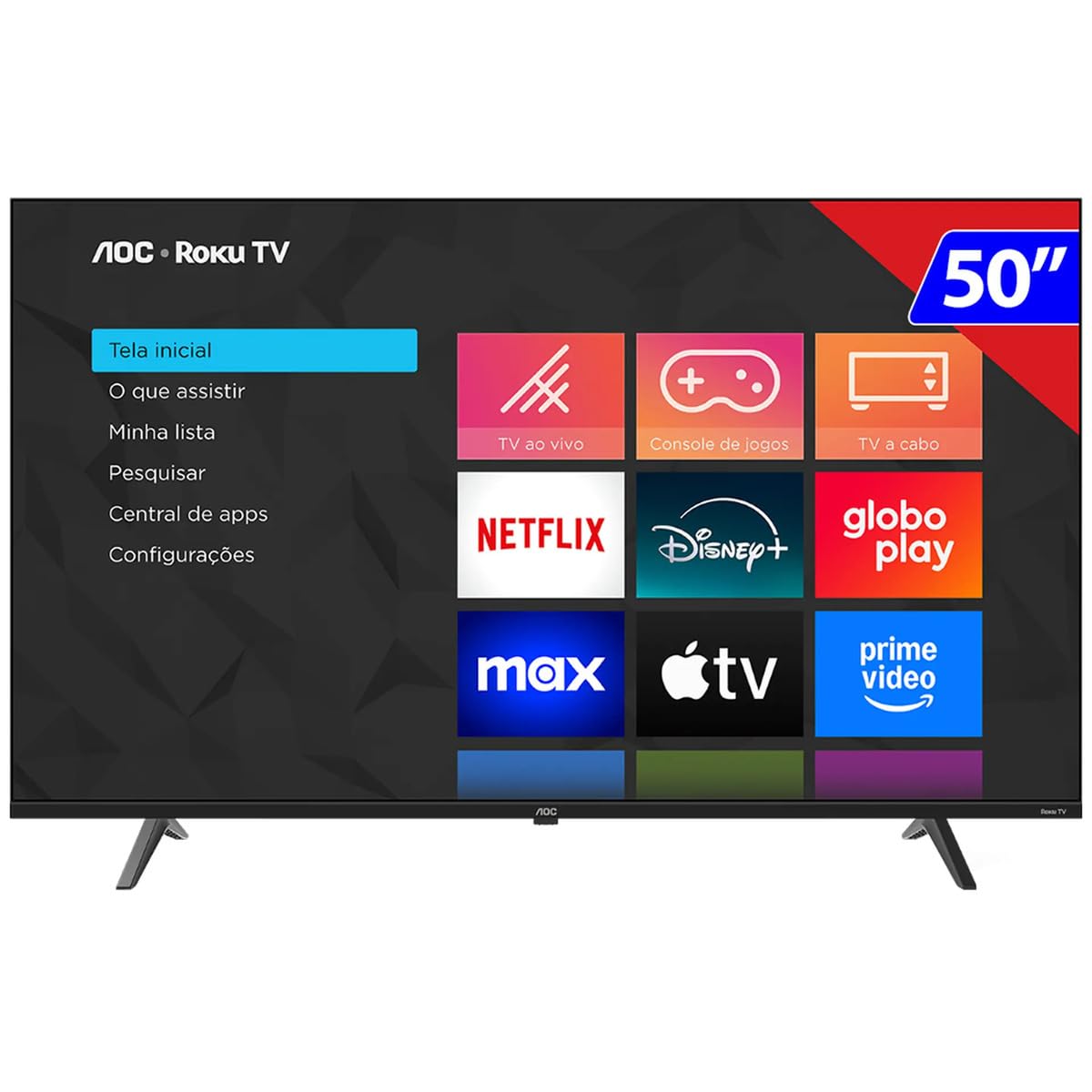
Gambar 1.1: Hareupeun view of the AOC Roku TV 50U7045/78G, showcasing the Roku home screen interface with options like 'Home', 'What to Watch', 'My List', 'Search', 'App Central', and 'Settings', alongside app icons for Netflix, Disney+, Globo Play, Max, Apple TV, and Prime Video.
Fitur konci:
- tampilan: 50-inch 4K UHD (3840 x 2160) LED display with a 60 Hz refresh rate.
- Desain: Flat screen with a borderless design for an expansive view.
- Platform Smart TV: Integrated Roku OS for easy access to streaming services, smartphone mirroring, and voice control capabilities.
- Audio: 2.0 channel audio system with 16W total power output.
- Prosesor: Quad Core processor for smooth navigation and performance.
- Konektipitas: 3 HDMI ports, 1 USB 2.0 port, 1 Ethernet RJ-45 port, Wi-Fi, Bluetooth, and AirPlay 2 support.
- Énergi Énergi: Eco mode and automatic shutdown timer for reduced power consumption.
2. Setup Guide
2.1 Unboxing jeung Inspection
Carefully remove the TV from its packaging. Inspect the TV and all included accessories for any signs of damage. Retain the packaging materials for future transport or service needs.
2.2 Pamasangan nangtung
If you plan to place the TV on a stand, follow these steps:
- Teundeun TV nyanghareupan handap dina permukaan lemes, beresih pikeun nyegah karuksakan layar.
- Align the TV stands with the corresponding slots on the bottom of the TV.
- Ngamankeun nangtung ngagunakeun screws disadiakeun. Pastikeun aranjeunna tightened pageuh.
2.3 Pamasangan Tembok (Pilihan)
If you intend to wall-mount your TV, refer to the wall mount kit instructions. This TV is compatible with VESA mounting standards. Ensure you use a compatible wall mount and follow all safety guidelines. Do not attempt to wall-mount the TV without proper tools and assistance.
2.4 Nyambungkeun Alat
Connect your external devices such as cable boxes, Blu-ray players, or gaming consoles to the appropriate ports on the back of the TV.

Gambar 2.1: Tukangeun view of the AOC Roku TV 50U7045/78G, illustrating the location of connectivity ports including HDMI, USB, and Ethernet, typically found on the side or back panel for easy access.
- HDMI: Use HDMI cables for high-definition video and audio. This TV has 3 HDMI ports.
- USB: Connect USB devices for media playback. This TV has 1 USB 2.0 port.
- Ethernet (RJ-45): Pikeun sambungan internét kabel.
- Antena/Kabel In: Sambungkeun anteneu atawa feed TV kabel.
- Optical Audio Out (SPDIF): Pikeun nyambungkeun ka sistem audio éksternal.
2.5 Initial Power On and Roku Setup
Saatos nyambungkeun sadaya kabel anu diperyogikeun:
- Colokkeun kabel listrik kana stop kontak listrik.
- Pencét tombol daya dina kadali jauh atanapi TV.
- Follow the on-screen instructions to complete the initial Roku setup, including language selection, network connection (Wi-Fi or Ethernet), and channel activation.
3. Parentah Operasi
3.1 Fungsi Remote Control
The Roku TV remote control provides intuitive navigation. Key buttons include:
- kakuatan: Ngahurungkeun atawa mareuman TV.
- imah: Mulih ka layar utama Roku.
- Pad arah (D-Pad): Navigates ménu jeung milih item.
- OKÉ / Lebetkeun: Konfirmasi pilihan.
- Balik: Mulih ka layar saméméhna.
- Volume Kaluhur/Turun: Saluyukeun volume audio.
- Jempé: Ngajempékeun atanapi nganonaktipkeun sora.
- Input: Switches between connected input sources (HDMI, TV tuner).
- Pilarian Sora: Activates voice command features (if supported by your remote).
3.2 Roku OS Napigasi
The Roku home screen provides access to all your entertainment. Use the D-Pad on your remote to:
- Browse streaming channels (e.g., Netflix, Disney+, Prime Video).
- Select input sources for connected devices.
- Access TV settings for picture, sound, and network configurations.
- Utilize the 'Search' function to find movies, shows, or apps.
3.3 Sambungan Jaringan
To access smart features and streaming content, ensure your TV is connected to the internet.
- Wifi: Arahkeun ka Settings > Network > Set up connection > Wireless sareng pilih jaringan anjeun.
- Ethernet: Connect an Ethernet cable from your router to the TV's RJ-45 port. The TV will automatically detect the wired connection.
3.4 Gambar jeung Sora Setélan
Sesuaikeun Anjeun viewpangalaman nguping sareng ngupingkeun:
- Modeu Gambar: Aksés Settings > TV picture settings to adjust brightness, contrast, color, and sharpness. Select from predefined modes like 'Movie', 'Standard', or 'Vivid'.
- Modeu sora: Aksés Setelan > Audio to adjust bass, treble, and balance. Choose from sound modes like 'Standard', 'Speech', or 'Music'.
3.5 Fitur pinter
- Pangeunteungan smartphone: Use compatible apps on your smartphone to cast content directly to your Roku TV.
- Kontrol sora: If your remote has a microphone button, press it and speak commands to search for content or control TV functions.
- Air Play 2: Stream content directly from Apple devices to your TV.
4. Pangropéa
4.1 Ngabersihan TV
- layar: Lembut usap layar nganggo lawon anu lemes, garing, teu aya serat. Pikeun tanda nekad, rada dampen the cloth with water or a screen-cleaning solution specifically designed for TVs. Ulah menyemprot cairan langsung kana layar.
- awak: Use a soft, dry cloth to wipe the TV's frame and back panel. Avoid using abrasive cleaners or solvents.
4.2 Apdet parangkat lunak
Your Roku TV may receive automatic software updates to improve performance and add new features. Ensure your TV is connected to the internet to receive these updates. You can manually check for updates via Setélan > Sistem > Apdet sistem.
5. Cara ngungkulan
Upami anjeun ngalaman masalah sareng TV anjeun, tingal solusi umum ieu:
| Masalah | Solusi anu mungkin |
|---|---|
| Taya kakuatan | Pastikeun kabel listrik dicolokkeun sacara aman kana TV sareng stop kontak listrik. Coba outlet béda. |
| Henteu aya gambar, tapi aya sora | Pariksa sumber input. Pastikeun alat nu disambungkeun dihurungkeun tur fungsina bener. Coba kabel HDMI anu béda. |
| Henteu aya sora, tapi aya gambar | Check the volume level and ensure the TV is not muted. Verify audio settings and external audio connections. |
| Kadali jauh teu jalan | Ganti batré dina rémot. Pastikeun teu aya halangan antara jauh sareng sénsor IR TV. |
| Teu bisa nyambung ka Wi-Fi | Ensure your Wi-Fi router is on and broadcasting. Re-enter the Wi-Fi password carefully. Try restarting your router and the TV. |
| Kualitas gambarna goréng | Check the resolution of the content being played. Adjust picture settings (brightness, contrast, sharpness). Ensure cables are securely connected. |
Lamun masalah persists sanggeus nyobian solusi ieu, mangga ngahubungan rojongan customer.
6. Spésifikasi
Detailed technical specifications for the AOC Roku TV 50U7045/78G:
| Fitur | Rincian |
|---|---|
| merek | AOC |
| Nomer modél | 50U7045/78G |
| Ukuran layar | 50 inci |
| Téknologi tampilan | LED |
| Resolusi | 4K UHD (3840 x 2160) |
| Refresh Laju | 60 Hz |
| Rasio Aspék | 16:9 |
| Babandingan Kontras | 1:200,000 |
| Prosesor | Quad Core |
| Sistem operasi | Roku OS |
| Kaluaran Audio | 2.0 Channels, 16W |
| Palabuhan HDMI | 3 |
| palabuhan USB | 1 (USB 2.0) |
| Ethernet (RJ-45) | 1 |
| Konéktipitas Wireless | Wi-Fi, Bluetooth, AirPlay 2 |
| Konsumsi Daya | 130W (with Eco mode) |
| Fitur husus | Sleep Timer, Smartphone Mirroring, Voice Control |
| Diménsi Produk (WxHxD) | 121.3 x 75.4 x 12.6 cm (kalayan nangtung) |
| Beurat produk | 11.5 kg |
| UPC | 7898620272616 |
7. Jaminan & Dukungan
7.1 Émbaran jaminan
Manufacturer warranty information for this product is not available within this manual. Please refer to your purchase documentation, retailer's policy, or the official AOC websitus pikeun istilah jeung kaayaan jaminan lengkep.
7.2 Rojongan Palanggan
For technical assistance, troubleshooting beyond this manual, or service inquiries, please contact AOC customer support through their official websitus atanapi inpormasi kontak anu disayogikeun sareng pameseran produk anjeun.


