1. Bubuka
This manual provides essential information for the safe and efficient operation of your AOC U32G4U 31.5-inch UHD 160Hz Gaming Monitor. Please read these instructions carefully before using the product and retain them for future reference. The AOC U32G4U monitor features a 31.5-inch Fast IPS panel, offering UHD (3840x2160) resolution at 160Hz, 1ms GtG response time, Adaptive Sync, HDR400 certification, and G-Sync compatibility for a high-performance visual experience. It also includes HDMI 2.1 connectivity and a USB hub.

Gambar 1.1: Hareupeun view of the AOC U32G4U monitor.
2. Émbaran Kasalametan
- Pastikeun monitor disimpen dina permukaan datar anu stabil pikeun nyegah ragrag teu kahaja.
- Anggo ngan ukur adaptor daya sareng kabel anu disayogikeun sareng monitor.
- Ulah meungpeuk bukaan ventilasi. Mertahankeun spasi nyukupan sabudeureun monitor pikeun aliran hawa ditangtoskeun.
- Hindarkeun ngalaan monitor ka suhu ekstrim, kalembaban, atanapi sinar panonpoé langsung.
- Pegatkeun sambungan kabel kakuatan ti stop kontak saméméh meresihan monitor.
- Ulah nyobian ngalereskeun monitor sorangan. Rujukkeun sadaya perawatan ka petugas layanan anu mumpuni.
3. Eusi Paket
Pastikeun yén sadaya item aya dina bungkusan:
- AOC U32G4U Monitor Display
- Monitor Stand Base
- Beuheung Stand Monitor
- Power Cable (IEC C13)
- Kabel HDMI
- Kabel DisplayPort
- USB-B to USB-A Cable (for USB Hub functionality)
- Pituduh setelan Gancang
4. Parentah Setup
4.1 Ngarakit Stand
- Taliti cabut monitor jeung nangtung komponén tina bungkusan.
- Attach the stand neck to the stand base, ensuring it clicks securely into place or is fastened with the provided screw.
- Align the assembled stand with the mounting area on the back of the monitor.
- Gently push the stand into the monitor until it locks securely.

Gambar 4.1: Balik view monitor sareng dudukanna napel.
4.2 Nyambungkeun Monitor
Sambungkeun kabel-kabel anu dipikabutuh ka port anu aya dina monitor sareng komputer anjeun atanapi alat anu sanés.
- Sambungan Daya: Sambungkeun kabel kakuatan ka input kakuatan monitor lajeng kana stop kontak listrik grounded.
- Sambungan Video:
- For optimal performance, use the supplied DisplayPort cable to connect to your computer's DisplayPort output.
- Alternatively, use an HDMI 2.1 cable to connect to your computer's or console's HDMI output. The monitor supports two HDMI 2.1 inputs.
- Sambungan Hub USB: Connect the USB-B to USB-A cable from the monitor's USB-B upstream port to an available USB port on your computer. This enables the monitor's integrated USB 3.2 hub.
- Kaluaran Audio: Connect headphones or external speakers to the 3.5mm headphone output jack if desired.
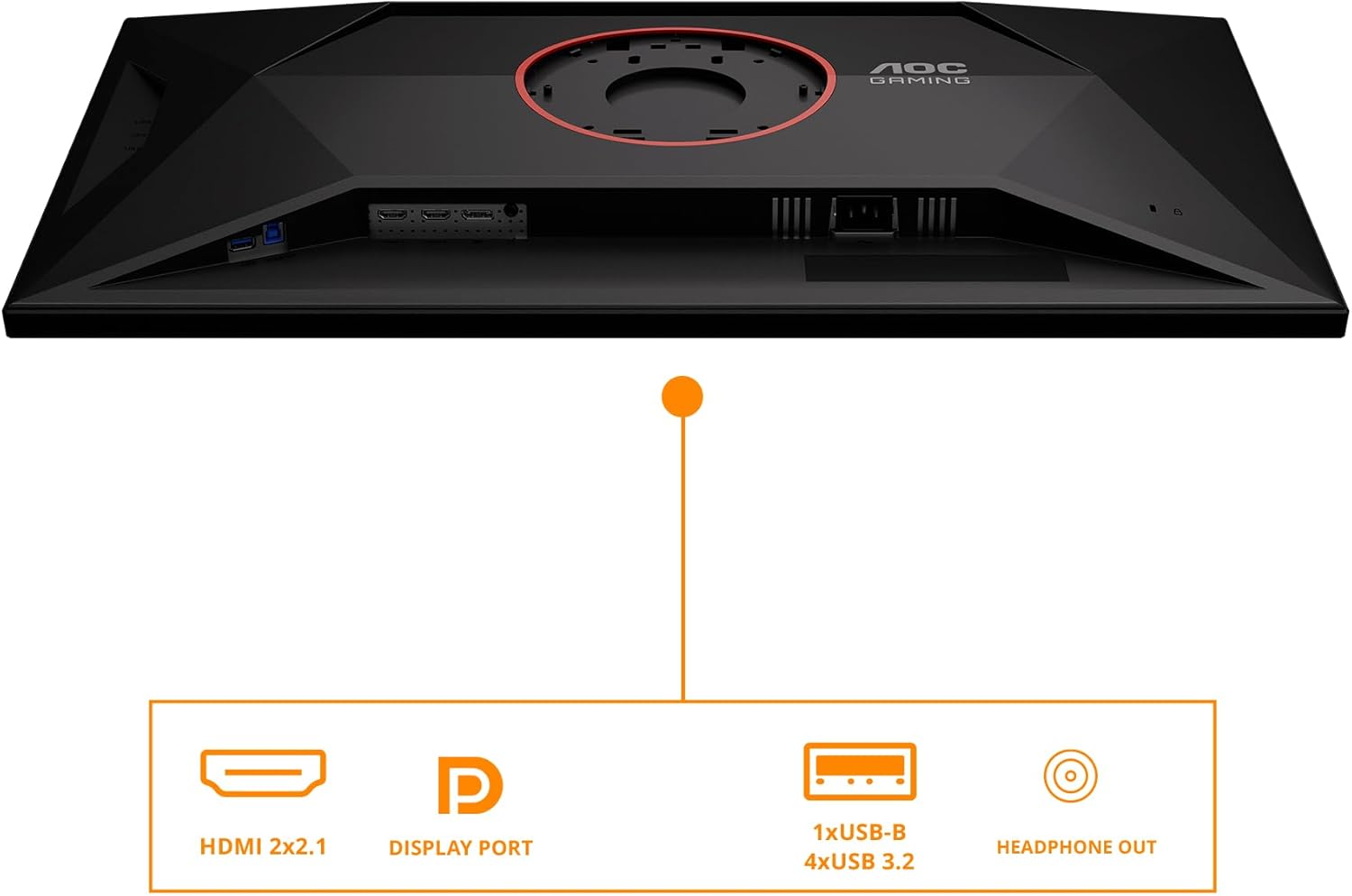
Figure 4.2: Monitor input and output ports.
4.3 Daya Awal Hurung
After connecting all cables, press the power button located on the monitor to turn it on. The monitor should automatically detect the active input source. If not, you may need to manually select the input source using the OSD menu.
5. Ngoperasikeun Monitor
5.1 Kontrol Tampilan Dina Layar (OSD)
The monitor features a joystick control located on the back or bottom-right for navigating the On-Screen Display (OSD) menu. This joystick allows you to adjust various settings.
- Push In: Activates the OSD menu or confirms a selection.
- Move Up/Down: Navigates ngaliwatan pilihan ménu.
- Pindah Kénca/Katuhu: Adjusts values or navigates sub-menus.
5.2 Ngatur Menu OSD
The OSD menu provides access to settings for picture quality, color, input selection, and more.
- Luminance: Adjusts brightness, contrast, and gamma.
- Setup Warna: Controls color temperature, sRGB mode, and other color-related settings.
- Picture Boost: Enhances specific areas of the screen.
- Persiapan OSD: Configures OSD language, transparency, and timeout.
- Setélan kaulinan: Accesses gaming-specific features like Game Mode, Shadow Control, Low Input Lag, and Adaptive Sync.
- Pilih Input: Manually switches between HDMI 1, HDMI 2, and DisplayPort inputs.
- Tambahan: Contains information about the current resolution and refresh rate, and options for resetting settings.
5.3 Nyaluyukeun Ergonomi
The monitor stand allows for ergonomic adjustments to optimize your viewing kanyamanan.
- Penyesuaian Jangkungna: Gently push or pull the monitor up or down along the stand neck to adjust its height. The monitor offers up to 130mm of height adjustment.
- Penyesuaian Dengdekkeun: Hold the top and bottom edges of the monitor and gently tilt it forward or backward to achieve your desired viewsudut ing.

Gambar 5.1: Pangaluyuan jangkungna monitor.
6. Pangropéa
6.1 Ngabersihan Monitor
- Salawasna pegatkeun sambungan kabel listrik sateuacan diberesihan.
- Make kaen nu lemes, teu aya lint rada dampDieusian ku cai atanapi pembersih layar anu hampang sareng henteu abrasive.
- Ulah menyemprot cleaner langsung kana layar. Larapkeun heula kana lawon.
- Hindarkeun ngagunakeun bénzéna, thinner, cleaners basis amonia, atawa bahan abrasive, sabab ieu bisa ngaruksak layar atawa c.asing.
6.2 Panyimpenan
If storing the monitor for an extended period, ensure it is powered off, disconnected from all cables, and stored in a cool, dry place, preferably in its original packaging to protect it from dust and physical damage.
7. Cara ngungkulan
Tingali tabel di handap pikeun masalah umum sareng solusina.
| Masalah | Mungkin Cukang lantaranana | Solusi |
|---|---|---|
| Taya Daya | kabel kakuatan teu disambungkeun; Stopkontak teu jalan. | Pastikeun kabel kakuatan disambungkeun aman ka monitor jeung stop kontak. Nguji outlet sareng alat sejen. |
| Taya Sinyal | kabel video teu disambungkeun; Sumber input salah dipilih. | Check video cable connections (HDMI/DP). Use OSD menu to select correct input source. Ensure computer is on. |
| Gambar poék/caang teuing | Setélan kacaangan/Kontras teu bener. | Adjust Brightness and Contrast settings via the OSD menu. |
| Kedip-kedip atanapi gambar menyimpang | Loose video cable; Graphics card driver issue; Incorrect refresh rate. | Reseat video cable. Update graphics card drivers. Check display settings for correct refresh rate (160Hz for UHD). |
| palabuhan USB teu jalan | Kabel USB upstream teu nyambung. | Pastikeun kabel USB-B ka USB-A disambungkeun tina monitor ka komputer Anjeun. |
8. Spésifikasi
Key technical specifications for the AOC U32G4U monitor:
| Fitur | Spésifikasi |
|---|---|
| Ukuran layar | 31.5 inci |
| Tipe Panel | IPS gancang |
| Resolusi Max | 3840 x 2160 Piksel (UHD) |
| Refresh Laju | 160Hz (UHD), 320Hz (FHD) |
| Waktu Tanggapan | 1ms GtG, 0.5ms MPRT |
| Rojongan HDR | HDR400 Certified |
| Sync adaptif | Yes (G-Sync Compatible) |
| Rasio Aspék | 16:9 |
| Viewdina Angles | 178° (Horizontal/Vértikal) |
| Input Video | 2x HDMI 2.1, 1x DisplayPort 1.4 |
| Hub USB | 1x USB-B (upstream), 4x USB 3.2 (downstream) |
| Kaluaran Audio | 1x Headphone Out (3.5mm) |
| Panyatur | Speaker stéréo terpadu |
| Érgonomi | Height Adjustment (130mm), Tilt |
| Gunung VESA | Supported (Mounting hardware not included) |
| Ukuran (L x W x H) | 10.61 x 28.19 x 18.19 inci (kalayan nangtung) |
| Beurat | 22 pon (kalayan nangtung) |
9. Garansi jeung Rojongan
For detailed warranty information, please refer to the warranty card included with your product or visit the official AOC website. Technical support and customer service contact information can also be found on the AOC website. Please have your monitor's model number (U32G4U) and serial number ready when contacting support.
Sumberdaya Online: For the latest drivers, software, and FAQs, please visit the official AOC support page.