
Cuifati CUIFATIvd1g4kecbu
Cuifati 4G CPE Cat6 Mobile WiFi Hotspot Router User Manual
Model: CUIFATIvd1g4kecbu
1. Bubuka
This manual provides detailed instructions for the setup, operation, and maintenance of your Cuifati 4G CPE Cat6 Mobile WiFi Hotspot Router. This device offers secure, high-speed internet sharing across multiple devices using a SIM card, making it suitable for various environments including home, office, and outdoor activities.
2. Eusi Paket
Punten parios yén sadaya barang anu didaptarkeun di handap aya dina pakét anjeun:
- Cuifati 4G CPE Cat6 Mobile WiFi Hotspot Router
- Adaptor kakuatan
- Kabel Ethernet
- Karabiner (pikeun gampang dibawa)
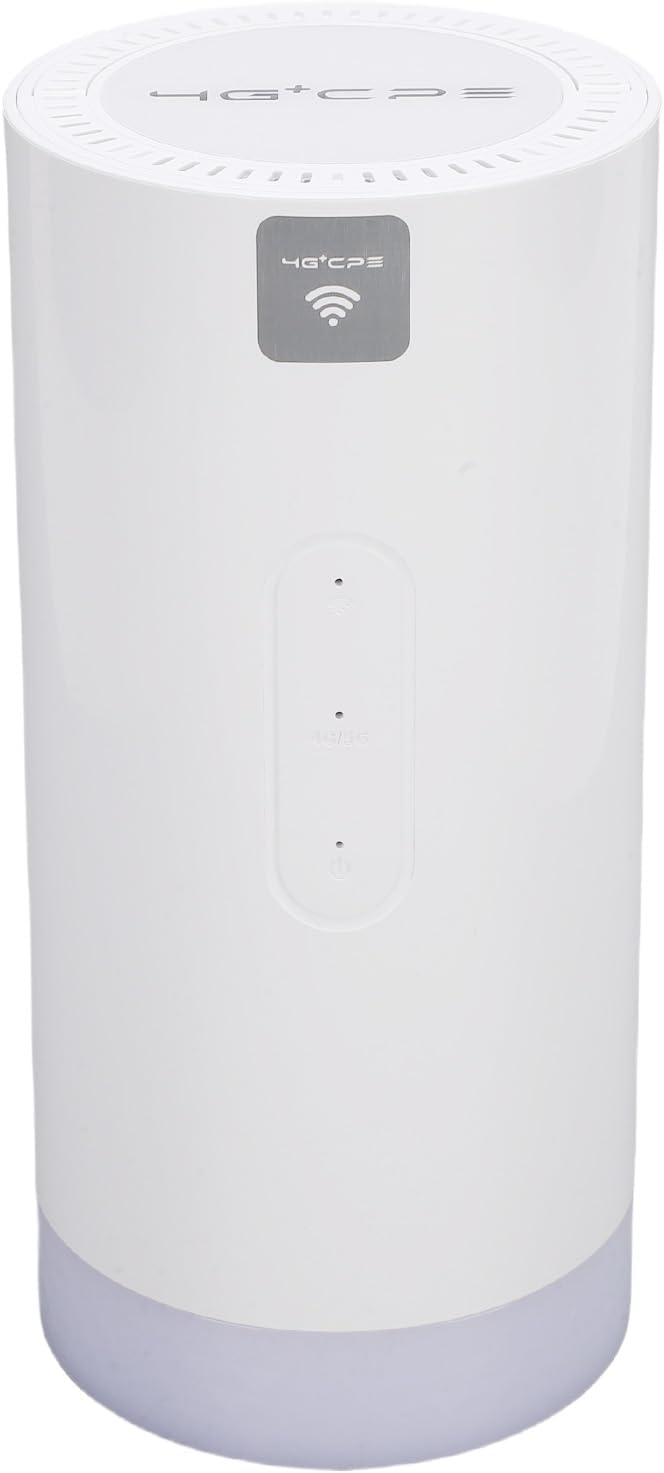
Image: Package contents including the router, power adapter, Ethernet cable, and carabiner.
3. Produk Langkungview
3.1 Panel payun

Gambar: Hareupeun view of the router, showing LED indicators and the 4G+CPE logo.
The front panel features LED indicators for WiFi connection status, network connection status, and battery level, providing an intuitive display of the device's operational status.
3.2 Panel Tukang sareng Port

Gambar: Tukangeun view of the router, displaying various ports and the product information label.
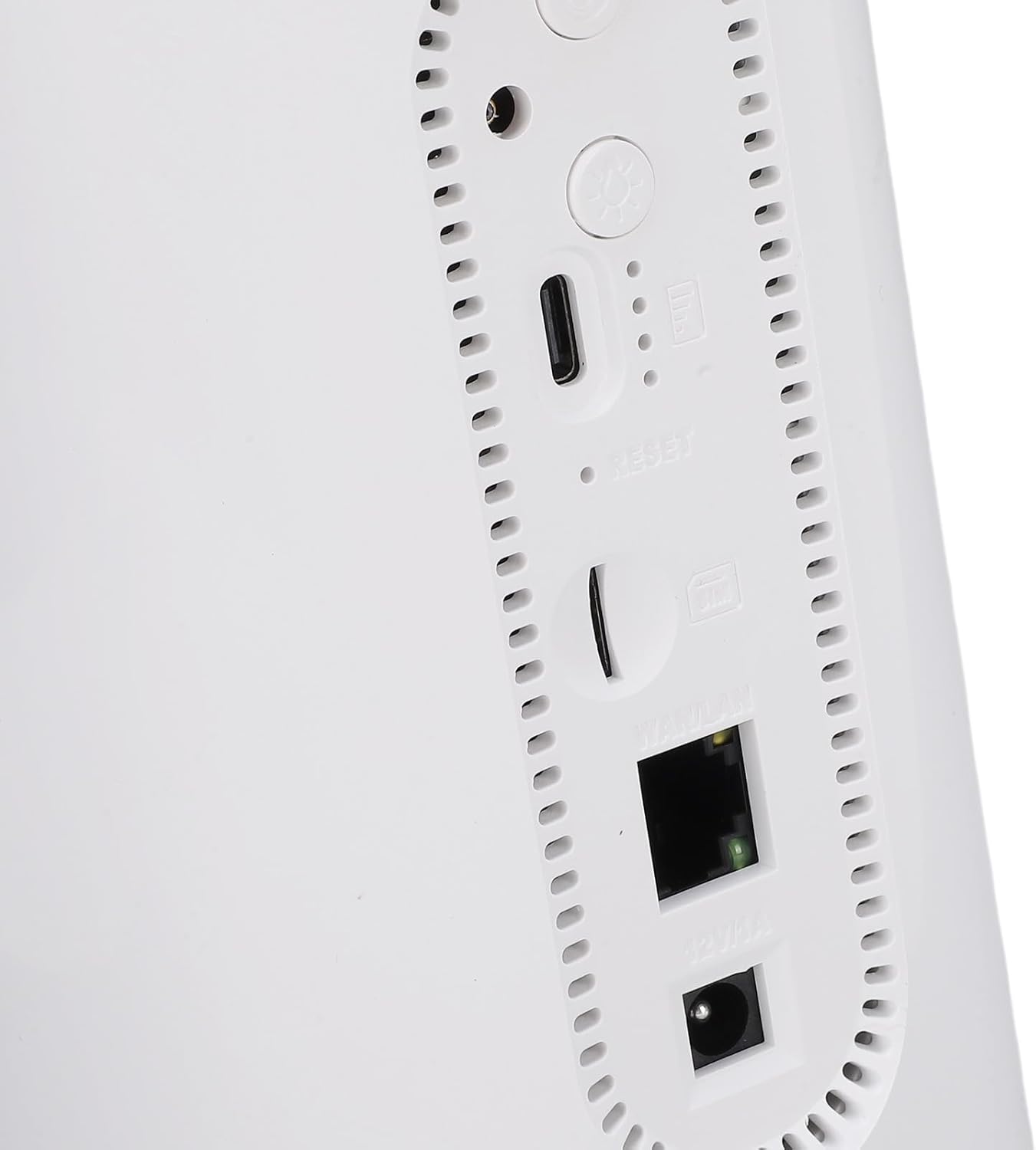
Gambar: Deukeut view of the rear ports, including SIM card slot, Reset button, WAN/LAN port, and power input.
The rear panel includes essential ports and controls:
- Slot Kartu SIM: For inserting a Micro SIM card.
- Tombol Reset: Dipaké pikeun mulangkeun setélan pabrik.
- Port WAN/LAN: An Ethernet port for wired connections or connecting to an existing network.
- Input kakuatan: Pikeun nyambungkeun adaptor kakuatan.
- Tombol Daya: Pikeun ngahurungkeun atawa mareuman alat.
- Camping Light Button: To activate or deactivate the colorful light feature.
4. Setélan
4.1 Pamasangan Kartu SIM
- Pastikeun router dipareuman.
- Panggihan slot kartu SIM dina panel tukang.
- Insert a Micro SIM card into the slot with the gold contacts facing down and the notched corner oriented correctly. Push until it clicks into place.
- To remove, gently push the SIM card again until it ejects.
4.2 Powering On
- Connect the provided power adapter to the power input port on the rear panel.
- Colokkeun adaptor kakuatan kana stop kontak témbok.
- Press and hold the Power Button until the LED indicators illuminate. The device will begin to boot up.
4.3 Initial WiFi Connection
- Once the router is powered on and the network indicator shows a stable connection, locate the default WiFi Network Name (SSID) and Password (PWD) on the label at the bottom or rear of the device. (Example: SSID: 4G+CPE-XXXX, PWD: XXXXXXXXXX)
- On your smartphone, tablet, or computer, search for available WiFi networks.
- Select the SSID corresponding to your router.
- Enter the default PWD when prompted.
- Ayeuna anjeun kedah nyambung ka internét.
5. Parentah Operasi
5.1 Nyambungkeun Alat
You can connect multiple devices to the router via WiFi. For wired connections, use an Ethernet cable to connect a device to the WAN/LAN port.
5.2 Ngaksés ka Web Manajemén Panganteur
To configure advanced settings, access the web panganteur manajemén:
- Ensure your device is connected to the router's WiFi network.
- Buka a web panyungsi (contona, Chrome, Firefox).
- Lebetkeun alamat IP standar (contona, 192.168.199.1) into the address bar and press Enter. This IP address is typically found on the product label.
- Enter the default username (e.g., admin) and password (e.g., admin) when prompted. These credentials are also on the product label.
- From the interface, you can change WiFi settings, view connected devices, and manage network preferences.
5.3 Indikator LED
The LED indicators on the front panel provide visual feedback on the router's status:
- Indikator WiFi: Shows the status of the WiFi network.
- Indikator jaringan: Displays the status of the 4G/3G/2G mobile network connection.
- Indikator batré: Nunjukkeun tingkat batré ayeuna.
Refer to the full product specifications for detailed indicator behavior (e.g., solid, blinking, color codes).
5.4 Camping Lampu Fungsi
This router includes a colorful light feature. Press the dedicated Camping Light Button on the rear panel to activate or deactivate this function. This can be useful for outdoor activities.
6. Pangropéa
- beberesih: Anggo kaén anu lemes sareng garing pikeun ngabersihan alat. Hindarkeun pembersih cair atanapi bahan abrasive.
- Panyimpenan: Simpen router di tempat anu tiis sareng garing, jauh tina sinar panonpoé langsung sareng suhu anu ekstrim.
- Perawatan batré: Pikeun umur batré anu optimal, ulah sering ngosongkeun batréna. Upami disimpen kanggo waktos anu lami, eusian batréna dugi ka sakitar 50%.
- Pembaruan firmware: périodik pariksa produsén urang websitus atawa nu web antarmuka manajemen pikeun apdet firmware anu sayogi pikeun mastikeun kinerja sareng kaamanan anu optimal.
7. Cara ngungkulan
- Henteu aya sambungan internét:
- Pastikeun kartu SIM dipasang kalayan leres sareng diaktipkeun nganggo paket data.
- Check the network LED indicator. If it's off or red, there might be a network issue or no signal.
- Balikan deui router sareng alat anu nyambung.
- Pariksa setélan APN dina web management interface (if applicable).
- Teu Bisa Nyambung ka WiFi:
- Ensure the WiFi LED indicator is on.
- Verify you are entering the correct WiFi password.
- Pindah ngadeukeutan ka router pikeun ningkatkeun kakuatan sinyal.
- Balikan deui router.
- Laju Internét Leutik:
- Pariksa kakuatan sinyal jaringan sélulér anjeun.
- Ngurangan jumlah alat nu disambungkeun.
- Pastikeun teu aya aplikasi latar tukang anu ngonsumsi bandwidth anu kaleuleuwihi.
- Try moving the router to a location with better signal reception.
- Router teu ngabales:
- Press and hold the Power Button for 10 seconds to force a shutdown, then restart.
- If issues persist, perform a factory reset by pressing the Reset button with a pin for 5-10 seconds. Note: This will erase all custom settings.
8. Spésifikasi
| Fitur | Spésifikasi |
|---|---|
| Nomer modél | CUIFATIvd1g4kecbu |
| merek | Cuifati |
| Téhnologi konektipitas | 4G LTE (Cat6), Ethernet |
| Tanpa kabel | 802.11 b/g/n/AC (2.4G, 5.8G) |
| Kacepetan WiFi | 2.4G: 300Mbps, 5.8G: 866Mbps |
| Frékuénsi Band Kelas | Tri-Band (LTE FDD, TDD, WCDMA, EDGE) |
| Tipe Kartu SIM | Micro SIM x 1 |
| Kapasitas batré | 10000mAh Lithium Cell (Built-in) |
| Énkripsi | WiFi Protected Access™ (WPA/WPA2) 2 |
| Diménsi | Kira-kira 200x95x92mm / 7.87x3.74x3.62 inci |
| Item Beurat | 1.88 pon |
| Alat nu cocog | Smartphones, Tablets, Laptops, Computers |
| Dianjurkeun Paké | Jero rohangan / Luar |
9. Garansi jeung Rojongan
For warranty information and technical support, please refer to the documentation included with your purchase or contact Cuifati customer service directly. You may also visit the official Cuifati websitus pikeun bantuan salajengna jeung sumber.
Ask a question about this manual
Ask about setup, troubleshooting, compatibility, parts, safety, or missing instructions. Manuals+ will review the question and use this page’s manual context to help answer it.