
Bubuka
This user manual provides detailed instructions for the installation, operation, maintenance, and troubleshooting of your LongPlus 8MP 4K UHD PoE Wired Security Camera Outdoor, Model LP8MEF8. This camera is designed to deliver high-quality surveillance with advanced features for enhanced security. Please read this manual thoroughly before using the product to ensure proper setup and functionality.
Naon dina Box
Carefully unpack the box and ensure all items are present and in good condition. If any items are missing or damaged, please contact LongPlus customer support.
- 1 x LongPlus Dome Camera
- 1 x Kotak Warna
- 1 x Stiker Peringatan
- 1 x Stiker Posisi
- 1 x Foam Bag/1 x Protective Film
Produk Leuwihview
Fitur konci
- Resolusi 4K UHD: Captures video at 3840x2160 pixels with a 132° wide viewing angle and HDR for clear, detailed footage.
- Deteksi Gerakan AI: Advanced object detection for humans and vehicles, with customizable activity zones and privacy masks to reduce false alerts.
- Triple Night Vision Modes: Offers IR Night Vision, Color Night Vision, and Smart Night Vision for clear visibility up to 100ft (30m) in various lighting conditions.
- Two-Way Audio & Strobe Light Alarm: Communicate with visitors or deter intruders using the built-in speaker and microphone, complemented by an automatic strobe light and siren alarm.
- Desain awét: IP67 weatherproof metal housing ensures reliable operation in extreme weather conditions (-30°C to 60°C / -22°F to 140°F).
- Aksés Jauh: Ngawas live footage and recordings via the Longvision app, compatible with iOS, Mac, Windows, and Android devices. Supports up to 32 users.
- Panyimpenan Éfisién: Utilizes H.265 High Efficiency Video Coding to optimize storage space. Supports local storage (via NVR, up to 10TB expandable) and cloud storage options.
- Konéktivitas PoE: Power over Ethernet (PoE) simplifies installation by delivering power, audio, and video through a single Ethernet cable.
Komponén Kaméra
The LongPlus LP8MEF8 camera features a robust dome design with integrated LED spotlights for color night vision, an infrared sensor for IR night vision, a lens, and a microphone/speaker for two-way audio. The durable metal housing provides protection against environmental elements.

Image: The LongPlus LP8MEF8 camera highlighting its IP67 weatherproof rating for all-season security and durable metal housing for efficient heat dissipation.

Image: Illustration of the camera's 132-degree wide field of view, capturing a broad area in 4K UHD resolution.
Disetél
1. Perencanaan Lokasi Instalasi
Pilih lokasi anu cocog pikeun kaméra anjeun, kalayan merhatikeun lokasi anu dipikahoyong viewing area, proximity to an NVR or PoE switch, and protection from direct impact. The camera is IP67 weatherproof, making it suitable for outdoor use in various conditions.
2. Masang kaméra
- Use the provided positioning sticker to mark the drill holes on the mounting surface.
- Drill holes according to the marks. Insert wall anchors if mounting on masonry.
- Secure the camera base to the mounting surface using the screws.
- Adjust the camera angle to cover the desired area.
3. Nyambungkeun kaméra
The LP8MEF8 camera uses Power over Ethernet (PoE) for simplified connectivity.
- Connect one end of an Ethernet cable to the camera's PoE port.
- Sambungkeun tungtung kabel Ethernet anu sanésna kana NVR (Network Video Recorder) anu diaktipkeun ku PoE atanapi saklar PoE.
- Ensure the NVR/PoE switch is powered on. The camera will receive power and transmit data through this single cable.

Image: Diagram showing the easy plug-and-play PoE connection between the LongPlus camera and an NVR, supporting distances up to 660ft.
4. Initial Configuration (via NVR or App)
Refer to your NVR's manual for specific camera addition procedures. Generally, the NVR will automatically detect PoE cameras. For app-based setup:
- Unduh Longvision aplikasi ti App Store (ios) atawa Google Play Store (Android).
- Ngadaptar akun tur asup.
- Follow the in-app instructions to add your camera. This typically involves scanning a QR code on the camera or manually entering its device ID.
- Sakali ditambahkeun, anjeun tiasa view hirup footage and configure settings.
Parentah Operasi
1. Hirup View sareng Playback
- Open the Longvision app or access your NVR interface.
- Select the desired camera to view hirup footage.
- Anggo fungsi puter deui pikeunview video dirékam.
2. Modeu Visi Peuting
The camera supports three night vision modes:
- IR Peuting Visi: Provides black and white video using infrared LEDs in low-light conditions.
- Warna Night Vision: Ngamangpaatkeun lampu sorot internal pikeun nyayogikeun pidéo warna pinuh dina cahaya anu kirang.
- Smart Night Vision: Automatically switches between IR and color modes based on detected motion or light conditions.
You can switch between these modes via the Longvision app or NVR settings.

Image: Visual representation of the three night vision modes (Full-Color, AI, IR) available on the LongPlus camera, adapting to various lighting scenarios.
3. AI Motion Detection and Alerts
- Aktipkeun Deteksi: In the app/NVR settings, enable AI motion detection for humans and/or vehicles.
- Zona Kagiatan: Nangtukeun wewengkon husus dina kaméra urang view where motion detection should be active. This helps filter out irrelevant alerts.
- Topeng Privasi: Configure privacy zones to block out sensitive areas from being recorded.
- Bewara: Set up push notifications to receive real-time alerts on your mobile device when motion is detected.

Image: The camera's smart AI motion detection feature, capable of distinguishing between persons and vehicles to provide more accurate alerts.
4. Two-Way Audio and Alarm Functions
- Audio Dua Arah: Use the microphone and speaker in the Longvision app to communicate with individuals near the camera.
- Strobe Light & Siren Alarm: When motion is detected, the camera can automatically trigger a strobe light and siren to deter intruders. This can also be manually activated via the app.

Image: A scenario depicting the camera's two-way audio and strobe light alarm features, allowing interaction and deterrence.
5. Modeu Rekaman
The camera supports various recording options when connected to a compatible NVR:
- Rekaman anu dipicu gerak: Records only when motion is detected (default).
- Scheduled recording: Records during specific times of the day.
- 24/7 continuous recording: Ngarékam terus-terusan.
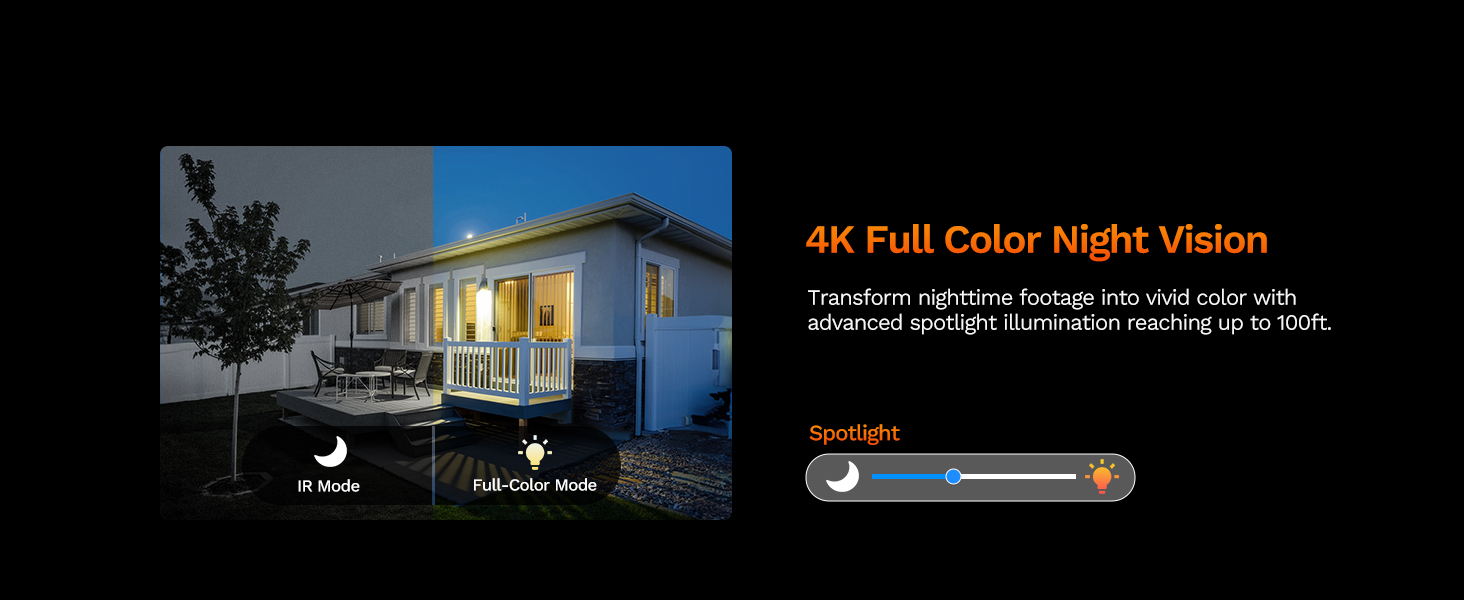
Image: The LongPlus NVR illustrating the benefits of H.265 (HEVC) video compression for saving storage space while maintaining video quality.
Pangropéa
- beberesih: Rutin ngabersihan lénsa kaméra jeung perumahan ku lemes, damp lawon. Hindarkeun pembersih abrasive anu tiasa ngagores lensa.
- Pembaruan firmware: Check the Longvision app or LongPlus website periodically for firmware updates. Keeping your camera's firmware updated ensures optimal performance and security.
- Pamariksaan kabel: Periodically inspect the Ethernet cable for any signs of wear or damage, especially in outdoor installations. Ensure connections are secure.
- Pamariksaan Lingkungan: Pastikeun teu aya halangan anu ngahalangan kaméra view or interfering with its sensors.
Pamérésan masalah
If you encounter issues with your LongPlus camera, refer to the following common problems and solutions:
| Masalah | Mungkin Cukang lantaranana | Solusi |
|---|---|---|
| Taya feed video | No power; Loose cable connection; Network issue. | Check PoE connection to NVR/switch. Ensure NVR/switch is powered on. Verify Ethernet cable integrity. |
| Kualitas gambar henteu saé | Lénsa kotor; Cahaya kurang; Masalah bandwidth jaringan. | Clean the camera lens. Ensure adequate lighting for color night vision or switch to IR mode. Check network speed. |
| Deteksi gerak teu jalan | Detection disabled; Incorrect sensitivity; Activity zone not set correctly. | Enable motion detection in app/NVR settings. Adjust sensitivity. Verify activity zone configuration. |
| Teu tiasa nyambung ka aplikasi | Incorrect network settings; App issues; Camera not online. | Ensure camera is connected to the network. Restart camera and router. Re-add camera to the app. Check app permissions. |
| Audio dua arah teu jalan | Microphone/speaker disabled; Volume too low; Network latency. | Check audio settings in the app. Adjust volume levels. Ensure stable network connection. |
If the problem persists after trying these solutions, please contact LongPlus customer support for further assistance.
spésifikasi
| Fitur | Katerangan |
|---|---|
| merek | LongPlus |
| Nomer modél | LP8MEF8 |
| Téhnologi konektipitas | Wired (Power over Ethernet - PoE) |
| Resolusi Capture Video | 4K UHD (3840x2160) |
| Téhnologi sénsor optik | CMOS |
| Tipe Lénsa | Dibereskeun |
| Viewdina Angle | 132 darajat |
| Visi Peuting | Yes, up to 100 Feet (30m) range (IR, Color, Smart modes) |
| Laju pigura | 30 fps |
| Modeu Ngarekam | Motion-triggered, Scheduled, 24/7 (via NVR) |
| Fitur husus | H.265 Video Coding, Siren Alarm, Strobe Light Alarm, Two-Way Audio, Vehicle/Person Detection, Activity Zones, Privacy Mask, IP67 Waterproof |
| Sumber Daya | Kabel Listrik (PoE) |
| Suhu Operasi | -30°C nepi ka 60°C (-22°F nepi ka 140°F) |
| Alat nu cocog | Cameras, Laptops, Personal Computers, Smartphones |
| Rojongan System Operasi | Android, Mac OS, Windows, iOS |
| Item Dimensi | 3.3 x 3.3 x 3.5 inci |
| Warna | Bodas |
Garansi sareng Rojongan
Émbaran jaminan
LongPlus provides a garansi 2 taun for this product from the date of purchase. This warranty covers manufacturing defects and ensures the product meets its specified performance standards under normal use.
Bantosan Téknis
LongPlus offers rojongan teknis hirupna for its customers. If you have any questions, require assistance with setup, operation, or troubleshooting, or encounter any issues not covered in this manual, please do not hesitate to contact our professional technical team. We are committed to responding to your inquiries within 24 hours.
For support, please visit the official LongPlus websitus atanapi tingal inpormasi kontak anu disayogikeun sareng bungkusan produk anjeun.