1. Bubuka
This manual provides essential instructions for the setup, operation, maintenance, and troubleshooting of your Marantz Cinema 50 9.4 Channel 8K Home Theater AV Receiver. Please read this manual thoroughly before using the product to ensure correct and safe operation.

Gambar 1.1: Hareupeun view of the Marantz Cinema 50 AV Receiver. This image displays the receiver's elegant front panel with the central display, input selector, and volume knob.
The Marantz Cinema 50 is designed to deliver immersive audio and video experiences, featuring 9.4 channel amplification, 8K Ultra HD support, Dolby Atmos, DTS:X, IMAX Enhanced, Auro 3D, and HEOS Built-in streaming capabilities.
2. Setélan
Proper setup is crucial for optimal performance. Follow these steps to connect your Marantz Cinema 50 AV Receiver.
2.1 Ngabongkar sareng Nempatkeun
Kaluarkeun panarima tina bungkusna kalayan ati-ati. Tempatkeun panarima dina permukaan anu stabil, rata kalayan ventilasi anu cekap. Pastikeun aya rohangan anu cekap di sakitar unit pikeun miceun panas.
2.2 Nyambungkeun Speaker
Connect your speakers to the corresponding speaker terminals on the rear panel of the receiver. Ensure correct polarity (+ to + and - to -) for each speaker. The Cinema 50 supports a 9.4 channel configuration, allowing for various surround sound setups including height channels.
2.3 Nyambungkeun Sumber Audio/Video
Connect your audio and video sources (e.g., Blu-ray player, game console, streaming device) to the HDMI input ports. The receiver features multiple 8K-compatible HDMI inputs. For audio-only sources, use the optical, coaxial, or analog audio inputs.
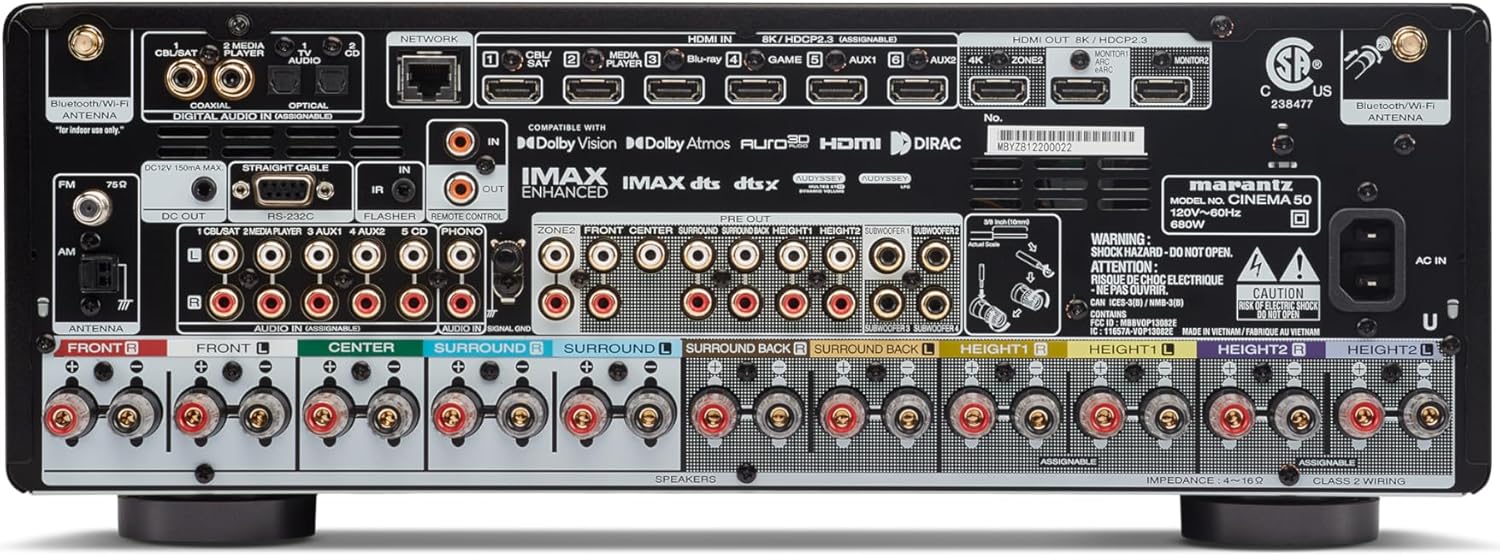
Image 2.1: Rear panel of the Marantz Cinema 50 AV Receiver. This image illustrates the various input and output ports, including HDMI, speaker terminals, and network connections, crucial for system setup.
2.4 Network and Antenna Connections
Connect the receiver to your home network using an Ethernet cable or via Wi-Fi. Attach the supplied Bluetooth/Wi-Fi antennas for wireless connectivity. Connect the FM/AM antennas for radio reception.
2.5 Sambungan Daya jeung Setup Awal
Once all connections are made, connect the power cord to the receiver and then to a wall outlet. Power on the receiver and follow the intuitive on-screen setup assistant for initial configuration, including speaker calibration and network settings.
3. Parentah Operasi
This section covers the basic operation of your Marantz Cinema 50 AV Receiver.
3.1 Daya Hurung/Pareuman
Pencét tombol daya dina panel hareup atawa kadali jauh pikeun ngahurungkeun panarima atawa mareuman.
3.2 Pamilihan Input
Use the INPUT selector knob on the front panel or the dedicated input buttons on the remote control to switch between connected audio/video sources (e.g., Blu-ray, Game, TV Audio).

Image 3.1: Front panel of the Marantz Cinema 50 AV Receiver, highlighting the central display which shows the current input and volume level during operation.
3.3 Volume Control
Adjust the volume using the VOLUME knob on the front panel or the volume up/down buttons on the remote control.
3.4 Modeu Sora
Select various sound modes to optimize your listening experience. The Cinema 50 supports advanced formats like Dolby Atmos, DTS:X, IMAX Enhanced, and Auro 3D, which can be selected via the remote control's sound mode buttons.
3.5 HEOS Built-in
Utilize the HEOS Built-in feature for multi-room audio and access to various streaming services like Spotify and Tidal. Control HEOS functions via the dedicated HEOS app on your smartphone or tablet.
3.6 Jauh Jauh
The included remote control provides full functionality for the receiver. Familiarize yourself with its layout for easy navigation and control of all features.
4. Pangropéa
Pangropéa rutin ngabantosan mastikeun umur panjang sareng kinerja anu optimal tina receiver anjeun.
4.1 beberesih
Wipe the exterior of the receiver with a soft, dry cloth. Do not use abrasive cleaners, solvents, or chemical sprays, as these can damage the finish. Avoid spraying liquids directly onto the unit.
4.2 Ventilasi
Ensure that the ventilation openings on the receiver are not blocked. Proper airflow is essential to prevent overheating. Do not place the receiver in an enclosed cabinet without adequate ventilation.
4.3 Manajemén kabel
Periodically check all cable connections to ensure they are secure and free from damage. Loose connections can lead to signal loss or poor audio/video quality.
5. Cara ngungkulan
If you encounter issues with your Marantz Cinema 50, refer to the following common troubleshooting tips.
5.1 Taya Daya
- Pariksa naha kabel listrik disambungkeun sacara aman ka panarima sareng stopkontak.
- Pariksa yen stop kontak listrik berpungsi ku cara nyolokkeun alat sejen.
5.2 Taya Sora
- Pastikeun sumber input anu bener dipilih.
- Check all speaker wire connections for correct polarity and secure fit.
- Verify that the volume is not muted or set to a very low level.
- Confirm that the audio output settings on your source device are correctly configured.
5.3 No Picture/Video
- Pastikeun sumber input anu bener dipilih.
- Check all HDMI cable connections between the source, receiver, and TV. Try a different HDMI cable if necessary.
- Confirm that your TV is set to the correct HDMI input.
- If experiencing handshake issues or no display on TV, pressing the HEOS button on the remote can sometimes help reset the connection.
5.4 Remote Control Teu Gawé
- Ganti batré dina kadali jauh.
- Ensure there are no obstructions between the remote control and the receiver's remote sensor.
- Point the remote control directly at the receiver.
6. Spésifikasi
Key technical specifications for the Marantz Cinema 50 AV Receiver:
| Fitur | Spésifikasi |
|---|---|
| Modél | Bioskop 50 |
| Saluran | 9.4 |
| Kaluaran Wattage | 110 Watts per channel |
| Téhnologi konektipitas | HDMI, Wi-Fi, Bluetooth |
| Total palabuhan HDMI | 9 |
| Format Audio Dirojong | Dolby Atmos, DTS:X, IMAX Enhanced, Auro 3D |
| Layanan streaming | Spotify, Tidal (via HEOS Built-in) |
| Dimensi produk | 15.5 x 17.4 x 6.5 inci |
| Item Beurat | 36.6 pon (16.62 Kilogram) |
| Warna | pérak |
7. Garansi jeung Rojongan
As this product is a renewed item, specific warranty details may vary. Please refer to the warranty information provided by your seller at the time of purchase. For technical support, product inquiries, or service, please contact Marantz customer support or visit their official websitus.
Disarankeun pikeun nahan bukti pameseran anjeun pikeun klaim garansi.


