1. Bubuka
This manual provides essential information for the safe and efficient operation of your Hisense 43Q6Q 4K QLED Smart TV. Please read this manual thoroughly before using your TV and retain it for future reference. This television features a 43-inch 4K UHD QLED display, Dolby Vision & Atmos, AI Upscaling, Game Mode Plus, and built-in Alexa for an enhanced viewpangalaman.
2. Émbaran Kasalametan
Salawasna perhatikeun pancegahan kaamanan di handap ieu pikeun nyegah kahuruan, kejutan listrik, atanapi tatu:
- Ulah ngalaan TV ka hujan atawa beueus.
- Ulah muka TV casing; ngarujuk sadaya jasa ka tanaga anu mumpuni.
- Pastikeun ventilasi ditangtoskeun sabudeureun TV.
- Jauhkeun TV tina sinar panonpoé langsung, sumber panas, sareng seuneu kabuka.
- Anggo ukur kabel listrik anu disayogikeun sareng TV.
- Cabut colokan TV nalika badai kilat atanapi nalika henteu dianggo kanggo waktos anu lami.
- Jauhkeun bagian leutik sareng batré jauh tina jangkauan barudak.
3. Naon dina Box
Pastikeun yén sadaya komponén aya:
- 1 LED TV (Hisense 43Q6Q)
- 1 Méja Top Stand
- 1 Buku Panduan Pamaké (ieu dokumén)
- 1 Kartu Garansi
- 1 Jauh Jauh
- 2 Batré AAA
4. Setélan
4.1. Télévisiview
Familiarize yourself with the front, side, and rear views of your Hisense 43Q6Q TV.

Gambar: Hareupeun view of the Hisense 43Q6Q 4K QLED Smart TV, showcasing desain bezel-na anu ipis.
Gambar: Sisi view of the Hisense 43Q6Q 4K QLED Smart TV, highlighting its thin profile.

Gambar: Tukangeun view of the Hisense 43Q6Q 4K QLED Smart TV, showing the input/output ports and mounting points.
4.2. Installing the Table Top Stand
- Taliti tempatkeun TV ka handap dina tempat anu datar tur lemes pikeun nyegah karuksakan layar.
- Align the stand with the screw holes on the bottom of the TV.
- Ngamankeun stand ngagunakeun screws disadiakeun. Pastikeun nangtung napel pageuh.
4.3. Pamasangan Tembok (Opsional)
If you choose to wall mount your TV, ensure you use a compatible VESA wall mount kit (not included) and follow the instructions provided with the wall mount. Professional installation is recommended.
4.4. Nyambungkeun Power
- Connect the power cord to the AC IN port on the TV.
- Colokkeun tungtung kabel listrik anu sanés ka stop kontak témbok.
4.5. Setup Awal
- Pencét tombol daya dina kadali jauh atawa TV pikeun ngahurungkeun.
- Turutan pitunjuk dina layar pikeun milih basa, nagara, sareng nyambung ka jaringan Wi-Fi anjeun.
- Complete the guided setup for the VIDAA U9 operating system.
5. Parentah Operasi
5.1. Kadali jauh
Insert the two AAA batteries into the remote control, observing the correct polarity. The remote allows you to navigate menus, adjust volume, change channels, and access smart features.

Image: The Hisense TV remote control, highlighting its voice control button and smart features.
5.2. Smart TV Features (VIDAA U9 OS)
Your Hisense TV runs on the VIDAA U9 operating system, providing access to a variety of streaming applications and smart functionalities.
- Ngaksés Aplikasi: Use the remote's home button to access the main smart TV interface, where you can find pre-installed apps like Netflix, Amazon Prime Video, JioCinema, and YouTube.
- Kontrol sora: Utilize the built-in Alexa by pressing the dedicated voice button on your remote. Speak commands to search for content, control playback, or manage smart home devices.
- Bagikeun layar: Share content from your mobile devices using Wi-Fi, Bluetooth, Apple AirPlay, or Apple Home.
Image: The Hisense Smart TV interface displaying various streaming application icons.
5.3. Gambar jeung Sora Enhancements
The TV incorporates advanced technologies for optimal viewngadengekeun.
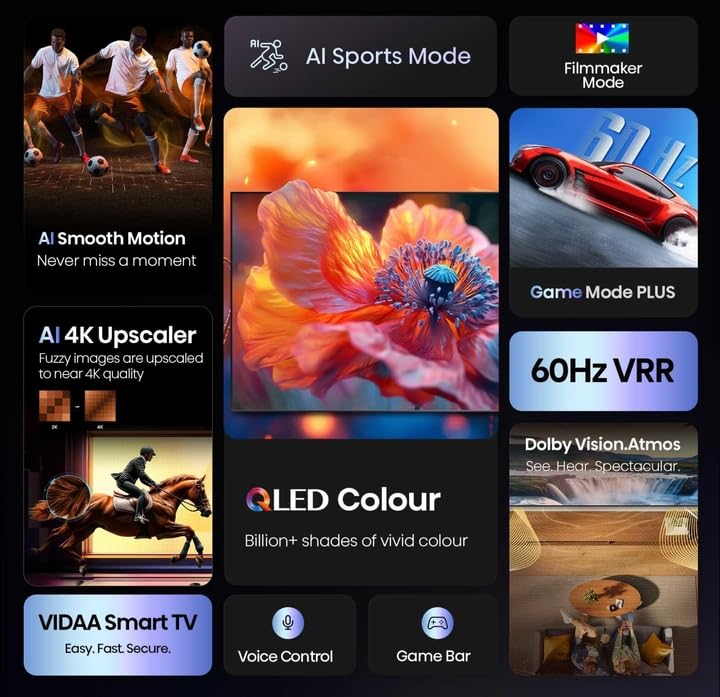
- Tampilan 4K QLED: Experience vibrant colors and sharp details with Quantum Dot technology.
- Dolby Vision & HDR10+ Decoding: Kontras sareng akurasi warna anu ditingkatkeun pikeun eusi anu cocog.
- AI Upscaling: Converts lower-resolution content to near 4K quality.
- Sénsor Cahaya AI: Automatically adjusts screen brightness based on ambient light for comfortable viewefisiensi sareng énergi.
- Modeu Filmmaker: Preserves the original aspect ratio, color, frame rate, and dynamic range as intended by the filmmaker.
- Dolby Atmos & DTS Virtual X: Provides immersive, multi-dimensional audio through the TV's dual 10W speakers.

Gambar: Leuwihview of Hisense TV features including AI Sports Mode, Filmmaker Mode, AI 4K Upscaler, QLED Colour, 60Hz VRR, Dolby Vision Atmos, VIDAA Smart TV, Voice Control, and Game Bar.

Image: Visual representation of QLED Colour technology, emphasizing billions of shades of vivid color.

Image: Illustration of the immersive sound experience provided by Dolby Vision Atmos.

Image: Demonstrates AI 4K Upscaler for clearer images and AI Smooth Motion for fluid action scenes.
Image: Explains Filmmaker Mode for authentic viewing and EzPlay for soundbar integration.
5.4. Fitur kaulinan
The Hisense 43Q6Q is equipped with features to enhance your gaming experience.
- Modeu Kaulinan Plus: Ngurangan lag input pikeun pangalaman kaulinan anu langkung responsif.
- ALLM (Modeu Latency Lemah Otomatis): Automatically switches to low-latency mode when a game console is detected.
- VRR (Variable Refresh Rate) 48–60 Hz: Synchronizes the TV's refresh rate with the game console's output to eliminate screen tearing and stuttering.
- Bar kaulinan: An integrated control center for managing game settings and monitoring gameplay data.

Image: Illustrates the Game Mode Plus for ultra-smooth gaming and the Game Bar for seamless management.
5.5. Konektipitas
TV anjeun nawiskeun sababaraha pilihan konektipitas:
- HDMI: Connect gaming consoles, Blu-ray players, and other HDMI-enabled devices.
- USB: Muterkeun média files tina alat panyimpenan USB.
- Ethernet: Pikeun sambungan internét kabel stabil.
- Wifi: Pikeun aksés internét nirkabel.
- Bluetooth: Sambungkeun headphone nirkabel atanapi alat Bluetooth anu sanés.
6. Pangropéa
6.1. Ngabersihan Layar
- Lembut usap layar nganggo lawon anu lemes, garing, teu aya serat.
- Pikeun tanda pengkuh, enteng dampen the cloth with water or a specialized screen cleaner (ensure it's safe for QLED displays) and wipe gently.
- Ulah nyemprotkeun cairan langsung kana layar.
6.2. Kaperawatan Umum
- Keep the TV free from dust by regularly wiping the casing ku lawon anu lemes sareng garing.
- Pastikeun bukaan ventilasi teu diblokir.
- Hindarkeun nempatkeun barang beurat dina luhureun TV.
7. Cara ngungkulan
Refer to the following table for common issues and solutions:
| Masalah | Mungkin Cukang lantaranana | Solusi |
|---|---|---|
| Taya kakuatan | Power cord disconnected; Power outlet not working | Pariksa sambungan kabel kakuatan; Nguji outlet sareng alat sejen. |
| Henteu aya gambar, tapi aya sora | Sumber input salah; Kabel HDMI/AV leupas | Press the 'Input' button on the remote to select correct source; Check cable connections. |
| Henteu aya sora, tapi aya gambar | Volume diheureuyan atawa handap teuing; Masalah alat audio éksternal | Hurungkeun bisu atanapi tambahkeun volume; Pariksa sambungan ka sistem audio éksternal. |
| Kadali jauh teu jalan | Batré béak atanapi dipasang kalayan teu leres; Halangan antara remot sareng TV | Ganti batré; Pastikeun garis paningal anu jelas ka sénsor IR TV. |
| Masalah sambungan Wi-Fi | Incorrect password; Router issues; TV too far from router | Re-enter Wi-Fi password; Restart router; Move TV closer to router or use Ethernet. |
8. Spésifikasi
| Fitur | Rincian |
|---|---|
| merek | Hisense |
| Modél | 43Q6Q |
| Ukuran layar | 108 cm (43 inci) |
| Téknologi tampilan | 4K QLED |
| Resolusi | 3840 x 2160 piksel (4K UHD) |
| Refresh Laju | 60 Hz |
| Sistem operasi | VIDA U |
| Kaluaran Audio | 2.0 Channel, Dolby Atmos, DTS Virtual X |
| Konektipitas | Wi-Fi, Ethernet, HDMI, USB, Bluetooth |
| Fitur husus | Netflix, Amazon Prime Video, JioCinema, YouTube, AI Upscaling, Pixel Pro, Bezel-less, Micro Dimming, ALLM, Game Mode Plus, Alexa Built-in |
| Dimensi produk | 7.4D x 96.3W x 56H Sentimeter |
| Item Beurat | 20 kg |
| Voltage | 230 volt |
| Wattage | 80 Watt |
9. Garansi jeung Rojongan
Your Hisense 43Q6Q TV comes with a 1 Taun Jaminan Komprehensif dina produk, anu disayogikeun ku Hisense ti tanggal pameseran.
For technical support, service requests, or warranty claims, please refer to the contact information provided on your warranty card or visit the official Hisense India websitus.


