1. Produk Langkungview
The Keychron M6 Silent Wireless Gaming Mouse is designed for optimal comfort and performance across various tasks, from gaming to productivity. It features a lightweight, ergonomic design, versatile connectivity options, and a high-precision optical sensor. This manual provides detailed instructions for setup, operation, and maintenance.

Image: Keychron M6 Silent Wireless Gaming Mouse, showcasing its ergonomic shape and main buttons.
2. Fitur konci
- Ultra-Ergonomic & Lightweight Design: The M6 mouse combines a compact, ergonomic shape with a lightweight 86g body for extended comfort. It includes over ten customizable buttons and an infinite metal scroll wheel.
- Stable Wireless with Ultra-Low Latency: Experience reliable 2.4GHz wireless performance with a 1000Hz polling rate. The M6 also supports Bluetooth 5.3 for multi-device use and flexible switching.
- High-Precision PixArt 3395 Sensor: Equipped with the advanced PixArt 3395 optical sensor, the M6 provides up to 26,000 DPI, 650 IPS tracking speed, and pinpoint accuracy.
- Infinite Scroll & Premium Metal Wheel: Features dual scrolling modes: smooth, infinite scroll for fast navigation and tactile mode for precision. The solid metal wheel offers a quiet, premium feel.
- Fully Programmable via Keychron Engine Software: Customize every button with Keychron Engine software on macOS and Windows. Create shortcuts, set macros, adjust DPI, polling rate, and LOD.
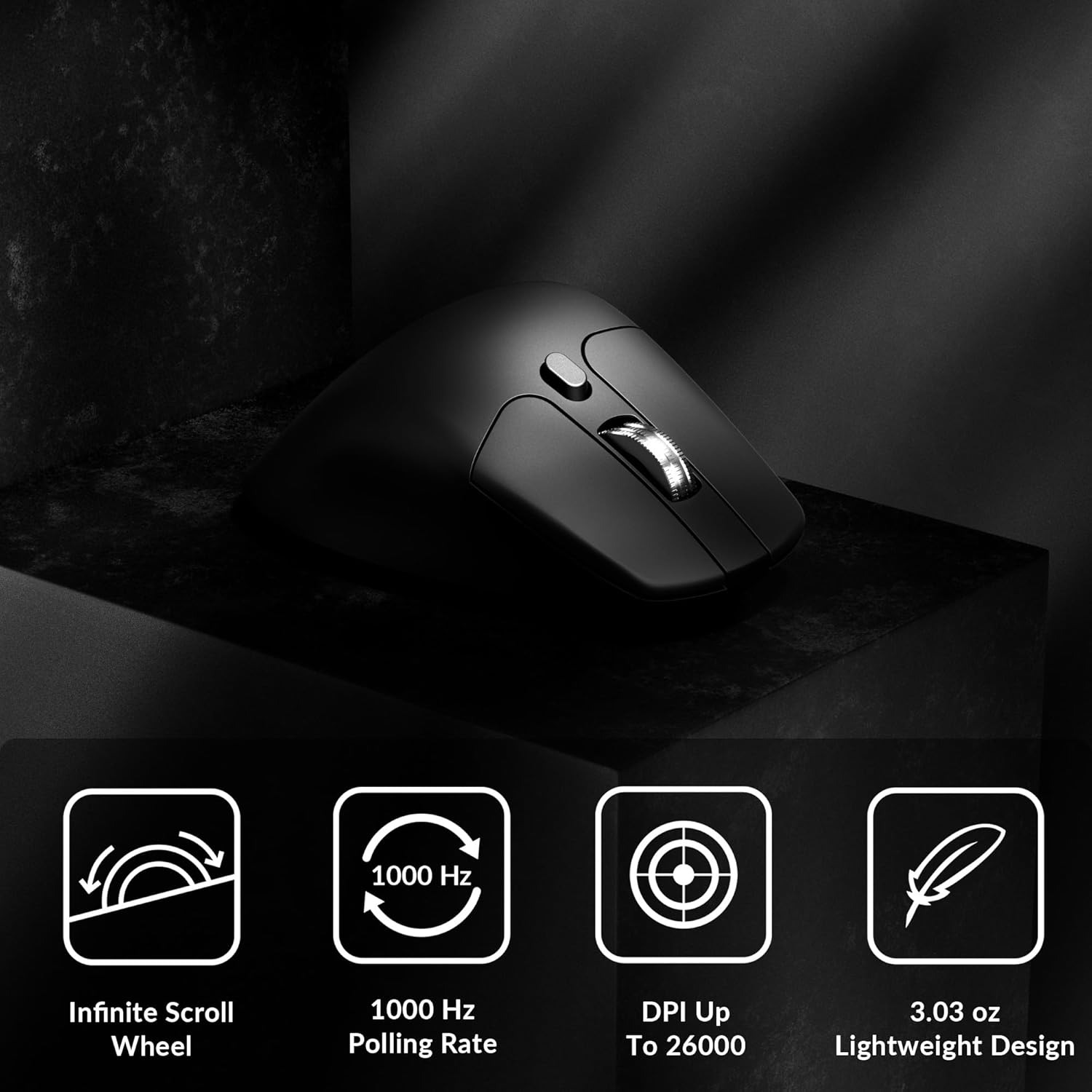
Image: Icons illustrating key features: Infinite Scroll Wheel, 1000 Hz Polling Rate, DPI Up To 26000, and Lightweight Design.
3. Setélan
3.1 Eusi pakét
Pastikeun yén sadaya item aya dina bungkusan:
- 1x Keychron M6 Mouse
- 1x Tipe-C ka Tipe-C Cable
- 1x Tipe-A kana Tipe-C Adaptor
- 1x Extension adaptor Pikeun panarima
- 1x Panarima Tipe-C 2.4 GHz
- 1x Tipe-A 2.4 GHz panarima
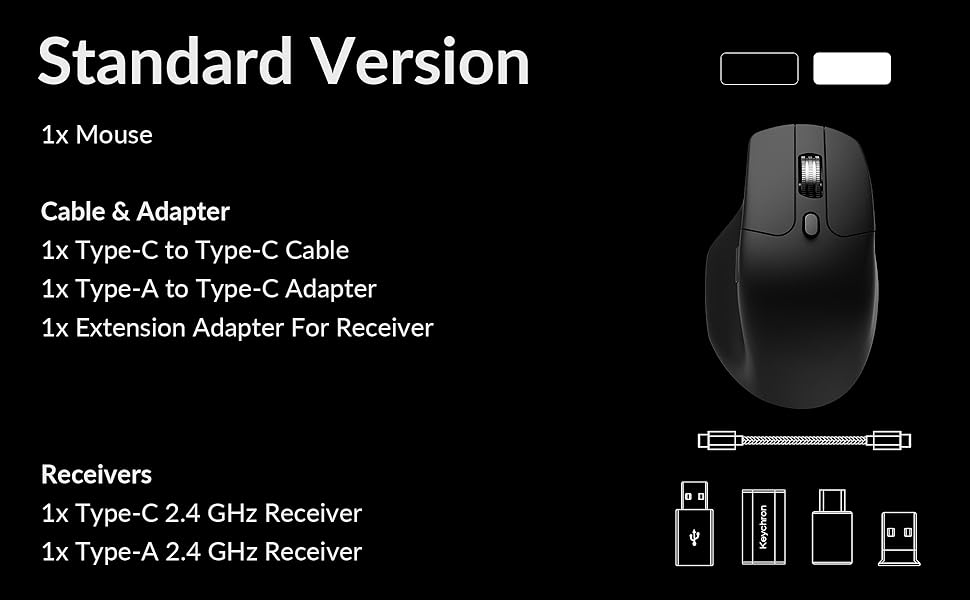
Image: Diagram showing the contents of the Keychron M6 mouse package.
3.2 Ngecas Awal
Before first use, it is recommended to fully charge the mouse. Connect the mouse to your computer using the provided Type-C cable. The LED indicator will show charging status.
3.3 Nyambungkeun Mouse
The Keychron M6 supports three connection modes: 2.4GHz wireless, Bluetooth 5.3, and wired.
- 2.4GHz Wireless: Insert the 2.4GHz receiver (Type-A or Type-C) into your computer's USB port. Switch the mode switch on the bottom of the mouse to 'G' (Gaming) mode. The mouse should connect automatically.
- Bluetooth 5.3: Switch the mode switch on the bottom of the mouse to 'B' (Bluetooth) mode. On your computer, search for Bluetooth devices and select 'Keychron M6' to pair.
- Maké kabel: Connect the mouse directly to your computer using the provided Type-C cable. The mouse will function in wired mode and charge simultaneously.

Image: Keychron M6 mouse connected to a laptop via 2.4GHz receiver, with Bluetooth 5.3 icon.
4. Parentah Operasi
4.1 Fungsi Dasar
- Klik Kénca/Katuhu: Fungsi tombol mouse standar.
- Gulung kabayang: Dianggo pikeun ngagulung vertikal.
- Kancing samping: Default to Forward/Backward navigation. Customizable via software.
- Roda jempol: Located on the side, used for horizontal scrolling.
4.2 DPI adjustment
The DPI (Dots Per Inch) button on the bottom of the mouse allows you to cycle through preset sensitivity levels. Each level is indicated by a specific LED color. You can customize these DPI levels using the Keychron Engine software.
4.3 Pangaluyuan Laju Polling
The polling rate button on the bottom of the mouse allows you to switch between different polling rates (125Hz, 500Hz, 1000Hz). A higher polling rate provides more responsive tracking, ideal for gaming. The LED indicator will change color to reflect the current polling rate.

Image: Close-up of the polling rate switch and indicator light on the mouse's underside.
4.4 Infinite Scroll Mode
The M6 features a button near the main scroll wheel to toggle between infinite scroll mode and tactile (notched) scroll mode. Infinite scroll allows for rapid navigation through long documents or web kaca.

Image: Diagram showing the infinite scroll button and the horizontal scrolling function of the thumb wheel.
5. Customization with Keychron Engine Software
The Keychron Engine software allows for comprehensive customization of your M6 mouse. It is compatible with macOS and Windows and can be accessed online, eliminating the need for a download.
- Tugas Button: Remap any of the mouse buttons to perform different functions, including keyboard shortcuts, multimedia keys, or macros.
- Nyiptakeun makro: Record and assign complex sequences of commands to a single button.
- DPI/Polling Rate/LOD Adjustment: Fine-tune sensor settings to match your preferences.
Nganjang ka Keychron resmi website to access the Keychron Engine software.

Image: Screenshot of the Keychron Engine software interface, showing button customization options for the M6 mouse.
6. Modeu konektipitas
The M6 mouse offers flexible connectivity to suit various setups:
- 2.4GHz Wireless: Provides a stable, low-latency connection with a 1000Hz polling rate, ideal for gaming and demanding tasks. Uses a dedicated USB receiver.
- Bluetooth 5.3: Offers seamless connection to multiple devices, allowing for quick switching between systems. Suitable for general use and productivity.
- Kabel (USB-C): Connects directly via the USB-C cable, providing a reliable connection and simultaneously charging the mouse.
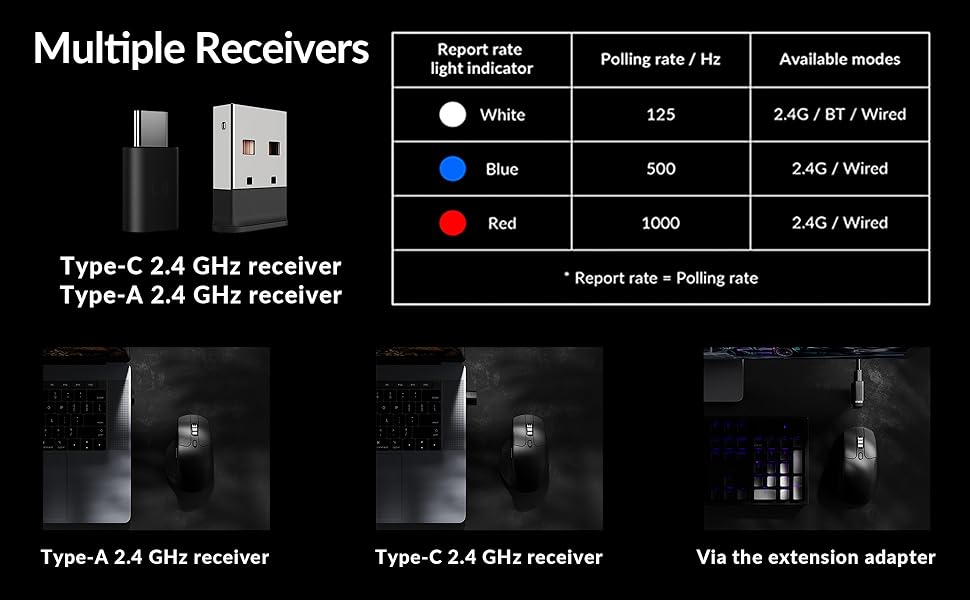
Image: Illustration of the Type-C and Type-A 2.4 GHz receivers, along with a table detailing polling rates and available modes.
7. Spésifikasi
| Nomer modél | M6S |
| Sénsor | Sénsor optik PixArt 3395 |
| DPI | Nepi ka 26,000 |
| IPS Tracking Speed | 650 |
| Laju Polling | 1000Hz (2.4GHz/Wired), 125Hz (Bluetooth) |
| Konektipitas | 2.4GHz Wireless, Bluetooth 5.3, Kabel USB-C |
| Beurat | 86g (3.03 ons) |
| Batré | 800 mAh (Up to 80 hours) |
| Saklar | Huano 20M Silent Micro Switch |
| Kasaluyuan | Windows, macOS, Linux |
| Diménsi | 4.82 x 2.97 x 1.97 inci (122.5 x 75.4 x 50 mm) |
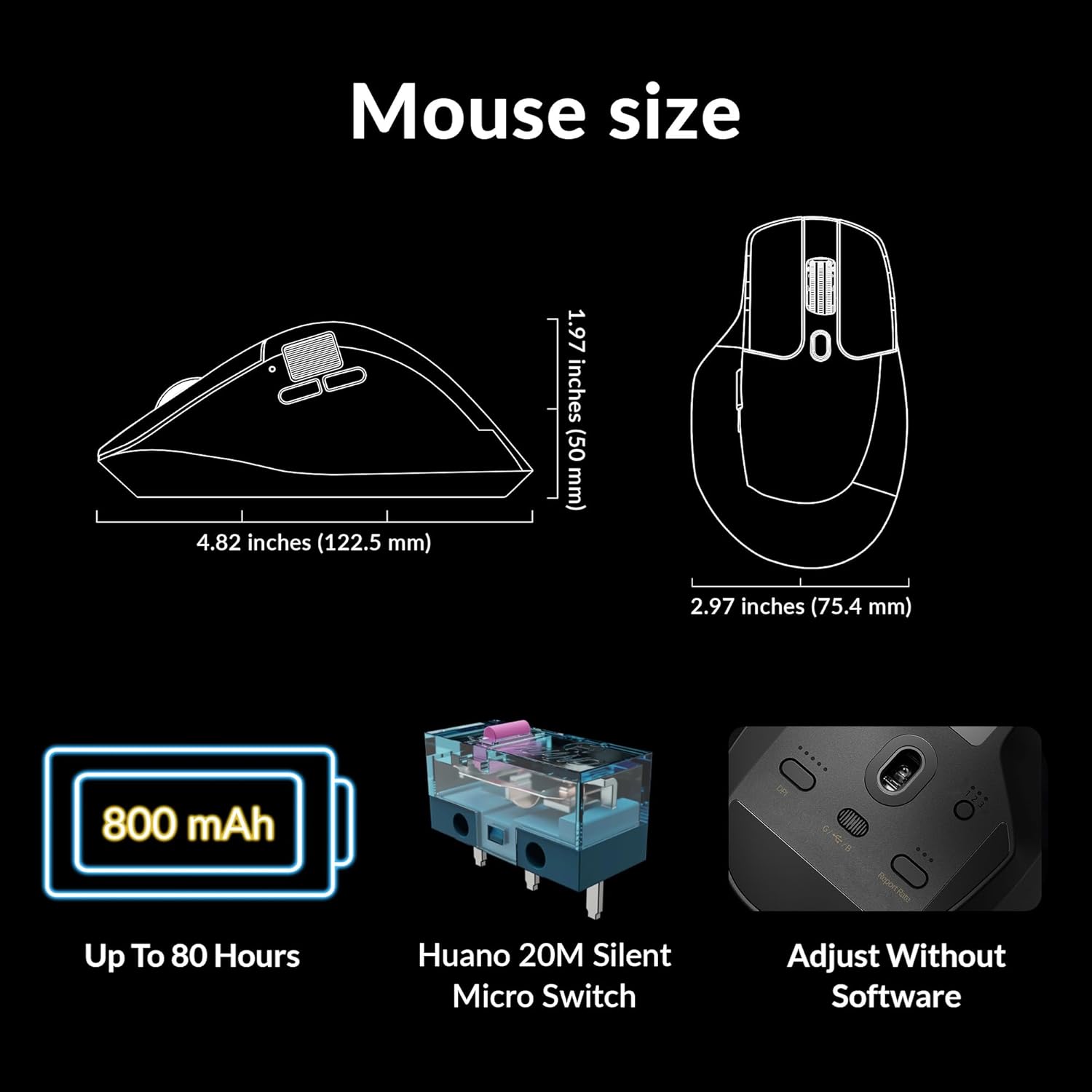
Image: Diagram showing the dimensions of the Keychron M6 mouse, its 800 mAh battery, and Huano 20M Silent Micro Switches.
8. Pangropéa
To ensure the longevity and optimal performance of your Keychron M6 mouse, follow these maintenance guidelines:
- beberesih: Anggo kaén anu lembut sareng garing pikeun ngusap permukaan beurit. Keur kokotor bandel, rada dampen lawon ku cai atawa solusi beberesih hampang. Hindarkeun bahan kimia anu kasar.
- Perawatan sénsor: Tetep sénsor optik dina handapeun beurit beresih jeung bébas tina lebu atawa lebu pikeun mastikeun tracking akurat.
- Perawatan batré: Ulah sering-sering ngecas batréna nepi ka pinuh. Pikeun panyimpenan jangka panjang, eusian beurit nepi ka sakitar 50% teras simpen di tempat anu tiis sareng garing.
- Panyimpenan: When not in use, store the mouse in a safe place to prevent physical damage.
9. Cara ngungkulan
If you encounter issues with your Keychron M6 mouse, refer to the following common solutions:
- Beurit Teu Ngabales:
- Pastikeun mouse tos dicas.
- Check the connection mode switch (2.4GHz, Bluetooth, Wired) is set correctly.
- For 2.4GHz, ensure the receiver is properly inserted and try a different USB port.
- For Bluetooth, re-pair the device in your computer's Bluetooth settings.
- Coba sambungkeun nganggo kabel USB-C pikeun nyingkahan masalah nirkabel.
- Pelacakan anu teu konsisten:
- Ngabersihan sénsor optik dina handapeun beurit.
- Pastikeun anjeun ngagunakeun beurit dina permukaan anu cocog (contona, alas beurit).
- Atur setélan DPI ka tingkat anu nyaman.
- Tombol Teu Gawé:
- Check Keychron Engine software for custom button assignments that might be interfering.
- Pastikeun firmware mouse parantos diénggalan.
- Masalah Roda Gulung:
- Toggle the infinite scroll button to ensure it's in the desired mode.
- Clean any debris around the scroll wheel.
10. Video Produk Resmi
Pidéo: Pajabat parantos réngséview of the Keychron M6 Silent Wireless Optical Gaming Mouse, highlighting its features and design.
11. Garansi jeung Rojongan
Keychron products come with a limited warranty. For detailed warranty information, technical support, and frequently asked questions, please visit the official Keychron websitus atanapi ngahubungan layanan palanggan maranéhna. Simpen bukti pameseran anjeun pikeun klaim garansi.


