Bubuka
Thank you for choosing the PRUNUS J-165 Portable Radio. This compact and versatile radio offers AM, FM, and Shortwave (SW) reception, along with convenient features like preset station buttons, a sleep timer, and a lock function. Designed for ease of use and portability, the J-165 provides reliable audio entertainment wherever you go. This manual will guide you through the setup, operation, and maintenance of your new radio.
Produk Leuwihview
The PRUNUS J-165 is a lightweight, battery-operated radio featuring a clear speaker and a 3.5mm headphone jack for private listening. Its compact design includes a back clip and hand strap for enhanced portability.
Fitur konci:
- Panarimaan Multi-Band: Access FM (87-108 MHz), AM (520-1710 KHz), and two Shortwave bands (SW1: 4.70-10.00 MHz, SW2: 11.40-17.9 MHz).
- 5 Preset Station Buttons: Quickly save and recall your favorite radio stations.
- Timer Saré: Set the radio to automatically turn off after 0-90 minutes.
- Desain portabel: Compact size (approximately 4.6 x 2.6 x 1.2 inches, weighing 3.6 oz) with a back clip and hand strap.
- Fungsi Konci: Prevents accidental button presses during transport or use.
- Resepsi anu saé: Equipped with an advanced DSP chip and a 16-inch telescopic antenna for stable signal reception.
- Sora Jelas: Built-in magnetic speaker and 3.5mm headphone jack.
- Batré Dioperasikeun: Powered by AA batteries (not included) for use at home or outdoors.
Radio Components and Controls:
Familiarize yourself with the various parts of your PRUNUS J-165 radio.
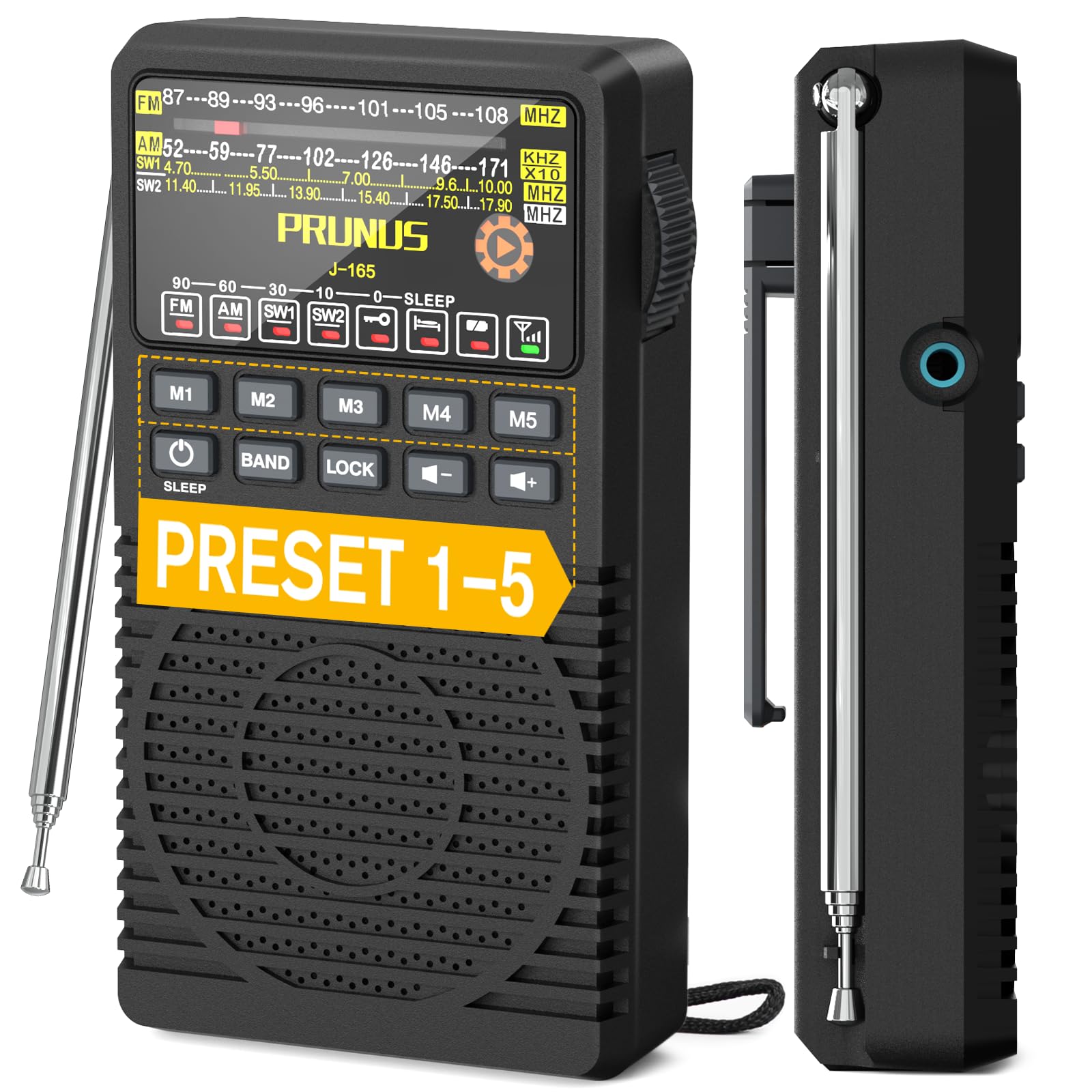

Disetél
1. Pamasangan batré:
- Tangtukeun lokasi kompartemen batré dina tonggong radio.
- Carefully open the battery compartment cover. Some models may require turning a small dial or using a pry tool to release the latch, especially the first time. The belt clip may need to be lifted or moved slightly to access the cover.
- Insert two (2) AA batteries (not included) into the compartment, ensuring correct polarity (+ and -) as indicated inside the compartment.
- Tutup panutup kompartemen batré aman.

2. Daya Awal Hurung:
Pencét jeung tahan tombol POWER button to turn on the radio. The display will illuminate, and the radio will start playing from the last tuned station or a default frequency.
Parentah Operasi
1. Hurung/Pareuman:
- Pencét jeung tahan tombol POWER button to turn the radio ON or OFF.
2. Band Selection:
- Pencét éta BAND button repeatedly to cycle through FM, AM, SW1, and SW2 bands. The selected band will be indicated on the display.
3. Tuning to a Station:
- Use the large side tuning knob to manually scan for stations. Turn the knob slowly for precise tuning.
- A signal indicator light will illuminate when a strong station is found, aiding in tuning accuracy.
4. Preset Stations (M1-M5):
The radio allows you to save up to 5 favorite stations for each band (FM, AM, SW1, SW2).
- Pikeun Nyimpen Stasion:
- Tune to your desired station using the tuning knob.
- Pencét terus tahan salah sahiji tombol anu tos disetel (M1 ka M5) dugi ka tampilan mastikeun stasiun parantos disimpen.
- Pikeun Nginget deui Stasion:
- Ensure you are on the correct band (FM, AM, SW1, or SW2).
- Press the corresponding preset button (M1 ka M5) once to instantly tune to the saved station.

5. Volume Control:
- Ngagunakeun éta Volume Naik (+) jeung Volume Turun (-) tombol pikeun nyaluyukeun tingkat sora.
6. Timer Saré:
Timer sare ngamungkinkeun radio otomatis pareum saatos periode anu disetél.
- Pencét éta SARE button repeatedly to cycle through available sleep timer durations (e.g., 10, 30, 60, 90 minutes, or OFF). The selected duration will be shown on the display.
- The radio will automatically power off once the set time has elapsed.

7. Fungsi konci:
The lock function prevents accidental button presses.
- Pencét éta KUNCI button to activate or deactivate the lock function. When activated, a lock icon will appear on the display, and most buttons will be unresponsive.
8. Paké Headphone:
- Plug any standard 3.5mm headphones (not included) into the headphone jack located on the side of the radio for private listening. The internal speaker will automatically mute when headphones are connected.

Pangropéa
beberesih:
- Wipe the radio with a soft, dry cloth. Do not use liquid cleaners or abrasive materials.
- Keep the radio away from dust, dirt, and moisture.
Perawatan batré:
- Cabut batré upami radio moal dianggo kanggo waktos anu panjang pikeun nyegah bocor.
- Replace batteries when the low battery indicator light appears or when audio quality degrades.
Pamérésan masalah
| Masalah | Mungkin Cukang lantaranana / Solusi |
|---|---|
| Radio teu hurung. |
|
| panarimaan goréng atawa statik. |
|
| Difficulty tuning to a specific station. |
|
| Tombol-tombol henteu ngaréspon. |
|
| Teu aya sora tina speaker nalika headphone dicabut. |
|
spésifikasi
| Fitur | Rincian |
|---|---|
| merek | PRUNUS |
| Modél | J-165 |
| Téhnologi Tuner | DSP (pamrosésan sinyal digital) |
| Pita Radio | FM, AM, SW1, SW2 |
| Rentang Frékuénsi FM | 87-108 MHz |
| Rentang Frékuénsi AM | 520-1710 KHz |
| Frequency Range SW1 | 4.70-10.00 MHz |
| Frequency Range SW2 | 11.40-17.9 MHz |
| Sumber Daya | 2 x Batré AA (teu kalebet) |
| Jack headphone | Standar 3.5mm |
| Bahan | palastik |
| Ukuran (approx.) | 4.6 x 2.6 x 1.2 inci (11.7 x 6.6 x 3.0 cm) |
| Beurat (approx.) | 3.6 oz (102 g) tanpa batré |

Émbaran jaminan
PRUNUS products are manufactured to high-quality standards. For specific warranty details, please refer to the warranty card included with your purchase or visit the official PRUNUS websitus. Simpen resi pameseran anjeun salaku bukti pameseran pikeun klaim garansi.
Rojongan Palanggan
If you encounter any issues or have questions regarding your PRUNUS J-165 radio that are not covered in this manual, please contact PRUNUS customer support. Contact information can typically be found on the product packaging, the official PRUNUS websitus, atawa ngaliwatan pangecér Anjeun.


