Bubuka
This manual provides detailed instructions for the installation, operation, and maintenance of your BSEED Bathroom Exhaust Fan with Bluetooth Speaker and LED Light (Model FAN-02). This unit integrates a powerful exhaust fan, customizable LED lighting, a Bluetooth speaker, and a digital temperature display into a single device. Please read this manual thoroughly before installation and use to ensure proper function and safety.
Naon dina Box
Bungkus sadaya komponén kalayan ati-ati sareng pariksa yén anjeun parantos nampi barang-barang ieu:
- BSEED Bathroom Exhaust Fan Unit
- Kadali jauh
- Saluran fleksibel
- Saluran Clamps
- Manual instalasi
- Sarung Tangan Pelindung

Setup sareng Instalasi
Before beginning installation, ensure the power supply to the installation area is turned off at the circuit breaker. It is recommended to consult a qualified electrician if you are unsure about any steps.
Cék Pra-Pasang
Before installing, connect the panel to the main unit and perform a functional test to ensure all features (fan, light, Bluetooth speaker) are working correctly. Connect the power cord to a power outlet and verify operation using the remote control.
Pamasangan Unit
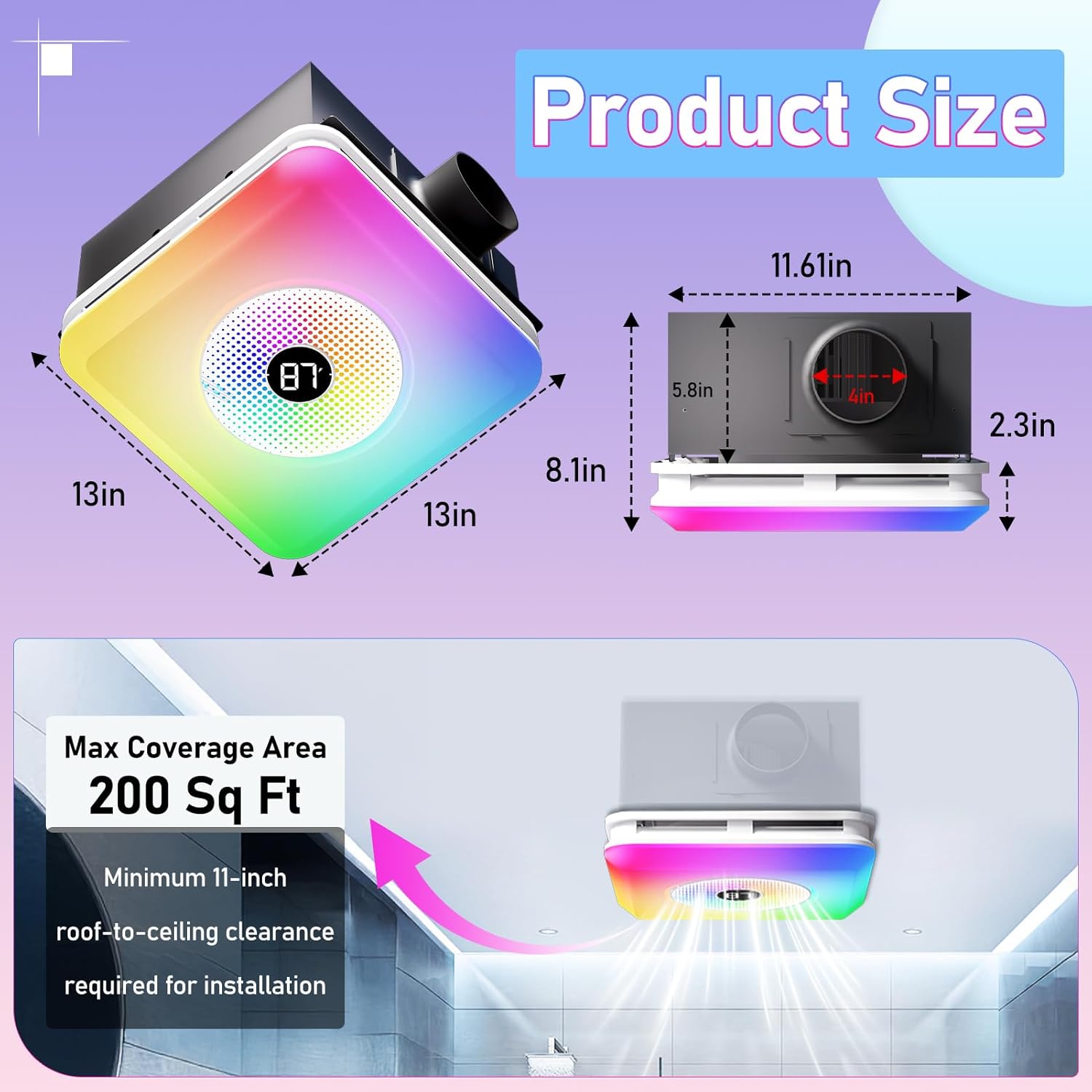
- Nyiapkeun lawang siling: Ensure a standard 11.22” x 11.22” ceiling opening is available. If not, carefully cut an opening of this size.
- Nyambungkeun Ducting: Attach the flexible ducting to the exhaust port of the fan unit using the provided duct clamp. Secure tightly with a screwdriver.
- Sambungan listrik: Connect the fan's wiring to your bathroom's electrical supply. Ensure all connections are secure and follow local electrical codes.
- Insert the Unit: Carefully push the main fan unit into the ceiling opening.
- Amankeun Panel: Connect the light panel to the main unit's wiring. Compress the spring clips on the light panel and push it into the main unit until it sits flush with the ceiling.

Parentah Operasi
The BSEED Bathroom Exhaust Fan is controlled via the included remote control. Ensure 2 AAA batteries (not included) are installed in the remote.
Fungsi Remote Control
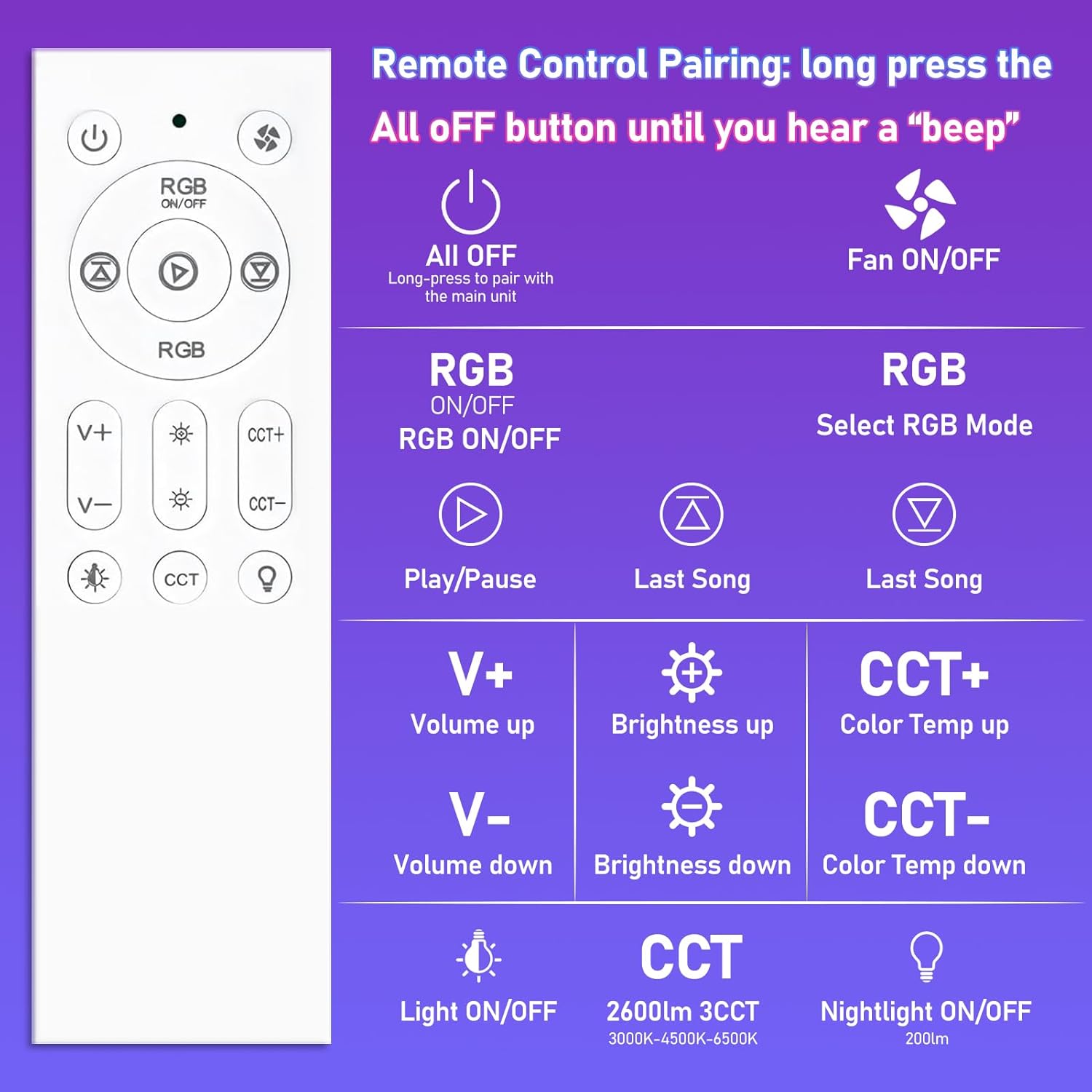
- Tombol Daya: Long press the "All OFF" button to pair with the main unit. Short press to turn all functions off.
- Kipas ON/OFF: Toggles the exhaust fan on or off.
- RGB ON/OFF: Activates or deactivates the RGB lighting.
- RGB Mode Selection: Cycles through various RGB lighting modes (e.g., Music Sync, Ripple, Breathing).
- Puter / Reureuh: Controls media playback for the Bluetooth speaker.
- Naékkeun/Turunkeun Volume (V+/V-): Adjusts the volume of the Bluetooth speaker.
- Brightness Up/Down: Saluyukeun kacaangan lampu LED.
- Color Temperature Up/Down (CCT+/CCT-): Changes the color temperature of the white light (3000K, 4500K, 6000K).
- Lampu ON/OFF: Toggles the main LED light on or off.
- Tombol CCT: Cycles through the three fixed color temperatures (3000K, 4500K, 6000K).
- Nightlight ON/OFF: Activates or deactivates the soft 200LM nightlight.
Bluetooth Speaker Pairing
To connect your device to the built-in Bluetooth speaker:
- Pastikeun unit kipas diaktipkeun.
- Dina alat sélulér anjeun, buka setélan Bluetooth.
- Milarian pikeun available devices and select "Music" or a similar name to pair.
- The speaker will automatically reconnect to the last paired device when powered on.
Fitur
Powerful and Quiet Exhaust Fan
The fan provides 230 CFM (Cubic Feet Per Minute) airflow, effectively removing steam and odors from bathrooms up to 200 square feet. Operating at a low noise level of 1.5 Sones, it ensures a quiet environment.
Dynamic LED Lighting
Lampu LED anu terintegrasi nawiskeun pilihan katerangan anu serbaguna:
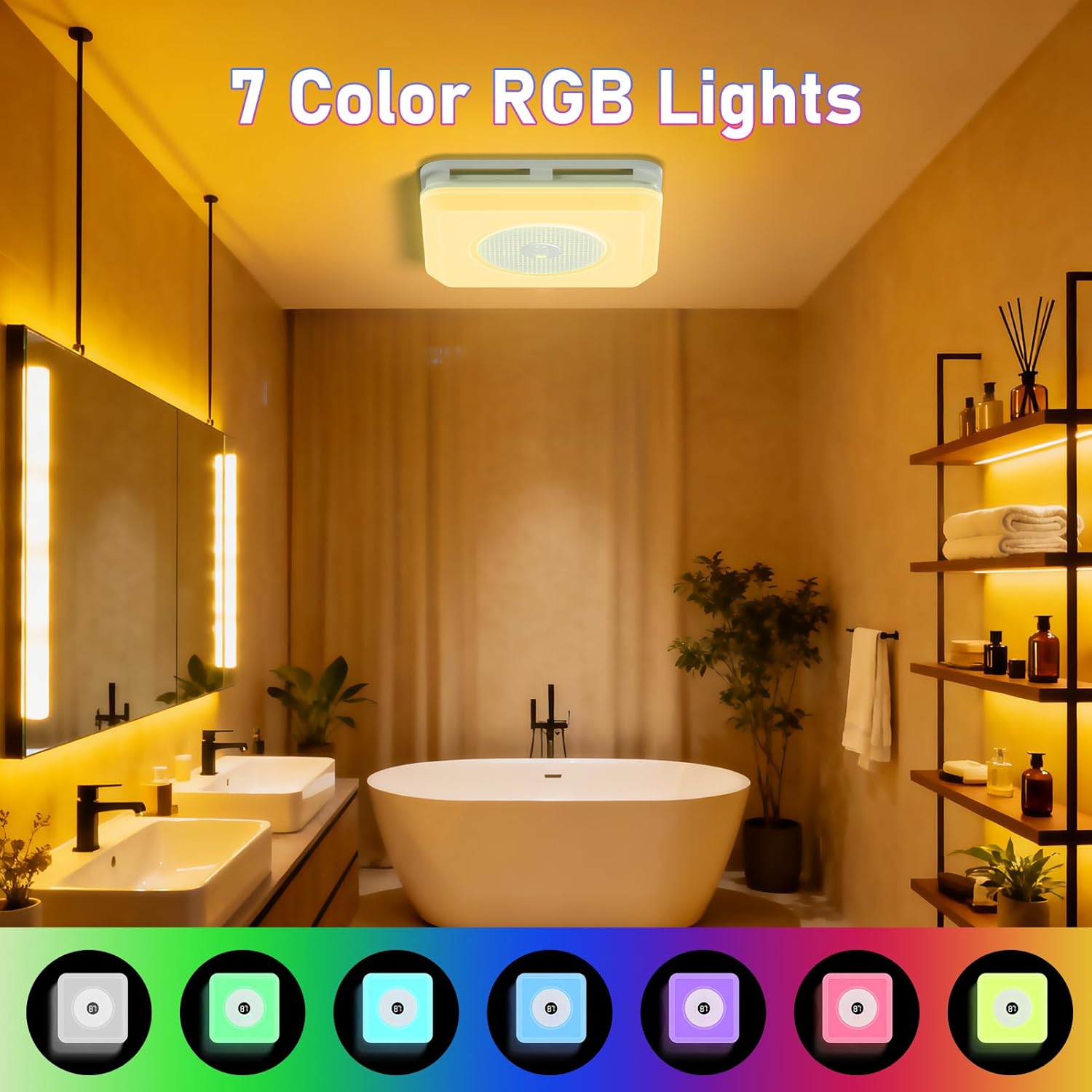
- 7-Color RGB: Choose from seven vibrant colors to create different moods.
- 3CCT Adjustable White Light: Select between 3000K (warm white), 4500K (natural white), and 6000K (cool white) to suit your preference.
- Dimming Stepless: Adjust the brightness of both white and RGB lights smoothly.
- Modeu dinamis: Includes Music Sync (lights react to audio), Ripple, and Breathing modes for an immersive experience.
- Lampu wengi: A soft 200LM nightlight provides subtle illumination for safety during nighttime.

Témbongkeun Digital
The unit features a digital display that shows the current room temperature, providing useful information at a glance.
Pangropéa
Pangropéa rutin ngajamin kinerja optimal sareng umur panjang kipas knalpot anjeun.
- Ngabersihan Grille: Périodik ngusap grille exterior ku lemes, damp lawon. Ulah make cleaners abrasive.
- beberesih internal: For deeper cleaning, turn off power at the circuit breaker. Remove the light panel by compressing the spring clips. Gently clean the fan blades and interior housing with a soft brush or vacuum cleaner. Reinstall the panel securely.
- Inspeksi Saluran: Annually inspect the ducting for any blockages or damage. Clear any obstructions to maintain efficient airflow.
Pamérésan masalah
If you encounter issues with your BSEED Bathroom Exhaust Fan, refer to the following common problems and solutions:
| Masalah | Mungkin Cukang lantaranana | Solusi |
|---|---|---|
| Kipas angin teu hurung | No power supply; Remote control batteries dead; Unit not properly connected. | Check circuit breaker; Replace remote batteries; Verify electrical connections. |
| Lampu teu hurung | No power supply; Remote control batteries dead; Light panel connection loose. | Check circuit breaker; Replace remote batteries; Re-seat light panel connection. |
| Bluetooth speaker not pairing | Speaker not in pairing mode; Device too far; Already paired to another device. | Ensure fan is on; Move device closer; Disconnect from other devices and try again. |
| Aliran hawa lemah | Ducting blocked or kinked; Fan blades dirty. | Inspect and clear ducting; Clean fan blades. |
Lamun masalah persists sanggeus nyobian solusi ieu, mangga ngahubungan rojongan customer.
spésifikasi
| Fitur | Spésifikasi |
|---|---|
| merek | BSEED |
| Ngaran modél | kipas-02 |
| Warna | Bodas |
| Kapasitas Aliran Udara | 230 Kaki Kubik Per Menit (CFM) |
| Tingkat Noise | 1.5 Sora |
| Wattage | 100 watt |
| Fitur lampu | 7-Color RGB, 3CCT (3000K, 4500K, 6000K), Stepless Dimming, Nightlight (200LM), Music Sync, Ripple, Breathing Modes |
| Métode kontrol | Kadali jauh |
| Témbongkeun Digital | Témbongkeun Suhu |
| Tipe Pamasangan | Gunung siling |
| Dimensi produk | 17.5 "D x 11.8" W x 15.7" H |
| Ceiling Opening Size | 11.22" x 11.22" (minimum 11-inch roof-to-ceiling clearance) |
| Item Beurat | 11.58 pon |
| Sumber Daya | AC |
| Sertifikasi | UL & FCC certified |
Garansi sareng Rojongan
This product is backed by UL & FCC certification, ensuring quality and safety standards. For specific warranty details, please refer to the warranty card included with your purchase or contact BSEED customer support directly. For technical assistance, troubleshooting not covered in this manual, or replacement parts, please reach out to BSEED customer service through their official websitus atanapi inpormasi kontak anu disayogikeun dina bungkusan produk anjeun.


