1. Bubuka
Thank you for choosing the Proscenic P11 Ultra Cordless Vacuum Cleaner. This manual provides essential information for the safe and efficient use, maintenance, and troubleshooting of your new appliance. Please read it thoroughly before first use and retain it for future reference.
The Proscenic P11 Ultra is designed for versatile cleaning across various surfaces, offering powerful suction and convenient features for a cleaner home environment.
2. Parentah Kasalametan penting
Salawasna turutan pancegahan kaamanan dasar nalika nganggo alat listrik pikeun ngirangan résiko kahuruan, kejutan listrik, atanapi tatu.
- Baca sadaya parentah sateuacan nganggo alat.
- Ulah make di luar atawa dina surfaces baseuh.
- Ulah ngantep dipaké salaku cocooan. Perhatian caket diperyogikeun nalika dianggo ku atanapi caket barudak.
- Anggo ngan sakumaha anu dijelaskeun dina manual ieu. Paké ngan kantétan dianjurkeun produsén urang.
- Entong dianggo nganggo kabel atanapi colokan anu rusak. Upami alat henteu jalan sakumaha sakuduna, parantos turun, ruksak, ditinggalkeun di luar, atanapi turun kana cai, balikkeun deui ka pusat layanan.
- Ulah narik atawa mawa ku ari, make ari salaku cecekelan, nutup panto dina ari, atawa narik ari sabudeureun ujung seukeut atawa juru. Ulah ngajalankeun alat ngaliwatan kabel. Tetep ari jauh ti surfaces dipanaskeun.
- Ulah cabut colokan ku cara narik kana kabel. Pikeun cabut colokan, keupeul colokan, teu ari.
- Ulah nanganan colokan atawa alat ku leungeun baseuh.
- Ulah nempatkeun obyék nanaon kana bukaan. Entong nganggo sareng bukaan anu diblokir; tetep bébas tina lebu, serat, rambut, sareng naon waé anu tiasa ngirangan aliran hawa.
- Jauhkeun buuk, pakean longgar, ramo, sareng sadaya bagian awak tina bukaan sareng bagian anu obah.
- Ulah nyokot naon bae anu kaduruk atawa ngaroko, kayaning roko, korek api, atawa lebu panas.
- Paké perawatan tambahan nalika meresihan dina tangga.
- Entong dianggo pikeun nyandak cairan anu gampang kaduruk atanapi kaduruk, sapertos béngsin, atanapi dianggo di daérah anu aya.
- Ulah nyokot bahan toksik (misalna, pemutih klorin, cleaner amonia, cleaner solokan).
- Ulah dianggo dina rohangan katutup anu aya uap tina cet dasar minyak, pengencer cet, sababaraha zat anti ngengat, lebu anu gampang kaduruk, atanapi uap anu ngabeledug atanapi toksik anu sanés.
- Do not vacuum hard or sharp objects such as glass, nails, screws, or coins.
- Salawasna mareuman alat ieu sateuacan nyambungkeun atanapi megatkeun sambungan nozzle motorized.
- Nyimpen alat di jero rohangan. Nyimpen jauh sanggeus pamakéan pikeun nyegah kacilakaan.
- Paké ngan carjer disadiakeun ku produsén pikeun ngecas.
- Ulah bakar alat sanajan ruksak parah. Batré bisa bitu dina seuneu.
- The battery should be fully charged and stored separately if the device is not used for a long time.
3. Eusi Paket
Carefully unpack your Proscenic P11 Ultra and check that all items are present and in good condition. If any items are missing or damaged, please contact customer support.
- Unit vakum utama
- Adjustable Telescopic Rod
- Motorized Floor Brush (Anti-Tangle with Green Light)
- Batré anu tiasa dicabut
- Accessory Kit (includes Crevice Tool, Dusting Brush)
- Adaptor (Charger)
- Charging Dock / Wall Mount
- Manual pangguna (dokumén ieu)
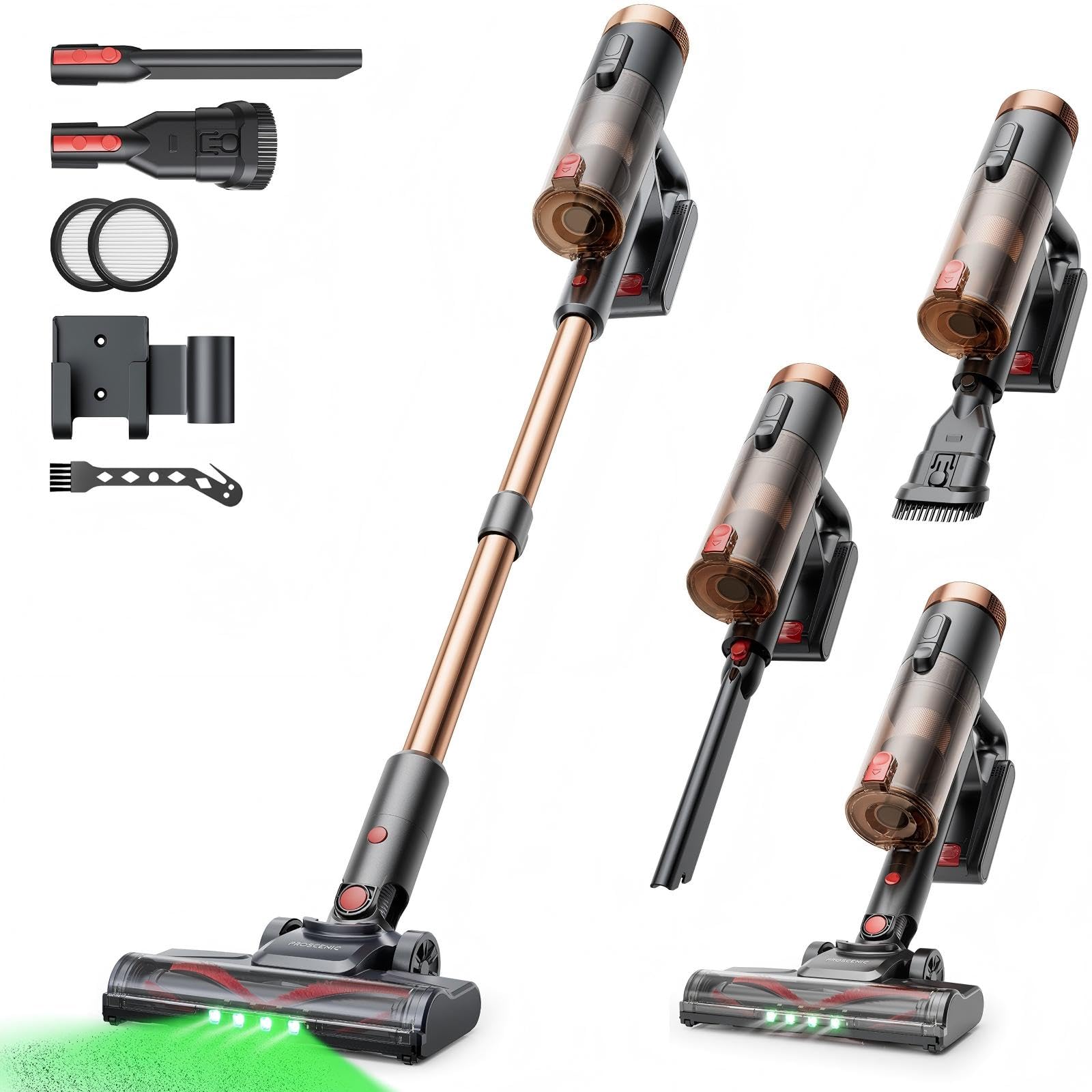
Image 1: Proscenic P11 Ultra main unit and included accessories. This image displays the vacuum cleaner's primary components, including the handheld unit, extension wand, floor brush, and various attachments.
4. Produk Langkungview
Familiarize yourself with the key components and features of your Proscenic P11 Ultra.
Fitur konci:
- Desain nangtung: Allows the vacuum to stand upright independently for convenient storage and breaks during cleaning.
- 180° Rotating Floor Brush: Enhances maneuverability, allowing easy access to tight corners and under furniture.
- Batang Teleskopik anu Bisa Disaluyukeun: Customize the height for comfortable use by various users.
- Anti-Tangle Brush with Green Detection Light: Prevents hair tangles and illuminates hidden dust particles for thorough cleaning.
- 50 kPa Super Strong Suction Power: Provides powerful cleaning performance for stubborn dirt and debris.
- Intelligent Touchscreen: Displays real-time information on battery life, maintenance status, and suction modes.
- Two Suction Power Modes: Offers versatile cleaning options for different floor types and cleaning needs.
- Batré anu tiasa dicabut: Allows for extended cleaning time with an optional spare battery and convenient charging.
Image 2: Close-up of the Proscenic P11 Ultra's intelligent touchscreen. The screen provides visual feedback on the vacuum's status.
5. Setup & Majelis
Follow these steps to assemble your Proscenic P11 Ultra and prepare it for first use.
5.1 Ngarakit Unit Utama
- Insert the adjustable telescopic rod into the main handheld vacuum unit until it clicks securely into place.
- Attach the motorized floor brush to the bottom end of the telescopic rod, ensuring it locks firmly.
- Insert the removable battery into the designated slot on the main unit until it clicks.
Image 3: Illustration of assembling the main vacuum unit, showing the connection points for the telescopic rod and floor brush.
5.2 Ngecas Batré
Saméméh dipaké munggaran, ngeusi batre pinuh. Batré bisa dicas bari digantelkeun kana unit utama atawa misah.
- Connect the adapter to the charging port on the battery or the charging dock.
- Colokkeun adaptor ka colokan listrik.
- The touchscreen display will indicate charging status. A full charge typically takes approximately 4-5 hours.
Image 4: The vacuum cleaner connected to its charger, illustrating the charging process. The battery can be charged while installed or removed.
5.3 Ngalampirkeun Asesoris
To use the crevice tool or dusting brush, detach the telescopic rod and floor brush from the main unit. Insert the desired accessory directly into the main unit's nozzle until it clicks.
6. Operasi
Learn how to effectively use your Proscenic P11 Ultra for various cleaning tasks.
6.1 Ngahurungkeun / Pareum sareng Modeu Nyeuseup
- Press the power button on the main unit to turn the vacuum cleaner on. It will start in the default suction mode.
- Use the mode selection button on the touchscreen to switch between the two available suction power modes: Standard and Max.
- Pencét deui tombol daya pikeun mareuman vacuum cleaner.
6.2 Beungeut beberesih
- Hard Floors & Carpets: Use the motorized floor brush for general cleaning. The green detection light will help identify fine dust.
- Tight Spaces & Corners: Utilize the crevice tool for narrow gaps, edges, and hard-to-reach areas.
- Upholstery & Delicate Surfaces: Attach the dusting brush for cleaning sofas, curtains, and other sensitive items.
- Bulu Piaraan: The anti-tangle brush is specifically designed to effectively pick up pet hair without tangling.
Image 5: The Proscenic P11 Ultra in use, demonstrating its maneuverability on a hard floor surface. The green light on the brush head is visible.
6.3 Freestanding Function
The P11 Ultra features a freestanding design. When you need to pause cleaning or store the vacuum temporarily, simply ensure it is balanced and stands upright on its own. This allows for convenient breaks without needing to lean the vacuum against a wall or lay it down.
7. Pangropéa
Pangropéa rutin ngajamin kinerja anu optimal sareng manjangkeun umur vacuum cleaner anjeun.
7.1 Ngosongkeun tong sampah
Kosongkeun tempat sampah saatos dianggo atanapi nalika garis eusian MAX parantos kahontal.
- Pastikeun vakum dipareuman.
- Panggihan tombol pelepas tempat sampah, biasana caket gagangna.
- Press the button to open the dustbin flap and empty contents into a waste bin.
- Tutupkeun panutup tempat sampah pageuh-pageuh nepi ka aya sora klik.
Image 6: A user demonstrating how to empty the transparent dustbin of the Proscenic P11 Ultra into a trash receptacle.
7.2 Ngabersihan Filter HEPA
Clean the HEPA filter regularly (e.g., monthly, depending on usage) to maintain suction power.
- Cabut tempat sampah tina unit utama.
- Twist and pull out the HEPA filter assembly.
- Ketok saringan gently dina tempat runtah pikeun miceun lebu leupas.
- If necessary, rinse the filter under cold running water. Ensure it is completely dry (for at least 24 hours) before reinserting. Do not use detergents.
- Reassemble the filter and dustbin.
7.3 Ngabersihan Sikat Roll
Périodik pariksa gulungan sikat pikeun bulu kusut atawa lebu.
- Turn off the vacuum and detach the motorized floor brush.
- Locate the brush roll release mechanism (refer to the floor brush diagram).
- Remove the brush roll. Use scissors or a cleaning tool to cut and remove any tangled hair or fibers.
- Pasangkeun deui gulungan sikat teras pageuhkeun mékanisme pelepasanna.
8. Cara ngungkulan
If you encounter issues with your Proscenic P11 Ultra, refer to the following common problems and solutions.
| Masalah | Mungkin Cukang lantaranana | Solusi |
|---|---|---|
| Vakum henteu hurung | Batré henteu dieusi atanapi henteu dipasang leres. | Pastikeun batréna geus dicas pinuh tur aman diselapkeun. |
| kakuatan nyeuseup low | Dustbin is full; Filter is clogged; Brush roll is blocked. | Empty dustbin. Clean or replace HEPA filter. Remove blockages from brush roll. |
| Gulungan sikat teu muter | Brush roll is tangled with hair/debris; Floor brush is not properly attached. | Clean brush roll. Reattach floor brush securely. |
| hirup batré pondok | Battery not fully charged; Using Max suction mode frequently; Battery degradation. | Ensure full charge. Use Standard mode for longer runtime. Consider replacing battery if significantly degraded. |
| Sora teu biasa | Blockage in nozzle or hose; Damaged brush roll. | Check for and remove any blockages. Inspect brush roll for damage. |
If the problem persists after attempting these solutions, please contact Proscenic customer support.
9. Spésifikasi
Technical specifications for the Proscenic P11 Ultra Cordless Vacuum Cleaner.
- model: P11 Ultra
- Sumber Daya: Batré Powered
- Voltage: 22.5 volt
- Daya nyeuseup: Nepi ka 50 kPa
- Beurat barang: 2.68 kg
- Kapasitas tong sampah: Approximately 1.0 Liter (1000 Microliters as per data, interpreted as 1.0L)
- Jenis saringan: Saringan HEPA
- Faktor Bentuk: Upright (Stick Vacuum)
- Tanpa kabel: Sumuhun
- Permukaan anu disarankeun: Carpet, Solid Wood, Upholstery
- Fitur husus: Freestanding Design, Touchscreen, Green Detection Light, Anti-Tangle Brush, Adjustable Telescopic Rod, Removable Battery
10. Garansi & Dukungan Konsumén
Proscenic provides a garansi 2 taun for the P11 Ultra Cordless Vacuum Cleaner, covering manufacturing defects from the date of purchase.
For any questions, technical assistance, or warranty claims, please contact our customer support team. We offer 7x24 hours customer support pikeun mantuan Anjeun.
Surélék: service-de@proscenic.com
Please have your model number (P11 Ultra) and purchase information ready when contacting support.


