Bubuka
This manual provides detailed instructions for the ORICO AP42F Magnetic Card Reader and M.2 SSD Enclosure. Please read this manual thoroughly before using the product to ensure proper operation and to maximize its features. This device combines a TF/SD 3.0 card reader with an M.2 NVMe SSD enclosure, offering high-speed data transfer and PD 100W charging capabilities, designed for compatibility with various Type-C devices including iPhone 15/16/17 Pro series, iPads, MacBooks, and Android devices.
Produk Leuwihview
Fitur konci
- Fungsi 5-in-1: Combines TF/SD 3.0 card reader and M.2 NVMe SSD enclosure.
- Transfer Data Kecepatan Tinggi: USB 3.2 Gen2 interface supporting up to 10Gbps for SSDs and 104MB/s for SD/TF cards.
- Pangiriman Daya 100W (PD): Supports up to 100W power input and 85W output for simultaneous charging and data transfer.
- Attachment magnét: Features 17 built-in magnets for secure and stable attachment to compatible devices, especially iPhone Pro models.
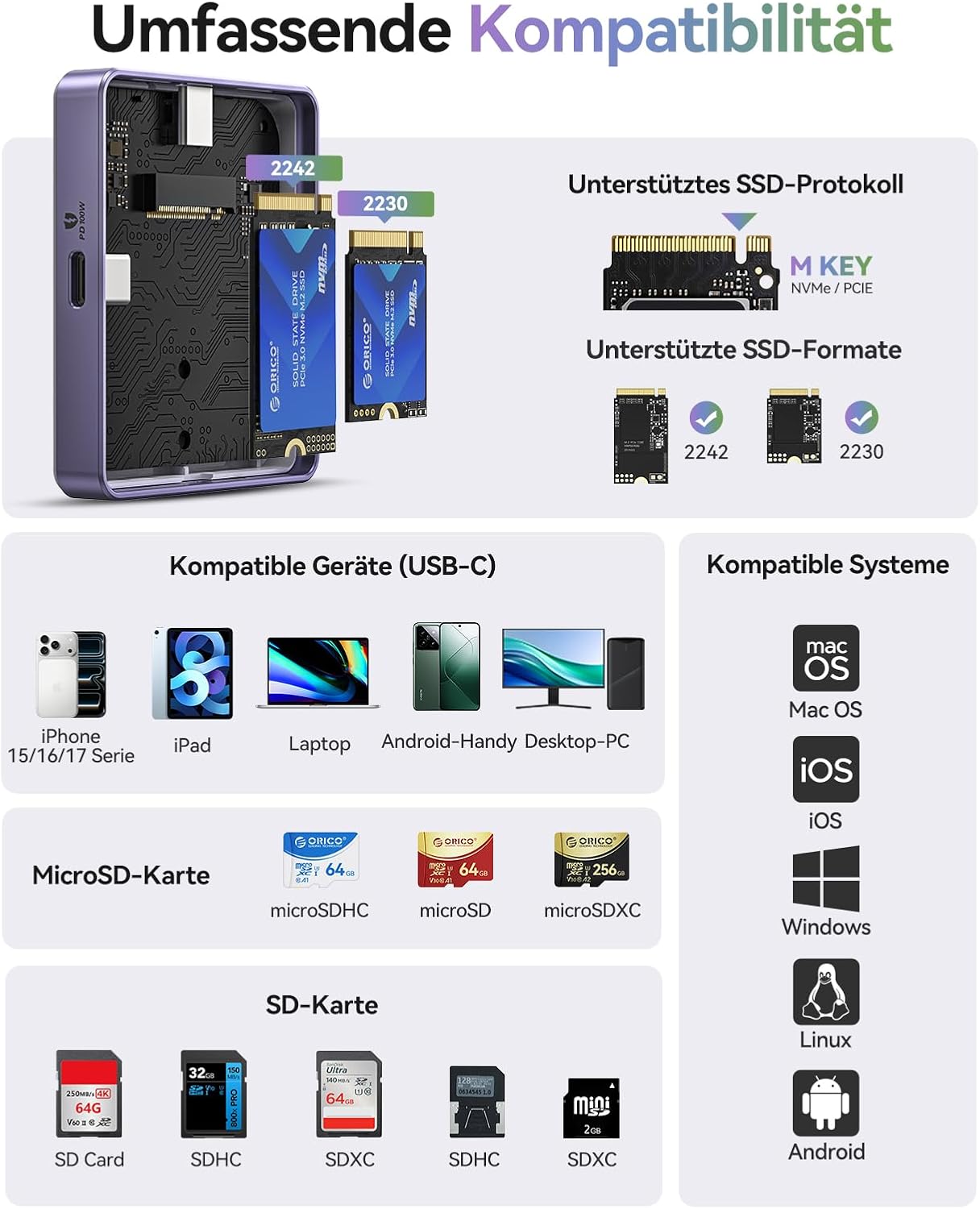
- Kasaluyuan SSD: Supports M.2 NVMe (M-key) SSDs in 2230 and 2242 form factors.
- Kasaluyuan Alat Wide: Compatible with iPhone 15/16/17 Pro/Pro Max, iPad Pro, MacBook, Android phones, laptops, and tablets with Type-C ports.
Eusi pakét
- ORICO Magnetic M.2 NVMe SSD Enclosure
- 0.3m USB-C to USB-C Cable
- Magnetic Ring (for non-magnetic devices)
- Pad termal
- Screws
- Obeng
- Manual pamaké
Diagram produk
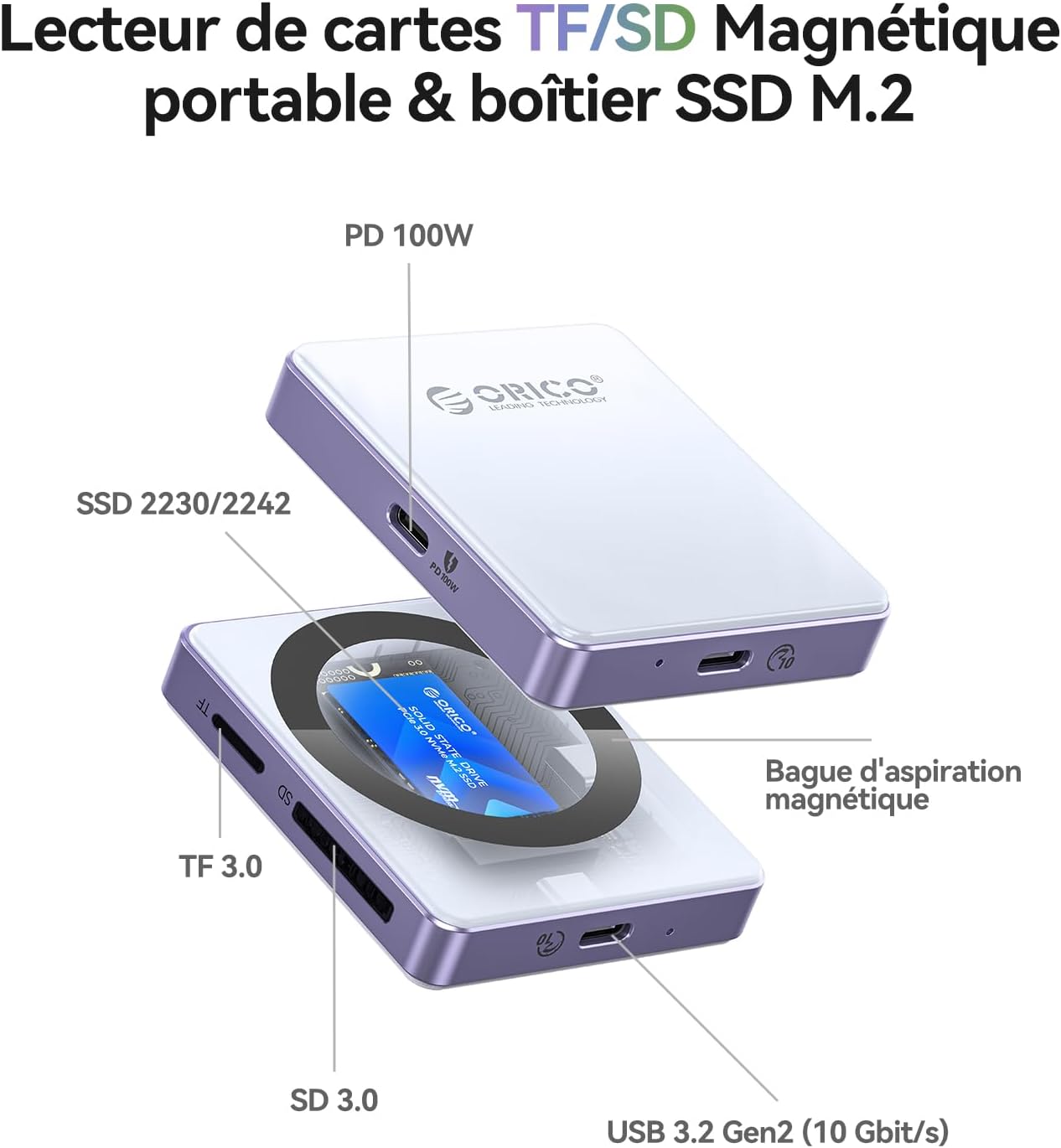
Disetél
Installing an M.2 NVMe SSD
- Carefully open the SSD enclosure.
- Insert your M.2 NVMe (M-key) SSD (2230 or 2242 form factor) into the slot. Ensure it is fully seated.
- Ngamankeun SSD ku screw disadiakeun.
- Apply the thermal pad to the SSD for optimal heat dissipation.
- Tutup kandangna kalayan aman.
Catetan: The SSD is not included and must be purchased separately. For optimal performance and to prevent disconnections, especially with phone USB ports, use SSDs with power consumption of 4.5W or less. For higher power SSDs, external power via the PD port is required.
Attaching to a Device
- For iPhones 15/16/17 Pro/Pro Max, the enclosure can magnetically attach directly to the back of the phone.
- For other devices or non-magnetic phone cases, use the included magnetic ring. Peel off the adhesive backing and attach the ring to the back of your device or case where you intend to mount the enclosure.

Parentah Operasi
Nyambung kana Alat Anjeun
- Connect the ORICO AP42F to your host device (iPhone, iPad, MacBook, PC, etc.) using the provided USB-C cable.
- Ensure the connection is secure. The device should be recognized automatically by your operating system.
Using the M.2 SSD Enclosure
- Once connected, the installed M.2 SSD will appear as an external storage device.
- Anjeun ayeuna tiasa mindahkeun files to and from the SSD at speeds up to 10Gbps.
- For iPhone 15 Pro series and later, the enclosure supports direct ProRes 4K 60/120fps video recording to the SSD.


Using the TF/SD Card Reader
- Insert your TF (MicroSD) or SD card into the corresponding slot on the enclosure.
- The card will appear as a separate external drive.
- Mindahkeun files at speeds up to 104MB/s.

Using the PD 100W Charging Port
- Connect a USB-C power adapter (up to 100W) to the PD port on the enclosure.
- This will provide power to both the enclosure and the connected host device (up to 85W output), allowing for simultaneous data transfer and charging.

Pangropéa
- Jaga kandang tetep bersih sareng bébas tina lebu. Anggo lawon anu lemes sareng garing pikeun ngabersihkeun.
- Hindarkeun alat ka suhu ekstrim, kalembaban, atanapi sinar panonpoé langsung.
- Ensure proper ventilation, especially during extended use, to prevent overheating of the SSD. The thermal pad helps with this.
- Ati-ati dina nangananana pikeun nyegah karusakan fisik.
Pamérésan masalah
| Masalah | Mungkin Cukang lantaranana | Solusi |
|---|---|---|
| Alat teu dikenal | Loose connection, incompatible SSD, driver issue, SSD not properly installed. |
|
| Frequent disconnections during use (especially with phones) | SSD power consumption exceeds phone's USB port limit. |
|
| Laju mindahkeun data lambat | USB port limitation, cable quality, SSD performance, host device limitations. |
|
| kantétan magnét lemah | Device not magnetic, thick case, incorrect placement of magnetic ring. |
|
spésifikasi
| Fitur | Rincian |
|---|---|
| merek | ORICO |
| Modél | AP42F |
| Bahan | alumunium |
| Kasaluyuan SSD | M.2 NVMe (M-key) 2230/2242 |
| Pamaca Kartu | TF 3.0, SD 3.0 |
| Data Transfer Rate (SSD) | Nepi ka 10 Gbps (USB 3.2 Gen2) |
| Data Transfer Rate (Card Reader) | Nepi ka 104 MB/s |
| Pangiriman Daya (PD) | Input: 100W, Output: 85W |
| Alat nu cocog | iPhone 15/16/17 Pro/Pro Max, iPad Pro, MacBook, Android phones, Laptops, Tablets (Type-C) |
| Sistem Operasi anu Dirojong | macOS, iOS, Windows, Linux, Android |
| Fitur husus | Compact, Magnetic Attachment (17 magnets) |
Garansi sareng Rojongan
ORICO products typically come with a standard manufacturer's warranty. Please refer to the warranty card included in your package or visit the official ORICO websitus pikeun istilah jeung kaayaan jaminan husus.
For technical support, troubleshooting assistance, or inquiries about your product, please contact ORICO customer service through their official website or the retailer where you purchased the product. Keep your purchase receipt and product model number (AP42F) handy when contacting support.
Sumberdaya Online:
- ORICO Official Store on Amazon
- (Refer to official ORICO website for direct support contact information)


