
CINMOORE CM-C2LU
Buku Panduan Pangguna Kaméra Dummy CINMOORE
Model: CM-C2LU
Merek: CINMOORE
1. Bubuka
Thank you for choosing the CINMOORE Dummy Camera. This indoor security camera is designed to provide reliable surveillance and peace of mind for your home or office. Featuring advanced AI detection, two-way audio, and clear night vision, it offers comprehensive monitoring capabilities. This manual will guide you through the setup, operation, and maintenance of your device.

Gambar: Hareupeun view of the CINMOORE Dummy Camera, a white, spherical camera with a dark lens and a blue indicator light, featuring the CINMOORE logo at its base.
2. Naon Kaasup
Mangga parios eusi pakét pikeun mastikeun yén sadaya barang aya:
- CINMOORE Security Camera × 1
- Mounting Bracket Base × 1
- Adaptor Daya × 1
- Data Cable × 1
- Screw Anchors × 1
- Manual pangguna × 1
3. Setélan
The CINMOORE Dummy Camera offers flexible installation options for various indoor environments.
3.1 Pilihan pamasangan
The camera can be installed using the following methods:
- Gunung siling: Ideal for wide-angle coverage from above.
- Tabletop Gunung: Simple placement on any flat surface.
- Tembok Gunung: Secure installation on a vertical surface.
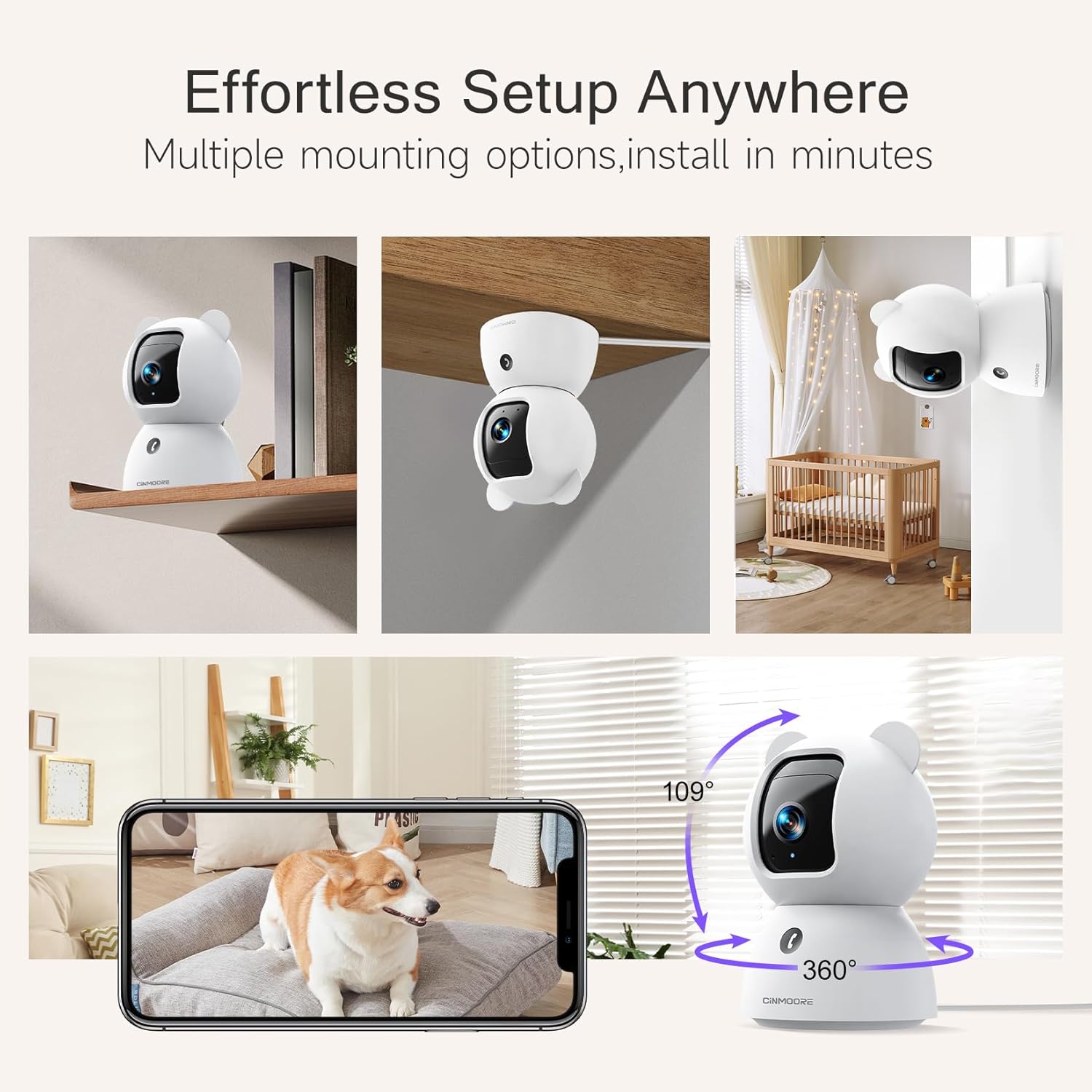
Image: A collage showing the CINMOORE Dummy Camera mounted in various positions: on a shelf, inverted on a ceiling, and on a wall, demonstrating its versatile installation options.
3.2 Léngkah-léngkah Persiapan Awal
- Daya Hurung: Connect the camera to the power adapter using the provided data cable and plug it into a power outlet.
- Unduh App: Download the official CINMOORE app from your smartphone's app store (iOS/Android).
- Pendaptaran Akun: Buka aplikasi sareng ngadaptarkeun akun énggal atanapi lebet upami anjeun parantos gaduh.
- Tambahkeun Alat: Follow the in-app instructions to add your new camera. This typically involves scanning a QR code on the camera or connecting to its temporary Wi-Fi hotspot.
- Sambungan Wi-Fi: Connect the camera to your home Wi-Fi network (2.4GHz recommended).
- panempatan: Position the camera in your desired location, ensuring it has a clear view wewengkon nu Anjeun hoyong monitor.
4. Parentah Operasi
4.1 Video Quality and Viewing
The camera captures video in 2.5K resolution, providing clear and detailed images. You can view the live feed and recorded footage through the CINMOORE app.

Image: A side-by-side comparison demonstrating the superior clarity of 2.5K resolution (left, showing a baby) versus 2K resolution (right, showing a puppy).
4.2 Pan & Tilt (PTZ) Functionality
The camera features PTZ (Pan, Tilt, Zoom) technology, allowing for 360-degree coverage. You can remotely control the camera's viewing angle through the app to monitor different areas of a room.

Image: The CINMOORE Dummy Camera surrounded by icons representing its features: Ultra HD 2.5K, Sound/Crying Alerts, Smart Night Vision, Encrypted Local Storage (up to 256GB), Secure Cloud Storage, Full Duplex Audio, Human/Pet Tracking, One-Touch Call, and Pan & Tilt, emphasizing its 360-degree protection.
4.3 Audio Dua Arah
Utilize the full-duplex two-way audio feature to communicate with people or pets in the camera's vicinity. This allows for natural, real-time conversations.

Image: A scene depicting a person speaking through a smartphone to a dog via the CINMOORE Dummy Camera, illustrating the two-way audio feature with speech bubbles.
4.4 Visi Peuting
The camera is equipped with clear IR night vision, providing 2.5K clarity even in low-light or complete darkness, with a range of up to 33 feet.

Gambar: Hiji jalma viewing a black-and-white night vision feed from the CINMOORE Dummy Camera on their smartphone, showing a baby and a dog in a crib, demonstrating clear IR night vision in a dark room.
4.5 AI Alerts and Detection
The camera supports various AI-powered detection features without monthly fees, including:
- Deteksi gerak: Alerts you to general movement.
- Deteksi Jalma: Specifically identifies human figures.
- Deteksi piaraan: Recognizes pet activity.
- Deteksi ceurik: Notifies you of baby crying sounds.

Image: Two children playing near the CINMOORE Dummy Camera, with icons below representing its AI detection capabilities: Person, Pet, Motion, and Crying, highlighting its no-monthly-fee AI alerts.
4.6 Pilihan Panyimpenan
The camera offers flexible and secure storage solutions:
- Panyimpenan Kartu SD: Supports local storage via an SD card (not included), expandable up to 512GB. Ensure "SD Card Encryption" is enabled in the app for secure viewing.
- Panyimpenan awan: Offers AWS Cloud Storage with a 30-day free trial, providing bank-level encrypted storage for your recordings.

Image: A diagram showing the CINMOORE Dummy Camera with callouts for its storage features: SD card slot (expandable up to 512GB), Reset Button, and AWS Cloud Storage (30-day free trial), emphasizing encrypted and secure flexible storage.
5. Pangropéa
To ensure optimal performance and longevity of your CINMOORE Dummy Camera, follow these maintenance guidelines:
- beberesih: Lembut usap lénsa kaméra jeung awakna ku kaén nu garing tur lemes. Ulah make bahan kimia kasar atawa bahan abrasive.
- panempatan: Pastikeun kaméra disimpen di lokasi anu stabil, jauh tina sinar panonpoé langsung, suhu anu ekstrim, sareng kalembaban anu luhur.
- Pembaruan firmware: Regularly check for and install firmware updates through the CINMOORE app to ensure your camera has the latest features and security enhancements.
- Sasayogian tanaga: Paké ngan adaptor kakuatan aslina disadiakeun kalawan kaméra.
6. Cara ngungkulan
If you encounter issues with your CINMOORE Dummy Camera, refer to the following common troubleshooting steps:
- Kaméra offline: Check your Wi-Fi connection and ensure the camera is within range of your router. Restart the camera by unplugging and re-plugging the power adapter.
- Kualitas pidéo goréng: Ensure the lens is clean and free from dust. Check your internet speed; a stable connection is crucial for high-resolution streaming.
- Henteu aya Audio: Verify that the microphone and speaker settings are enabled in the app. Ensure there are no obstructions blocking the microphone or speaker on the camera.
- Detection Not Working: Check the detection sensitivity settings in the app. Ensure the camera's view jelas tur teu kahalangan.
- Teu Bisa Nyambung ka Aplikasi: Ensure you have the latest version of the CINMOORE app. Try resetting the camera (using the reset button, if available) and re-adding it to the app.
For further assistance, please contact CINMOORE customer support.
7. Spésifikasi
| Ngaran modél | Kaamanan Jero rohangan Cam |
| Nomer Modél Item | CM-C2LU |
| merek | CINMOORE |
| Téhnologi konektipitas | Kabel, Wi-Fi |
| Resolusi Capture Video | 2.5K |
| Pamakéan jero rohangan / outdoor | jero rohangan |
| Fitur husus | 2 Way Audio, Cry Detection, HD Resolution, PTZ Technology |
| Wengi Sawangan Sawangan | 33 suku |
| Tipe Pamasangan | Ceiling Mount / Tabletop Mount / Wall Mount |
| Bahan | Acrylonitrile Butadiene Styrene (ABS) |
| Item Ukuran L x W x H | 7.6 x 7.6 x 11.4 Sentiméter |
| Item Beurat | 340 g |
| Tingkat Résistansi Cai | Tahan cai |
| Dianjurkeun Mangpaat | Baby Monitoring, Pet Monitoring, Indoor Home Security, Office Surveillance |
8. Garansi jeung Rojongan
Garansi: The CINMOORE Dummy Camera comes with a 1-year warranty from the date of purchase. Please retain your proof of purchase for warranty claims.
Rojongan: For technical support, troubleshooting assistance, or warranty inquiries, please visit the official CINMOORE website or contact their customer service team. Refer to the product packaging or the CINMOORE app for specific contact details.
Ask a question about this manual
Ask about setup, troubleshooting, compatibility, parts, safety, or missing instructions. Manuals+ will review the question and use this page’s manual context to help answer it.